
1. Úvod
Děkuji za nákupasing the GOLDSTAR 70070-BKW Astronomical Telescope. This manual provides essential information for the proper assembly, operation, and maintenance of your telescope. With its 70mm objective lens and 700mm focal length, this refractor telescope is designed for both celestial observation, such as viewing the moon and planets, and terrestrial viewing. It includes multiple eyepieces, a star chart, and a smartphone adapter for capturing images.
2. Bezpečnostní informace
- WARNING: Never look directly at the sun through the telescope or its finderscope. Doing so can cause immediate and irreversible severe eye damage, including permanent blindness. Always use a certified solar filter over the objective lens if observing the sun.
- POZOR: Ensure the telescope is assembled and placed on a stable, level surface. An unstable setup can lead to the telescope tipping over, potentially causing damage to the equipment or personal injury.
- Chraňte dalekohled před vlhkostí a extrémními teplotami.
- Do not allow children to use the telescope unsupervised.
3. Obsah balení
Ověřte, zda balení obsahuje všechny následující položky:
- Telescope Optical Tube (70mm Objective, 700mm Focal Length)
- Nastavitelný hliníkový stativ
- Finderscope
- Eyepieces: H20mm, H12.5mm, SR4mm
- 2x Barlowův objektiv
- 1.5x Erecting Eyepiece (Erect Image Lens)
- Adaptér pro smartphone
- Star Chart
- Zásobník na příslušenství
4. Nastavení a montáž
Follow these steps to assemble your GOLDSTAR 70070-BKW telescope:
- Nastavení stativu: Spread the tripod legs to their full extent. Secure the accessory tray to the center brace of the tripod. Adjust the leg height as needed for comfortable viewIng.
- Mount the Telescope Tube: Attach the telescope optical tube to the equatorial mount on top of the tripod. Ensure it is securely fastened using the provided screws.
- Připojení hledáčku: Slide the finderscope into its bracket on the main telescope tube and tighten the retaining screws.
- Vložte okulár: Loosen the thumbscrews on the diagonal mirror or erecting eyepiece holder. Insert your desired eyepiece (e.g., H20mm for lowest magnification) into the holder and tighten the thumbscrews to secure it.
- Attach Smartphone Adapter (Optional): If you plan to use the smartphone adapter, attach it to the eyepiece as shown in the image below.
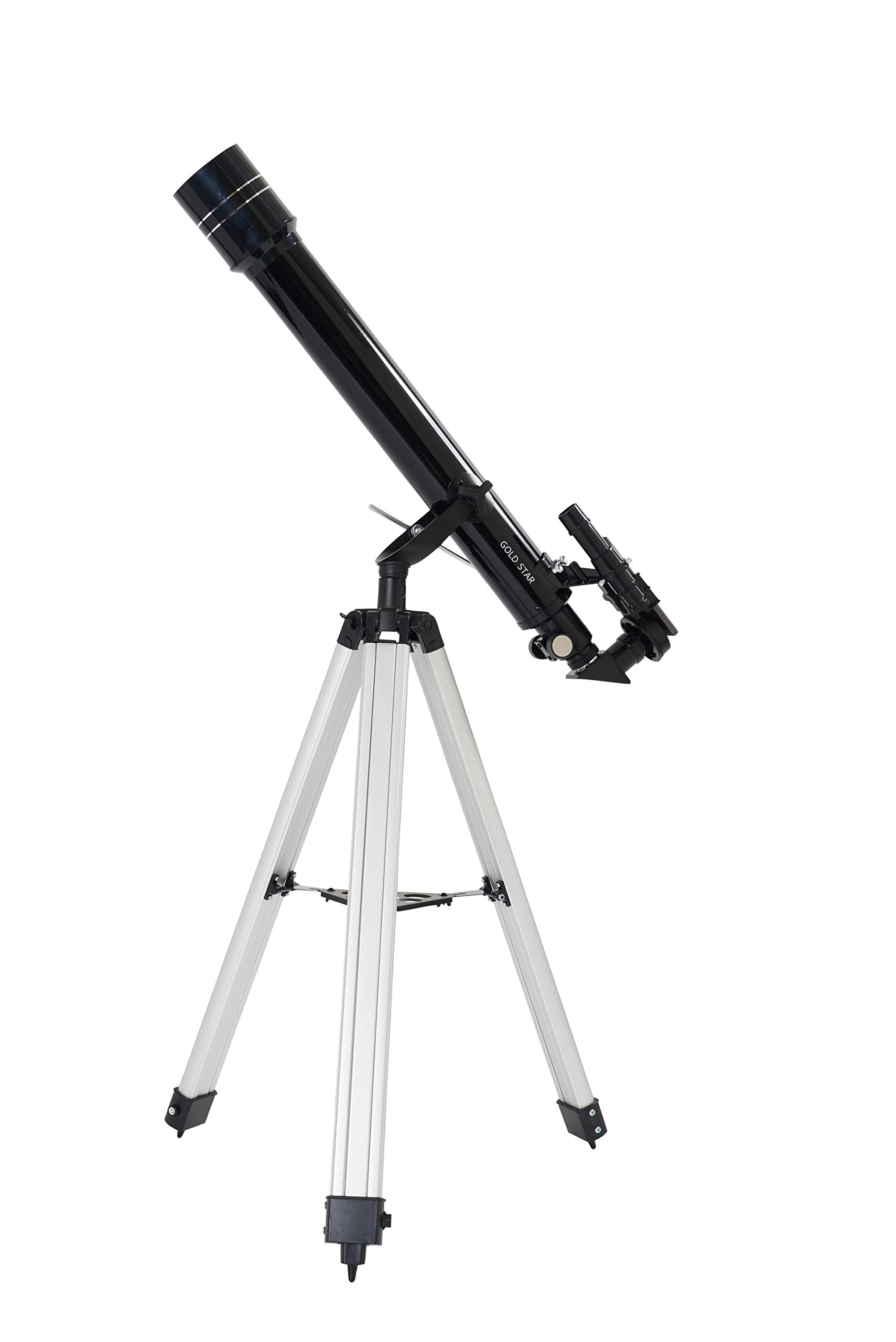
Image: Fully assembled GOLDSTAR 70070-BKW Astronomical Telescope.

Image: Telescope with smartphone adapter attached for photography.
5. Návod k obsluze
5.1 Aligning the Finderscope
The finderscope helps you locate objects quickly. To align it:
- Point the main telescope at a distant, easily identifiable object (e.g., a distant tree or building) during daylight hours.
- Vycentrujte objekt v okuláru hlavního dalekohledu.
- Podívejte se do hledáčku a upravujte jeho zarovnávací šrouby, dokud se stejný objekt nedostane do středu zaměřovacího kříže hledáčku.

Obrázek: Detail view of the telescope's main tube and finderscope.
5.2 Změna zvětšení
The telescope comes with three eyepieces and a Barlow lens to vary magnification:
- H20mm Eyepiece: Provides 35x magnification (700mm / 20mm = 35x). Ideal for wide-field viewa lokalizace objektů.
- H12.5mm Eyepiece: Provides 56x magnification (700mm / 12.5mm = 56x). Good for more detailed views of the moon and planets.
- SR4mm Eyepiece: Provides 175x magnification (700mm / 4mm = 175x). For high-power observation of specific details.
- 2x Barlowova čočka: Doubles the magnification of any eyepiece. For example, using the H20mm eyepiece with the 2x Barlow lens will give 70x magnification (35x * 2 = 70x).
To change magnification, remove the current eyepiece and insert a different one, or insert the Barlow lens first, then the eyepiece into the Barlow lens.


Image: Various eyepieces and a 2x Barlow lens.
5.3 Zaostřování
Once an object is centered in the eyepiece, slowly turn the focus knob until the image appears sharp and clear. Fine-tuning may be required as objects move or as your eyes adjust.
5.4 Celestial Observation
Pro astronomické viewing, use the diagonal mirror (if included) to provide a more comfortable viewing angle. Start with the lowest magnification eyepiece (H20mm) to locate your target, then switch to higher magnifications for more detail. The included star chart can assist in identifying constellations and celestial objects.

Image: Included star chart to aid in celestial navigation.
5.5 Pozemní pozorování
Pro viewing objects on Earth, use the 1.5x Erecting Eyepiece. This accessory corrects the inverted image produced by the telescope, allowing you to see objects right-side up. Simply insert the erecting eyepiece into the focuser, then insert your desired eyepiece into the erecting eyepiece.

Image: The 1.5x Erecting Eyepiece for terrestrial viewIng.
5.6 Smartphone Photography
The included smartphone adapter allows you to capture photos and videos through the telescope. Attach the adapter to an eyepiece, then secure your smartphone to the adapter. Align your phone's camera with the eyepiece lens and use your phone's camera app to take pictures or record videos.

Image: Smartphone adapter for attaching a phone to the eyepiece.
6. Údržba
6.1 Čištění čoček
Handle optical surfaces with extreme care. Dust on lenses can be removed with a soft brush or a can of compressed air. For smudges or fingerprints, use a specialized optical cleaning solution and a microfiber cloth. Apply the solution to the cloth, not directly to the lens, and wipe gently in a circular motion. Avoid touching the lens surfaces with your fingers.
6.2 Skladování
When not in use, store the telescope in a dry, dust-free environment. Keep all lens caps on to protect the optical surfaces. If possible, store the telescope in its original packaging or a dedicated carrying case.
6.3 Obecná péče
Avoid exposing the telescope to sudden temperature changes, which can cause condensation. Do not overtighten screws or knobs, as this can damage the components.
7. Řešení problémů
- Obrázek je rozmazaný: Adjust the focus knob slowly. Ensure the correct eyepiece is fully inserted and secured. Check for condensation on the lenses.
- Nelze najít objekty: Ensure the finderscope is properly aligned with the main telescope. Start with the lowest magnification eyepiece (H20mm) for a wider field of view.
- Image is inverted/reversed: To je u astronomických dalekohledů normální. U pozemských viewing, use the 1.5x Erecting Eyepiece to correct the image orientation.
- Dalekohled je nestabilní: Ensure the tripod legs are fully extended and locked, and the telescope tube is securely mounted. Avoid using the telescope on uneven surfaces.
8. Specifikace
| Funkce | Specifikace |
|---|---|
| Číslo modelu | 70070-BKW |
| Optický design | Refraktor |
| Průměr objektivu | 70 mm |
| Ohnisková vzdálenost | 700 mm |
| Okuláry součástí balení | H20mm (35x), H12.5mm (56x), SR4mm (175x) |
| Barlowův objektiv | 2x |
| Montáž okuláru | 1.5x |
| Typ montáže | Equatorial (Manual) |
| Typ zaměření | Manuální ostření |
| Zahrnuté příslušenství | Star Chart, Smartphone Adapter |
| Hmotnost produktu | Přibližně 9.17 lb (4.16 kg) |
9. Záruka a podpora
Informace o záruce a zákaznické podpoře naleznete v dokumentaci dodané při nákupu nebo se obraťte na svého prodejce. Uschovejte si doklad o koupi pro případné reklamace.