
Asustor AS-RC13
ASUSTOR AS-RC13 IR Remote Control User Manual
Model: AS-RC13 | Brand: Asustor
Konec produktuview
The ASUSTOR AS-RC13 is a 13-key infrared (IR) remote control designed for use with compatible ASUSTOR Network Attached Storage (NAS) devices. This remote allows users to conveniently control media playback and navigate the ASUSTOR Portal interface on their NAS, enhancing the home theater experience.
It is compatible with a wide range of ASUSTOR NAS models, including but not limited to: AS5202T, AS5304T, AS6102T, AS6104T, AS6202T, AS6204T, AS6208T, AS6210T, AS3102T, AS3104T, AS3202T, AS3204T, AS6302T, AS6404T, AS6602T, AS6604T, AS6702T, AS6704T, and AS6706T. Ensure your ADM firmware is version 3.0 or above for optimal compatibility.
Obsah balení
- ASUSTOR AS-RC13 IR Remote Control
- Poznámka: Baterie AAA nejsou součástí balení a je nutné je zakoupit samostatně.
Nastavení
1. Instalace baterie
The AS-RC13 remote control requires two (2) AAA batteries for operation. Follow these steps to install the batteries:
- Najděte kryt prostoru pro baterie na zadní straně dálkového ovladače.
- Posuňte kryt dolů nebo ve směru šipky, abyste jej otevřeli.
- Vložte dvě baterie typu AAA a ujistěte se, že kladný (+) a záporný (-) pól správně shodují s označením uvnitř přihrádky.
- Zasuňte kryt přihrádky na baterie zpět na místo, dokud bezpečně nezacvakne.
2. Počáteční připojení a párování
Once batteries are installed, the remote is ready for use. For detailed instructions on pairing the remote with your specific ASUSTOR NAS model and configuring its functions within the ASUSTOR ADM (ASUSTOR Data Master) operating system, please refer to the official ASUSTOR website. Specific guidance can often be found under "College Course 136" or in the support documentation for your NAS model.

Obrázek 1: Přední strana view of the ASUSTOR AS-RC13 remote control.
Obsluha dálkového ovládání
The AS-RC13 remote control features 13 keys designed for intuitive navigation and control of your ASUSTOR NAS when connected to a display via HDMI and using the ASUSTOR Portal.
Klíčové funkce:
- Vypínač: Typically used to power on/off or put the NAS into sleep mode.
- Navigation Pad (Up, Down, Left, Right, OK/Enter): For navigating menus, selecting items, and confirming actions.
- Tlačítko Domů: Returns to the main ASUSTOR Portal screen.
- Settings/Menu Button: Accesses settings or context menus within applications.
- Zvýšení/Snížení hlasitosti: Ovládá hlasitost zvukového výstupu.
- Tlačítko ztlumení: Ztlumí nebo zapne zvuk.
- Tlačítko Zpět/Návrat: Přejde zpět na předchozí obrazovku nebo do předchozí nabídky.
- Tlačítko Přehrát/Pozastavit: Ovládá přehrávání médií (přehrávání, pozastavení).
For specific application controls and advanced functionalities, refer to the user interface of the ASUSTOR Portal and the respective applications running on your NAS. The remote's functionality is highly integrated with the ADM operating system and its installed apps.
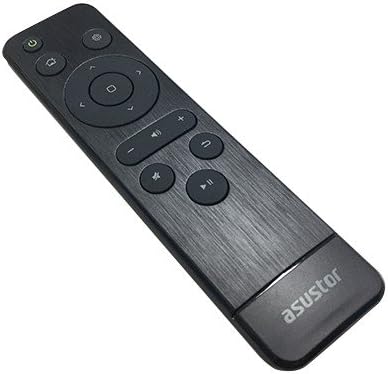
Obrázek 2: Úhlové view of the ASUSTOR AS-RC13 remote control.
Údržba
Výměna baterie:
When the remote control's responsiveness decreases or it stops functioning, it is likely time to replace the batteries. Follow the battery installation steps outlined in the "Setup" section to replace the two AAA batteries. Always use fresh, high-quality batteries for optimal performance.
Čištění:
To clean the remote control, use a soft, dry cloth. For stubborn dirt or grime, slightly dampOtřete hadřík vodou nebo jemným neabrazivním čisticím prostředkem. Nepoužívejte agresivní chemikálie, rozpouštědla nebo abrazivní materiály, protože by mohly poškodit povrch dálkového ovladače nebo jeho vnitřní součásti.
Odstraňování problémů
- Dálkové ovládání nereaguje:
- Zkontrolujte, zda jsou baterie správně vloženy a zda jsou dostatečně nabité. V případě potřeby je vyměňte.
- Ensure there are no obstructions between the remote control and the NAS's IR receiver.
- Verify that your NAS model is listed as compatible and that its ADM firmware is up to date (version 3.0 or above).
- Omezená funkčnost:
- Some functions may require specific applications or configurations within the ASUSTOR Portal. Consult the ASUSTOR website or NAS documentation for detailed usage guides.
For further assistance, refer to the official ASUSTOR support resources, including their online knowledge base and forums.
Specifikace
| Funkce | Detail |
|---|---|
| Značka | Asustor |
| Číslo modelu | AS-RC13 |
| Typ ovládání | Infračervený (IR) |
| Počet klíčů | 13 |
| Zdroj napájení | 2 x AAA baterie (nejsou součástí balení) |
| Rozměry (DxŠxV) | 6.1 x 1.77 x 0.98 palce (15.5 x 4.5 x 2.5 cm) |
| Hmotnost | 0.32 unce (9 gramů) |
| Barva | Černý |
| Kompatibilní zařízení | ASUSTOR NAS models including AS-302T, AS-304T, AS-202TE, AS-204TE, AS7004T, AS7008T, AS7010T, AS5002T, AS5004T, AS5102T, AS5104T, AS5008T, AS5010T, AS5108T, AS5110T, AS6102T, AS6104T, AS6202T, AS6204T, AS6208T, AS6210T, AS3102, AS3102T v2, AS3104T, AS3202T, AS3204T, AS3204T v2, AS6302T, AS6404T, AS5202T, AS5304T, AS6602T, AS6604T, AS6702T, AS6704T, AS6706T, AS5402T, AS5404T. (ADM firmware 3.0 or above required). |
Záruka a podpora
Information regarding the specific warranty terms and conditions for the ASUSTOR AS-RC13 remote control is not provided within this manual. For warranty details, technical support, and service inquiries, please visit the official ASUSTOR website or contact ASUSTOR customer service directly.
Official ASUSTOR Webmísto: www.asustor.com
Ask a question about this manual
Ask about setup, troubleshooting, compatibility, parts, safety, or missing instructions. Manuals+ will review the question and use this page’s manual context to help answer it.