
Zavedení
The ISDT T8 Battgo Lipo Battery Charger/Discharger is a versatile and powerful smart charger designed for various battery types. It features a new circuit structure for high cooling efficiency, an advanced algorithm for reliability, and a user-friendly interface. This manual provides essential information for setting up, operating, and maintaining your ISDT T8 charger.
- Vysoký výstupní výkon: Capable of charging up to 1000W with a maximum charge current of 30A.
- Široká kompatibilita baterií: Supports LiPo, LiFe, Li-ion, LiHv (1-8S), NiMH, NiCd (1-21S), and Pb (1-14S) batteries.
- Intuitivní rozhraní: Features a 2.4-inch 320x240 IPS LCD display and a new navigation key for easy operation.
- Smart Battery Technology: Fully supports BattGO smart battery technology for enhanced functionality.
- Bezpečnostní funkce: Includes comprehensive protection against over-temperature (OT), over-current (OC), over-voltage (OV), over-load (OL), and reverse polarity.
Konec produktuview
Familiarize yourself with the key components and ports of your ISDT T8 Smart Charger.

Obraz: Přední a boční view of the ISDT T8 Smart Charger, highlighting the Input port (12-40V), Update port, USB port, Screen, Enter key, Multi-function key, Output port, and Balance port.
- Input Port (XT60): Connects to your DC power source (12-40V).
- Output Port (XT60): Connects to the main power lead of the battery being charged.
- Balance Port: Connects to the balance lead of your battery for cell balancing. Supports 1-8S batteries.
- USB port: For firmware updates and charging external devices (e.g., mobile phones).
- Navigační klávesa: A thumb pad for menu navigation (up, down, left, right) and selection (center press).
- Obrazovka: 2.4-inch IPS LCD display showing charging status and settings.
Nastavení
- Připojte zdroj napájení:
Connect your DC power source (e.g., ISDT 160W AC adapter or a large field battery) to the Input port (XT60) on the left side of the charger. The charger supports 12-40V input. Ensure the power source is appropriate for the desired charging current. For example, the ISDT 160W AC adapter supports up to 6A. For higher currents, a more powerful DC source is required.

Obraz: The ISDT T8 Smart Charger powered by an external ISDT 160W AC adapter.
- Připojte baterii:
First, connect the balance lead of your battery to the appropriate slot in the Balanční port on the right side of the charger. Always connect the negative side first. Then, connect the main power lead (XT60) of your battery to the Output port (XT60). The charger will automatically detect the battery's cell count and type.

Obraz: The ISDT T8 Smart Charger connected to a battery, demonstrating the BattGO smart battery technology.
Návod k obsluze
The ISDT T8 features an intuitive interface for easy operation. Use the navigation key to move through menus and adjust settings.
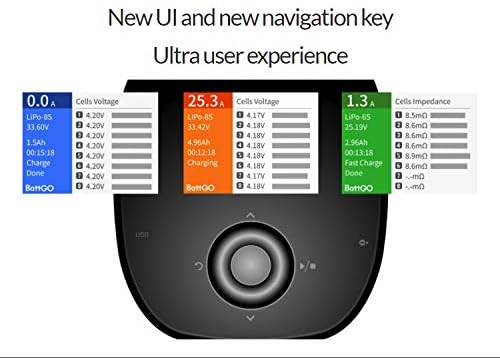
Obraz: The ISDT T8 Smart Charger's display showing the user interface and the central navigation key.
- Hlavní obrazovka přesview:
Upon powering on, the screen displays real-time information including current (Amps), battery type (e.g., LiHV-4S), total voltage, mAh charged, charging time, and individual cell voltages. A graphical representation of cell voltages helps monitor balance.
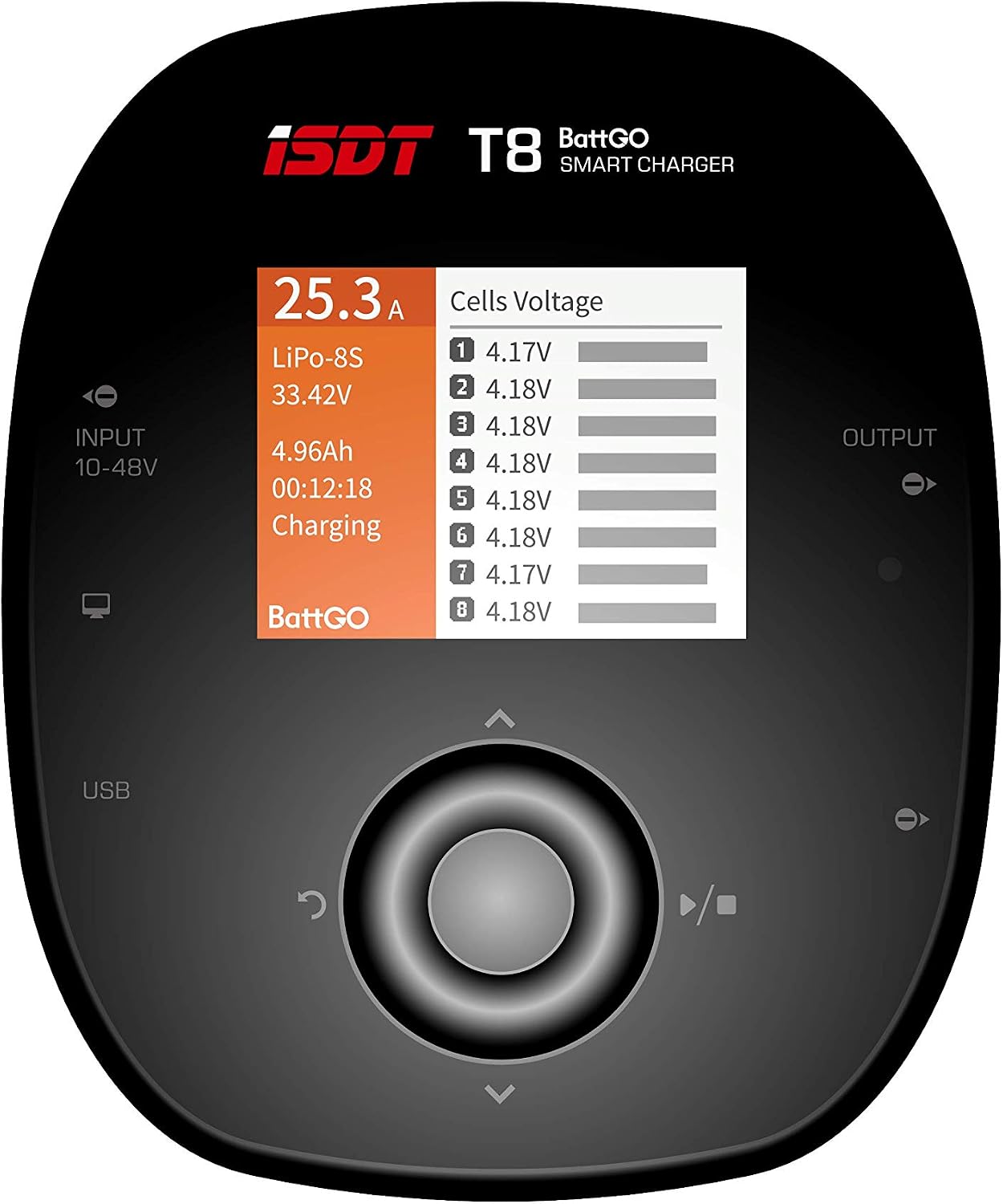
Obraz: The ISDT T8 display showing individual cell voltages and overall battery status during charging.
- Accessing Task Settings:
Press the center button on the navigation key to enter the Task Settings menu. Here you can configure your charging parameters.
- Výběr typu baterie:
Navigate to "Battery Type" and select the correct chemistry for your battery (LiPo, LiHv, LiFe, Li-ion, NiMH, NiCd, Pb). The charger often auto-detects, but manual confirmation is good practice.

Obraz: The ISDT T8 Smart Charger displaying the range of supported battery types.
- Setting Cell Voltage and Count:
Adjust the "Cells Voltage" (final charge voltage per cell) and "Cell Count" (number of cells in series) to match your battery's specifications. The charger will typically auto-detect the cell count.
- Adjusting Charge Current:
Set the "Current" (charge rate in Amps). A common recommendation for LiPo batteries is 1C (e.g., 1.8A for an 1800mAh battery) for safe and prolonged battery life. You can adjust this during charging if needed.
- Choosing Task:
Select your desired task: "Charge" (standard charging), "Discharge" (to deplete battery), or "Storage" (to bring battery to a safe storage voltage for extended periods).
- Starting/Stopping Task:
Navigate to "Start" and press the center button to begin the task. To stop a task, press the center button and select "Stop", or use the dedicated play/stop button on the right side of the navigation key.
- Sledování pokroku:
During a task, you can view "Working Info" (watts, temperature) and "Cells Impedance" by navigating left/right on the main screen. This provides detailed insights into the battery's health and charging process.
Multi-Battery Charging (with Balance Board)
The ISDT T8 can be used with a compatible balance board (not included) to charge multiple batteries simultaneously. Ensure all batteries connected to the balance board have the same cell rating (e.g., all 4S, all 6S).
Funkce nabíjení přes USB
The integrated USB port (2.1A/5V) allows you to charge external devices like mobile phones while the charger is powered, even when charging a LiPo battery. This is particularly useful for field charging scenarios.
Video: Detailní review and demonstration of the ISDT T8 Smart Charger's features, including setup, menu navigation, charging various battery types, and using the USB charging port for external devices. This video provides a comprehensive visual guide to operating the charger.
Údržba
- Udržujte v čistotě: Regularly clean the charger's exterior and ports to prevent dust and debris buildup.
- Správné skladování: Nabíječku skladujte na chladném a suchém místě mimo dosah přímého slunečního záření a extrémních teplot.
- Aktualizace firmwaru: Check the official ISDT website for firmware updates to ensure optimal performance and access to new features. Use the dedicated firmware port for updates.
- Kontrola kabelů: Periodically inspect all cables and connectors for signs of wear or damage. Replace any damaged components immediately.
Odstraňování problémů
| Problém | Možná příčina | Řešení |
|---|---|---|
| Nabíječka se nezapne. | No power input or incorrect voltage. | Ensure power source is connected correctly and provides 12-40V DC. Check power cables. |
| Battery not detected or error message. | Incorrect battery connection, damaged battery, or wrong settings. | Verify main and balance leads are securely connected. Check battery health. Ensure selected battery type and cell count match the connected battery. |
| Charging is slow or stops prematurely. | Insufficient input power, high internal resistance of battery, or charger overheating. | Use a more powerful DC input source if charging at high currents. Check battery condition. Ensure adequate ventilation for the charger. |
| Charger displays "Over-Temperature" warning. | Charger is overheating due to high load or poor ventilation. | Reduce charging current. Ensure the charger is in a well-ventilated area. Allow it to cool down before resuming operation. |
Specifikace
- Vstupní objemtage: DC 12-40V
- Max. Vstupní proud: 35A
- Výstupní objemtage: 0-37V
- Nabíjecí proud: 0.1-30.0A
- Vybíjecí proud: 0.1-5.0A
- Max Charge Capacity: 1000W
- Max Discharge Capacity: 20W
- Balancing Current: 2.2 A / článek
- Vyvážené buňky: 8S
- Podporované typy baterií: LiFe/Lilon/LiPo/LiHv (1-8S), NiMH/Cd (1-21S), Pb (1-14S)
- USB port: 2.1A/5V
- Zobrazit: 2.4 inch 320x240 IPS LCD
- Provozní teplota: 0-40 °C
- Skladovací teplota: -20-60 °C
- Rozměry: 100 x 120 x 58 mm (3.94 x 4.72 x 2.28 palce)
- Hmotnost: 305 g (10.6 uncí)
- Podporované jazyky: English, German, French, Spanish, Japanese, Traditional Chinese, Simplified Chinese
Záruka a podpora
For warranty claims, technical support, or service inquiries, please contact ISDT customer service directly or refer to the official ISDT webUschovejte si účtenku jako doklad o koupi pro ověření záruky.
Official ISDT Store: Visit the ISDT Store on Amazon