
Důležité bezpečnostní pokyny
Read all instructions before using this humidifier. Failure to follow these instructions may result in electric shock, fire, or serious injury.
- Zvlhčovač vždy umístěte na pevný, rovný a rovný povrch.
- Udržujte napájecí kabel mimo dosah horkých povrchů.
- Nepoužívejte zvlhčovač s poškozeným kabelem nebo zástrčkou.
- Před plněním, čištěním nebo přemisťováním odpojte zvlhčovač ze zásuvky.
- Neblokujte vzduchové otvory.
- Nepoužívejte venku.
Konec produktuview
The Honeywell Top Fill Tower Humidifier (HEV620W) is designed to provide cool, invisible moisture to maintain optimal humidity levels in your home. It features a digital humidistat, multiple speed settings, and a convenient top-fill design.

Image: Honeywell Top Fill Tower Humidifier, Model HEV620W, in white.
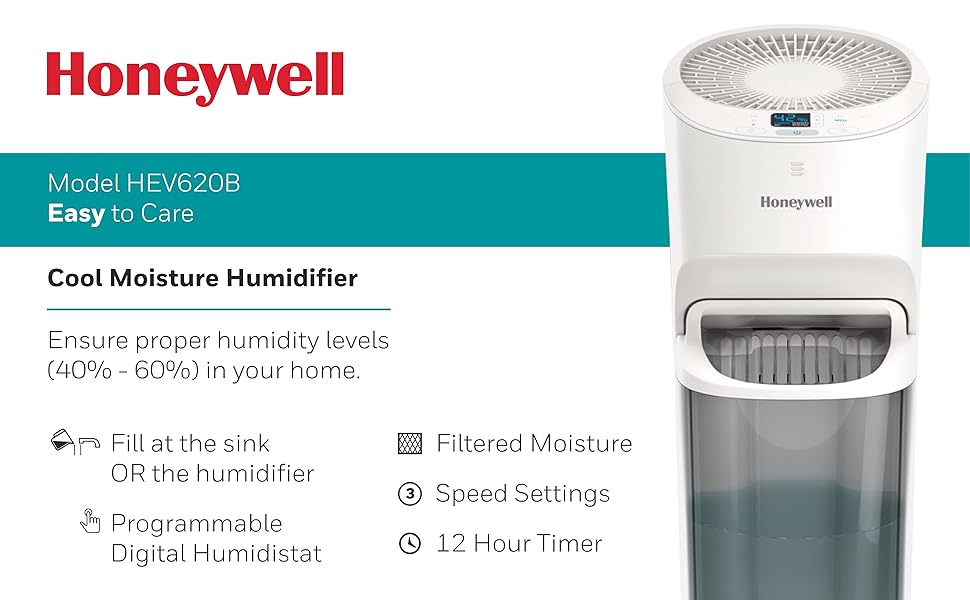
Obrázek: Overview of the Honeywell Humidifier's key features including cool invisible moisture, digital humidistat, and 3 speed settings.
Nastavení
- Vybalte zvlhčovač: Opatrně odstraňte veškerý obalový materiál.
- Position the Humidifier: Place the unit on a firm, level, water-resistant surface at least 12 inches away from walls and furniture. Ensure the mist outlet is not directed at walls or furniture.
- Naplňte vodní nádrž:
- Odstraňte horní kryt.
- Pour clean, cool tap water directly into the water tank opening. Do not overfill.
- Bezpečně nasaďte horní kryt.

Image: Diagram illustrating two methods for filling the humidifier: directly into the unit or by removing the tank and filling at a sink.

Image: Demonstrates pouring water directly into the top of the humidifier for easy refilling.
Návod k obsluze
- Zapnutí/vypnutí: Stiskněte tlačítko napájení (⑁) pro zapnutí nebo vypnutí jednotky.
- Upravte rychlost ventilátoru: Stiskněte tlačítko rychlosti ventilátoru (☠) to cycle through low, medium, and high settings.
- Nastavení požadované vlhkosti: Use the humidity control buttons (▲ / ▼) to set your desired humidity level. The unit will automatically turn off when the set level is reached and restart when humidity drops.
- Nastavit časovač: Stiskněte tlačítko časovače (⏱) to set the operating time (e.g., 2, 4, 8, 12 hours). The unit will automatically shut off after the selected time.

Obrázek: Podrobný view of the digital control panel, showing humidity display and control buttons.
Údržba
Regular maintenance is crucial for optimal performance and longevity of your humidifier.
Denní údržba
- Naplňte nádržku na vodu čerstvou, studenou vodou.
Týdenní údržba
- Clean the Water Tank and Base:
- Odpojte zvlhčovač.
- Vyjměte nádržku na vodu a vyprázdněte zbývající vodu.
- Clean the tank and base with a mild detergent and rinse thoroughly.
- For mineral buildup, use a descaling solution or white vinegar.
- Check and Replace Filter:
- The "Check Filter" light will illuminate when it's time to inspect the filter.
- Slide out the filter tray from the back of the unit.
- Inspect the wicking filter for discoloration or hardening. Replace if necessary.

Image: Shows how to access and remove the wicking filter from the rear of the humidifier for inspection or replacement.

Image: A close-up of the Honeywell T-Filter, indicating it is a replacement part.
Odstraňování problémů
| Problém | Možná příčina | Řešení |
|---|---|---|
| Zvlhčovač se nezapne. | No power, unit not plugged in, water tank empty. | Ensure unit is plugged into a working outlet. Check if the water tank is filled. |
| Žádná mlha nebo nízký výkon mlhy. | Dry or clogged filter, low water level, incorrect humidity setting. | Check water level and refill. Inspect and replace the wicking filter if necessary. Adjust desired humidity setting higher. |
| "Refill" light is on. | Nádrž na vodu je prázdná nebo téměř prázdná. | Doplňte nádržku na vodu. |
| Svítí kontrolka „Zkontrolujte filtr“. | Filter needs inspection or replacement. | Inspect the wicking filter and replace if it shows signs of wear or mineral buildup. |
| Jednotka je hlučná. | Jednotka není na rovném povrchu, otáčky ventilátoru jsou příliš vysoké. | Ensure the humidifier is on a stable, level surface. Try a lower fan speed setting. |
Specifikace
| Funkce | Detail |
|---|---|
| Značka | Honeywell |
| Číslo modelu | HEV620W |
| Provozní režim | Odpařovací |
| Kapacita | 1.5 XNUMX galonů |
| Doba běhu | Až 24 hodin |
| Pokrytí podlahové plochy | 700 čtverečních stop |
| Speciální funkce | Humidistat, Timer |
| Kontrolní metoda | Dotek |
| Typ filtru | Knot |
| Rozměry (D x Š x V) | 8.66"H x 9.84"Š x 24.72"V |
| Hmotnost položky | 12.5 libry |
| Zdroj napájení | Elektrický kabel |
| svtage | 120V |

Image: Diagram illustrating the physical dimensions of the humidifier.
Záruka a podpora
For warranty information or technical support, please refer to the warranty card included with your product or contact Honeywell customer service. Honeywell products are manufactured by Kaz, a Helen of Troy company.
You can often find customer service contact details on the product packaging or the official Honeywell webmísto.