
Konec produktuview
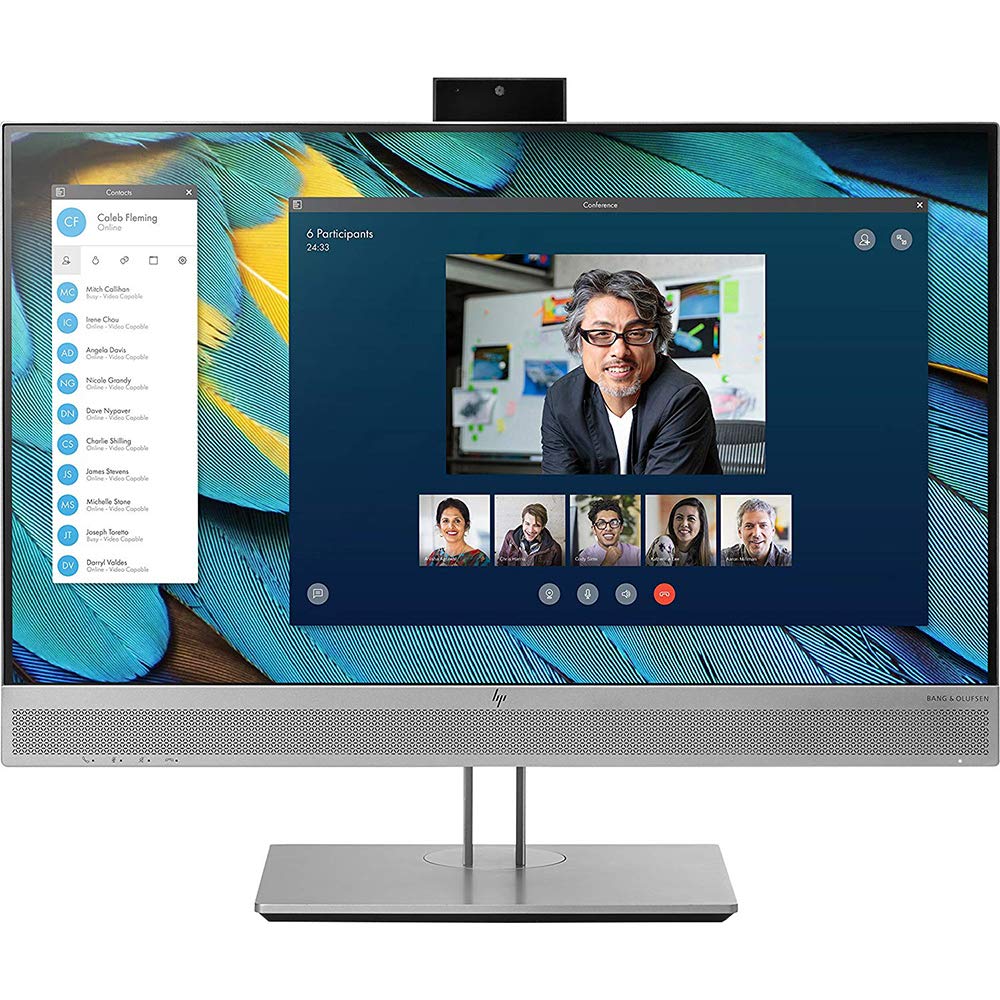
Image: HP EliteDisplay E243m 23.8-inch LED-Lit Monitor, shown in black/silver.
The HP EliteDisplay E243m is a 23.8-inch LED-Lit monitor designed for comfortable connectivity and collaboration. It features optimal video and audio capabilities, a 3-sided micro-edge bezel for seamless multi-display setups, and 4-way adjustable ergonomics for user comfort. This monitor is suitable for various professional environments, offering clear visuals and integrated communication tools.
Co je zahrnuto
The following items are typically included with your HP EliteDisplay E243m monitor:
- HP EliteDisplay E243m LED-backlit LCD monitor
- VGA kabel
- DisplayPort kabel
- Software (drivers and utilities)
- Napájecí kabel
- USB cable (for webcam and microphone functionality)
Průvodce nastavením
Připojení monitoru
- Připojte napájecí kabel: Plug one end of the power cable into the monitor's power input and the other end into a grounded electrical outlet.
- Připojte video kabel: Choose one of the available video input ports (DisplayPort, HDMI, or VGA) on the monitor and connect it to the corresponding output port on your computer. It is recommended to use only one video input cable at a time to avoid potential display conflicts.
- Připojte kabel USB: For the integrated webcam and dual microphones to function, connect the provided USB cable from the monitor's USB upstream port to an available USB port on your computer.
- Adjust Monitor Position: Position the monitor on a stable surface. Utilize the monitor's ergonomic stand to adjust the height, tilt, swivel, and pivot for optimal viewpohodlí.
Obsluha monitoru
Zapnutí/vypnutí
Locate the power button, typically on the front or bottom bezel of the monitor. Press it to turn the monitor on or off. The power indicator light will illuminate when the monitor is active.
Nabídka na obrazovce (OSD).
Use the control buttons located on the monitor's bezel to access and navigate the On-Screen Display (OSD) menu. This menu allows you to adjust various settings, including:
- Jas a kontrast
- Nastavení barev
- Input Source Selection (VGA, HDMI, DisplayPort)
- Hlasitost zvuku
- Picture-in-Picture (if supported)
Integrovaný Webkamera a mikrofon
The HP EliteDisplay E243m features an integrated 720p HD webcam and dual digital microphones for video conferencing and communication. The webcam is designed to pop up from the top bezel when activated. Ensure the USB cable is connected from the monitor to your computer for these features to function correctly. You may need to select the monitor's webcam and microphone as your default devices in your operating system's sound and camera settings or within your video conferencing application.
Péče a údržba
Čištění obrazovky
Obrazovku monitoru jemně otřete měkkým hadříkem, který nepouští vlákna. V případě odolných šmouh lehceampen the cloth with water or a non-abrasive, ammonia-free screen cleaner. Do not spray liquid directly onto the screen, as it may damage internal components.
Čištění exteriéru
Wipe the monitor's exterior casing with a soft, dry cloth. Avoid using harsh chemicals, abrasive cleaners, or solvents, as these can damage the finish.
Skladování
When storing the monitor, ensure it is placed in a cool, dry environment, away from direct sunlight and extreme temperatures. Use original packaging if available to protect it from dust and physical damage.
Odstraňování běžných problémů
Žádný displej
- Zkontrolujte napájení: Ensure the power cable is securely connected to both the monitor and a functional power outlet. Verify the power indicator light is on.
- Verify Video Cable: Confirm that the video cable (HDMI, DisplayPort, or VGA) is firmly connected to both the monitor and your computer's video output port.
- Single Video Input: Ensure only one video input cable is connected to the monitor at a time. Connecting multiple video inputs simultaneously can sometimes cause display issues or incorrect resolution detection.
- Vyberte zdroj vstupu: Use the OSD menu buttons to manually select the correct input source (e.g., HDMI, DisplayPort) that matches your connected cable.
- Výstup z počítače: Confirm your computer is powered on and sending a video signal. Try connecting another display to your computer to rule out a computer-side issue.
WebKamera nebo mikrofon nefunguje
- USB připojení: Verify that the USB cable is connected from the monitor's upstream USB port to an available USB port on your computer. This connection is essential for the webkamera a mikrofon.
- Webcam Position: Ensure the integrated webcam is in its 'pop-up' position.
- Nastavení operačního systému: Check your computer's operating system privacy settings to ensure applications have permission to access the camera and microphone.
- Nastavení aplikace: Within your video conferencing or recording application, confirm that the HP EliteDisplay E243m's webcam and microphone are selected as the default input devices.
Technické specifikace
| Funkce | Specifikace |
|---|---|
| Značka | HP |
| Číslo modelu | 1FH48A8#ABA |
| Velikost obrazovky | 23.8 palce |
| Rezoluce | FHD 1080p (1920 x 1080 pixelů) |
| Poměr stran | 16:9 |
| Obnovovací frekvence | 60 Hz |
| Doba odezvy | 5 milisekund |
| Typ zobrazení | LED |
| Jas | 250 cd/m² |
| Kontrastní poměr | 1000:1 |
| Viewúhel | 170 stupňů |
| Připojení k hardwaru | DisplayPort, HDMI, VGA, USB |
| Popis fotoaparátu | 720p integrated HD webcam with dual digital microphones |
| Typ montáže | Držák na zeď |
| Hmotnost položky | 14.55 libry |
| Barva | Černá/Stříbrná |
Záruka a zákaznická podpora
This HP EliteDisplay E243m monitor (Model Number: 1FH48A8#ABA) comes with a 3 roky omezená zárukaTato záruka se vztahuje na vady materiálu a zpracování při běžném používání během záruční doby.
For detailed warranty terms, technical assistance, driver downloads, or to access support resources, please visit the official HP support website. When contacting support, please have your monitor's model number (1FH48A8#ABA) and serial number readily available to expedite service.