
1. Úvod
This manual provides essential information for the safe and efficient operation of your InFocus IN3148HD 1080p 5000 Lumen Professional Projector. Please read these instructions thoroughly before using the projector and retain them for future reference. The InFocus IN3148HD is designed for professional environments, offering high brightness, full HD resolution, and versatile connectivity for various presentation needs.

Obrázek 1: Přední strana view of the InFocus IN3148HD Projector.
2. Klíčové vlastnosti
The InFocus IN3148HD projector offers a range of features designed for high-performance presentations:
- 1080p (1920 x 1080) Native Resolution: Delivers crisp, high-definition images.
- Jas 5000 Lumens: Ensures clear visibility in well-lit rooms.
- 1.5x optický zoom: Provides flexibility in projector placement and image sizing.
- Podpora 3D: Compatible with Blu-ray and other 3D content sources.
- 10W Speaker: Integrated audio for presentations.
- Více možností připojení: Includes two HDMI 1.4 ports, VGA, and more.
- Sledování sítě: Allows for remote management and control.
Video 1: Overview of the InFocus IN3148HD projector's features and capabilities.
3. Nastavení a instalace
3.1 Vybalení
Carefully remove the projector and all accessories from the packaging. Verify that all components listed in the packing list are present and undamaged. Keep the original packaging for future transport or storage.
3.2 Umístění
Position the projector on a stable, flat surface or mount it securely. Ensure adequate ventilation around the unit to prevent overheating. Consider the throw distance and screen size for optimal image quality. The projector supports both tabletop and ceiling mount installations.

Figure 2: Projector dimensions for installation planning.
4. Konektivita
The IN3148HD offers a variety of input and output ports for connecting to different devices.
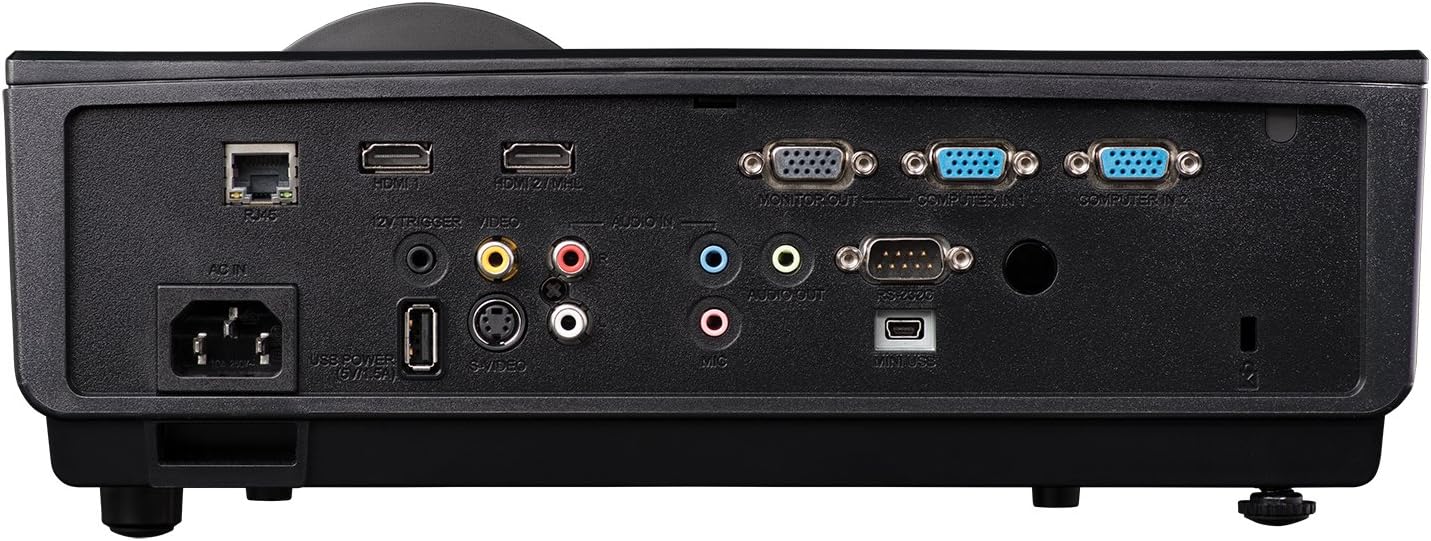
Figure 3: Rear panel showing available connection ports.
- HDMI (x2): For digital video and audio input from computers, Blu-ray players, and other HDMI-enabled devices.
- VGA (x2): Pro analogový video vstup z počítačů.
- USB: Pro servis nebo aktualizace firmwaru.
- Síť (RJ45): Pro řízení a monitorování sítě.
- Zvukový vstup/výstup: 3.5mm jacks for external audio sources or output to external speakers.
- Video (RCA): Pro kompozitní video vstup.
5. Provoz
5.1 Zapnutí/vypnutí
- Zapnutí: Connect the power cord and press the power button on the projector or remote control. The power indicator light will turn blue.
- Vypnout: Dvakrát stiskněte tlačítko napájení. Projektor se před úplným vypnutím spustí chladicí cyklus.
5.2 Úprava obrazu
- Soustředit: Otáčejte ostřícím kroužkem na objektivu, dokud nebude obraz ostrý.
- Lupa: Velikost obrazu změníte otáčením kroužku zoomu na objektivu.
- Korekce lichoběžníkového zkreslení: Use the keystone correction function in the OSD (On-Screen Display) menu to correct trapezoidal image distortion.
6. 3D funkce
The InFocus IN3148HD projector supports 3D content from compatible sources, such as Blu-ray players. To experience 3D, you will need active 3D glasses (sold separately) and a 3D-enabled source device.
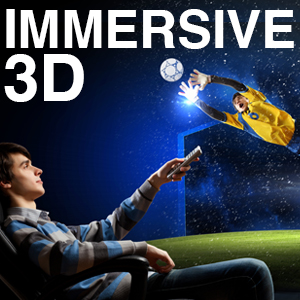
Figure 4: Visual representation of 3D content viewIng.
7. Údržba
Pravidelná údržba zajišťuje optimální výkon a prodlužuje životnost vašeho projektoru.
- Lamp Nahrazení: Jáamp has a limited lifespan. Refer to the OSD menu for lamp informace o hodinách. Vyměňte lamp when its brightness significantly decreases or when the lamp indicator light illuminates. Always use genuine InFocus replacement lamps.
- Čištění filtru: Clean the air filter regularly to prevent dust buildup, which can affect cooling and image quality. Refer to the full user manual for specific instructions on accessing and cleaning the filter.
- Čištění objektivu: Use a soft, lint-free cloth and a specialized lens cleaning solution to gently clean the projector lens. Avoid abrasive materials.
8. Řešení problémů
If you encounter issues with your projector, consult the table below for common problems and solutions.
| Problém | Možná příčina | Řešení |
|---|---|---|
| Není zobrazen žádný obrázek | Power cable disconnected, input source not selected, lamp selhání. | Check power connection, select correct input source, replace lamp v případě potřeby. |
| Obraz je rozmazaný | Lens out of focus, incorrect throw distance. | Upravte zaostřovací kroužek a změňte polohu projektoru. |
| Žádný zvuk | Volume too low, audio cable disconnected, incorrect audio source. | Zvyšte hlasitost, zkontrolujte připojení audio kabelu a vyberte správný audio vstup. |
| Projektor se přehřívá | Zablokované větrání, znečištěný vzduchový filtr. | Ensure clear ventilation, clean air filter. |
9. Specifikace
Detailed technical specifications for the InFocus IN3148HD projector.
| Funkce | Specifikace |
|---|---|
| Značka | InFocus |
| Název modelu | IN3148HD |
| Rozlišení displeje | 1920 x 1080 (1080p) |
| Jas | 5000 Lumens (ANSI) |
| Kontrastní poměr | 1000:1 |
| Typ zobrazení | DLP |
| Technologie připojení | HDMI, USB, VGA |
| Speciální funkce | 3D streamování |
| Lamp Wattage | 310 wattů |
| Provozní životnost světelného zdroje | 4500 hodiny |
| Hmotnost položky | 4.47 kg |
10. Záruka a podpora
For warranty information, technical support, or service inquiries, please refer to the warranty card included with your product or visit the official InFocus webUschovejte si účtenku jako doklad o koupi pro případ reklamace.