
DIGITNOW m126
DIGITNOW 22MP All-in-1 Film & Slide Scanner
Uživatelská příručka
1. Úvod
This manual provides detailed instructions for the operation and maintenance of your DIGITNOW 22MP All-in-1 Film & Slide Scanner (Model m126). This device is designed to convert various film and slide formats, including 35mm, 135, 110, 126, and Super 8 films/slides/negatives, into high-quality digital JPG photos. Please read this manual thoroughly before use to ensure proper functionality and to maximize the lifespan of your scanner.
2. Obsah balení
Ověřte, zda jsou v balení obsaženy všechny níže uvedené položky:
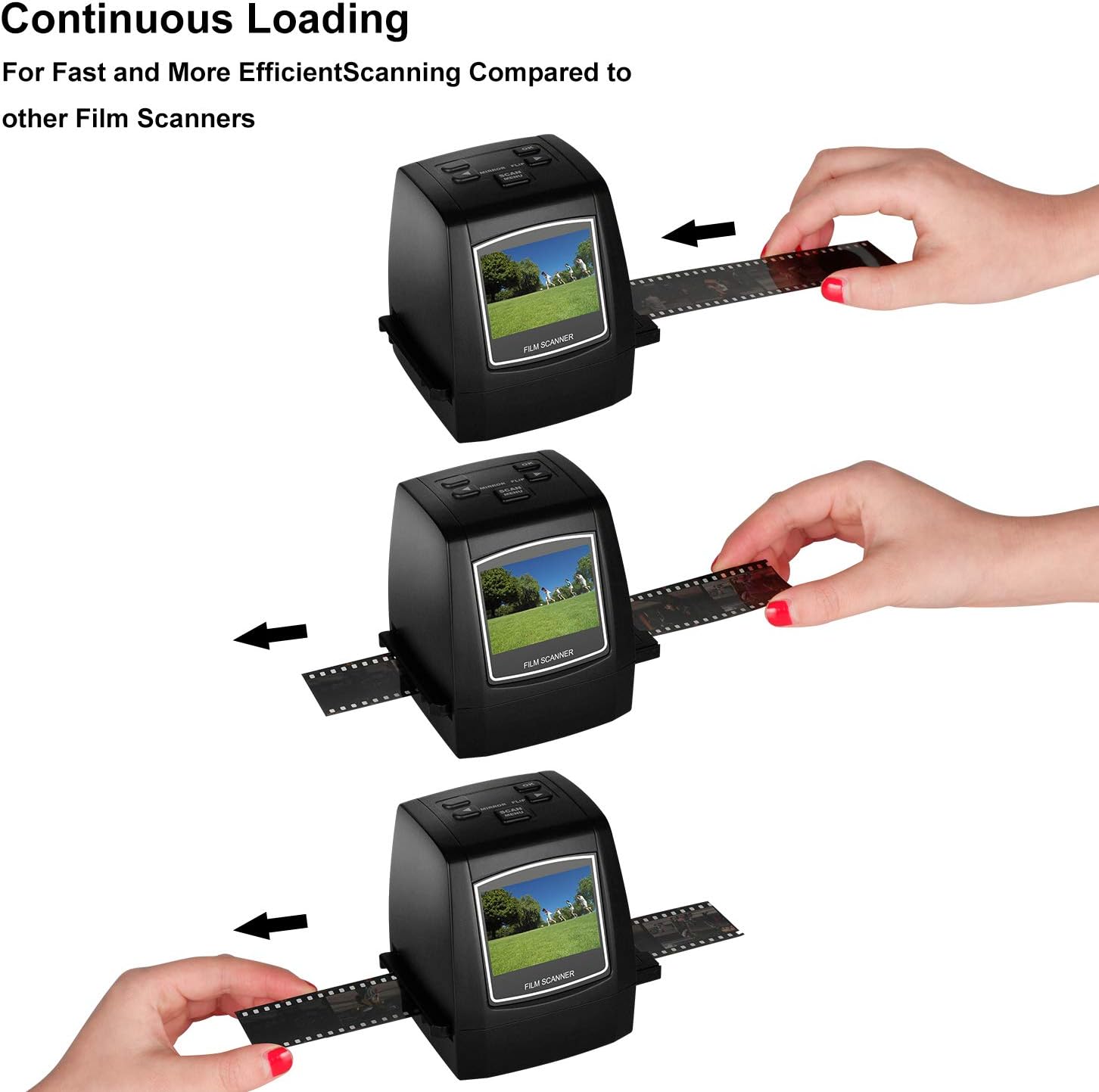
Image: All components included in the DIGITNOW Film & Slide Scanner package.
- DIGITNOW 22MP All-in-1 Film & Slide Scanner
- AC adaptér 100-240V
- USB datový kabel
- Uživatelská příručka
- Držák na negativní film
- Držák snímku
- Super 8 Film Holder
- Držák na film 110
- Čisticí kartáč
3. Vlastnosti produktu
- Converts 35mm/135, 110, 126KPK and Super 8 films, Slides & Negatives into digital JPEG format within 1 to 2 seconds.
- Stand-Alone operation, no computer required. Transfer old film/slides to Color or Black&White pictures in an SD card (up to 32GB, not included) and adjust the brightness or color of the image directly on the device.
- Mac & PC Compatible. Easily transfer high-resolution images to your computer, laptop, smartphone, and tablet.
- With software interpolation, digitized photo quality can reach up to 22 Megapixels.
- View scanned photos directly on the integrated 2.4” color LCD screen, or connect it to a TV for a larger display.
4. Popis dílů

Obrázek: Přední strana view of the scanner, showing the 2.4-inch LCD screen and control buttons.

Obrázek: Zadní view of the scanner, highlighting the SD card slot, USB port, and TV Out port.
Ovládací tlačítka:
- Vypínač: Turns the scanner ON/OFF.
- Tlačítko OK: Confirms selections or captures an image.
- Šipky vlevo/vpravo: Navigate menus or adjust settings.
- Mirror/Flip Button: Flips or mirrors the image during preview.
- Scan/Menu Button: Zahájí skenování nebo otevře hlavní nabídku.
Porty a sloty:
- Slot pro SD kartu: Insert an SD card (up to 32GB, not included) for saving scanned images.
- USB port: Connects to a computer for data transfer or power.
- TV Out Port: Connects to a TV for larger display of images.
5. Nastavení
- Připojení napájení: Connect the provided AC adapter to the scanner's USB port and plug it into a power outlet. Alternatively, connect the scanner to a computer's USB port using the supplied USB cable.
- Vložte SD kartu: Insert an SD card (not included) into the SD card slot on the back of the scanner. Ensure it is inserted correctly until it clicks into place.
- Zapnutí: Press the Power button to turn on the scanner. The LCD screen will light up.
6. Návod k obsluze
6.1 Supported Film and Slide Types

Image: Visual representation of the various film and slide formats compatible with the scanner.
6.2 Skenování filmů a diapozitivů
Follow these steps to digitize your films and slides:
- Select Film Type: From the main menu, use the arrow buttons to navigate to the 'Capture' mode. Press OK. Then, select the appropriate film type (e.g., 35mm Negative, 135 Slide, Super 8, 110, 126) using the arrow buttons and press OK to confirm.
- Insert Film/Slide Holder: Insert the correct film or slide holder into the slot on the side of the scanner. Ensure it slides in smoothly.
- Load Film/Slide: Carefully load your film strip or slide into the designated slot on the holder. For film strips, ensure the film is flat and properly aligned. For slides, place them securely in the slide holder.
- Předview Obraz: The image from your film or slide will appear on the 2.4-inch LCD screen. You can use the 'Mirror/Flip' button to adjust the orientation if needed.
- Upravit nastavení (volitelné): Press the 'Scan/Menu' button to access settings like exposure compensation (brightness) or color balance (Red, Green, Blue). Use the arrow buttons to adjust and OK to confirm.
- Skenovat obrázek: Once the image looks satisfactory, press the 'OK' button to capture and save the digital photo to the inserted SD card.
- Nepřetržité skenování: For film strips, gently pull the film through the holder to the next frame and repeat the scanning process.

Image: Demonstration of continuous film loading for efficient scanning.
6.3 Videoukázka
Watch this official product video for a visual guide on unboxing, setting up, and operating the DIGITNOW Film & Slide Scanner:
Video: A comprehensive guide demonstrating the unboxing, setup, and scanning process of the DIGITNOW Film & Slide Scanner. This video covers inserting film/slides, adjusting settings, and capturing digital images.
7. Údržba
To ensure optimal performance and longevity of your scanner, follow these maintenance tips:
- Čištění objektivu: Use the provided cleaning brush to gently remove any dust or debris from the scanner's lens and film slot. Do not use liquid cleaners or abrasive materials.
- Čištění exteriéru: Otřete vnější povrch skeneru měkkým, suchým hadříkem.
- Skladování: Pokud skener nepoužíváte, skladujte jej na chladném a suchém místě mimo dosah přímého slunečního záření a extrémních teplot.
8. Řešení problémů
| Problém | Možná příčina | Řešení |
|---|---|---|
| Skener se nezapne. | Chybí připojení k napájení nebo vadný adaptér. | Ensure the AC adapter is securely connected to the scanner and a working power outlet. Try a different USB port or power outlet. |
| Image appears dark or discolored. | Incorrect exposure/color settings or dirty lens. | Adjust exposure compensation and color balance settings in the menu. Clean the scanner lens with the provided brush. |
| Nelze ukládat obrázky na SD kartu. | SD card full, not inserted correctly, or corrupted. | Check if the SD card has enough free space. Reinsert the SD card. Try a different SD card. Format the SD card (this will erase all data). |
| Film/slide not recognized or blurry. | Incorrect film holder or improper loading. | Ensure you are using the correct film/slide holder for your media type. Make sure the film/slide is inserted flat and correctly aligned within the holder. |
9. Specifikace
| Funkce | Detail |
|---|---|
| Rozměry produktu | 3.2 x 3.2 x 4 palců (4.03"H x 3.42"Š x 4.03"V) |
| Hmotnost položky | 9.6 unce (0.6 libry) |
| Číslo modelu | m126 |
| Typ média | Negativy, diapozitiv, foto |
| Typ skeneru | Film |
| Technologie připojení | USB |
| Rezoluce | 7200 DPI (Interpolated to 22MP) |
| Technologie optických senzorů | CMOS |
| Minimální systémové požadavky | Windows 7 (for PC connection) |
| Vestavěná paměť | 128 MB |
| LCD obrazovka | 2.4palcový barevný LCD displej |
| Podporované typy filmů | 35mm/135, 110, 126KPK, Super 8 Films/Slides/Negatives |
10. Záruka a podpora
For warranty information and technical support, please refer to the contact details provided on the product packaging or the official DIGITNOW webUschovejte si účtenku jako doklad o koupi pro případné reklamace.
Ask a question about this manual
Ask about setup, troubleshooting, compatibility, parts, safety, or missing instructions. Manuals+ will review the question and use this page’s manual context to help answer it.