
Zavedení
This manual provides detailed instructions for the proper use and maintenance of your SUNITEC Bluetooth Car Speakerphone BC936SA. Please read this manual thoroughly before operating the device to ensure optimal performance and safety.
Bezpečnostní informace
Do not use the hands-free device in a manner that distracts your attention from the road while driving.
Obsah balení
Ověřte, zda jsou v balení přítomny všechny položky:
- SUNITEC BC936SA Bluetooth Car Speakerphone
- USB nabíječka do auta
- USB nabíjecí kabel
- Zadní klip
- Uživatelská příručka

Image: Contents of the SUNITEC BC936SA package, including the speakerphone, car charger, USB cable, back clip, and user manual.
Konec produktuview
Familiarize yourself with the components and controls of your speakerphone:
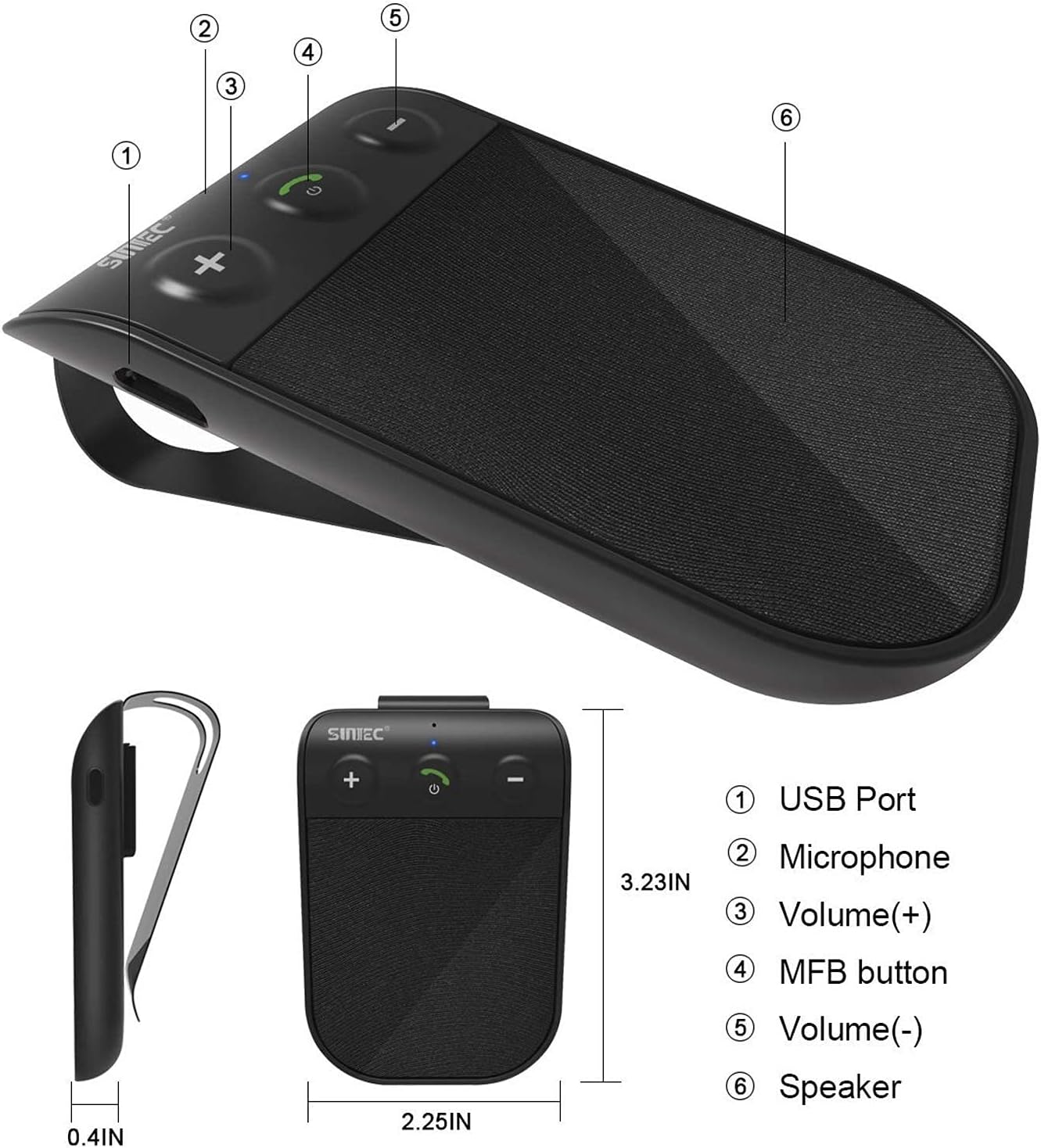
Image: Diagram showing the SUNITEC BC936SA speakerphone with labeled parts: (1) USB Port, (2) Microphone, (3) Volume (+), (4) MFB button, (5) Volume (-), (6) Speaker.
Nastavení
1. Nabíjení zařízení
Before first use, fully charge the speakerphone. Connect the USB charging cable to the device and the car charger. A red light indicates charging. Charging typically takes less than 2 hours. The device provides up to 12 hours of talk time and 980 hours of standby time on a full charge.
Video: This video demonstrates several features of the SUNITEC BC936SA. It shows the 'Battery Low' voice prompt (0-3s), unboxing the product (3-7s), adjusting volume (7-10s), using GPS directions (10-12s), charging with a red indicator light (12-15s), connecting multiple devices (15-19s), power on/off (19-20s), and a Siri call demonstration (20-38s).

Image: Visual representation of the battery indicator, showing a full charge of 400 mAh and estimated usage hours.
2. Montáž hlasitého telefonu
Attach the speakerphone to your car's sun visor using the included clip. Ensure it is securely fastened and does not obstruct your view za jízdy.

Image: The SUNITEC BC936SA speakerphone clipped onto a car's sun visor, showing its discreet placement.
3. Párování s telefonem
- Turn on the speakerphone. It will enter pairing mode automatically.
- Na svém mobilním telefonu povolte Bluetooth a vyhledejte dostupná zařízení.
- Select "BC936SA" from the list of devices to connect.
- Once connected, the speakerphone will provide voice guidance confirming the connection.
The device supports connecting two mobile phones simultaneously, allowing for easy switching between calls and music.

Image: The SUNITEC BC936SA speakerphone positioned between two smartphones, illustrating its ability to connect to two devices simultaneously.

Image: A visual showing the speakerphone connecting to two phones, highlighting the dual link feature.
Návod k obsluze
1. Power On/Off and Auto Reconnection
The speakerphone features an auto power-on function. Once paired and connected, the BC936SA will automatically power on and reconnect to your phone when the car door is opened. When not in use, it will automatically power off to conserve battery.

Image: A hand opening a car door, with an inset showing the SUNITEC BC936SA on the sun visor, indicating the auto power-on feature upon car door opening.

Image: A visual showing the speakerphone automatically powering on when the car door is opened.
2. Uskutečňování a přijímání hovorů
The speakerphone provides clear calls thanks to its noise cancellation technology. Use the MFB (Multi-Function Button) to answer, end, or reject calls. Adjust volume using the dedicated volume buttons.
3. Voice Commands (Siri/Google Assistant)
The BC936SA supports Siri and Google Assistant. Activate your phone's voice assistant to make calls, send messages, or get GPS directions, allowing you to remain focused on the road.

Image: The speakerphone next to a phone displaying voice command examples for Siri and Google Assistant, emphasizing safe driving.

Image: A visual showing the speakerphone activating Siri or Google Assistant for voice commands.
4. Přehrávání hudby
You can stream music from your connected phone through the speakerphone. Use the volume buttons to adjust playback levels.

Image: The SUNITEC BC936SA speakerphone with sound waves emanating from it, next to a smartphone displaying a music player, highlighting its ultra-clear sound quality with Bluetooth 5.0.
Údržba
1. Čištění
Zařízení otřete měkkým, suchým hadříkem. Nepoužívejte agresivní chemikálie ani abrazivní čisticí prostředky.
2. Péče o baterie
To prolong battery life, avoid exposing the device to extreme temperatures. Recharge the battery when the "Battery Low" voice prompt is heard.
Odstraňování problémů
| Problém | Možná příčina | Řešení |
|---|---|---|
| Zařízení se nezapne. | Baterie je vybitá. | Zařízení plně nabijte. |
| Nelze spárovat s telefonem. | Bluetooth is off on phone or device is not in pairing mode. | Ensure Bluetooth is enabled on your phone. Put the speakerphone into pairing mode (usually by holding the MFB button). Delete previous pairings on your phone and try again. |
| Špatná kvalita zvuku během hovorů. | Interference or low signal. | Ensure the speakerphone is within range of your phone. Check for other devices causing interference. Adjust volume. |
| Auto power on/off not working. | Device not properly paired or sensor obstructed. | Re-pair the device. Ensure the device is securely mounted and the sensor is not blocked. |
Pro další pomoc se prosím obraťte na kontaktní informace v části Záruka a podpora.
Specifikace
| Funkce | Detail |
|---|---|
| Značka | SUNITEC |
| Model | BC936SA |
| Rozměry produktu | 11.68 x 1.78 x 4.57 cm |
| Hmotnost položky | 62.37 gramů |
| Hardwarové rozhraní | Bluetooth, USB |
| Kompatibilní zařízení | Zařízení Bluetooth |
| Další funkce | Bluetooth |
| Režim zvukového výstupu | Stereo |
| svtage | 3.7 voltů |
| Typ zdroje napájení | Napájení z baterie |
| Typ baterie | Dobíjecí lithiový polymer |
| Průměrná výdrž baterie (pohotovostní režim) | 980 hodiny |
| Doba nabíjení | 2 hodiny |
| Bezdrátový typ | Bluetooth |
| Podporované standardy | Bluetooth |
| Vstup lidského rozhraní | Tlačítka |
| Materiál | Plast |
| Typ instalace | Phone, Car |
| Bluetooth Technology Support | Ano |

Image: Close-up of the Bluetooth 5.0 Qualcomm chipset, indicating advanced connectivity.
Záruka a podpora
SUNITEC offers a 365-day free return policy for any product issues. For technical support or inquiries, please contact our customer service. We aim to provide quick responses within 24 hours.
Pro více informací navštivte www.sunitec.net.