
Tronsmart G02
Uživatelská příručka k bezdrátovému hernímu ovladači Tronsmart Mars G02
Model: G02
Zavedení
Thank you for choosing the Tronsmart Mars G02 Wireless Game Controller. This manual provides detailed instructions for setting up, operating, and maintaining your controller to ensure optimal performance across various compatible devices, including smartphones, tablets, PCs, and smart TVs.
Obsah balení
Prosím, ověřte, zda jsou v balení přítomny všechny položky:
- Tronsmart Mars G02 Wireless Game Controller
- USB nabíjecí kabel
- 2.4GHz USB přijímač
- Uživatelská příručka (tento dokument)

Image: Contents of the Tronsmart Mars G02 Wireless Game Controller package, showing the controller, USB receiver, charging cable, and user manual.
Konec produktuview
Familiarize yourself with the various components and controls of your Tronsmart Mars G02 controller.

Obrázek: Přední strana view of the Tronsmart Mars G02 controller, highlighting the D-pad, left and right joysticks, A/B/X/Y buttons, Start, Select, Home, and Turbo buttons.

Image: The Tronsmart Mars G02 controller with its integrated smartphone holder extended, ready to secure a mobile device for gaming.
Klíčové vlastnosti:
- Dual Connectivity: Supports both Bluetooth and 2.4GHz wireless connections.
- Integrated Phone Holder: Adjustable holder for smartphones (3.5 to 6 inches).
- Multi-Platform Compatibility: Works with Android devices, PCs, and smart TVs.
- Ergonomic Design: Comfortable grip for extended gaming sessions.
- Turbo Function: Programmable turbo button for rapid fire.
Nastavení
1. Nabíjení regulátoru
Before initial use, fully charge the controller. Connect the supplied USB charging cable to the controller's charging port and the other end to a USB power source (e.g., computer USB port, USB wall adapter). The charging indicator light will show the charging status and turn off when fully charged.
2. Připojení k zařízením
The Tronsmart Mars G02 offers two primary connection methods:
2.1. Bluetooth Connection (for Android Smartphones/Tablets)
- Ujistěte se, že je ovladač vypnutý.
- Stiskněte a podržte Tlačítko Domů a Tlačítko simultaneously for 3 seconds until the indicator light flashes rapidly, indicating pairing mode.
- Na svém zařízení Android přejděte na Nastavení > Bluetooth a zapněte Bluetooth.
- Scan for available devices and select "Tronsmart Mars G02" from the list.
- Po připojení se kontrolka na ovladači rozsvítí trvale.
2.2. 2.4GHz Wireless Connection (for PC/Smart TV/TV Box)
- Insert the 2.4GHz USB receiver into an available USB port on your PC, Smart TV, or TV Box.
- Ujistěte se, že je ovladač vypnutý.
- Stiskněte a podržte Tlačítko Domů a tlačítko X simultaneously for 3 seconds until the indicator light flashes rapidly.
- The controller will automatically connect to the USB receiver. Once connected, the indicator light will become solid.
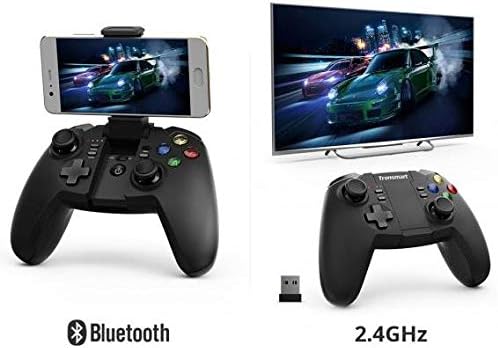
Image: Illustration showing the Tronsmart Mars G02 controller connecting to a smartphone via Bluetooth and to a television via its 2.4GHz USB receiver.
3. Attaching a Smartphone (Optional)
The integrated phone holder can accommodate smartphones between 3.5 and 6 inches.
- Gently pull up the phone holder from the center of the controller.
- Adjust the angle to your preference (up to 135 degrees).
- Carefully place your smartphone into the holder, ensuring it is securely gripped.

Obrázek: Boční view of the Tronsmart Mars G02 controller demonstrating the adjustable angles (90 and 135 degrees) of the integrated phone holder, designed for phones between 3.5 and 6 inches.
Návod k obsluze
Zapnutí/vypnutí
- Zapnutí: Stiskněte tlačítko Tlačítko Domů once. The controller will attempt to reconnect to the last paired device.
- Vypnout: Stiskněte a podržte Tlačítko Domů for 5 seconds until the indicator lights turn off. The controller will also automatically power off after 5 minutes of inactivity.
Funkce tlačítek
The Tronsmart Mars G02 features standard gaming controller buttons:
- Analogové joysticky vlevo/vpravo: For precise 360-degree movement.
- D-Pad (směrový ovladač): Pro směrový vstup.
- Tlačítka A/B/X/Y: Akční tlačítka, obvykle barevně odlišená.
- L1/R1 (Bumpers): Knoflíky na ramenou.
- L2/R2 (Spouštěče): Analogové spouštěče pro variabilní vstup.
- Tlačítko Start: Typically used to pause or confirm actions.
- Vybrat tlačítko: Often used for menu navigation or secondary functions.
- Tlačítko Domů: Powers the controller on/off, and returns to the home screen on some devices.
- Tlačítko Turbo: Activates rapid-fire for assigned buttons.
Funkce Turbo
To enable the Turbo function for a specific button:
- Stiskněte a podržte Tlačítko Turbo.
- While holding Turbo, press the desired action button (e.g., A, B, X, Y, L1, R1, L2, R2) once. The Turbo function is now active for that button.
- To disable Turbo for that button, repeat the process: hold Turbo and press the action button again.

Image: The Tronsmart Mars G02 controller positioned in front of a range of compatible devices, including a smartphone, tablet, laptop, and television, illustrating its multi-platform support.
Údržba
- Keep the controller dry. Avoid exposure to moisture or liquids.
- Ovladač čistěte měkkým, suchým hadříkem. Nepoužívejte agresivní chemikálie ani abrazivní čisticí prostředky.
- Regulátor skladujte na chladném a suchém místě mimo dosah přímého slunečního záření a extrémních teplot.
- Zabraňte pádu ovladače na zem nebo jeho vystavení silným nárazům.
- When not in use for extended periods, charge the controller periodically to maintain battery health.
Odstraňování problémů
| Problém | Řešení |
|---|---|
| Ovladač se nezapne. | Ensure the controller is charged. Connect it to a power source using the USB cable. |
| Nelze se připojit přes Bluetooth. |
|
| Cannot connect via 2.4GHz receiver. |
|
| Buttons are unresponsive or laggy. |
|
Specifikace
- Rozměry produktu: 7.4 x 18 x 13.8 cm
- Hmotnost: 400 g
- Konektivita: Bluetooth, 2.4GHz Wireless
- Kompatibilita: Multi (Android, PC, Smart TV, TV Box)
- Reference výrobce: 2724572970803
- ASIN: B0777SKFX6
Ask a question about this manual
Ask about setup, troubleshooting, compatibility, parts, safety, or missing instructions. Manuals+ will review the question and use this page’s manual context to help answer it.