
Zavedení
This manual provides detailed instructions for the Walfront Bluetooth Audio Receiver Board 4.1. This versatile module integrates Bluetooth audio reception, USB decoding playback, and MicroSD card decoding playback, making it suitable for various audio applications such as car audio upgrades, home stereo systems, and DIY projects. Please read this manual thoroughly before use to ensure proper installation and operation.
Vlastnosti produktu
- Multiple Audio Input Modes: Supports Bluetooth 4.1 reception, USB decoding playback, and MicroSD (T-F) card decoding playback.
- Širokoformátová kompatibilita: Plays MP3, WMA, WAV, FLAC, and APE (FAST encoding format) audio files.
- Zvukové efekty: Built-in equalizer with Class, Jazz, Rock, Bass, and Normal sound modes (effective in USB/MicroSD playback).
- Uživatelsky přívětivé ovládání: On-board buttons for mode switching, track navigation, volume control, and EQ settings.
- Kompaktní design: Small form factor (50mm x 40mm) for easy integration into various setups.
- Napájení: Operates on DC 5V.
Obsah balení
- 1 x Walfront Bluetooth Audio Receiver Board 4.1
- Note: Additional cables or accessories are not included unless specified.
Konec produktuview
Familiarize yourself with the various components and interfaces of the audio receiver board.

Obrázek 1: Shora dolů view of the Walfront Bluetooth Audio Receiver Board 4.1, showing the MicroUSB power input, 3.5mm audio output, control buttons, MicroSD card slot, and USB-A port.

Obrázek 2: Shora dolů view of the board with key dimensions indicated: 50mm length and 40mm width.
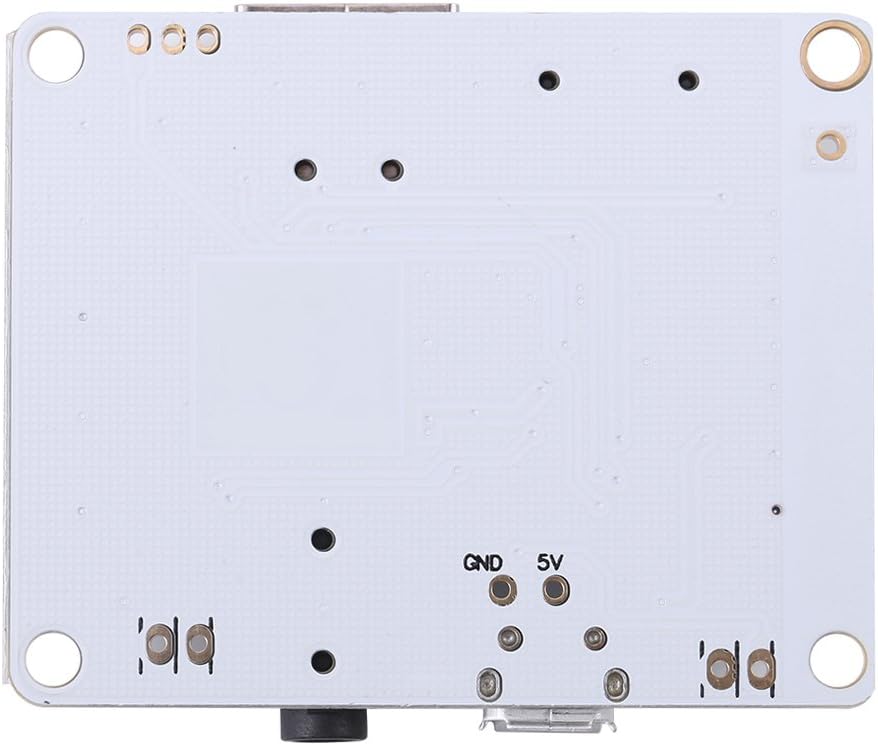
Obrázek 3: Dno view of the Walfront Bluetooth Audio Receiver Board, showing solder points for GND and 5V power input.

Obrázek 4: Detailed close-up of the control buttons (MODE, PLAY, NEXT, BACK, EQ), 3.5mm audio jack, and USB-A port.
Klíčové komponenty:
- MicroUSB port: For 5V DC power input.
- 3.5mm audio jack: Stereo audio výstup.
- Slot pro microSD kartu: Pro přehrávání zvuku files from a MicroSD card.
- Port USB-A: Pro přehrávání zvuku files z USB flash disku.
- Ovládací tlačítka:
- REŽIM: Switches between Bluetooth, USB, and MicroSD input modes.
- PLAY/PAUSE: Toggles playback.
- DALŠÍ: Short press for next track; long press to increase volume.
- ZADNÍ: Short press for previous track; long press to decrease volume.
- EQ: Cycles through sound equalizer presets (Class, Jazz, Rock, Bass, Normal).
- M_ANT: Bluetooth anténa.
- ZTLUMIT: Mute output.
- MIC: Microphone input (if applicable, though not explicitly stated for this model).
- 5V/GND Solder Points: Alternative power input.
Pokyny pro nastavení
- Připojení napájení:
Connect a 5V DC power supply to the MicroUSB port on the board. Alternatively, you can solder a 5V DC power source to the designated 5V and GND solder points on the board. Ensure correct polarity to prevent damage.
- Připojení zvukového výstupu:
Connect the 3.5mm audio output jack to your amplifier, active speakers, or headphones using a standard 3.5mm audio cable.
- Input Source Preparation:
- For MicroSD Card Playback: Insert a MicroSD card containing supported audio files (MP3, WMA, WAV, FLAC, APE) into the MicroSD card slot.
- For USB Playback: Vložte USB flash disk s podporovaným zvukovým souborem filedo portu USB-A.
Důležité: Always ensure the power supply is stable and within the specified 5V DC range. Incorrect voltagMůže to poškodit modul.
Návod k obsluze
1. Zapnutí/vypnutí
The module powers on automatically when connected to a 5V DC power source. There is no dedicated power button.
2. Výběr režimu
Stiskněte tlačítko MODE button to cycle through the available input modes:
- Bluetooth Reception Mode
- USB Decoding Playback Mode
- MicroSD Card Decoding Playback Mode
3. Bluetooth Reception Mode
- Switch the module to Bluetooth mode using the MODE tlačítko.
- The module will enter pairing mode, indicated by an audible prompt or LED indicator (if present).
- Na zařízení s podporou Bluetooth (např. chytrý telefon, tablet) vyhledejte dostupná zařízení Bluetooth.
- Select the device named "Bluetooth Audio" or similar (specific name may vary) to pair.
- Once paired, you can play audio from your device, and it will be output through the module.
4. USB/MicroSD Card Playback Mode
- Insert a USB flash drive or MicroSD card containing supported audio filedo příslušného slotu.
- Switch the module to USB or MicroSD mode using the MODE button. The module will automatically begin playing audio files.
- Ovládání přehrávání:
- Krátký stisk PLAY/PAUSE pro pozastavení nebo obnovení přehrávání.
- Krátký stisk DALŠÍ pro další skladbu.
- Krátký stisk ZADNÍ for the previous track.
5. Ovládání hlasitosti
- Dlouhé stisknutí DALŠÍ pro zvýšení hlasitosti.
- Dlouhé stisknutí ZADNÍ pro snížení hlasitosti.
6. Zvukové efekty (ekvalizér)
Stiskněte tlačítko EQ button to cycle through different sound equalizer presets. These effects are only active during USB or MicroSD card playback.
- Třída
- Jazz
- Rock
- Bas
- Normální
Specifikace
| Funkce | Detail |
|---|---|
| Napájení | DC 5V |
| Podporované zvukové formáty | MP3, WMA, WAV, FLAC, APE (FAST encoding format) |
| Režim zvukového výstupu | Prostorový zvuk (konfigurace 4.1 kanálů) |
| Technologie připojení | Bluetooth, bezdrátové připojení |
| Typ ovladače | Touch (on-board buttons) |
| Speciální funkce | Bluetooth Receiver, USB Decode Playback, MicroSD Card Decode Playback |
| Kompatibilní zařízení | reproduktory, Amplifiers, Headphones |
| Rozměry (D x Š) | 50mm x 40mm (1.97"D x 1.57"W) |
| Hmotnost | 11g (0.024lb / 0.352 ounces) |
Odstraňování problémů
| Problém | Možná příčina / řešení |
|---|---|
| No power / Module not turning on. |
|
| Žádný audio výstup. |
|
| Nelze spárovat přes Bluetooth. |
|
| Přehrávání z USB/MicroSD nefunguje. |
|
Údržba
- Uchovávejte modul v suchu a mimo dosah vlhkosti.
- Nevystavujte modul extrémním teplotám.
- Clean the surface with a soft, dry cloth. Do not use harsh chemicals or solvents.
- Handle the board carefully to avoid damaging components or solder joints.
Bezpečnostní informace
- This product is an electronic component and should be handled with care.
- Ensure proper ventilation when operating, especially if enclosed.
- Do not attempt to disassemble or modify the module beyond the intended connections. This may void any potential warranty and cause damage.
- Uchovávejte mimo dosah dětí.
- Elektronický odpad zlikvidujte zodpovědně v souladu s místními předpisy.
Záruka a podpora
Informace o záruce nebo technickou podporu získáte od prodejce nebo oficiálního zástupce výrobce. webUschovejte si doklad o koupi pro případné reklamace.
Manufacturer: Walfront