
1. Důležité bezpečnostní informace
Please read this entire instruction manual before installation. If you have any questions regarding safety or installation, please contact a qualified service technician. LogiLink is not responsible for damage or injury caused by incorrect mounting or use.
- Nosnost: Nepřekračujte maximální nosnost 35 kg (77 lb).
- Velikost televizoru: Tento držák je určen pro televizory s úhlopříčkou od 37 do 70 palců.
- Typ stěny: Ensure the mounting surface can safely support the combined weight of the equipment and hardware.
- Nástroje: Pro instalaci použijte vhodné nástroje.
- Děti: Během instalace držte děti v dostatečné vzdálenosti. Malé části mohou představovat nebezpečí udušení.
2. Konec produktuview
The LogiLink BP0038 is a fixed TV wall mount designed to securely hold your television close to the wall, providing a clean and space-saving installation.
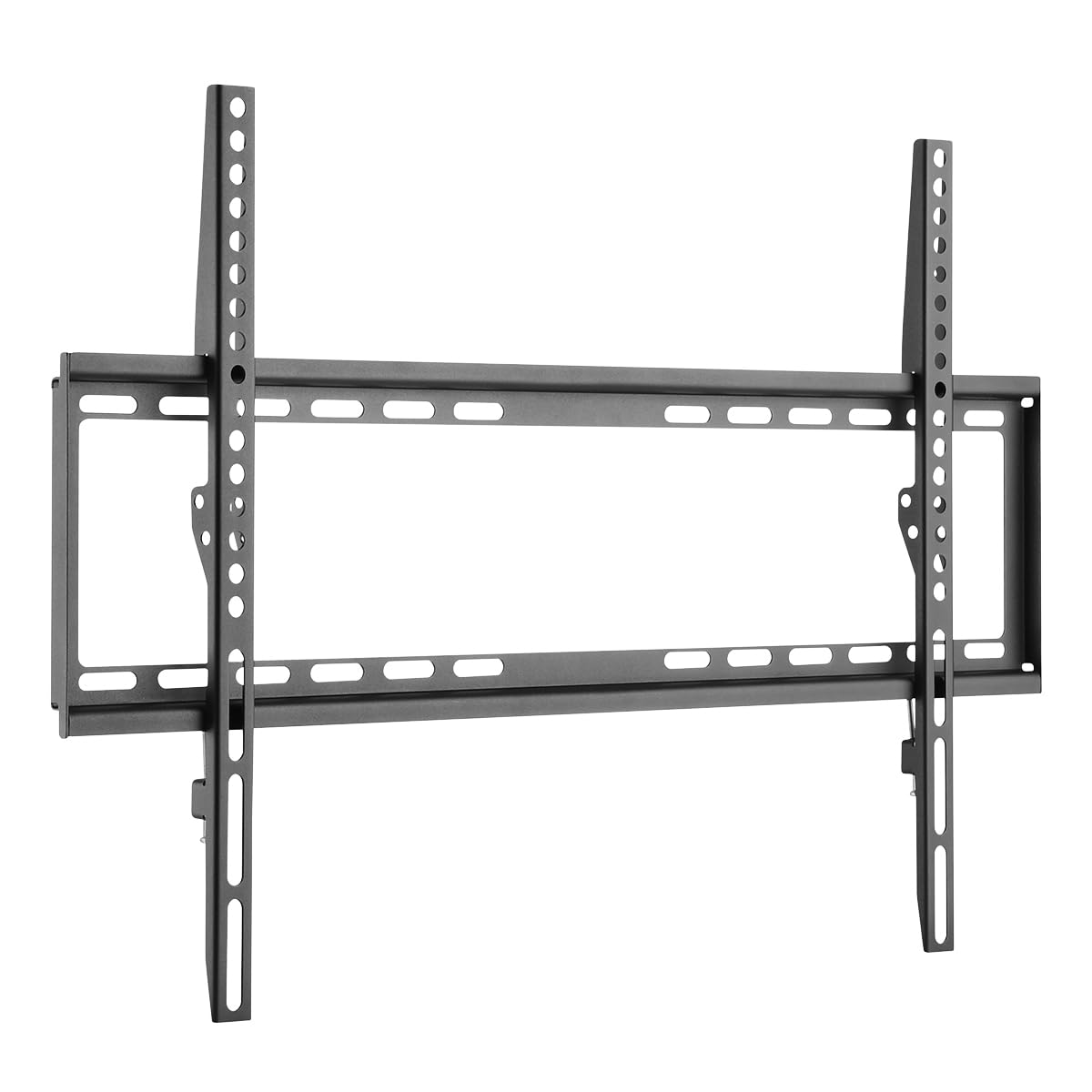
Obrázek 2.1: Přesview of the LogiLink BP0038 Fixed TV Wall Mount.
3. Obsah balení
Verify that all components are present and undamaged before beginning installation. If any parts are missing or damaged, do not proceed with installation and contact your retailer.

Figure 3.1: Illustration of typical mounting hardware included.
- Nástěnná deska (1x)
- Držáky na televizi (2x)
- Mounting Screws (various sizes for TV and wall)
- Wall Anchors (for concrete/brick walls)
- Podložky a rozpěrky
4. Specifikace
| Model | BP0038 |
| Barva | Černý |
| Materiál | Legovaná ocel |
| Hmotnost položky | 1.08 kg (2.38 lb) |
| Rozměry (DxŠxV) | 42.2 x 2 x 66.5 cm |
| Kapacita zatížení | 35 kg (77 lb) |
| Kompatibilita VESA | 200x200, 400x200, 300x300, 400x400, 600x400 |
| Typ montáže | Opraveno |
| Vzdálenost od zdi | 20.5 mm |
| Vhodná velikost TV | 37-70 palců |

Figure 4.1: Detailed dimensions of the wall mount components.
5. Pokyny k instalaci
Follow these steps carefully to ensure a safe and secure installation.

Obrázek 5.1: Přesview procesu instalace.
5.1 Kontrolní seznam před instalací
- Verify your TV's weight and VESA mounting pattern (distance between mounting holes on the back of the TV) are within the mount's specifications.
- Determine your wall type (wood stud, concrete, brick) and ensure it can support the weight.
- Ujistěte se, že je veškerý obsah balení přítomen a nepoškozený.
5.2 Potřebné nástroje (není součástí balení)
- Elektrická vrtačka
- Vodováha
- Vyhledávač trámů (pro dřevěné trámové stěny)
- Tužka
- Měřicí páska
- Šroubovák s křížovou hlavou
- Wrench (if needed for specific bolts)
5.3 Montáž nástěnné desky
- Determine the desired height for your TV. Use the wall plate as a template and a spirit level to mark the drilling points on the wall.
- For wood stud walls: Locate the center of the wood studs using a stud finder. Drill pilot holes (recommended size in manual, typically smaller than screw diameter).
- For concrete/brick walls: Drill holes at the marked points. Insert the plastic wall anchors into the drilled holes.
- Align the wall plate with the drilled holes and secure it to the wall using the appropriate screws. Ensure it is firmly attached and level.
5.4 Attaching TV Brackets
- Opatrně položte televizor displejem dolů na měkký, čistý povrch, abyste zabránili poškození obrazovky.
- Identifikujte montážní otvory VESA na zadní straně televizoru.
- Select the correct diameter and length of TV screws from the provided hardware kit that fit your TV's mounting holes. Use spacers if the TV back is uneven or if cables need clearance.
- Attach the two TV brackets to the back of your TV using the selected screws, washers, and spacers. Ensure the brackets are oriented correctly (hooks facing downwards) and are securely tightened.
5.5 Mounting the TV to the Wall Plate
- S pomocí opatrně zvedněte televizor a zavěste držáky televizoru na horní okraj nástěnné desky.
- Jemně spusťte televizor dolů, dokud nebudou držáky zcela usazeny na nástěnné desce.
- Locate the safety screws or locking mechanisms on the bottom of the TV brackets. Tighten these screws to secure the TV to the wall plate and prevent accidental dislodging.
6. Provoz
The LogiLink BP0038 is a fixed wall mount. Once installed, your TV will remain in a static position, flush against the wall. No adjustments for tilt, swivel, or extension are possible with this model.
7. Údržba
- Čištění: Držák čistěte měkkým, suchým hadříkem. Nepoužívejte abrazivní čisticí prostředky ani rozpouštědla.
- Pravidelná kontrola: Pravidelně kontrolujte všechny šrouby a spoje, zda jsou pevně utažené a bezpečné. V případě potřeby je dotáhněte.
8. Řešení problémů
| Problém | Možná příčina | Řešení |
|---|---|---|
| Televizor není po instalaci v rovině. | Nástěnná deska nebyla během instalace dokonale vyrovnaná. | Carefully remove the TV, loosen the wall plate screws, adjust the plate using a spirit level, and re-tighten. Ensure to use a spirit level during initial marking. |
| Držák se zdá být uvolněný nebo nestabilní. | Screws are not fully tightened, incorrect anchors used, or wall type not suitable. | Ensure all screws are securely tightened. Verify that the correct wall anchors were used for your wall type. If unsure, consult a professional. |
| Držák na televizi nepasuje. | TV size or VESA pattern is incompatible. | Double-check your TV's VESA pattern and weight against the mount's specifications (Section 4). This mount supports VESA up to 600x400 and TVs from 37-70 inches, up to 35 kg. |
9. Záruka a podpora
This LogiLink BP0038 TV Wall Mount comes with a 2letá záruka výrobce od data nákupu. Tato záruka se vztahuje na vady materiálu a zpracování při běžném používání.
For technical support, warranty claims, or if you have any questions not covered in this manual, please contact your retailer or visit the official LogiLink webstránky s informacemi o zákaznickém servisu.
Uschovejte si prosím doklad o koupi pro účely záruky.