
1. Úvod
This manual provides essential information for the safe and efficient operation of your Lenco L-30BK Belt Drive Turntable. Please read these instructions thoroughly before using the device and retain them for future reference. The Lenco L-30BK is designed for playing vinyl records at 33 and 45 RPM, featuring a built-in preamplifier and USB connectivity for digitizing your vinyl collection.
2. Bezpečnostní informace
- Zdroj napájení: Zajistěte napájení objtage odpovídá požadavkům uvedeným na jednotce. Používejte pouze dodaný napájecí adaptér.
- Voda a vlhkost: Nevystavujte jednotku dešti, vlhkosti ani kapajícím/stříkajícím tekutinám. Na jednotku nestavte předměty naplněné tekutinami, například vázy.
- Větrání: Zajistěte dostatečné větrání. Neblokujte větrací otvory.
- Teplo: Udržujte jednotku mimo dosah zdrojů tepla, jako jsou radiátory, topná tělesa, sporáky nebo jiná zařízení (včetně amplifikátory), které produkují teplo.
- Čištění: Před čištěním odpojte přístroj ze zásuvky. Použijte měkký, suchý hadřík. Nepoužívejte tekuté ani aerosolové čisticí prostředky.
- Servis: Nepokoušejte se tento výrobek opravit sami. Veškerý servis svěřte kvalifikovanému servisnímu personálu.
- Umístění: Place the turntable on a stable, level surface to prevent vibrations and ensure proper playback.
3. Obsah balení
Zkontrolujte prosím, zda jsou v balení obsaženy všechny níže uvedené položky:
- Lenco L-30BK Turntable Unit
- Prachový kryt
- Talíř
- Řemen
- Slipmat
- Napájecí adaptér
- USB kabel
- Audio kabel RCA
- Návod k použití
- Pick-up Needle (pre-installed on cartridge)
4. Konec produktuview
Familiarize yourself with the components of your Lenco L-30BK turntable.

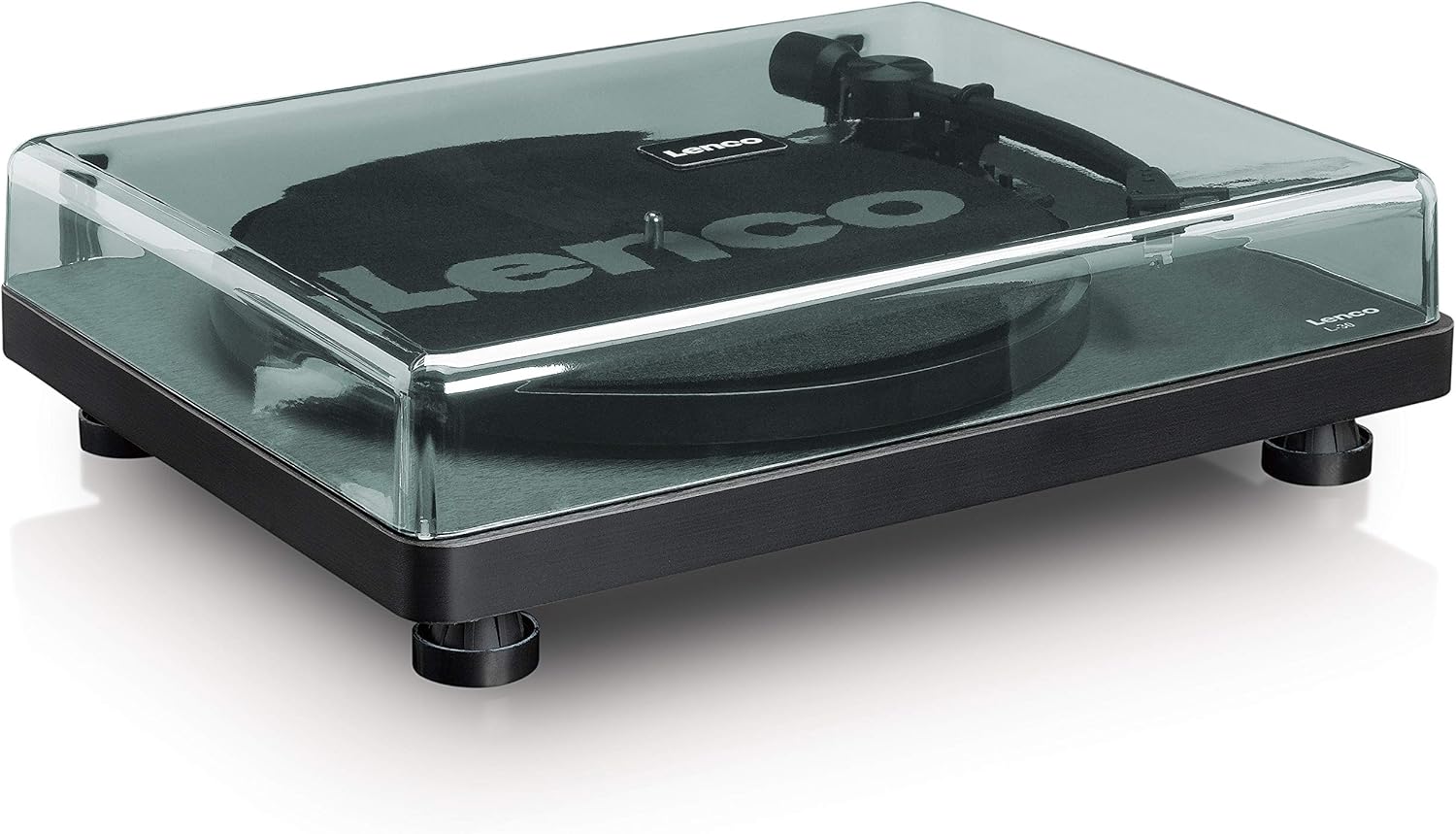
Obrázek 4.1: Přední view of the Lenco L-30BK Turntable with the dust cover open, revealing the main components including the platter, tonearm, and control buttons.

Obrázek 4.2: Rear panel connections of the Lenco L-30BK, including RCA audio outputs (L/R), USB port, DC12V power input, and the main power switch.
Klíčové komponenty:
- Talíř: The circular platform where records are placed.
- Rameno: Drží kazetu a stylus, který čte drážky desky.
- Cartridge and Stylus: Converts physical vibrations into electrical signals. The L-30BK features a Movable Magnet Sensor (MMC) with an individually replaceable stylus.
- Volič rychlosti: Switch to select between 33 and 45 RPM playback speeds.
- Automatické vypnutí: Automaticky zastaví otáčení talíře na konci desky.
- Protiprachový kryt: Chrání gramofon před prachem, když se nepoužívá.
- RCA Audio Outputs (L/R): Pro připojení k externímu amplifier nebo aktivní reproduktory.
- USB port: For connecting to a computer to digitize vinyl records.
- Napájení DC12V: Pro připojení napájecího adaptéru.
5. Nastavení
5.1 Vybalení a umístění
- Opatrně vyjměte gramofon z obalu.
- Place the unit on a stable, level surface, away from direct sunlight, heat sources, and excessive dust or vibrations.
- Install the dust cover by aligning its hinges with the slots on the back of the turntable.

Obrázek 5.1: The Lenco L-30BK Turntable with its protective dust cover closed, ready for placement.
5.2 Instalace talíře a pásu
- Place the platter onto the turntable spindle.
- Locate the drive belt, typically found underneath the platter or separately packaged.
- Carefully stretch the drive belt around the motor pulley and the inner rim of the platter. Ensure the belt is not twisted.
- Umístěte slipmat na talíř.
5.3 Připojení zvuku
The L-30BK has a built-in preamplifier, allowing direct connection to most audio systems.
- Connect the RCA audio cable (red for right channel, white for left channel) from the AUDIO OUT jacks on the rear of the turntable to the LINE IN or AUX IN jacks on your amplifier nebo aktivní reproduktory.
5.4 Připojení napájení
- Connect the DC12V power adapter to the DC12V POWER input on the rear of the turntable.
- Zapojte napájecí adaptér do vhodné zásuvky.
5.5 USB Connection (for Digitization)
- To digitize your vinyl records, connect the USB cable from the USB port on the rear of the turntable to an available USB port on your computer (PC or Mac).
6. Návod k obsluze
6.1 Zapnutí/vypnutí
- Flip the ON/OFF switch on the rear panel to the 'ON' position to power on the turntable.
- Flip the switch to 'OFF' when not in use.
6.2 Přehrávání desky
- Umístěte desku na talíř a ujistěte se, že je vycentrovaná.
- Select the appropriate speed (33 or 45 RPM) using the speed selector switch. For 45 RPM singles, place the included adapter on the spindle if needed.
- Zvedněte raménko přenosky pomocí páčky pro nastavení tónu.
- Ručně umístěte raménko přenosky nad požadovanou počáteční drážku desky.
- Jemně spusťte raménko přenosky pomocí páčky pro přehrávání. Jehla se dotkne desky a spustí se přehrávání.
- At the end of the record, the auto shut-off function will stop the platter rotation. Lift the tonearm and return it to its rest.

Obrázek 6.1: Proper technique for lowering the tonearm onto a record for playback.
Obrázek 6.2: Detailní view of the Movable Magnet Sensor (MMC) cartridge and stylus assembly.
6.3 Digitalizace záznamů přes USB
The L-30BK allows you to convert your vinyl records into digital audio files pomocí počítače.
- Připojte gramofon k počítači pomocí dodaného kabelu USB.
- Download and install audio recording software such as Audacity (available online for free) on your computer.
- Open the recording software and select the USB Audio Device as the input source.
- Start recording in the software, then begin playing your record on the turntable as described in section 6.2.
- Once the record finishes, stop the recording in the software and save your digitized audio file.
7. Údržba
7.1 Čištění gramofonu
- Před čištěním vždy odpojte gramofon ze zásuvky.
- K otření skříně a krytu proti prachu použijte měkký, suchý hadřík, který nepouští vlákna.
- Nepoužívejte abrazivní čisticí prostředky, vosky ani rozpouštědla, protože by mohly poškodit povrchovou úpravu.
7.2 Stylus Care and Replacement
- The stylus is a delicate component. Avoid touching it with your fingers.
- Clean the stylus regularly using a soft brush, gently brushing from back to front.
- The stylus should be replaced after approximately 300-500 hours of playback, or if you notice a degradation in sound quality.
- To replace the stylus, carefully pull the old stylus assembly forward and down from the cartridge. Insert the new stylus assembly by pushing it upwards and backwards into the cartridge until it clicks into place.
8. Řešení problémů
If you encounter problems with your turntable, refer to the following common issues and solutions:
| Problém | Možná příčina | Řešení |
|---|---|---|
| Žádná síla | Power adapter not connected; Power switch off; Wall outlet faulty. | Ensure power adapter is securely connected; Turn power switch to 'ON'; Test wall outlet with another device. |
| Žádný zvuk nebo nízká hlasitost | RCA kabely nejsou správně připojeny; Amplifier/speakers off or volume low; Input selected incorrectly on ampživější. | Check RCA cable connections; Turn on amplifier/speakers and adjust volume; Select correct input source on your audio system. |
| Zkreslený zvuk | Dirty stylus; Damaged stylus; Dirty record; Turntable not on a stable surface. | Clean the stylus; Replace the stylus if damaged; Clean the record; Ensure turntable is on a stable, level surface. |
| Přeskakování záznamu | Dirty or scratched record; Stylus worn or damaged; Turntable not level; External vibrations. | Clean the record; Replace the stylus; Ensure turntable is level; Place turntable away from sources of vibration. |
| Problémy s nahráváním na USB | USB cable not connected; Incorrect input selected in software; Software not installed. | Check USB cable connection; Select 'USB Audio Device' as input in recording software; Install Audacity or similar software. |
9. Specifikace
| Název modelu | L-30BK |
| Značka | Lenco |
| Typ pohonu | Řemenový pohon |
| Rychlosti | 33 1/3, 45 ot./min |
| Předampdoživotní | Vestavěný |
| Typ kazety | Movable Magnet Sensor (MMC) |
| Konektivita | USB, RCA Audio Out |
| Automatické vypnutí | Ano |
| Průměr talíře | 300 mm |
| Materiál | Wood (Enclosure) |
| Barva | Černý |
| Hmotnost položky | 3.28 kg |
| Rozměry (D x Š x V) | 41 d x 32 š x 12 v centimetrů |
| Odstup signálu od šumu | 60 dB |
| svtage | 240 voltů |
| Zdroj napájení | Elektrický kabel |
10. Záruka a podpora
Lenco products are manufactured to high quality standards. In the event of a defect, your product is covered by the terms of the warranty in your country of purchase. For detailed warranty information, please refer to the warranty card included with your product or visit the official Lenco website. For technical support or service inquiries, please contact Lenco customer service through their official channels.