
InFocus IN112XV
Uživatelská příručka k prezentačnímu projektoru InFocus IN112XV
Model: IN112XV | Brand: InFocus
1. Úvod
This manual provides essential information for the safe and efficient operation of your InFocus IN112XV Presentation Projector. The IN112XV is designed for business presentations and educational use, offering a long lamp life, high brightness, and clear image quality.
- Rozšířené Lamp Život: Enjoy over 15,000 hours of viewIng.
- Vysoký jas: 3800 lumens for clear images in various lighting conditions.
- Kontrastní poměr: 26000:1 for distinct whites and blacks.
- Flexibilní Viewing: Projects images from 28 inches to 300 inches diagonally.
- Konektivita: Features HDMI input and SVGA (800 x 600) resolution.
2. Obsah balení
Ověřte, zda jsou v balení obsaženy všechny níže uvedené položky:
- InFocus IN112XV Projector
- Napájecí kabel
- Dálkové ovládání
- VGA kabel
- Dokumentace (tato příručka a další průvodci)
3. Konec produktuview
Familiarize yourself with the components and controls of your InFocus IN112XV projector.
3.1 Přední View
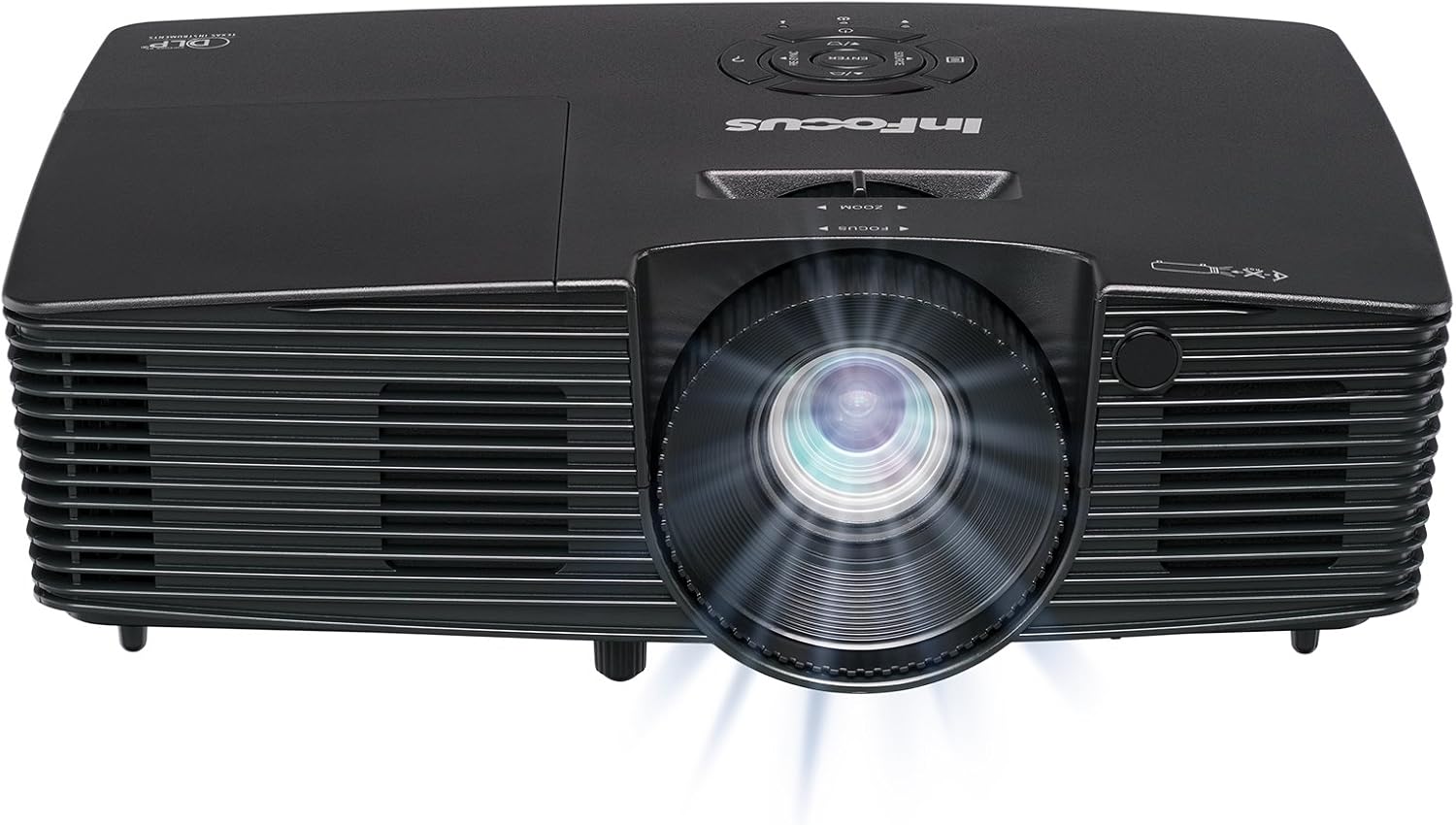
Obrázek 3.1: Přední view of the InFocus IN112XV projector. This image highlights the main projection lens and the front ventilation grilles.
3.2 Nahoru View a Ovládací panel

Obrázek 3.2: Nahoru view of the InFocus IN112XV projector. The control panel is visible on the right, featuring buttons for power, source selection, menu navigation, keystone adjustment, and volume. The focus and zoom adjustment rings are located around the lens.
The control panel on the top of the projector allows for basic operation without the remote. Key buttons include:
- Moc: Slouží k zapnutí nebo vypnutí projektoru.
- Zdroj: Cyklicky prochází dostupné vstupní zdroje.
- Menu: Přístup k nabídce na obrazovce (OSD).
- Zadejte: Confirms selections in the OSD menu.
- Šipky: Procházení možností nabídky a úprava nastavení.
- Re-Sync: Synchronizes the image.
3.3 Zadní View a připojovací porty

Obrázek 3.3: Zadní view of the InFocus IN112XV projector. This image displays the available connection ports, including Video In, S-Video In, Computer In (VGA), HDMI, and the power input.
Zadní panel nabízí různé porty pro připojení externích zařízení:
- Video vstup: For composite video sources.
- S-Video In: For S-Video sources.
- Computer In (VGA): For connecting to computers via VGA cable.
- HDMI: For digital video and audio sources.
- Servis: For service and maintenance purposes.
- Příkon: Connects the power cord to an electrical outlet.
3.4 Dálkové ovládání

Obrázek 3.4: Remote control for the InFocus IN112XV projector. The remote provides full control over the projector's functions, including power, source selection, menu navigation, keystone correction, and volume.
The remote control offers convenient access to all projector functions. Ensure batteries are correctly installed.
4. Nastavení
4.1 Umístění
Position the projector on a stable, flat surface or mount it securely. Ensure there is adequate space around the projector for ventilation.
4.2 Připojení napájení
- Připojte napájecí kabel ke vstupnímu portu projektoru.
- Zapojte druhý konec napájecího kabelu do uzemněné elektrické zásuvky.
4.3 Připojení vstupních zdrojů
The projector supports various input sources. Choose the appropriate cable for your device:
- HDMI: Connect an HDMI cable from your source device (e.g., laptop, media player) to the projector's HDMI port.
- VGA (vstup pro počítač): Connect a VGA cable from your computer to the projector's Computer In port. This is a plug-and-play connection.
- Video In / S-Video In: Use composite video or S-Video cables for older video sources.
- Mobilní zařízení: To connect an iPad or smartphone, a LightCast Key (sold separately) is required.
5. Návod k obsluze
5.1 Zapnutí/vypnutí
- Zapnutí: Stiskněte tlačítko Moc button on the projector's control panel or the remote control. The power indicator light will change.
- Vypnutí: Stiskněte tlačítko Moc button again. A confirmation message may appear. Press again to confirm shutdown. Allow the projector to cool down before unplugging.
5.2 Výběr vstupního zdroje
After connecting your source device, select the correct input:
- Stiskněte tlačítko Zdroj button on the projector's control panel or the remote control to cycle through available inputs (HDMI, VGA, Video, S-Video).
- Alternatively, use the dedicated input buttons (HDMI, VGA, Video) on the remote control.
5.3 Nastavení zaostření a zoomu
For a clear and appropriately sized image, adjust the lens rings:

Obrázek 5.1: Manual Focus Adjustment. This image illustrates the effect of adjusting the focus ring, transforming a blurry projection into a clear and sharp image.
- Soustředit: Otočte Soustředit ring on the projector lens until the image appears sharp and clear.
- Lupa: Otočte Přiblížení ring on the projector lens to adjust the size of the projected image.
5.4 Korekce lichoběžníkového zkreslení
If the projected image appears trapezoidal (wider at the top or bottom), use keystone correction to square it:
- Stiskněte tlačítko Keystone+ or Keystone- buttons on the remote control to adjust the image geometry.
5.5 Navigace v nabídce
Access the On-Screen Display (OSD) menu for advanced settings:
- Stiskněte tlačítko Menu button on the remote or control panel.
- Use the arrow keys to navigate through menu options.
- Stiskněte Vstupte pro výběr možnosti nebo potvrzení nastavení.
- Stiskněte Menu znovu pro ukončení OSD.
6. Údržba
6.1 lamp Život
Projektor lamp has an estimated life of over 15,000 hours. When the lamp reaches the end of its life, the projector may display a warning message or the image brightness may significantly decrease. Refer to the full service manual for lamp replacement procedures if necessary.
6.2 Čištění
- Projektor Casing: K otření vnější strany projektoru použijte měkký, suchý hadřík. Nepoužívejte abrazivní čisticí prostředky ani rozpouštědla.
- Čočka: Gently clean the lens with a lens cleaning cloth and specialized lens cleaning solution. Avoid touching the lens surface with your fingers.
- Větrací otvory: Periodically check and clean the ventilation openings to ensure proper airflow and prevent overheating. Use a soft brush or compressed air to remove dust.
7. Řešení problémů
Tato část se zabývá běžnými problémy, se kterými se můžete u projektoru setkat.
| Problém | Možná příčina | Řešení |
|---|---|---|
| Není zobrazen žádný obrázek |
|
|
| Obraz je rozmazaný |
|
|
| Obrázek je lichoběžníkový |
|
|
| Projector runs hot or smells of burning plastic |
|
|
| Žádný zvuk |
|
|
Důležitá poznámka: This projector is not recommended for high-definition movie viewing. While it can accept a 1080p input signal, it projects at its native SVGA (800 x 600) resolution.
8. Specifikace
| Funkce | Detail |
|---|---|
| Číslo modelu | IN112XV |
| Technologie displeje | DLP |
| Nativní rozlišení | SVGA (800 x 600) |
| Jas | 3800 XNUMX lumenů |
| Kontrastní poměr | 26000:1 |
| Lamp Život | Až 15,000 hodin |
| Konektivita | HDMI, VGA (Computer In), Video In, S-Video In |
| Speciální funkce | 3D-Ready |
| Doporučená použití | Obchod, vzdělávání |
| Rozměry produktu | 8.8 x 12.4 x 4 palce |
| Hmotnost položky | 5.5 libry |
9. Záruka a podpora
9.1 Informace o záruce
The InFocus IN112XV projector is backed by a 2-letá zárukaTato záruka se vztahuje na vady materiálu a zpracování při běžném používání. Uschovejte si prosím doklad o koupi pro případ uplatnění záruky.
9.2 Zákaznická podpora
For technical assistance, troubleshooting beyond this manual, or warranty service, please contact InFocus customer support. Contact information can typically be found on the official InFocus webwebu nebo v dokumentaci dodané s vaším produktem.
Ask a question about this manual
Ask about setup, troubleshooting, compatibility, parts, safety, or missing instructions. Manuals+ will review the question and use this page’s manual context to help answer it.