
AT&T CD4930
AT&T CD4930 Corded Phone User Manual
Model: CD4930
1. Konec produktuview
The AT&T CD4930 is a corded telephone system designed for reliable communication with integrated digital answering system and Caller ID features. It offers user-friendly functionality with an extra-large tilt display and large buttons for enhanced visibility and ease of use.
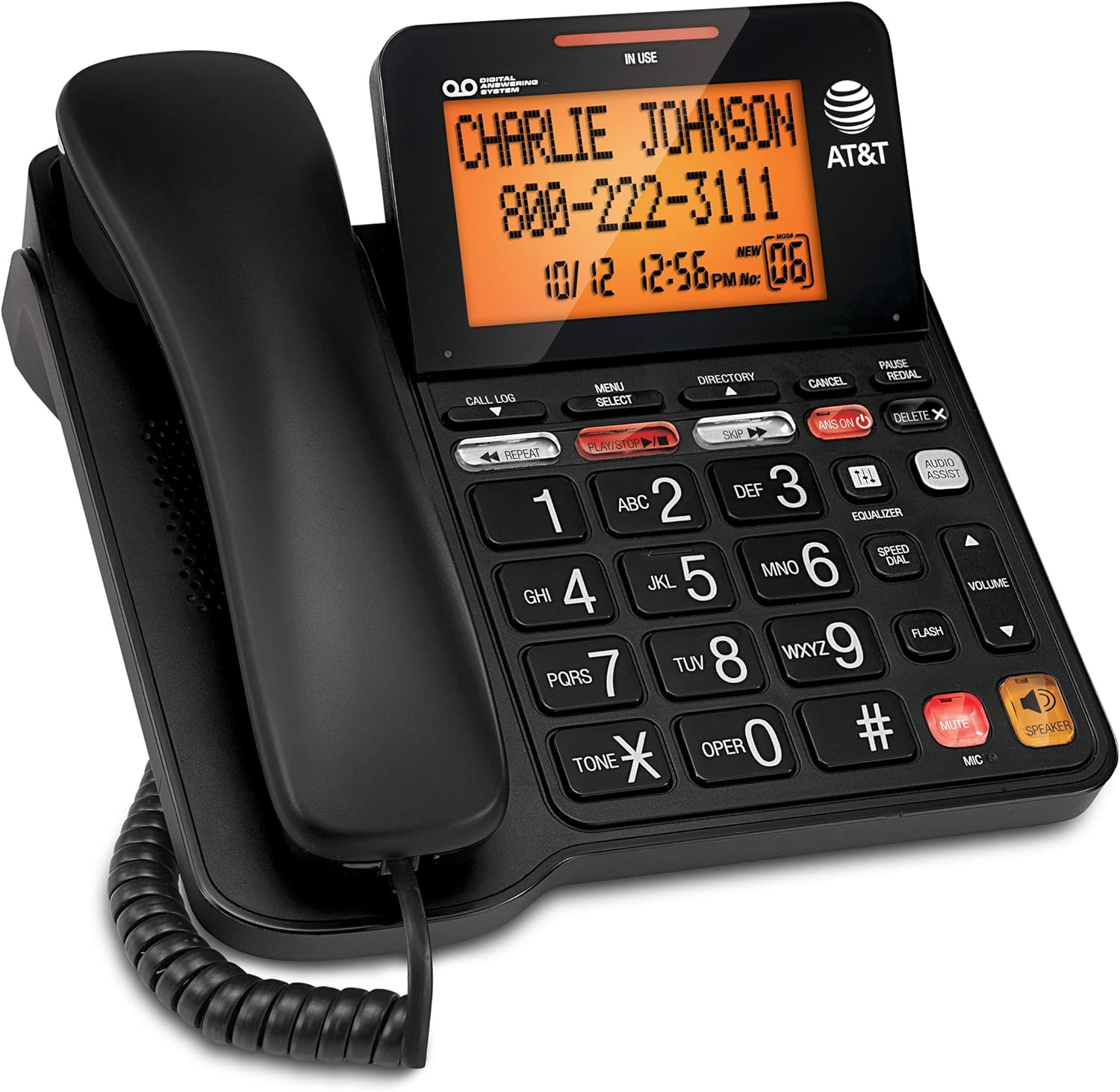
Figure 1: AT&T CD4930 Corded Phone with Digital Answering System and Caller ID.
Klíčové vlastnosti:
- Digitální záznamník: Records up to 25 minutes of messages, announcements, and memos. Features instant playback, selective save/delete, and message skipping/repeating.
- Hlasitý telefon: Allows hands-free conversation, enabling multiple participants to join calls.
- Podsvícený displej: Provides clear visibility of caller information, time, and date.
- ID volajícího: Displays name, number, time, and date of incoming calls, including call waiting.
- Extra-Large Tilt LCD: Nastavitelný displej pro optimální viewing of Caller ID and call history.
- Audio Assist: Temporarily increases overall volume and enhances sound frequencies for clearer speech.
- Ekvalizér: Customizable audio profiles (bass, treble, natural tones) to suit individual needs.
2. Nastavení
2.1 Obsah balení
Ujistěte se, že v balení jsou všechny součásti:
- AT&T CD4930 Corded Phone Base Unit
- Sluchátko
- Svinutý kabel sluchátka
- Kabel telefonní linky
- Napájecí adaptér
2.2 Připojení
- Připojení sluchátka: Zapojte jeden konec spirálového kabelu sluchátka do sluchátka a druhý konec do zdířky označené SLUCHÁTKO na boku základny telefonu.
- Připojení telefonní linky: Zapojte jeden konec telefonního kabelu do zdířky označené ČÁRA on the back of the phone base. Plug the other end into a telephone wall jack.
- Připojte napájení: Plug the small end of the AC power adapter into the DC IN 6V jack on the back of the phone base. Plug the large end into a standard electrical outlet.
Upon successful connection, the display will illuminate, and the phone will perform a self-check. Allow a few moments for the phone to initialize.
2.3 Initial Setup (Date and Time)
Setting the correct date and time is crucial for accurate Caller ID and answering system timestamps.
- Stiskněte MENU/SELECT.
- Použijte ▼ or ▲ buttons to scroll to NASTAVTE DATUM/ČASa poté stiskněte MENU/SELECT.
- Zadejte aktuální měsíc, den a rok pomocí číselné klávesnice. Stiskněte MENU/SELECT after each entry.
- Enter the current hour and minute. Use the ▼ or ▲ tlačítka pro výběr AM or PMa poté stiskněte MENU/SELECT potvrdit.
- Stiskněte ZRUŠIT pro opuštění nabídky.
3. Návod k obsluze
3.1 Uskutečňování a přijímání hovorů
- Chcete-li zavolat: Zvedněte sluchátko nebo stiskněte REPRODUKTOR. Dial the phone number.
- Chcete-li přijmout hovor: When the phone rings, lift the handset or press REPRODUKTOR.
- Ukončení hovoru: Place the handset back on the cradle or press REPRODUKTOR if using speakerphone.
3.2 Hlasitý telefon
The speakerphone allows for hands-free communication.
- Aktivovat: Během hovoru stiskněte REPRODUKTOR tlačítko.
- Deaktivace: Lift the handset to switch back to handset mode, or press REPRODUKTOR hovor ukončíte znovu.
3.3 Ovládání hlasitosti
Adjust the listening volume during a call.
- Během hovoru stiskněte VOLUME ▲ to increase volume or VOLUME ▼ snížit hlasitost.
3.4 Funkce ztlumení
Temporarily disable your microphone during a call.
- Během hovoru stiskněte ZTLUMIT. The microphone will be muted.
- Stiskněte ZTLUMIT znovu pro obnovení konverzace.
3.5 Redial and Pause
- Opakovaná volba: Zvedněte sluchátko nebo stiskněte REPRODUKTORa poté stiskněte OPAKOVÁNÍ to dial the last number called.
- Pauza: When entering a phone number, press PAUZA to insert a 4-second pause. Useful for dialing numbers that require access codes or extensions.
4. Digitální záznamník
The integrated digital answering system can record up to 25 minutes of messages.
4.1 Turning the Answering System On/Off
- Stiskněte ANS ON/OFF to toggle the answering system on or off. When on, the ANS ON rozsvítí se kontrolka.
4.2 Playing Messages
- Stiskněte PLAY/STOP to play new messages. If no new messages, it will play old messages.
- Během přehrávání:
- Stiskněte OPAKOVAT to repeat the current message. Press twice to play the previous message.
- Stiskněte PŘESKOČIT přejdete na další zprávu.
- Stiskněte VYMAZAT to delete the current message.
- Stiskněte PLAY/STOP pro zastavení přehrávání.
4.3 Recording an Outgoing Announcement
- Stiskněte MENU/SELECT.
- Přejděte na OZNÁMENÍ a stiskněte MENU/SELECT.
- Vybrat RECORD ANN. a stiskněte MENU/SELECT.
- Speak clearly into the microphone on the phone base.
- Stiskněte PLAY/STOP to end recording. The announcement will play back.
5. Funkce identifikace volajícího
The Caller ID feature displays information about incoming calls.
5.1 Viewing Call Log
- Stiskněte TELEFONNÍ ZÁZNAM.
- Použití ▼ or ▲ to scroll through the call entries.
- Stiskněte ZRUŠIT vystoupit.
5.2 Dialing from Call Log
- Zatímco viewing a call log entry, lift the handset or press REPRODUKTOR vytočit zobrazené číslo.
5.3 Deleting Call Log Entries
- Zatímco viewing a call log entry, press ODSTRANIT X to delete the current entry.
- To delete all entries, press MENU/SELECT, přejděte na DELETE ALL CALLSa stiskněte MENU/SELECT. Po zobrazení výzvy potvrďte.
6. Údržba
6.1 Čištění telefonu
To keep your phone clean, wipe it with a soft, slightly damp cloth. Do not use cleaning sprays or harsh chemicals, as these may damage the finish or electrical components.
6.2 Obecná péče
- Nevystavujte telefon extrémním teplotám, přímému slunečnímu záření nebo vlhkosti.
- Do not drop the phone or subject it to severe impact.
- Keep the phone away from sources of electrical noise, such as motors or fluorescent lighting.
7. Řešení problémů
If you experience issues with your AT&T CD4930 phone, refer to the following common problems and solutions:
| Problém | Řešení |
|---|---|
| Žádný oznamovací tón. |
|
| Neslyším volajícího nebo volající neslyší mě. |
|
| Caller ID is not displaying. |
|
| Answering system is not recording messages. |
|
For further assistance, please refer to the full user manual available on the AT&T support website or contact AT&T customer service.
8. Specifikace
| Funkce | Detail |
|---|---|
| Číslo modelu | CD4930 |
| Značka | AT&T |
| Typ telefonu | Pevná linka |
| Typ systému odpovědí | Digitální |
| Kapacita záznamu | Až 25 minut |
| Zdroj napájení | Elektrický kabel |
| Typ vytáčení | Duální klávesnice |
| Materiál | Plast |
| Hmotnost položky | 2.42 libry |
| Rozměry balení | 10.2 x 8.98 x 3.62 palce |
| Výrobce | VTech |
| Země původu | Malajsie |
9. Záruka a podpora
9.1 Informace o záruce
For detailed warranty information regarding your AT&T CD4930 Corded Phone, please refer to the warranty card included in your product packaging or visit the official AT&T webZáruční podmínky se mohou lišit.
9.2 Zákaznická podpora
If you require technical assistance, have questions about your product, or need to report an issue, please contact AT&T Customer Support:
- Online podpora: Visit the official AT&T support website for FAQs, troubleshooting guides, and downloadable manuals.
- Telefonická podpora: Refer to your product documentation or the AT&T webweb s nejaktuálnějšími kontaktními čísly zákaznického servisu.
Please have your product model number (CD4930) and serial number ready when contacting support.
Ask a question about this manual
Ask about setup, troubleshooting, compatibility, parts, safety, or missing instructions. Manuals+ will review the question and use this page’s manual context to help answer it.