
1. Úvod
This manual provides comprehensive instructions for the Everycom EC-801 80mm Direct Thermal Receipt Printer. It covers installation, operation, maintenance, and troubleshooting to ensure optimal performance and longevity of your device. The EC-801 is a high-speed monochrome desktop thermal printer featuring an auto-cutter and multiple connectivity options.
Klíčové vlastnosti:
- 300mm/s Ultra High-Speed Printing
- Rich Interface: Ethernet + USB
- Auto Cutter (Full / Half Cutting)
- Compatible with ESC / POS Print Instruction Mode
- Podporuje operační systémy Windows a Linux
2. Obsah balení
Ověřte prosím, zda jsou ve vašem balení obsaženy všechny níže uvedené položky:
- 1 x Everycom EC-801 80mm Thermal Receipt Printer
- 1 x Paper Guard Plate
- 1 x Paper Bering (Spindle)
- 1 x CD (for drivers and utilities)
- 1 x napájecí adaptér
- 1 x USB kabel
- 1 x 80mm Thermal Sample Roll

Image: Everycom EC-801 package contents.
3. Konec produktuview
3.1 Přední panel

Obrázek: Přední strana view of the EC-801 printer.
- Indikátor napájení: Illuminates when the printer is powered on.
- Indikátor CHYBY: Illuminates or flashes to indicate a printer error (e.g., paper out, print head overheat).
- PAPER Indicator: Illuminates when paper is loaded, flashes when paper is low, and turns off when paper is out.
- Tlačítko FEED: Stisknutím tlačítka posunete papír ručně.
3.2 Zadní panel

Obrázek: Zadní view of the EC-801 printer with ports.
- Vypínač: Zapíná nebo vypíná tiskárnu.
- Napájecí port: Připojuje se k dodanému napájecímu adaptéru.
- USB port: Connects to a computer via USB cable.
- Ethernet (Net) Port: Connects to a network for LAN printing.
- Port pro zásuvku na peníze: Connects to a cash drawer for automatic opening.
3.3 Vnitřní komponenty
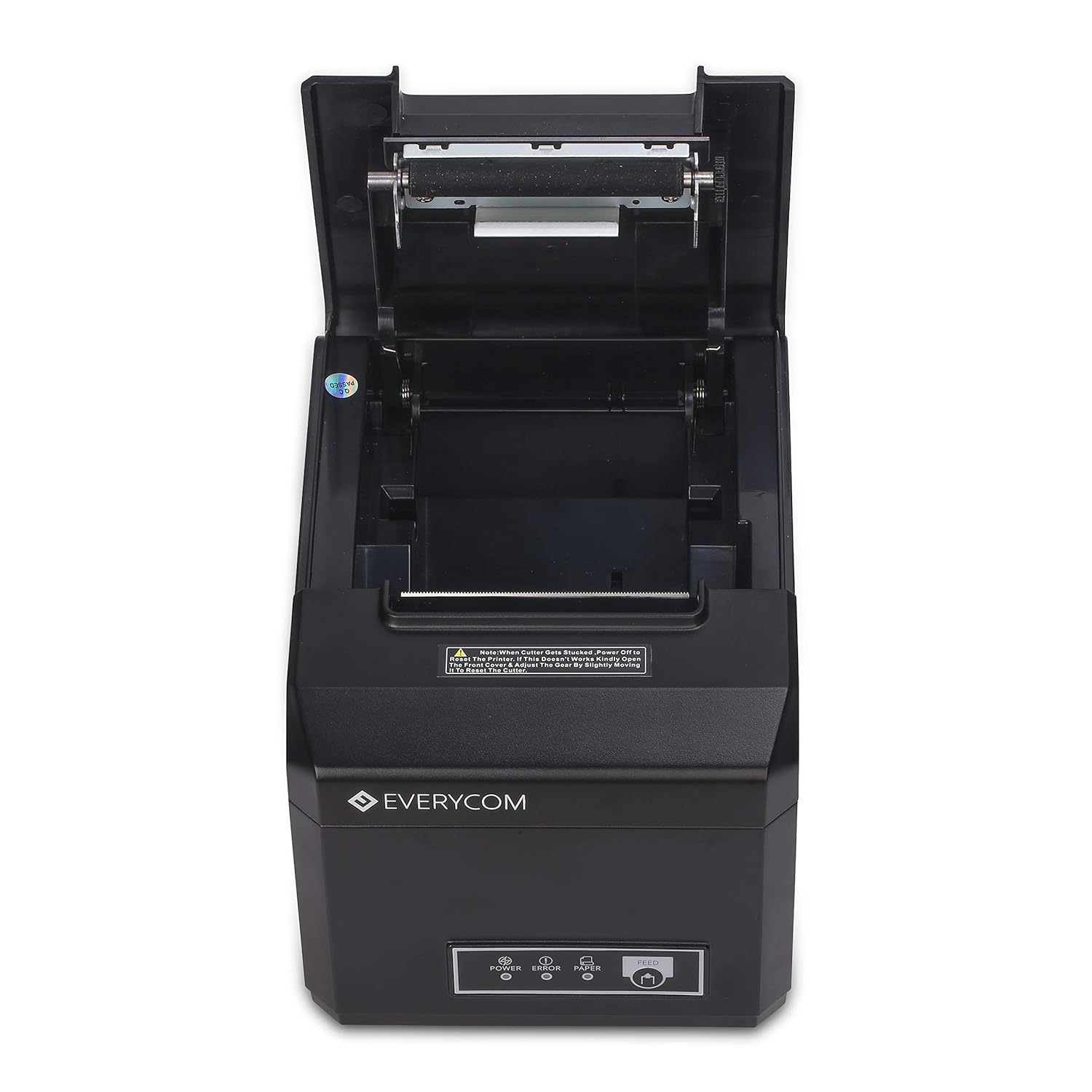
Image: EC-801 printer with paper compartment open.
- Paper Roll Compartment: Area for loading the thermal paper roll.
- tisková hlava: Termální prvek zodpovědný za tisk.
- Automatická řezačka: Mechanism for automatically cutting receipts.
4. Nastavení
4.1 Vybalení a umístění
- Opatrně vyjměte tiskárnu a veškeré příslušenství z obalu.
- Place the printer on a stable, flat surface. Ensure adequate ventilation around the device.
4.2 Propojovací kabely
- Připojte napájecí adaptér k napájecímu portu tiskárny a poté jej zapojte do elektrické zásuvky.
- Pro připojení USB: Připojte jeden konec kabelu USB k portu USB tiskárny a druhý konec k počítači.
- Pro připojení Ethernet: Connect an Ethernet cable to the printer's Ethernet port and the other end to your network router or switch.
- Volitelný: Connect a cash drawer cable to the cash drawer port if using an external cash drawer.
4.3 Vkládání termopapíru
- Open the printer's top cover by pressing the release latch (if present) or lifting the cover firmly.
- Vložte roli termopapíru do přihrádky a ujistěte se, že papír je podáván zespodu a že přední okraj je rovný.
- Pull a small amount of paper past the cutter blade.
- Close the top cover firmly until it clicks into place. Ensure the paper is taut and not jammed.
4.4 Instalace ovladače
- Insert the provided CD into your computer's CD-ROM drive. Follow the on-screen instructions to install the printer drivers.
- If your computer does not have a CD-ROM drive, please visit the Everycom official website to download the latest drivers for your operating system (Windows or Linux).
- After installation, configure the printer settings as required by your application.
5. Návod k obsluze
5.1 Zapnutí/vypnutí
- To power on the printer, flip the power switch on the rear panel to the 'ON' position. The POWER indicator on the front panel will illuminate.
- To power off the printer, flip the power switch to the 'OFF' position.
5.2 Základní tisk
- Ujistěte se, že je tiskárna zapnutá a připojená k počítači nebo síti.
- Open the application from which you wish to print (e.g., POS software, text editor).
- Select the Everycom EC-801 as your printer and initiate the print command.
- Tiskárna automaticky vytiskne účtenku a ořízne papír pomocí funkce automatické řezačky.

Image: EC-801 printer performing a self-test print.
5.3 Using the FEED Button
Pressing the FEED button will advance the paper by a small amount. This is useful for checking paper alignment or manually advancing paper after a print job.
5.4 Kontrolky
- POWER (Solid Green): Printer is on and ready.
- ERROR (Solid Red): General error. Refer to troubleshooting.
- ERROR (Flashing Red): Specific error, such as print head overheating. Allow printer to cool.
- PAPER (Solid Green): Paper is loaded and sufficient.
- PAPER (Flashing Green): Paper is low. Prepare to replace the roll.
- PAPER (Off): Paper is out.
6. Údržba
6.1 Čištění tiskové hlavy
Regular cleaning of the print head ensures clear print quality and extends the life of your printer.
- Vypněte tiskárnu a odpojte napájecí kabel.
- Open the top cover to access the print head.
- Using a soft, lint-free cloth lightly dampened with isopropyl alcohol, gently wipe the print head surface. Avoid touching the print head with bare hands.
- Před zavřením krytu a opětovným připojením napájení nechte tiskovou hlavu zcela vyschnout.
6.2 Výměna papírové role
When the PAPER indicator flashes or turns off, it's time to replace the paper roll. Follow the steps in Section 4.3 for loading thermal paper.
6.3 Obecné čištění
Wipe the exterior of the printer with a soft, dry cloth to remove dust and debris. Do not use harsh chemicals or abrasive cleaners.
7. Řešení problémů
If you encounter issues with your Everycom EC-801 printer, refer to the following common problems and solutions:
- Tiskárna se nezapíná:
Ensure the power cable is securely connected to both the printer and a working power outlet. Check the power switch position. - Žádný tisk nebo slabý tisk:
Verify that thermal paper is loaded correctly and that it is thermal paper (not plain paper). Clean the print head as described in Section 6.1. Ensure the paper roll is not exhausted. - Zaseknutý papír:
Turn off the printer, open the top cover, and carefully remove any jammed paper. Ensure the paper path is clear before reloading the paper and closing the cover. Handle the paper compartment lid with care to prevent damage to hinges. - Error indicator illuminated:
This indicates a general error. Check for paper out, paper jam, or print head overheating. If the issue persists after addressing these, power cycle the printer. - Connectivity issues (USB/Ethernet):
Check that the USB or Ethernet cable is securely connected. For Ethernet, verify network settings and ensure the printer's IP address is correctly configured. Reinstall or update printer drivers if necessary. - Blurry or crooked print:
Ensure the paper roll is loaded straight and the print head is clean. Try printing a self-test page to diagnose.
8. Specifikace
| Způsob tisku | Přímé tepelné |
| Šířka tisku | 80 mm |
| Rychlost tisku | 300 mm/s |
| Rezoluce | 203 DPI |
| Rozhraní | USB, ethernet |
| Auto Cutter | Yes (Full / Half Cutting) |
| Kompatibilita OS | Windows, Linux |
| Sada příkazů | ESC/POS Compatible |
| Rozměry produktu (D x Š x V) | 18.6 x 14.5 x 13.3 centimetrů |
| Hmotnost položky | 1.8 kg |
| Tiskový výstup | Monochromatický |
9. Informace o záruce
Everycom products are covered by a manufacturer's warranty. Please refer to the warranty card included in your package or contact Everycom customer support for detailed information regarding warranty terms and conditions, including coverage period and service procedures.
10. Zákaznická podpora
For any technical assistance, product inquiries, or support, please contact Everycom customer service:
- Bezplatné číslo: 1800 121 4480
- Pracovní doba: Monday - Saturday, 10:00 AM - 6:30 PM (Except on Public Holidays)

Image: Everycom Customer Service Contact.