
Edifier DA5100
Edifier DA5100 5.1 Speakers User Manual
Váš komplexní průvodce nastavením, provozem a údržbou.
Zavedení
Děkuji za nákupasing the Edifier DA5100 5.1 multimedia speaker system. This manual provides detailed instructions to help you set up, operate, and maintain your speakers for optimal performance and longevity. Please read this manual thoroughly before using the product.
Obsah balení
Než budete pokračovat, ověřte si prosím, zda jsou v balení přítomny všechny komponenty:
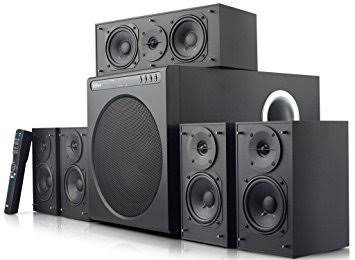
- Subwooferová jednotka
- Středový reproduktor
- Front satellite speakers (2)
- Rear satellite speakers (2)
- Dálkové ovládání
- Audio input cables (RCA to RCA, 3.5mm to RCA)
- Speaker connection cables
- Uživatelská příručka (tento dokument)
Důležitá bezpečnostní opatření
Pro zajištění bezpečného provozu a prevenci poškození dodržujte prosím následující:
- Nevystavujte jednotku dešti nebo vlhkosti.
- Do not open the speaker enclosures; there are no user-serviceable parts inside.
- Umístěte jednotku na stabilní, rovný povrch, aby se nepřevrátila.
- Ensure adequate ventilation around the speakers and subwoofer.
- Disconnect from power during lightning storms or when unused for long periods.
- Uchovávejte mimo dosah zdrojů tepla a přímého slunečního záření.
- Používejte pouze určený napájecí zdroj a příslušenství.
Průvodce nastavením
1. Umístění reproduktoru
Proper speaker placement is crucial for optimal 5.1 surround sound experience.
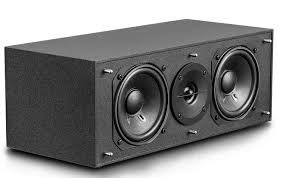
- Středový reproduktor: Place directly in front of the listening position, typically above or below your display.
- Front Speakers (Left/Right): Position equidistant from the listening position, forming an equilateral triangle with the listener.
- Rear Speakers (Left/Right): Place behind the listening position, slightly to the sides, at ear level or slightly above.
- subwoofer: Can be placed anywhere in the room, but corner placement often enhances bass. Experiment for best results.
2. Připojení reproduktorů
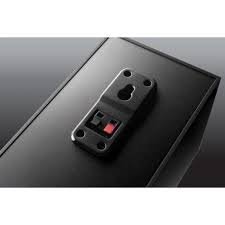
Connect the satellite speakers to the subwoofer unit using the provided speaker cables. Ensure correct polarity (red to red, black to black) for each connection.
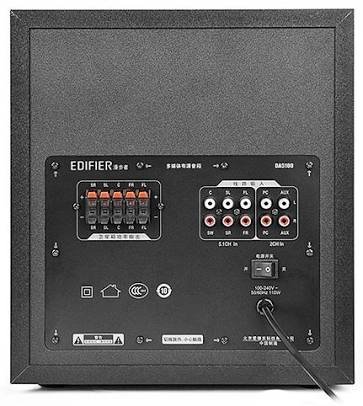
- Identify the speaker output terminals on the rear of the subwoofer. These are typically labeled for Front Left (FL), Front Right (FR), Center (C), Surround Left (SL), and Surround Right (SR).
- Connect each satellite speaker to its corresponding terminal on the subwoofer.
3. Připojení zdrojů zvuku
The DA5100 offers multiple input options. Choose the one that best suits your audio source.
- 5.1 kanálový vstup: For true 5.1 surround sound, connect your DVD player, Blu-ray player, or sound card's 5.1 analog outputs to the corresponding 5.1 input jacks on the subwoofer (FL, FR, C, SL, SR, SW).
- PC vstup: Use the 3.5mm to RCA cable to connect your computer's audio output to the "PC" input jacks.
- Vstup AUX: Use the RCA to RCA cable to connect other stereo audio devices (e.g., TV, game console) to the "AUX" input jacks.
4. Připojení napájení
After all audio and speaker connections are made, connect the power cord to the subwoofer and then to a wall outlet. Ensure the power switch on the rear of the subwoofer is in the "OFF" position before plugging in.
Návod k obsluze
1. Zapnutí/vypnutí
Locate the power switch on the rear panel of the subwoofer. Flip it to the "ON" position to power on the system. Flip it to "OFF" to power off.
2. Výběr vstupu
Use the "Input" button on the remote control or the control panel on the subwoofer to cycle through the available audio inputs: 5.1, PC, AUX.
3. Ovládání hlasitosti
Use the "Volume +" and "Volume -" buttons on the remote control or the main volume knob on the subwoofer to adjust the overall system volume.
4. Individual Channel Volume Adjustment
The remote control allows for individual adjustment of the center, surround, and subwoofer volumes to fine-tune your sound experience.
- Press the "Center", "Surround", or "Subwoofer" button on the remote.
- Use the "Volume +" or "Volume -" buttons to adjust the level for that specific channel.
5. Funkce ztlumení
Press the "Mute" button on the remote control to temporarily silence the audio. Press it again to restore the sound.
Údržba a péče
To keep your Edifier DA5100 speakers in optimal condition:
- Čištění: Use a soft, dry cloth to wipe down the speaker surfaces. Do not use liquid cleaners or abrasive materials.
- Větrání: Ensure that the subwoofer's heat sink and ventilation ports are not obstructed.
- Skladování: Pokud budete reproduktory skladovat delší dobu, odpojte je od napájení a uložte je na chladném a suchém místě.
- Správa kabelů: Keep cables tidy and avoid sharp bends or kinks to prevent damage.
Odstraňování problémů
If you encounter issues with your Edifier DA5100 system, refer to the table below for common problems and solutions.
| Problém | Možná příčina | Řešení |
|---|---|---|
| Žádný zvuk | Power off; incorrect input selected; loose cables; muted. | Check power switch; select correct input; re-connect all cables securely; un-mute. |
| Zkreslený zvuk | Volume too high; poor audio source quality; incorrect cable connection. | Reduce volume; try a different audio source; check cable connections and polarity. |
| Dálkové ovládání nefunguje | Dead batteries; obstruction between remote and sensor. | Replace batteries; ensure clear line of sight to the subwoofer's IR sensor. |
| Only some speakers producing sound | Incorrect 5.1 setup; loose speaker cables; audio source not 5.1. | Verify 5.1 input connections; check individual speaker cables; ensure audio source is outputting 5.1. |
If the problem persists, please contact Edifier customer support.
Specifikace
The following are the general specifications for the Edifier DA5100 5.1 speaker system. Specifications are subject to change without notice.
- Výkon: RMS 8W x 5 + 38W (THD+N=10%)
- Frekvenční odezva: R/L/C/SL/SR: 150Hz-20KHz | SW: 20Hz-130Hz
- Vstupní citlivost: 5.1CH: L/R: 450mV+/-50mV; SW: 150mV+/-50mV | PC: 700mV+/-50mV | AUX: 350mV+/-50mV
- Typ vstupu: 5.1 Channel, PC, AUX
- Basová jednotka: 8 palců (210 mm)
- Mid-range Unit: 3 palců (78 mm)
- Jednotka výšek: 1 palců (25 mm)
- Rozměry (subwoofer): 270 mm x 300 mm x 435 mm (Š x V x H)
- Dimensions (Satellite): 130 mm x 160 mm x 100 mm (Š x V x H)
Informace o záruce
Edifier products come with a limited warranty. Please refer to the warranty card included with your product or visit the official Edifier webPodrobné záruční podmínky platné pro váš region naleznete na webových stránkách. Uschovejte si účtenku jako doklad o koupi pro případ reklamace.
Zákaznická podpora
For further assistance, technical support, or service inquiries, please contact Edifier customer support through their official webwebu nebo kontaktních informací uvedených na obalu produktu.
Oficiální Edifier Webmísto: www.edifier.com
Ask a question about this manual
Ask about setup, troubleshooting, compatibility, parts, safety, or missing instructions. Manuals+ will review the question and use this page’s manual context to help answer it.