
Zavedení
Thank you for choosing the Altec Lansing ALP-L2200PK Lightning Series Speaker. This powerful Bluetooth speaker is designed for both indoor and outdoor use, featuring a robust audio system, dynamic party lights, and a built-in media player. This manual provides essential information for setting up, operating, maintaining, and troubleshooting your speaker to ensure optimal performance and longevity.

Obrázek 1: Přední strana view of the ALP-L2200PK speaker, showcasing the main woofer and integrated party lights.
Vlastnosti produktu
- Ultra Portable Design: Equipped with a built-in trolley handle and wheels for easy transport.
- Vysoký výstupní výkon: Features 2,200 watts peak power with a 15-inch high excursion woofer and a 3.5-inch horn tweeter.
- Všestranná konektivita: Supports Bluetooth streaming with a range of up to 100 feet, USB and SD card media playback, FM radio, XLR, RCA, and AUX inputs.
- Dynamic Party Lights: User-controlled multi-color light show with 5 built-in modes to enhance your audio experience.
- Stereo párování: Ability to wirelessly pair with a second Lightning speaker for an immersive stereo sound experience.
- Dodávané příslušenství: Comes with a microphone and speaker stand.
Průvodce nastavením
1. Vybalování
Opatrně vyjměte reproduktor a veškeré příslušenství z obalu. Obal si uschovejte pro budoucí přepravu nebo skladování.
2. Fyzické umístění
- Place the speaker on a stable, flat surface. For optimal sound dispersion, consider using the included speaker stand.
- Zajistěte dostatečné větrání kolem reproduktoru, abyste zabránili jeho přehřátí.
- The speaker is designed for both indoor and outdoor use, but it is not waterproof. Avoid exposure to rain or excessive moisture.
3. Připojení napájení
Connect the power cable to the AC input on the rear panel of the speaker and then to a standard electrical outlet.
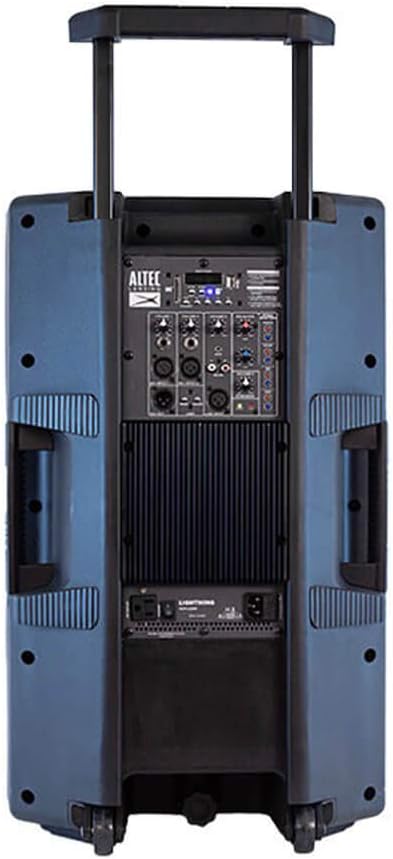
Figure 2: Rear panel of the ALP-L2200PK, illustrating the various input and output connections.
4. Počáteční zapnutí
Locate the power switch on the rear panel and turn the speaker ON. The display will illuminate, indicating the speaker is ready for operation.
Návod k obsluze
1. Párování Bluetooth
- Ensure the speaker is powered on and in Bluetooth mode (usually indicated on the display).
- Na svém mobilním zařízení (chytrý telefon, tablet, notebook) povolte Bluetooth a vyhledejte dostupná zařízení.
- Select "ALP-L2200PK" from the list of devices. Once connected, a confirmation sound may play.
2. Media Player (USB/SD Card)
Vložte USB disk nebo SD kartu se zvukovým souborem files into the respective slot on the control panel. The speaker will automatically detect the media and begin playback. Use the control panel buttons to navigate tracks and adjust volume.
3. FM rádio
Switch to FM radio mode using the mode button on the control panel. Use the tuning controls to scan for and select radio stations.
4. Wired Audio Inputs (XLR, RCA, AUX)
- XLR vstup: For professional audio equipment like microphones or mixers.
- RCA vstup: For connecting devices with RCA outputs (e.g., DVD players, older audio equipment).
- Vstup AUX: For connecting devices with a 3.5mm audio jack (e.g., smartphones, MP3 players).
Connect your audio source to the appropriate input on the rear panel. Select the corresponding input mode on the speaker's control panel.
5. Stereo Pairing (BT-LINK)
To create a wireless stereo pair with another Altec Lansing Lightning Series speaker (e.g., GSP-L2200PK), ensure both speakers are powered on and in Bluetooth mode. Follow the BT-LINK instructions provided with your second speaker to establish the connection. Once paired, audio will play in stereo across both units.
6. Ovládání párty světel
Use the dedicated light control buttons on the speaker's panel to cycle through the 5 built-in light modes, adjust colors, or turn the lights off. The lights can pulse with the beat of the music or maintain a steady glow.
7. Použití mikrofonu
Connect the included microphone to the designated microphone input on the rear panel. Adjust the microphone volume using the dedicated control.
Údržba
- Čištění: K čištění vnější strany reproduktoru používejte měkký, suchý hadřík. Nepoužívejte abrazivní čisticí prostředky, vosky ani rozpouštědla.
- Skladování: Pokud reproduktor delší dobu nepoužíváte, skladujte jej na chladném a suchém místě, mimo dosah přímého slunečního záření a extrémních teplot.
- Větrání: Během provozu se ujistěte, že ventilační otvory reproduktoru nejsou blokovány, aby nedošlo k jeho přehřátí.
- Napájecí kabel: Pravidelně kontrolujte napájecí kabel, zda není poškozen. Pokud je poškozen, přestaňte jej používat a kontaktujte zákaznickou podporu.
Odstraňování problémů
| Problém | Možná příčina | Řešení |
|---|---|---|
| Žádná síla | Napájecí kabel není připojen; Vypnutý vypínač; Spálená pojistka; Problém se zásuvkou. | Ensure power cable is securely connected. Turn power switch ON. Check the fuse (refer to specifications for type). Test the power outlet with another device. |
| Žádný zvuk | Volume too low; Incorrect input mode selected; Audio source issue; Damaged speaker component. | Increase master volume and input volume. Select the correct input mode (Bluetooth, AUX, USB, etc.). Verify audio source is playing. If only tweeter works and subwoofer does not, contact customer support. |
| Chyba párování Bluetooth | Speaker not in pairing mode; Device too far; Interference; Device's Bluetooth off. | Ensure speaker is in Bluetooth pairing mode. Move device closer to speaker. Avoid strong electromagnetic interference. Turn Bluetooth on/off on your device. |
| Party světla nefungují | Lights turned off; Mode selected does not show lights. | Press the light control button to cycle through modes or turn lights on. |
| Přehřívání reproduktoru | Blocked ventilation; Prolonged high volume use. | Ensure vents are clear. Reduce volume and allow speaker to cool down. If issue persists, discontinue use and contact customer support. |
Specifikace

Figure 3: Dimensions of the ALP-L2200PK speaker.
| Funkce | Detail |
|---|---|
| Název modelu | ALP-L2200PK |
| Značka | Altec Lansing |
| Typ reproduktoru | Woofer (15 Inches), Horn Tweeter (3.5 Inches) |
| Špičkový výstupní výkon | 2200 wattů |
| Technologie připojení | Bluetooth, USB, SD Card, XLR, RCA, AUX |
| Dosah Bluetooth | Až 100 stop |
| Režim zvukového výstupu | Stereo (with BT-LINK pairing) |
| Rozměry (D x Š x V) | 36 H x 43 Š x 71 V centimetrů (14.17 H x 16.93 Š x 27.95 V palců) |
| Hmotnost položky | 20 kg (44.09 lb) |
| Materiál | ABS |
| Barva | Blue (referring to woofer color) |
| Zahrnuté komponenty | Speaker, Microphone, Speaker Stand |
| Doporučené použití | Uvnitř, venku |
| Vodotěsný | Žádný |
Záruka a podpora
For detailed warranty information, please refer to the warranty card included with your product or visit the official Altec Lansing webmísto.
If you encounter any issues not covered in the troubleshooting section or require further assistance, please contact Altec Lansing customer support. Contact details can typically be found on the product packaging or the official brand webmísto.
Altec Lansing Official Webmísto: https://alteclansing.com/