
1. Úvod
This manual provides instructions for the ROCCAT KONE Aimo Gaming Mouse. The KONE Aimo features an Owl-Eye Optical Sensor, customizable RGB AIMO LED illumination, and 23 programmable keys. It is designed for precision and ergonomic comfort during extended use.
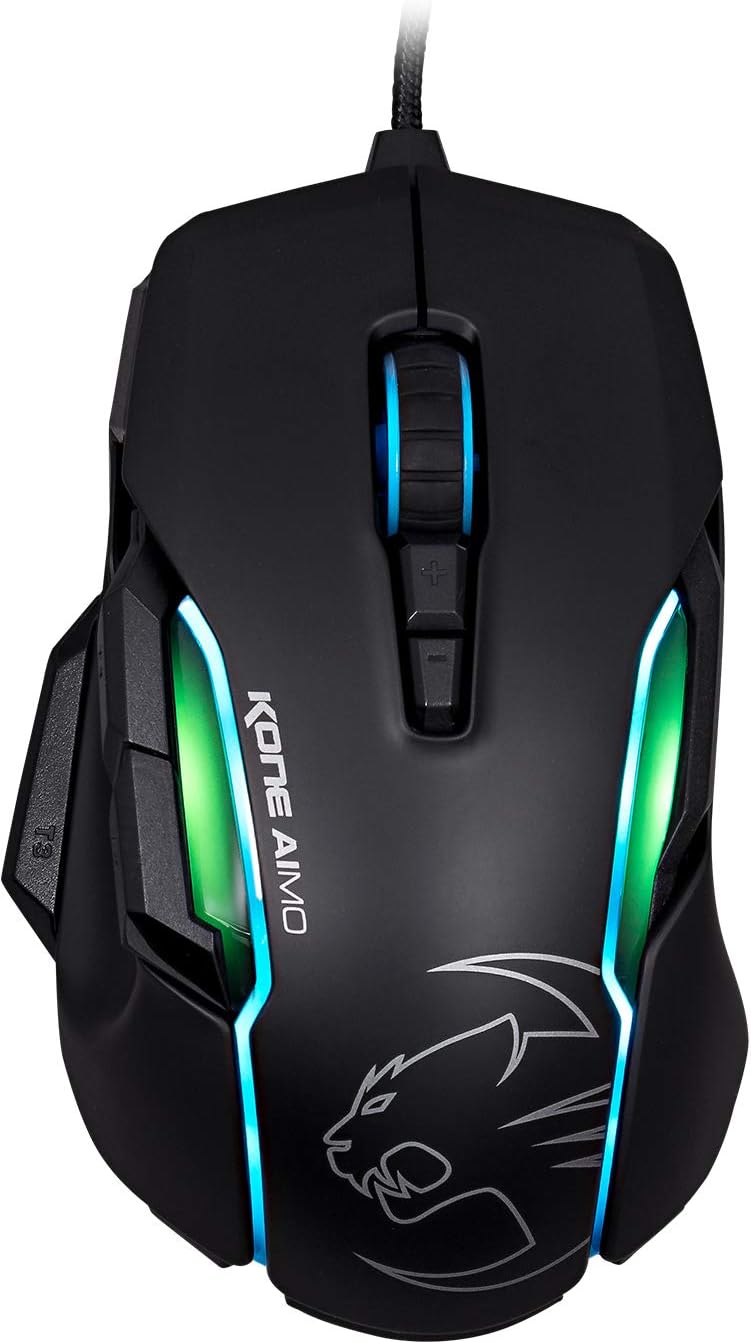
Obrázek 1: Nahoře view of the ROCCAT KONE Aimo Gaming Mouse, showcasing its ergonomic shape and RGB lighting zones.
2. Obsah balení
Ověřte, zda jsou v balení přítomny všechny položky:
- KONE AIMO Mouse with Attached Braided USB Cable
- Rychlý průvodce
- ROCCAT Stickers

Figure 2: Retail packaging of the ROCCAT KONE Aimo Gaming Mouse.
3. Nastavení
- Připojte myš: Plug the USB cable of the ROCCAT KONE Aimo mouse into an available USB port on your computer.
- Instalace ovladače: Your operating system (Windows 7, 8, 8.1, 10) should automatically detect and install the necessary drivers.
- Instalace softwaru ROCCAT Swarm: For full customization of DPI settings, button assignments, and AIMO lighting, download and install the ROCCAT Swarm software from the official ROCCAT website. This software allows you to create and manage profiles.

Figure 3: The ROCCAT KONE Aimo mouse in use on a mouse pad, connected to a computer.
4. Návod k obsluze
4.1. Funkce tlačítek
The KONE Aimo features 23 programmable keys, including a tri-button thumb zone and a 4D tilting Titan wheel. These can be customized via the ROCCAT Swarm software.
- Kliknutí levým/pravým tlačítkem myši: Standardní funkce myši.
- Scroll Wheel (4D Titan Wheel): Scrolls vertically and can tilt horizontally for additional functions. Also acts as a clickable button.
- Tlačítka pro nastavení DPI: Located above and below the scroll wheel, these buttons allow for on-the-fly DPI sensitivity changes. Settings are configured in the Swarm software.
- Thumb Buttons (T1, T2, T3): Three buttons located on the left side, easily accessible by the thumb. The bottom-most button (T3) is often defaulted to the Easy-Shift[+] function.
- Easy-Shift[+] Button: This exclusive ROCCAT feature doubles the number of programmable functions for other buttons when held down, effectively expanding the total programmable keys.

Obrázek 4: Detailní view of the programmable thumb buttons (T1, T2, T3) on the left side of the mouse.
4.2. AIMO Lighting System
The AIMO lighting system provides intelligent, reactive RGB illumination across four independently configurable LED light zones and the glowing mouse wheel. It can synchronize with other compatible ROCCAT devices and is programmable through the ROCCAT Swarm software.

Figure 5: The KONE Aimo mouse displaying its multi-zone RGB AIMO illumination.
4.3. Owl-Eye Optical Sensor
The mouse is equipped with the ROCCAT Owl-Eye Optical Sensor, a modified PixArt 3361 sensor, offering adjustable DPI from 100 to 12,000. This sensor provides precise tracking and responsiveness. A built-in tracking distance control unit monitors the lift-off distance for enhanced accuracy.

Figure 6: The bottom of the mouse, highlighting the Owl-Eye Optical Sensor.
4.4. Ergonomie
The KONE Aimo features refined ergonomics designed for comfort during extended use. Its shape provides a natural fit for the hand, with a dedicated thumb rest area.

Figure 7: A hand gripping the KONE Aimo mouse, illustrating its ergonomic design.
5. Údržba
- Čištění: K čištění povrchu myši použijte měkký, suchý hadřík. V případě odolných nečistot použijte lehceamp Lze použít hadřík, který zajistí, aby se do vnitřních součástí nedostala vlhkost.
- Péče o senzor: Keep the optical sensor on the underside of the mouse clean and free of dust or debris to ensure optimal tracking performance.
- Správa kabelů: Abyste předešli poškození, vyhněte se ostrým ohybům nebo nadměrnému tahání za opletený USB kabel.
6. Řešení problémů
- Myš nereaguje:
- Ujistěte se, že je kabel USB bezpečně zapojený do funkčního portu USB.
- Try a different USB port or another computer to rule out port or system issues.
- Restartujte počítač.
- Tracking Issues / Inaccurate Movement:
- Vyčistěte optický senzor na spodní straně myši.
- Ujistěte se, že myš používáte na čisté a vhodné podložce pod myš nebo jiném povrchu.
- Check DPI settings in the ROCCAT Swarm software.
- RGB Lighting Not Working / Incorrect:
- Ověřte, zda je software ROCCAT Swarm spuštěný a aktualizovaný.
- Zkontrolujte nastavení osvětlení v softwaru Swarm.
- Ujistěte se, že žádný konfliktní software neovládá RGB osvětlení.
- Nefunkční tlačítka:
- Check button assignments in the ROCCAT Swarm software.
- Ensure the software is not experiencing issues (try restarting it).
7. Specifikace
| Funkce | Detail |
|---|---|
| Značka | ROCCAT |
| Číslo modelu | ROC-11-815-BK |
| Senzor | Owl-Eye Optical Sensor (modified PixArt 3361) |
| Rozsah DPI | 100 až 12 000 DPI |
| Programovatelná tlačítka | 23 (s Easy-Shift[+]) |
| Osvětlení | RGBA AIMO LED Illumination (4 independent zones + scroll wheel) |
| Konektivita | USB (kabelové) |
| Kompatibilita operačního systému | Windows 7, Windows 8, Windows 8.1, Windows 10 (32-bit and 64-bit versions) |
| Hmotnost položky | 11.2 unce (přibližně 317.5 gramů) |
| Rozměry produktu (DxŠxV) | 5.12 x 2.95 x 1.57 palce (přibližně 13 x 7.5 x 4 cm) |
8. Záruka a podpora
For warranty information, technical support, and additional resources, please visit the official ROCCAT website or contact ROCCAT customer service. Keep your proof of purchase for warranty claims.
Můžete také navštívit Obchod ROCCAT na Amazonu pro více informací o produktu.


