
USB nabíjecí kabel
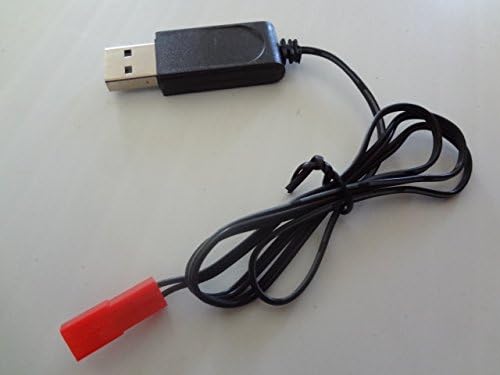
Uživatelská příručka k nabíjecímu kabelu USB pro drony Sky Viper
Značka: Generické
Model: USB Charger Cord
Zavedení
This user manual provides essential information for the safe and effective use of your Sky Viper Drone USB Charger Cord. This cable is designed specifically for charging various Sky Viper drone models. Please read this manual thoroughly before use to ensure proper operation and longevity of your charger.
Konec produktuview
Komponenty
- 1 x USB Charging Cable (65cm / 25.4 inches in length)
Kompatibilita
This USB charging cable is compatible with the following Sky Viper drone models:
- Sky Viper Stunt Quadcopter
- Sky Viper Camera Drone
- Sky Viper X-Quad
- Sky Viper s670 Stunt
- Sky Viper v950HD/STR
- Sky Viper s1700
- Sky Viper v2400HD/FPV
- Sky Viper Hover Racer
Obrázky produktů


Nastavení
The USB Charger Cord requires minimal setup. Ensure you have a compatible USB power source (e.g., computer USB port, USB wall adapter, power bank) that provides 5V output.
- Uncoil the USB charging cable.
- Locate a suitable USB power source.
- Ensure the drone's battery is accessible and ready for charging.
Návod k obsluze
Follow these steps to charge your Sky Viper drone battery using the USB Charger Cord:
- Insert the USB-A plug of the charging cable into your chosen USB power source.
- Connect the red drone connector end of the cable to the charging port on your Sky Viper drone's battery. Ensure the connection is firm and secure.
- Observe the charging indicator light on the charger (if present) or on your drone. The light typically indicates charging status (e.g., red for charging, green for fully charged). Refer to your specific drone's manual for details on its charging indicator.
- Allow the battery to charge fully. Charging times may vary depending on the battery capacity and the power output of your USB source.
- Once charging is complete, disconnect the cable from the drone battery first, then from the USB power source.
Instruktážní video
Video 1: A demonstration of the USB Charger for the Drone SVCHA, showing the cable and its connectors. This video provides a visual overview produktu.
Údržba
- Čištění: Wipe the cable and connectors with a dry, soft cloth. Do not use liquid cleaners or solvents.
- Skladování: Kabel skladujte na chladném a suchém místě mimo dosah přímého slunečního záření a extrémních teplot. Zabraňte nadměrnému kroucení ani ohýbání kabelu, abyste předešli jeho poškození.
- Inspekce: Periodically inspect the cable for any signs of wear, fraying, or damage to the connectors. Discontinue use if any damage is observed.
Odstraňování problémů
| Problém | Možná příčina | Řešení |
|---|---|---|
| Drone battery not charging. | Loose connection; faulty USB power source; damaged cable; drone battery issue. | Ensure both ends of the cable are securely connected. Try a different USB port or power adapter. Inspect the cable for damage. Consult your drone's manual for battery troubleshooting. |
| Nabíjení je pomalé. | Nízký výstupní výkon ze zdroje USB. | Use a USB power source with higher amperage (e.g., a dedicated wall adapter instead of a computer USB port). |
| Kabel se zdá být poškozený. | Physical wear and tear. | Discontinue use immediately and replace the cable. |
Specifikace
- Materiál: Plast
- Délka: 65 cm (25.4 palců)
- Vstupní objemtage: 240 Volts (Note: This refers to the maximum input voltage the charger is designed to handle from a power adapter, not the typical USB 5V output it expects from a source.)
- Kompatibilita: Sky Viper Stunt Quadcopter, Camera Drone, X-Quad, s670 Stunt, v950HD/STR, s1700, v2400HD/FPV, Hover Racer.
Záruka a podpora
Information regarding specific warranty terms or direct support contacts for this Generic brand product is not available in the provided data. Please refer to the retailer or original point of purchase for any warranty claims or support inquiries.
Ask a question about this manual
Ask about setup, troubleshooting, compatibility, parts, safety, or missing instructions. Manuals+ will review the question and use this page’s manual context to help answer it.