
1. Úvod
Thank you for choosing the WINGONEER LP-168 Plus Bluetooth 2.1 Channel Audio Power Amplifier. This device is designed to provide a high-quality audio experience with versatile connectivity options. Please read this manual carefully before use to ensure proper operation and to maximize the performance of your ampživější.
Klíčové vlastnosti:
- High-quality integrated Bluetooth module for wireless audio streaming.
- 2.1 Channel output: 2 x 45W RMS for main speakers and 1 x 68W for subwoofer.
- Supports USB playback for MP3 files.
- RCA audio input for connecting external devices like DVD/CD/VCD/TV/PC.
- Electronic volume control with dedicated Bass and Treble adjustments.
- Bright LED display for mode and track information.
- Includes a compact IR remote control for convenient operation.
2. Bezpečnostní informace
To prevent fire, electric shock, and other hazards, please observe the following safety precautions:
- Nevystavujte toto zařízení dešti nebo vlhkosti.
- Neotevírejte ampzáchranář casing. Veškerý servis svěřte kvalifikovanému personálu.
- Ujistěte se, že je napájecí adaptér hlasitýtage odpovídá místnímu napájení.
- Udržujte amplifier away from direct sunlight, heat sources, and excessive dust.
- Zajistěte dostatečné větrání kolem jednotky, aby se zabránilo přehřátí.
- Odpojte napájecí adaptér během bouřek nebo pokud jej nebudete delší dobu používat.
3. Obsah balení
Zkontrolujte prosím balení, zda neobsahuje následující položky:
- 1 x WINGONEER LP-168 Plus Audio Power Ampdoživotní
- 1 x Power Adapter (AC 100-240V to DC 19V-24V)
- 1 x Signal Cable (RCA to 3.5mm or similar)
- 1 x IR dálkové ovládání
- 1 x WINGONEER USB LED Light

Image: Contents of the WINGONEER LP-168 Plus package, showing the amplifier, remote, power supply, and manual.

Image: The included WINGONEER USB LED Light.
4. Konec produktuview
Přední panel:
- Tlačítko MODE: Switches between input sources (Bluetooth, USB, RCA).
- Tlačítka PŘEDCHOZÍ/DALŠÍ: For USB playback, navigates tracks.
- Tlačítko PLAY/PAUSE: For USB playback, controls playback.
- USB port: Pro připojení USB flash disků.
- IR přijímač: Pro signály dálkového ovládání.
- Knoflík VOLUME: Adjusts overall volume.
- Knoflík TREBLE: Upravuje vysokofrekvenční zvuk.
- Knoflík BASS: Upravuje nízkofrekvenční zvuk.
- LED displej: Shows current mode, track information, etc.
Zadní panel:
- AUDIO INPUT (RCA L/R): Připojte externí zdroje zvuku.
- +R OUT - / +L OUT -: Speaker terminals for right and left main speakers.
- + SUB SPEAKER -: Subwoofer output terminals.
- MRAVENEC: Bluetooth antenna connector.
- POWER INPUT (DC 19V-24V): Připojte dodaný napájecí adaptér.
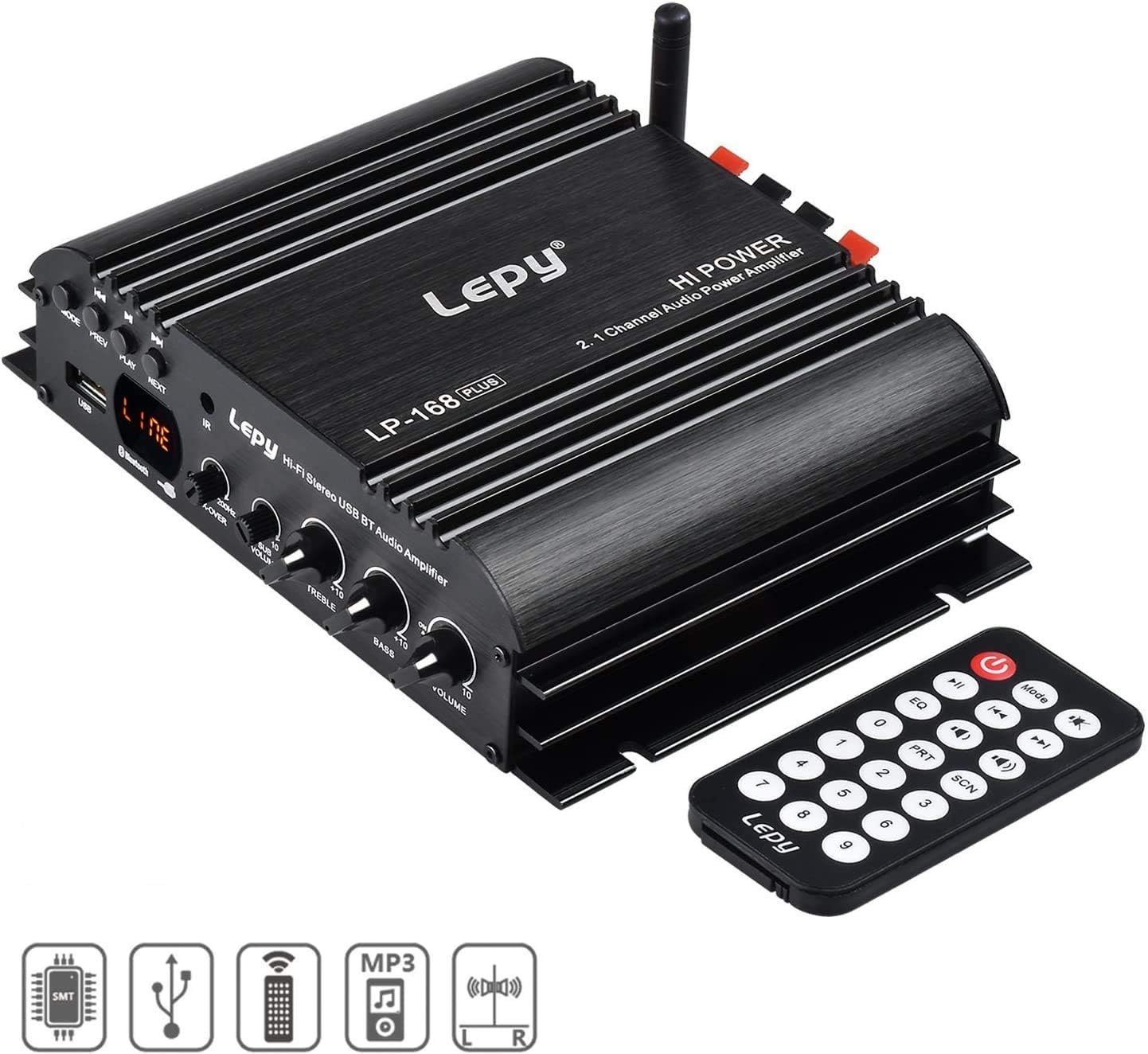
Image: Front panel of the LP-168 Plus ampvysavač s dálkovým ovládáním.

Image: Rear panel connections of the LP-168 Plus ampživější.
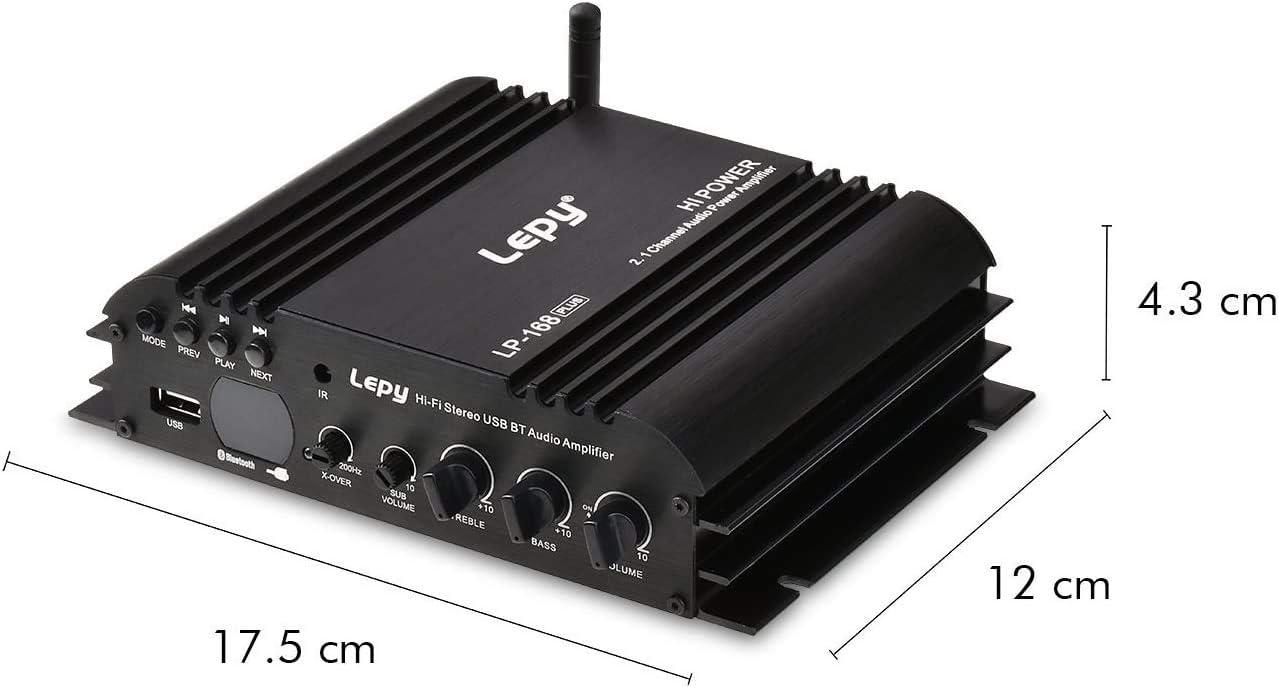
Image: Dimensions of the LP-168 Plus ampživější.
5. Nastavení
Follow these steps to set up your WINGONEER LP-168 Plus ampživější:
- Připojení reproduktorů: Connect your passive main speakers to the +R OUT - a +L OUT - terminals. Ensure correct polarity (+ to + and - to -). For the subwoofer, connect it to the + SUB SPEAKER - terminály. amplifier supports 4-8 Ohm speakers.
- Connect Audio Source (RCA): If using an external device (e.g., DVD, CD player, PC), connect its audio output to the AUDIO INPUT (RCA L/R) na ampzadním panelu zařízení Liferier pomocí kabelu RCA.
- Connect Bluetooth Antenna: Screw the provided Bluetooth antenna into the MRAVENEC konektor na zadním panelu.
- Připojte napájení: Plug the DC output of the provided power adapter into the POWER INPUT (DC 19V-24V) na amplifier. Then, plug the AC input of the power adapter into a wall outlet (AC 100-240V, 50/60Hz).

Image: Connection diagram for the LP-168 Plus ampživější.
6. Návod k obsluze
Zapnutí/vypnutí:
Po připojení se amplifier will power on automatically. There is no dedicated power button on the unit; power is controlled by connecting/disconnecting the power adapter or using the remote control's power button.
Výběr zdroje vstupu:
Stiskněte tlačítko MODE button on the front panel or the remote control to cycle through available input sources: Bluetooth, USB, and RCA (Audio Input).
Volume, Bass, and Treble Control:
- Otočte OBJEM knob on the front panel or use the volume buttons on the remote control to adjust the overall sound level.
- Otočte BASS knoflík pro zvýšení nebo snížení nízkofrekvenčních zvuků.
- Otočte ZTROJNÁSOBIT knoflík pro zvýšení nebo snížení vysokofrekvenčních zvuků.
Provoz Bluetooth:
- Přepněte amplifier to Bluetooth mode using the MODE button. The LED display will indicate "BT".
- On your Bluetooth-enabled device (smartphone, tablet, computer), search for available Bluetooth devices.
- Select "LP-168 Plus" from the list to pair. Once paired, the amplifier will emit a confirmation sound.
- You can now play audio from your device wirelessly through the ampživější.
USB přehrávání:
- Vložte USB flash disk s audio soubory ve formátu MP3 fileje do USB port na předním panelu.
- Přepněte amplifier to USB mode using the MODE button. The LED display will show track information.
- Použijte PLAY/PAUSE, PŘEDCHOZÍa DALŠÍ buttons on the front panel or remote control to manage playback.
Funkce dálkového ovládání:
The included IR remote control allows you to conveniently manage the amplifier from a distance. Functions include power on/off, mode selection, volume control, track navigation (USB), EQ presets, and more.
7. Údržba
- Čištění: K čištění používejte měkký, suchý hadřík amplifier's exterior. Do not use liquid cleaners or solvents.
- Skladování: When not in use for extended periods, disconnect the power adapter and store the amplifier in a cool, dry place.
- Větrání: Ujistěte se, že ventilační žebra na ampZáchranné zařízení není blokováno, aby se zabránilo přehřátí.
8. Řešení problémů
| Problém | Možná příčina | Řešení |
|---|---|---|
| Žádný zvukový výstup. |
|
|
| Bluetooth se nepřipojuje. |
|
|
| Přehrávání z USB nefunguje. |
|
|
| Dálkové ovládání nefunguje. |
|
|
9. Specifikace
| Model | LP-168 Plus |
| Výstupní výkon | 2 x 45W RMS (Main Channels), 1 x 68W (Subwoofer) |
| Impedance reproduktoru | 4-8 ohmů |
| Celkové harmonické zkreslení (THD) | <0.1 % |
| Poměr signálu k šumu (SNR) | >80 dB |
| Frekvenční odezva | 20Hz-20kHz |
| Vstupní impedance | 47 tis |
| Vstupní objemtage | DC 19V-24V |
| AC Input (Power Adapter) | 100-240V 50/60Hz |
| Rozměry (D x Š x V) | 17.6 x 15.5 x 4.3 cm |
| Čistá hmotnost | 495 g |
| Barva | Černý |
10. Záruka a podpora
This WINGONEER product comes with a standard manufacturer's warranty. Please refer to the warranty card included in your package for specific terms and conditions. For technical support, troubleshooting assistance, or warranty claims, please contact your retailer or the WINGONEER customer service department.
Uschovejte si prosím doklad o koupi pro účely záruky.