
Delock 83687
Uživatelská příručka k kabelu Delock USB 2.0 AB
Model: 83687
Konec produktuview
This manual provides instructions for the Delock USB 2.0 A-B Cable, model 83687. This cable is designed for connecting devices with a USB Type-A port to devices with a USB Type-B port, facilitating data transfer.
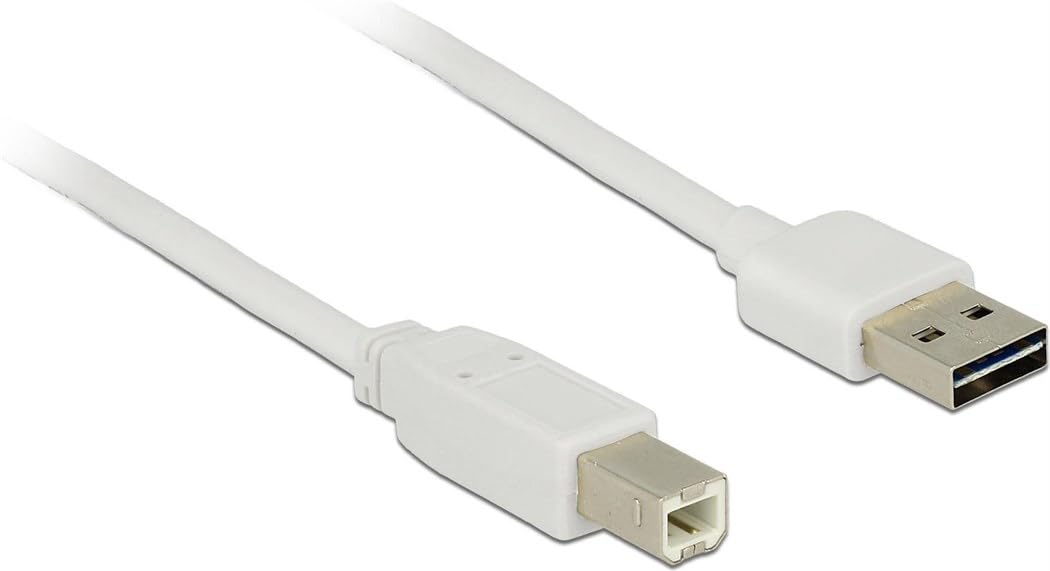
Image: The Delock USB 2.0 A-B Cable, featuring a white cable and gold-plated connectors. The USB Type-A connector is visible on the right, and the USB Type-B connector is on the left.
Nastavení
The Delock USB 2.0 A-B Cable is designed for simple plug-and-play operation. Follow these steps to connect your devices:
- Identifikace portů: Locate the USB Type-A port on your host device (e.g., computer, laptop) and the USB Type-B port on your peripheral device (e.g., printer, scanner, external hard drive).
- Connect USB Type-A: Insert the USB Type-A connector of the cable into the corresponding USB Type-A port on your host device. Ensure it is fully seated.
- Connect USB Type-B: Insert the USB Type-B connector of the cable into the corresponding USB Type-B port on your peripheral device. Ensure it is fully seated.
- Ověřit připojení: Once both ends are connected, your operating system should automatically detect the peripheral device. If necessary, install any required drivers for your peripheral device as per its manufacturer's instructions.
This cable is compatible with devices such as laptops and personal computers.
Návod k obsluze
Once the cable is properly connected, it facilitates data transfer between the connected devices. The cable supports USB 2.0 specifications, allowing for data transfer rates of up to 480 Mbit/s.
- Ensure both connected devices are powered on for proper communication.
- Initiate data transfer operations (e.g., printing, scanning, file transfer) through the software or operating system interface of your host device.
- For optimal performance, avoid disconnecting the cable during active data transfer.
Údržba
To ensure the longevity and optimal performance of your Delock USB 2.0 A-B Cable, follow these maintenance guidelines:
- Skladování: Store the cable in a cool, dry place away from direct sunlight and extreme temperatures. Avoid tightly coiling or bending the cable, especially near the connectors, to prevent internal damage.
- Čištění: Pokud se kabel nebo konektory znečistí, jemně je otřete měkkým, suchým hadříkem, který nepouští vlákna. Nepoužívejte tekuté čisticí prostředky ani abrazivní materiály.
- Zacházení: Always grasp the connector housing when plugging or unplugging the cable, rather than pulling on the cable itself. This prevents strain on the cable's internal wires and connections.
- Ochrana: Keep the cable away from sharp objects, heavy furniture, or areas where it might be stepped on or pinched, as this can damage the insulation and internal conductors.
Odstraňování problémů
If you encounter issues with your Delock USB 2.0 A-B Cable, consider the following troubleshooting steps:
| Problém | Možná příčina / řešení |
|---|---|
| Zařízení nebylo rozpoznáno |
|
| Pomalý přenos dat |
|
| Přerušované připojení |
|
Specifikace
| Funkce | Detail |
|---|---|
| Značka | Delock |
| Číslo modelu | 83687 |
| Typ kabelu | USB 2.0 AB kabel |
| Délka kabelu | 2 metrů (6.56 stop) |
| Konektor 1 | USB Type-A samec |
| Konektor 2 | USB Type-B Male |
| Verze USB | 2.0 |
| Rychlost přenosu dat (max.) | 480 XNUMX XNUMX Mbit/s |
| Kontakty | Pozlacené |
| Barva | Bílý |
| Kompatibilní zařízení | Laptop, Personal Computer, and other devices with USB A and B ports |
| Speciální funkce | Přenos dat |
Záruka a podpora
For information regarding warranty coverage and technical support for your Delock USB 2.0 A-B Cable, please refer to the official Delock webnebo se obraťte přímo na jejich zákaznický servis. Konkrétní záruční podmínky se mohou lišit v závislosti na regionu a prodejci.
Manufacturer: DeLOCK
Datum první dostupnosti: 29. srpna 2017
Ask a question about this manual
Ask about setup, troubleshooting, compatibility, parts, safety, or missing instructions. Manuals+ will review the question and use this page’s manual context to help answer it.