
Konec produktuview
The MOTOROLA Talkabout T280 is a rechargeable two-way radio designed for instant communication. It features 22 channels, a maximum talking range of 25 miles under optimal conditions, and weather alert capabilities. The T280 is suitable for various communication needs, including outdoor activities and emergency preparedness.
Mezi klíčové vlastnosti patří:
- 22 FRS channels for communication.
- Rechargeable NiMH battery packs with micro-USB charging.
- Weatherproof design for durability.
- Emergency preparedness features, including weather alerts.

Obrázek: Spodní část view of the Motorola T280 radio, featuring the 'Talkabout' branding.
Obsah balení
The MOTOROLA Talkabout T280 bundle includes the following items:
- Two (2) T280 Radios
- One (1) Y Cable with Dual Micro-USB Chargers
- Two (2) NiMH Rechargeable Battery Packs
- Dvě (2) spony na opasek
- One (1) Red Carry Case
- Emergency Preparedness Checklist
Nastavení
1. Instalace baterie
- Ujistěte se, že je rádio vypnuté.
- Najděte kryt přihrádky na baterie na zadní straně rádia.
- Otevřete kryt bateriového prostoru.
- Insert the NiMH rechargeable battery pack, ensuring correct polarity. The radio also supports 4 AAA alkaline batteries (not included) as an alternative.
- Bezpečně zavřete kryt bateriového prostoru.

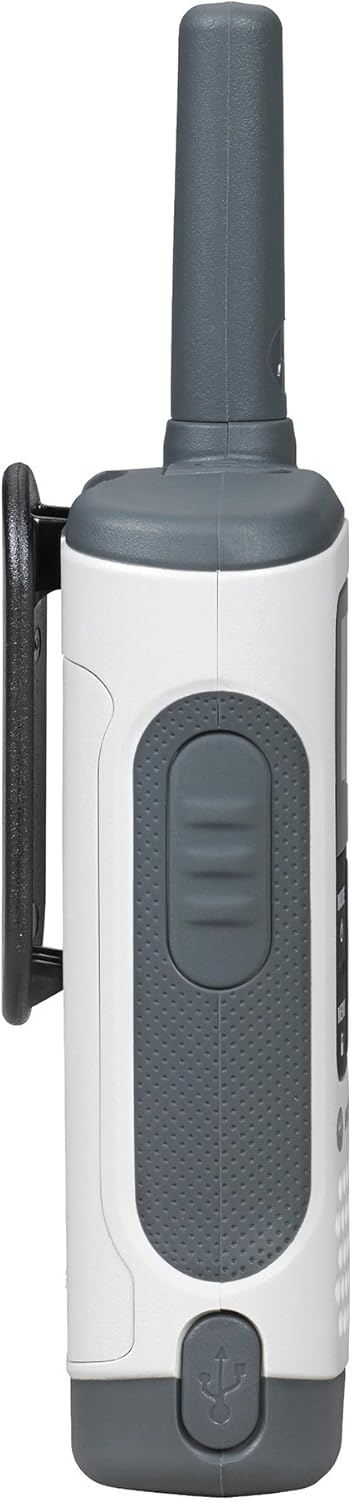
Obrázek: Boční view of the Motorola T280 radio, illustrating the general area for battery access and the belt clip attachment point.
2. Nabíjení baterií
- Connect the Y cable with dual micro-USB chargers to a compatible USB power source.
- Plug the micro-USB connectors into the charging ports located at the bottom of each radio.
- The battery indicator on the radio display will show charging status.
- Před prvním použitím nechte dostatek času na plné nabití (obvykle 8–10 hodiny).
Obrázek: Spodní část view of the Motorola T280 radio, highlighting the micro-USB charging port.
3. Připevnění spony na opasek
- Zarovnejte klip na opasek s drážkami na zadní straně rádia.
- Posuňte sponu na opasek směrem dolů, dokud nezapadne na místo.
- Chcete-li klip vyjmout, stiskněte pojistku a posuňte jej nahoru.
Návod k obsluze
1. Zapnutí/vypnutí
- Zapnutí: Stiskněte a podržte tlačítko MODE/MENU button until the radio turns on.
- Vypnutí: Stiskněte a podržte tlačítko MODE/MENU button until the radio turns off.

Obrázek: Přední strana view of two Motorola T280 radios, showing the display, MODE/MENU, plus/minus, and monitor buttons.
2. Nastavení hlasitosti
- Použijte + (Plus) and - (Minus) buttons to increase or decrease the listening volume.
3. Výběr kanálu
- Při zapnutém rádiu stiskněte tlačítko MODE/MENU jednou tlačítko. Číslo kanálu bude blikat.
- Použijte + or - tlačítky vyberte požadovaný kanál (1–22).
- Stiskněte tlačítko MODE/MENU button again to confirm the channel selection.
- For optimal communication, ensure all radios in your group are set to the same channel and privacy code.
4. Nastavení kodexu ochrany osobních údajů
Privacy codes help reduce interference from other users. The T280 supports 121 privacy codes (38 CTCSS codes and 83 DCS codes).
- Po výběru kanálu stiskněte tlačítko MODE/MENU dvakrát tlačítko. Číslo privátního kódu bude blikat.
- Použijte + or - tlačítky vyberte požadovaný kód ochrany osobních údajů.
- Stiskněte tlačítko MODE/MENU znovu stiskněte tlačítko pro potvrzení kódu ochrany osobních údajů.
5. Vysílání a příjem
- Pro přenos: Stiskněte a podržte Push-to-Talk (PTT) tlačítko PTT umístěné na boku rádia. Mluvte zřetelně do mikrofonu. Uvolněte tlačítko PTT pro poslech.
- Příjem: Ujistěte se, že není stisknuto tlačítko PTT. Rádio bude automaticky přijímat vysílání na vybraném kanálu a s vybraným privátním kódem.
Obrázek: Boční view of the Motorola T280 radio, highlighting the Push-to-Talk (PTT) button.
6. Funkce monitoru
- Stiskněte tlačítko PO button (often labeled with a 'Z' or 'MON' icon) to temporarily disable the privacy code and listen for activity on the current channel. This is useful for checking for weak signals or if you suspect interference.
7. Weather Alerts
The T280 can receive NOAA weather alerts. Refer to the radio's display for weather channel indicators. In areas with NOAA broadcasts, the radio can alert you to severe weather conditions.
- To activate/deactivate weather alerts, consult the full user manual for specific menu navigation steps.
Údržba
1. Péče o baterie
- Always use the provided NiMH rechargeable battery packs or approved AAA alkaline batteries.
- Nekombinujte staré a nové baterie ani různé typy baterií.
- Remove batteries if the radio will not be used for extended periods.
- Baterie skladujte na chladném a suchém místě.
2. Čištění
- Očistěte rádio měkkým hadříkemamp tkanina.
- Nepoužívejte abrazivní čisticí prostředky nebo rozpouštědla.
- Ensure the micro-USB charging port is free of debris.
3. Voděodolnost
The T280 radio is designed to be waterproof. However, ensure all port covers (e.g., micro-USB charging port, accessory port) are securely closed to maintain its water resistance. Avoid submerging the radio for extended periods or exposing it to high-pressure water jets.

Obrázek: Nahoře view of the Motorola T280 radio, showing the antenna and the covered accessory port.
Odstraňování problémů
| Problém | Možné řešení |
|---|---|
| Rádio se nezapne. |
|
| Nelze komunikovat s jinými rádii. |
|
| Špatná kvalita zvuku nebo statický šum. |
|
| Omezený rozsah. |
|
Specifikace
| Funkce | Detail |
|---|---|
| Číslo modelu | T280 |
| Rozměry produktu | 6.42 x 2.13 x 1.24 palce |
| Hmotnost položky | 6.4 unce |
| Počet kanálů | 22 |
| Frekvenční rozsah | 300 MHz - 3 GHz |
| Maximální dosah hovoru | 25 mil (za optimálních podmínek) |
| Zdroj napájení | NiMH Rechargeable Battery Packs (included) or 4 AAA batteries (not included) |
| svtage | 9.6 V (DC) |
| Úroveň odolnosti proti vodě | Vodotěsný |
| Speciální funkce | Rechargeable, Waterproof, Weather Alerts |
Záruka a podpora
For warranty information, technical support, and additional resources, please visit the official Motorola Solutions webnebo kontaktujte jejich oddělení zákaznických služeb.
You can find more information and products from Motorola Solutions at their official store: Obchod s řešeními Motorola.