
1. Úvod
The Stealth Cam STC-PX14X is a high-performance hunting game and trail camera designed to capture images and videos of wildlife. Featuring a 10.0 Megapixel sensor and 14 IR emitters, it offers a 50-foot infrared range for clear night vision. The camera records HD video in 15-second clips at a 16:9 wide ratio and includes a burst mode that captures 1-6 images per triggering event. Recovery time can be set between 5-59 seconds or 5-59 minutes, allowing for flexible monitoring. This manual provides detailed instructions for setting up, operating, maintaining, and troubleshooting your STC-PX14X camera.
2. Nastavení
2.1 Vybalení
Carefully remove all components from the packaging. Ensure that the camera, mounting strap, and any included documentation are present. Inspect the camera for any signs of damage before proceeding with installation.
2.2 Instalace baterie
The STC-PX14X camera requires 8 AA batteries for operation. To install batteries:
- Open the camera housing latch located on the side of the unit.
- Vyhledejte uvnitř fotoaparátu přihrádku na baterii.
- Insert 8 fresh AA batteries, ensuring correct polarity (+/-) as indicated within the compartment.
- Bezpečně zavřete kryt bateriového prostoru.
2.3 Instalace SD karty
A standard SD card (not included) is required to store captured images and videos. For optimal performance and to avoid potential issues, use a standard SD card. Avoid using Ultra, Pro, Max, or Extreme labeled SD cards, as these may cause compatibility problems.
- S otevřeným krytem kamery vyhledejte slot pro SD kartu.
- Vložte SD kartu do slotu kovovými kontakty směrem dolů, dokud nezacvakne.
- Chcete-li kartu vyjmout, jemně na ni zatlačte, dokud nevyskočí.
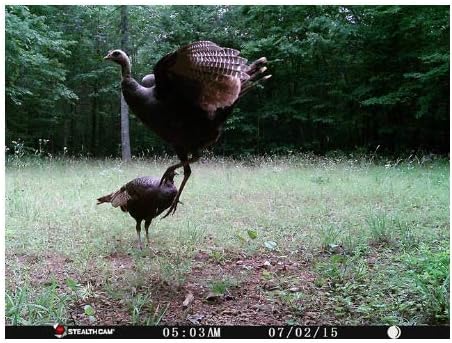
Image: The Stealth Cam STC-PX14X with its side compartment open, showing the internal control panel, screen, and battery/SD card access area.
2.4 Montáž fotoaparátu
The STC-PX14X is designed for outdoor use and can be mounted using the included strap or a wall mount (not included).
- Select a suitable location that provides a clear view oblasti, kterou chcete monitorovat.
- Provlékněte montážní popruh otvory na zadní straně fotoaparátu.
- Securely fasten the camera to a tree or post, ensuring it is stable and pointed in the desired direction.
- Podle potřeby upravte úhel kamery.
3. Návod k obsluze
3.1 Zapnutí/vypnutí
To power on the camera, slide the power switch to the 'ON' position. The camera will perform a brief self-test. To power off, slide the switch to the 'OFF' position.
3.2 Základní nastavení
Access the camera's menu using the control buttons inside the housing to adjust settings such as:
- režim: Select between Photo, Video, or Burst mode.
- Rezoluce: Set image resolution (up to 10 MP) or video resolution (1080p).
- Burst režim: Configure the number of images (1-6) to capture per trigger.
- Doba zotavení: Set the delay between triggered events (5-59 seconds or 5-59 minutes).
- Datum/čas: Nastavte aktuální datum a čas pro přesný časamps on captures.

Obrázek: Přední strana view of the Stealth Cam STC-PX14X camera, highlighting the lens and IR emitter array.
3.3 Pořizování fotografií a videí
Once configured, the camera will automatically capture images or videos when motion is detected within its sensor range. The 14 IR emitters ensure effective capture even in low-light or nighttime conditions, with a range of up to 50 feet.

Obrázek: Bývalý/áample of a daytime photograph captured by the Stealth Cam STC-PX14X, showing a deer in a grassy field.
4. Údržba
4.1 Čištění
To ensure optimal performance, periodically clean the camera's exterior, especially the lens and IR emitter area. Use a soft, dry cloth. For stubborn dirt, a slightly damp cloth can be used, but ensure no moisture enters the camera housing.
4.2 Výměna baterie
Replace all 8 AA batteries when the low battery indicator appears on the screen or when performance degrades. Always replace with a fresh set of high-quality alkaline or lithium batteries for best results.
4.3 Správa SD karty
Regularly check the SD card capacity. When the card is full, the camera will stop recording. Transfer captured media to a computer and format the SD card periodically to maintain performance. Always format the SD card using the camera's internal formatting function if available, or a computer, before reinserting it.
5. Řešení problémů
If you encounter issues with your Stealth Cam STC-PX14X, refer to the following common problems and solutions:
- Kamera se nezapíná:
- Ujistěte se, že jsou baterie vloženy správně se správnou polaritou.
- Replace all 8 AA batteries with fresh ones.
- Check that the power switch is firmly in the 'ON' position. - Poor Picture/Video Quality:
- Ensure the camera lens is clean and free from dirt or condensation.
- Verify that you are using a standard SD card. High-speed cards (Ultra, Pro, Max, Extreme) may cause compatibility issues and result in poor image quality.
- Check lighting conditions. Extreme backlighting or very dark environments can affect quality. - No Night Photos/Videos:
- Check battery level; low batteries can affect IR emitter performance.
- Ensure the camera's IR settings are enabled (if configurable).
- Verify that the IR emitters are not obstructed. - Kamera se nespouští:
- Adjust the sensor sensitivity setting in the camera menu.
- Ensure the camera is positioned correctly, with no obstructions directly in front of the sensor.
- Check battery level. - Chyba SD karty:
- Ensure the SD card is properly inserted.
- Try formatting the SD card using the camera's menu or a computer.
- Test with a different, known-good standard SD card.
6. Specifikace
| Název modelu | STC-PX14X |
| Efektivní rozlišení | 10 MP |
| Rozlišení záznamu videa | 1080p |
| Délka videa | 15 seconds (16:9 wide ratio) |
| IR zářiče | 14 IR emitters |
| IR Dosah | 50 stop |
| Burst Mode | 1–6 snímky na spuštění |
| Doba zotavení | 5–59 sekund / 5–59 minut |
| Hodnocení voděodolnosti | IP54 |
| Zdroj napájení | 8 AA batteries required (AC/DC optional) |
| Rozměry | 1 x 1 x 1 palce |
| Hmotnost položky | 1.17 libry |
| Technologie připojení | Bezdrátové, Wi-Fi |
| Vnitřní/venkovní použití | Venkovní |
| Typ montáže | Držák na zeď |
7. Informace o záruce
For detailed warranty information regarding your Stealth Cam STC-PX14X camera, please refer to the warranty card included with your product or visit the official Stealth Cam website. Warranty terms and conditions may vary and are subject to change by the manufacturer.
8. Zákaznická podpora
If you require further assistance or have questions not covered in this manual, please contact Stealth Cam customer support. You can typically find contact information, including phone numbers and email addresses, on the official Stealth Cam webweb (www.stealthcam.com) nebo v obalu produktu.