
Zavedení
This manual provides detailed instructions for the setup, operation, maintenance, and troubleshooting of your DIGITNOW! M503 Multi-Function Turntable System. Please read this manual thoroughly before using the product to ensure proper function and longevity.
Klíčové vlastnosti
- 3-speed turntable (33, 45, and 78 RPM) with Bluetooth connectivity and built-in stereo speakers (3W RMS x 2).
- Integrated CD player, MP3 player, cassette deck, and analog AM/FM stereo tuner.
- USB port, SD/MMC card reader, and Aux-in for versatile audio input.
- Direct recording function (from turntable, CD, USB, SD, MMC) and encoding feature for digital conversion of songs to MP3 format.
Obsah balení
Po vybalení se ujistěte, že jsou všechny položky přítomny:
- DIGITNOW! M503 Multi-Function Turntable System
- Napájecí kabel
- Dálkové ovládání
- Uživatelská příručka
- External Speakers (if included with your specific model)
Konec produktuview
Familiarize yourself with the components and controls of your M503 system.

Obrázek 1: Přední strana view of the DIGITNOW! M503 Multi-Function Turntable System, showcasing the turntable, control panel, and CD tray.
Ovládací prvky a vstupy na předním panelu

Figure 2: Close-up of the front panel, showing the display, control buttons, USB port, SD/MMC slot, and volume/tuning knobs.
- AUX IN: 3.5mm vstup pro externí audio zařízení.
- USB port: For USB flash drives (playback and recording).
- Slot SD/MMC: For SD or MMC memory cards (playback and recording).
- Sluchátkový jack: 3.5mm výstup pro soukromý poslech.
- Displej: Zobrazuje aktuální režim, informace o skladbě a rádiovou frekvenci.
- Ovládací tlačítka: Play/Pause, Stop, Skip Forward/Backward, Mode selection, Folder navigation, Delete, Record.
- Knoflík ladění: Upravuje rádiovou frekvenci.
- Ovladač napájení/hlasitosti: Zapíná/vypíná přístroj a upravuje hlasitost.
- Zásobník na CD: Pro vkládání audio CD.
Input/Output Overview

Figure 3: Visual representation of various input and output options, including Aux In, USB, Headphone, SD Card, CD Tray, and Cassette Holder.
Nastavení
- Rozbalení: Opatrně vyjměte jednotku z obalu. Obal si uschovejte pro budoucí přepravu nebo skladování.
- Umístění: Place the system on a stable, level surface away from direct sunlight, heat sources, and excessive dust or moisture. Ensure adequate ventilation around the unit.
- Připojení napájení: Connect the power cable to the AC inlet on the rear of the unit and then to a standard wall outlet.
- Speaker Connection (if applicable): If your model includes external speakers, connect them to the speaker output jacks on the rear of the main unit.
- Protiprachový kryt: Ensure the dust cover is properly seated on the turntable.
Návod k obsluze
Obsluha gramofonu
- Otevřete protiprachový kryt.
- Umístěte vinylovou desku na talíř gramofonu.
- Select the appropriate speed (33, 45, or 78 RPM) using the speed selector switch. For 45 RPM records, place the included 45 RPM adapter on the center spindle.
- Uvolněte zámek tónového ramene.
- Jemně zvedněte raménko přenosky pomocí páčky pro nastavení tónu a umístěte hrot přenosky nad požadovanou stopu na desce.
- Lower the tone arm slowly using the cue lever. The record will begin to play.
- Upravte hlasitost pomocí knoflíku Napájení/Hlasitost.
- To stop playback, lift the tone arm using the cue lever and return it to the tone arm rest. Secure the tone arm lock.
Provoz CD přehrávače
- Press the MODE button until "CD" appears on the display.
- Stisknutím tlačítka OPEN/CLOSE otevřete přihrádku na CD.
- Vložte audio CD do přihrádky potištěnou stranou nahoru.
- Press the OPEN/CLOSE button again to close the tray. The system will read the CD and begin playback automatically.
- K ovládání přehrávání použijte tlačítka Přehrát/Pozastavit, Zastavit a Přeskočit.
Obsluha kazetového přehrávače
- Insert a cassette tape into the cassette holder on the side of the unit.
- Press the MODE button until "TAPE" appears on the display.
- Press the Play button on the cassette deck to begin playback.
- Use the Fast Forward and Rewind buttons as needed. Note that advanced controls like pause or track skip may not be available on all cassette decks.
Provoz rádia AM/FM
- Press the MODE button until "RADIO" appears on the display.
- Select AM or FM band using the band selector switch (if available, otherwise it might cycle through modes).
- Rotate the TUNING knob to search for radio stations.
- Extend the FM antenna (if applicable) for better reception.
USB/SD/MMC Playback
- Insert a USB flash drive into the USB port or an SD/MMC card into the corresponding slot.
- Press the MODE button until "USB" or "SD" appears on the display. The system will automatically detect and begin playing compatible audio file(např. MP3).
- Use the Play/Pause, Stop, Skip, and Folder buttons to navigate and control playback.
Připojení Bluetooth

Figure 4: The M503 system wirelessly connected to a smartphone via Bluetooth, enabling audio streaming.
- Press the MODE button until "BLUETOOTH" or "BT" appears on the display. The unit will enter pairing mode.
- Na smartphonu nebo jiném zařízení s podporou Bluetooth povolte Bluetooth a vyhledejte dostupná zařízení.
- Select "DIGITNOW M503" (or similar) from the list of devices to pair.
- Once paired, you can stream audio from your device to the M503 system.
Připojení Aux-In
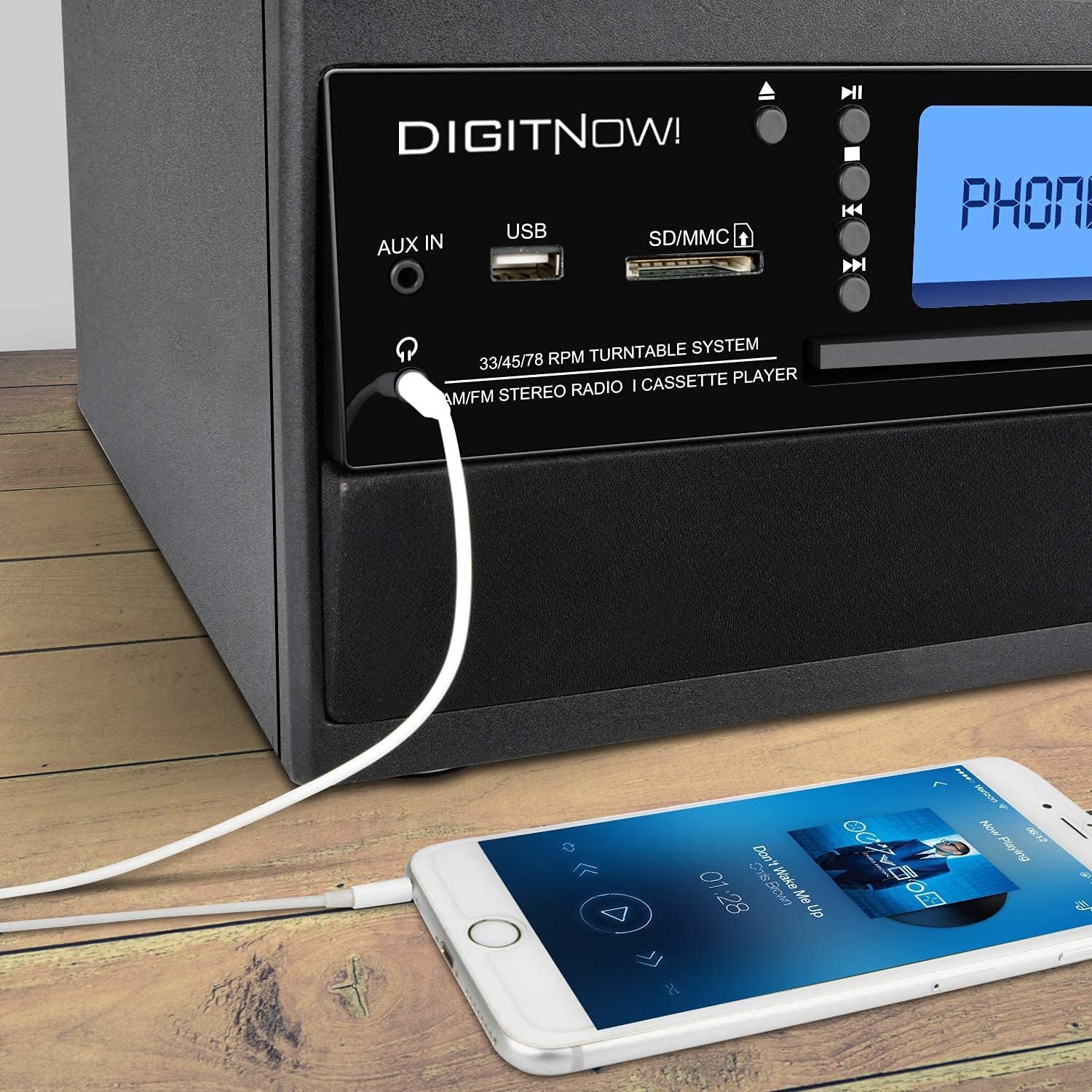
Figure 5: A smartphone connected to the M503 system using a 3.5mm Aux-In cable for wired audio playback.
- Connect one end of a 3.5mm audio cable (not included) to the AUX IN jack on the front panel of the M503.
- Druhý konec kabelu připojte do konektoru pro sluchátka nebo audio výstupu vašeho externího zařízení (např. smartphonu, MP3 přehrávače).
- Press the MODE button until "AUX" appears on the display.
- Start playback on your external device and adjust the volume on both the device and the M503.
Direct Recording (Encoding to MP3)
The M503 allows you to record audio from the turntable, CD, or cassette directly to a USB flash drive or SD/MMC card in MP3 format.
- Vložte USB flash disk nebo SD/MMC kartu do příslušného slotu.
- Select the desired source (Turntable, CD, or Cassette) using the MODE button and prepare it for playback (e.g., place a record, insert a CD/cassette).
- Press the REC button on the front panel. The display will indicate recording mode.
- Start playback on your chosen source. The system will begin recording the audio to the USB drive or SD/MMC card.
- Press the REC button again to stop recording. The recorded file will be saved as an MP3.
Údržba
- Čištění jednotky: K otření vnější strany jednotky použijte měkký, suchý hadřík. Nepoužívejte abrazivní čisticí prostředky ani rozpouštědla.
- Péče o stylus: Gently clean the stylus regularly with a soft brush designed for turntable styli. Avoid touching the stylus with your fingers.
- Protiprachový kryt: Pokud gramofon nepoužíváte, mějte kryt proti prachu zavřený, aby se v něm nehromadil prach.
- Péče o CD/kazety: Handle CDs by the edges and store them in their cases. Keep cassette tapes away from magnetic fields.
Odstraňování problémů
| Problém | Možná příčina | Řešení |
|---|---|---|
| Žádná síla | Napájecí kabel není připojen; zásuvka není aktivní. | Ensure power cable is securely connected and the outlet is functional. |
| Žádný zvuk | Volume too low; incorrect mode selected; external speakers not connected. | Increase volume; select correct input mode; check speaker connections. |
| Turntable not spinning or playing slowly | Incorrect speed selected; drive belt issue; stylus dirty or damaged. | Verify speed setting (33/45/78 RPM); check drive belt; clean or replace stylus. |
| Párování Bluetooth se nezdařilo | Device too far; Bluetooth not enabled on external device; unit not in pairing mode. | Ensure devices are close; enable Bluetooth on external device; set M503 to Bluetooth mode. |
| CD/USB/SD not reading | Disc/media dirty or damaged; incompatible file formát. | Clean disc/media; try different media; ensure files are compatible (e.g., MP3). |
Specifikace
| Číslo modelu | M503 |
| Značka | DIGITNOW |
| Rozměry (D x Š x V) | 31.7 x 20 x 29 cm |
| Hmotnost | 3.71 kg |
| Zdroj napájení | Elektrický kabel (220 voltů) |
| Rychlosti gramofonu | 33/45/78 ot./min |
| Zvukový výstup | Built-in Stereo Speakers (3W RMS x 2), Headphone Jack |
| Konektivita | Bluetooth Receiver, USB, SD/MMC Card Reader, Aux-In |
| Podporovaná média | Vinyl Records, Audio CDs, Cassette Tapes, USB drives, SD/MMC cards |
| Speciální funkce | MP3 Encoding (from Vinyl, CD, Cassette to USB/SD) |
Záruka a podpora
For warranty information, technical support, or service inquiries, please refer to the warranty card included with your product or contact DIGITNOW! customer service directly. Keep your proof of purchase for warranty claims.
This product is designed for home use. Any unauthorized modifications or repairs will void the warranty.