
Zavedení
This manual provides detailed instructions for the installation, operation, and maintenance of your Minolta MNCD53-S Car Dashboard Camera. Please read this manual thoroughly before using the device to ensure proper functionality and safety.
The Minolta MNCD53-S is designed to record your road trips in full 1080P HD resolution, featuring a 140-degree wide-angle lens, Wide Dynamic Range (WDR), G-Sensor for emergency recording, and loop recording capabilities. Review footage on the integrated 3.0-inch LCD screen.
Co je v krabici
- Minolta MNCD53-S Car Dashboard Camera
- SD karta (8 GB součástí balení)
- Vak
- USB kabel
- Návod k použití (tento dokument)
- Záruční list
Bezpečnostní informace
- Do not operate the camera or adjust settings while driving. Always pull over to a safe location before making any adjustments.
- Ensure the camera is securely mounted and does not obstruct your view silnice nebo narušovat aktivaci airbagů.
- Nevystavujte fotoaparát extrémním teplotám, delšímu přímému slunečnímu záření nebo nadměrné vlhkosti.
- Používejte pouze dodaný napájecí kabel a příslušenství, abyste předešli poškození zařízení nebo vozidla.
- Pro zajištění jasných záznamů udržujte objektiv čistý.
- The internal battery is primarily for saving emergency files and maintaining settings. The camera requires continuous power from the vehicle's lighter socket for daily operation.
Konec produktuview
The Minolta MNCD53-S dash camera is designed for reliable in-car video recording. Below are its key features and a visual representation.
- Full HD 1080P Video Recording: Zachycuje jasné videotage.
- Širokoúhlý objektiv 140°: Poskytuje široký view silnice.
- 3.0palcový LCD displej: Pro živé vystoupení view, přehrávání a navigace v nabídce.
- G-senzor: Automatically detects sudden impacts or movements and locks the current video file aby se zabránilo přepisování.
- Nahrávání ve smyčce: Continuously records, overwriting the oldest unlocked files, když je paměťová karta plná.
- Detekce pohybu: Starts recording automatically when motion is detected in front of the camera (useful when parked).
- Široký dynamický rozsah (WDR): Improves video quality in varying light conditions, such as bright sunlight and shadows.
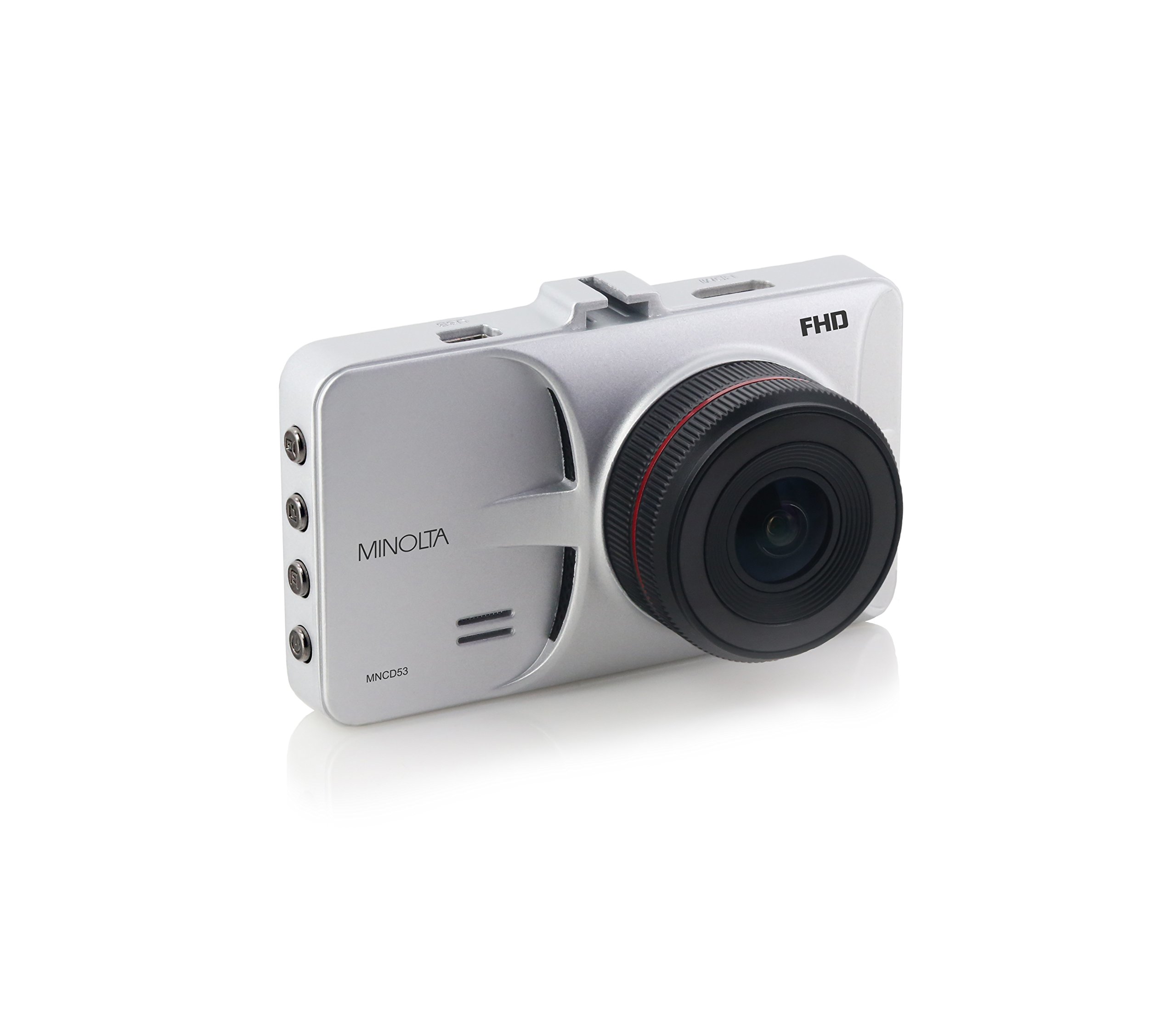
Obrázek 1: Přední strana view of the Minolta MNCD53-S Car Dashboard Camera, showing the 3.0-inch LCD screen displaying a city night scene.
Nastavení
- Vložte SD kartu: Locate the SD card slot on the camera. Gently insert the provided 8GB SD card (or another compatible Class 10 or higher microSD card, up to 32GB) until it clicks into place. Ensure the camera is off before inserting or removing the SD card.
- Montáž kamery:
- Attach the suction cup mount to the camera.
- Clean the desired area on your windshield. Ensure it does not obstruct your view or interfere with safety features.
- Press the suction cup firmly against the windshield and engage the locking mechanism to secure it.
- Adjust the camera angle to capture the road ahead.

Figure 2: The Minolta MNCD53-S Car Dashboard Camera mounted on a car windshield, showing the driver's perspective of the road.
- Připojení napájení:
- Connect the provided USB power cable to the camera's power input port.
- Plug the other end of the power cable into your vehicle's 12V lighter socket.
- The camera will typically power on automatically when the vehicle starts and power off when the vehicle is turned off.
- Počáteční zapnutí: The camera should power on automatically when connected to power. If not, press and hold the power button.
- Nastavit datum a čas: Access the camera's menu settings to set the correct date and time. This is crucial for accurate timestamps on your recordings. Refer to the "Operating Instructions" section for general menu navigation.
Návod k obsluze
Familiarize yourself with the camera's buttons and menu system for optimal use.
Základní nahrávání
- When the camera is powered on, it typically begins recording automatically. A red indicator or icon on the screen usually signifies active recording.
- Recordings are saved in segments (e.g., 3 or 5 minutes) due to loop recording.
- To manually start/stop recording, press the designated record button (refer to your camera's physical buttons).
Navigace v nabídce
The camera features a menu system accessible via physical buttons. Common buttons include:
- Tlačítko nabídky: Enters the settings menu.
- Tlačítka nahoru/dolů: Procházejte možnostmi nabídky.
- Tlačítko OK/Potvrdit: Vybere možnost nebo potvrdí nastavení.
- Tlačítko režimu: Přepíná mezi režimem nahrávání videa, fotografování a přehrávání.
Key Settings to Adjust:
- Datum/čas: Nastavte aktuální datum a čas pro přesný časamps.
- Nahrávání ve smyčce: Adjust the duration of video segments (e.g., 1, 3, 5 minutes).
- Citlivost G-senzoru: Adjust sensitivity for emergency recording. Higher sensitivity means it will trigger more easily.
- Detekce pohybu: Enable or disable this feature. Use with caution when parked as it can drain the battery or fill the SD card quickly.
- WDR: Enable or disable Wide Dynamic Range for improved image quality in varied lighting.
Přehrávání
- Switch to playback mode using the Mode button.
- Use the navigation buttons to browse through recorded video files.
- Press the OK/Confirm button to play a selected video.
- Na view files on a computer, remove the SD card and insert it into a card reader, or connect the camera directly to a computer via USB.
Režim fotografie
- Switch to photo mode using the Mode button.
- Press the record/shutter button to capture still images.
Údržba
- Čištění objektivu: Use a soft, lint-free cloth to gently wipe the camera lens. Avoid abrasive materials or harsh chemicals.
- Čištění obrazovky: Use a microfiber cloth to clean the LCD screen.
- Správa SD karet:
- Regularly format the SD card (e.g., once a month) within the camera's settings to ensure optimal performance and prevent data corruption.
- Zálohování důležité footage to a computer before formatting.
- Replace the SD card if you notice frequent errors or degraded performance.
- Skladování: If storing the camera for an extended period, remove it from the windshield and store it in its pouch in a cool, dry place.
Odstraňování problémů
| Problém | Možná příčina | Řešení |
|---|---|---|
| Fotoaparát se nezapne. | No power from vehicle; faulty power cable; internal battery depleted. | Check vehicle's lighter socket and fuse. Ensure power cable is securely connected. Try a different power source or cable if available. The internal battery is for emergency files, not sustained operation. |
| Camera stops recording or does not record continuously. | SD card full; SD card error; G-Sensor triggered too often; motion detection enabled. | Format the SD card. Use a Class 10 or higher SD card. Adjust G-Sensor sensitivity. Disable motion detection if not needed while driving. |
| Video footage je rozmazané nebo nejasné. | Protective film on lens; dirty lens; incorrect focus (unlikely for fixed focus); poor lighting. | Remove any protective film. Clean the lens with a soft cloth. Ensure WDR is enabled in challenging light conditions. |
| Date and time settings reset. | Vnitřní baterie je vybitá. | Ensure the camera is consistently powered by the vehicle to allow the internal battery to maintain charge for settings. Re-enter date and time. |
| Suction mount does not hold. | Dirty windshield; cold temperatures; worn suction cup. | Clean the windshield and suction cup thoroughly. Warm the windshield slightly in cold weather. Replace the mount if it is damaged. |
Specifikace
| Funkce | Detail |
|---|---|
| Název modelu | MNCD53-S |
| Rozlišení záznamu videa | 1080p Full HD |
| Skutečný úhel View | 140 stupňů |
| Velikost obrazovky | 3palcový LCD displej |
| Speciální funkce | Loop Recording, Motion Sensing, G-Sensor, Wide Dynamic Range (WDR) |
| Technologie připojení | USB kabel |
| Kompatibilní operační systémy | Windows 7 / 8 / 10, Mac OS 10.8 / 10.9 / 10.10 |
| Typ montáže | Sací držák |
| Typ paměti Flash | SD (supports up to 32GB, Class 10 recommended) |
| Typ baterie | Lithium Ion (internal, for emergency files and settings) |
| Hmotnost položky | 0.3 libry |
| Výrobce | Minolta |
| UPC | 084438960143 |
Záruka a podpora
Informace o záruce
The Minolta MNCD53-S Car Dashboard Camera comes with a 1letá omezená záruka od data nákupu. Tato záruka se vztahuje na výrobní vady a vady zpracování při běžném používání. Nevztahuje se na škody způsobené nesprávným použitím, nehodami, neoprávněnými úpravami nebo přírodními katastrofami.
Uschovejte si prosím doklad o koupi pro uplatnění záruky.
Zákaznická podpora
For technical assistance, troubleshooting not covered in this manual, or warranty inquiries, please contact Minolta customer support. Refer to the warranty card or the official Minolta webstránky s nejaktuálnějšími kontaktními informacemi.
When contacting support, please have your product model number (MNCD53-S) and proof of purchase readily available.