
1. Úvod
This manual provides essential information for setting up, operating, maintaining, and troubleshooting your HP ENVY Photo 7155 All-in-One Printer. This device is designed for printing, scanning, and copying, with a focus on high-quality photo output and wireless connectivity.
2. Co je v krabici
Před zahájením instalace ověřte, zda jsou všechny komponenty přítomny:
- HP ENVY Photo 7155 All-in-One Printer
- Černá inkoustová kazeta HP 64
- Tříbarevná inkoustová kazeta HP 64 Setup
- Napájecí kabel
- Instalační plakát

Obrázek 2.1: Přední strana view of the HP ENVY Photo 7155 printer, illustrating its photo printing capability.
3. Nastavení
Pro počáteční nastavení tiskárny postupujte takto:
- Vybalení tiskárny: Odstraňte z tiskárny veškerý balicí materiál, pásky a ochranné fólie.
- Připojte napájení: Zapojte napájecí kabel do tiskárny a poté do zásuvky ve zdi. Tiskárna se automaticky zapne.
- Instalace inkoustových kazet: Open the ink cartridge access door. Wait for the carriage to stop moving. Insert the HP 64 Black and Tri-color ink cartridges into their respective slots until they click into place. Close the access door.
- Vložte papír: Load plain white paper into the main paper tray. For photo printing, load photo paper into the dedicated photo tray.
- Instalace softwaru a ovladačů: Download the HP Smart app from your device's app store or visit the official HP support website. Follow the on-screen instructions to install the necessary software and drivers for your computer or mobile device.
- Připojení k síti: During the software installation, you will be prompted to connect the printer to your wireless network. Follow the instructions on the printer's touchscreen display and the HP Smart app to establish a Wi-Fi connection.
Obrázek 3.1: Zadní view of the printer, highlighting the power connection and USB port for wired setup options.
4. Obsluha tiskárny
4.1. Používání dotykového displeje
The printer features a 2.65-inch color touchscreen for direct control of printing, scanning, and copying functions, as well as managing settings.

Figure 4.1: Interacting with the printer's color touchscreen for various functions.
4.2. Vkládání papíru
- Hlavní zásobník papíru: For plain paper, envelopes, and other standard media. Adjust the paper guides to fit the paper size.
- Zásobník na fotografie: For photo paper. Ensure the photo paper is loaded correctly, typically glossy side up.
4.3. Tisk dokumentů a fotografií
- Z počítače: Select the print option from your application, choose the HP ENVY Photo 7155, and adjust settings as needed (paper type, quality, color).
- Z mobilních zařízení (aplikace HP Smart): Use the HP Smart app to print documents and photos directly from your smartphone or tablet. The app allows printing from cloud services like iCloud, Google Drive, and Dropbox.
- Přímý tisk fotografií: Insert an SD card into the printer's card slot and use the touchscreen to select and print photos directly.

Figure 4.2: Demonstrating remote wireless printing from a mobile device using the HP Smart app.
4.4. Skenování dokumentů
You can scan documents and photos using the flatbed scanner:
- Skenování do počítače: Place the document on the scanner glass. Use the HP Smart app or the printer's touchscreen to initiate a scan and save it to your computer.
- Skenovat do e-mailu: Select the scan to email option from the printer's touchscreen and follow the prompts to send the scanned document as an email attachment.
4.5. Kopírování dokumentů
Place the original document on the scanner glass. From the printer's touchscreen, select the 'Copy' option. You can choose between color or black and white copies and adjust the number of copies.
5. Údržba
5.1. Výměna inkoustových kazet
When an ink cartridge is low or empty, the printer will display a notification. To replace:
- Ujistěte se, že je tiskárna zapnutá.
- Otevřete přístupová dvířka inkoustových kazet.
- Zatlačte na prázdnou kazetu, abyste ji uvolnili, a poté ji vytáhněte.
- Vyjměte novou kazetu z obalu a opatrně odstraňte ochrannou pásku.
- Vložte novou kazetu do slotu, dokud nezacvakne na místo.
- Zavřete přístupová dvířka inkoustových kazet.
Consider enrolling in HP Instant Ink for automatic ink delivery.
5.2. Čištění tiskárny
- Vnější: Vnější povrchy otřete měkkým hadříkem, který nepouští vlákna. Nepoužívejte abrazivní čisticí prostředky.
- Tisková hlava: If print quality issues occur (streaks, faded colors), use the printer's maintenance menu on the touchscreen or the HP Smart app to perform a printhead cleaning cycle.
- Sklo skeneru: Clean the scanner glass with a soft, lint-free cloth lightly dampdoplněno čističem skla.
6. Řešení problémů
Pokud se s tiskárnou setkáte s problémy, vyzkoušejte následující běžná řešení:
- Tiskárna nereaguje: Ensure the printer is powered on and connected to the network. Restart both the printer and your computer/mobile device.
- Problémy s kvalitou tisku: Check ink levels. Perform a printhead cleaning cycle. Ensure you are using appropriate paper settings for your print job.
- Zaseknutý papír: Follow the on-screen instructions or consult the HP support website for steps to clear paper jams from various areas of the printer.
- Problémy s připojením: Verify your Wi-Fi network is active and the printer is within range. Reconnect the printer to the network via the setup menu or HP Smart app. Ensure printer drivers are up to date.
- Chybové zprávy: Note any error codes or messages displayed on the touchscreen and refer to the HP support webstránky pro konkrétní řešení.
7. Specifikace
| Funkce | Specifikace |
|---|---|
| Název modelu | HP ENVY Photo 7155 |
| Funkce | Tisk, kopírování, skenování |
| Technologie tisku | Inkoustové |
| Konektivita | Wi-Fi, Bluetooth, USB 2.0 |
| Maximální rozlišení barevného tisku | 4800 x 1200 dpi |
| Maximální rozlišení černobílého tisku | 1200 x 1200 dpi |
| Rychlost tisku (černobíle) | Až 14 str./min |
| Rychlost tisku (barevně) | Až 9 str./min |
| Oboustranný tisk | Automatický |
| Typ skeneru | Valník |
| Maximální vstupní kapacita listu | 100 listů (hlavní zásobník) |
| Počet zásobníků | 2 (Main, Photo) |
| Kontrolní metoda | Touchscreen, Voice (Alexa) |
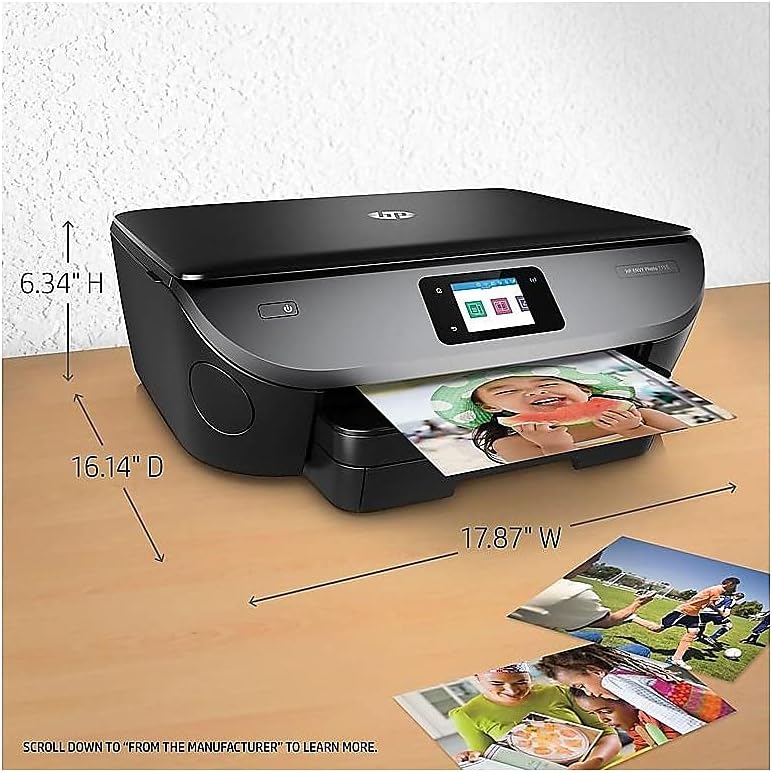
| Rozměry produktu (D x Š x V) | 6.34 cm x 17.87 cm x 16.14 cm |
| Hmotnost položky | 14 libry |
| Spotřeba energie | 13.95 wattů (v zapnutém stavu) |

Figure 7.1: Printer dimensions for placement and space planning.
8. Záruka a podpora
The HP ENVY Photo 7155 All-in-One Printer comes with a limited warranty. For detailed warranty information, technical support, driver downloads, and additional troubleshooting resources, please visit the official HP support website. You can also find comprehensive user manuals in PDF format on the HP support portal.