
1. Úvod
The Arkscan AS500 is a versatile wireless mini barcode ring scanner designed for comfort and efficiency. Its ergonomic design allows for hands-free operation, making it ideal for various applications such as picking, sorting, inventory management in warehouses, distribution centers, retail stores, and libraries. This device supports both online wireless mode and offline memory mode, capable of storing up to 20,000 barcodes.
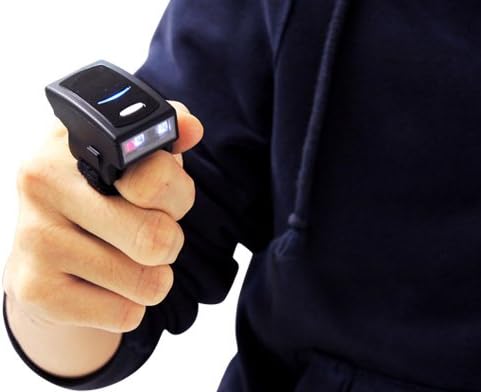
The Arkscan AS500 scanner is designed to be worn comfortably on a finger, enabling hands-free scanning.
2. Obsah balení
- Arkscan AS500 Wireless Ring Mini Barcode Scanner Unit
- USB nabíjecí kabel
- Uživatelská příručka
3. Konec produktuview
Klíčové vlastnosti
- Compatible with iOS, Android, Windows, PC, Mac, and Linux devices.
- Easy setup and pairing with devices.
- Dedicated iOS button for simultaneous on-screen keyboard typing and barcode scanning.
- Small, wearable, and lightweight design for hands-free scanning.
- Capable of scanning barcodes from both paper and computer screens.
- Long-lasting battery, supporting approximately 6000 scans per charge.
- Wireless range of up to 10 meters (33 feet) line of sight.
- Multiple scanning modes: continuous, manual/trigger, flash, toggle, and auto close.
- Offline memory mode with 2MB storage, capable of storing up to 20,000 barcodes.
- Supports wireless HID, wireless SPP, USB HID, and USB VCP profiles.
Podporované 1D symboliky
Codabar, Code 11, Code 32 (PARAF), Code 128, Code 2 of 5, Code 39, Code 93, EAN/JAN-13, EAN/JAN 8, EAN-UCC Emulation, IATA Code 2 of 5, Interleaved 2 of 5, Matrix 2 of 5, MSI, GS1 DataBar, TCIF Linked Code 39, UPC-A, UPC E, GS1 Databar, UPC-A/EAN-13 with Extended coupon Code, Coupon GS1, GS1 codebar.
4. Nastavení
4.1 Nabíjení skeneru
Before initial use, fully charge the scanner. Connect the provided USB charging cable to the scanner and a power source (e.g., computer USB port or USB wall adapter). The LED indicator will show charging status.
4.2 Zapnutí/vypnutí
- Zapnutí: Press and hold the trigger button for approximately 1 second until you hear a beep and the indicator light turns on.
- Vypnutí: Press and hold the trigger button for several seconds until the indicator light turns off and you hear a power-off tone.
5. Připojení a párování
5.1 Bluetooth HID Mode (Recommended)
This mode allows the scanner to function as a wireless keyboard, sending scanned data directly to any text input field on your connected device without requiring special software.
- Ujistěte se, že je skener zapnutý a plně nabitý.
- Scan the 'BT mode - HID' barcode from your user manual (or a configuration sheet if provided). The scanner will emit several beeps.
- On your host device (smartphone, tablet, PC), go to Bluetooth settings and enable Bluetooth.
- Hledat available devices. The scanner should appear as 'Wireless Scanner' or similar.
- Select 'Wireless Scanner' from the discovered device list to initiate pairing.
- Once successfully paired, the scanner will beep twice to confirm the connection.
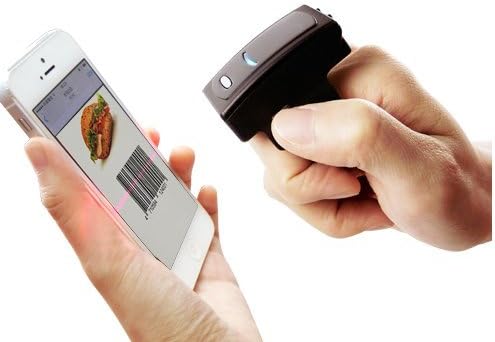
The Arkscan AS500 can scan barcodes directly from a smartphone screen.
Pro zařízení se systémem iOS: The AS500 includes a secondary iOS button. Pressing this button enables the on-screen keyboard for typing while maintaining the scanner connection, eliminating the need to disconnect and reconnect.
5.2 Bluetooth SPP Mode
This mode is typically used for applications that require a serial port profile for data communication. It may require specific software or drivers on the host device to interpret the data. Scan the 'BT mode - SPP' barcode from your user manual to switch to this mode.
5.3 USB připojení
The scanner can also be connected directly to a computer via the USB cable. In USB HID mode, it functions as a wired keyboard. In USB VCP (Virtual COM Port) mode, it emulates a serial port, requiring appropriate drivers and software.
6. Obsluha skeneru
6.1 Základní skenování
To scan a barcode, aim the laser aimer at the center of the barcode and press the trigger button. A successful scan will be indicated by a beep and/or a change in the indicator light.

The AS500 scanner in use within a warehouse environment, scanning a package.
6.2 Režimy skenování
The AS500 supports various scanning modes to suit different operational needs:
- Nepřetržitý režim: Scans continuously without needing to press the trigger for each barcode.
- Manual/Trigger Mode: Requires a press of the trigger for each scan.
- Režim blesku: Scans rapidly when the trigger is held down.
- Přepínací režim: Press once to start continuous scanning, press again to stop.
- Auto Close Mode: The scanner automatically powers off after a period of inactivity to conserve battery.
6.3 Offline Memory Mode (Data Collector)
When operating in offline memory mode, the AS500 can store up to 20,000 barcodes in its internal 2MB memory. This is useful for collecting data when out of range of a host device. To retrieve stored data, connect the scanner via USB and follow the instructions in your full user manual for data download.

The Arkscan AS500 scanner is used to efficiently scan barcodes on multiple books.
7. Údržba
7.1 Čištění
Pro zachování optimálního výkonu udržujte skenovací okénko skeneru čisté. Používejte měkký hadřík bez žmolků, lehce navlhčenýampened with water or a mild cleaning solution. Avoid abrasive materials or harsh chemicals that could scratch the window or damage the device.
7.2 Péče o baterii
The AS500 uses a Lithium Metal battery. To prolong battery life, avoid fully discharging the battery frequently. Store the scanner in a cool, dry place when not in use for extended periods. Recharge the battery regularly, even if the scanner is not in active use.
8. Řešení problémů
Běžné problémy a řešení
- Scanner not pairing with device:
- Ujistěte se, že je skener plně nabitý a zapnutý.
- Ověřte, zda je na hostitelském zařízení povoleno rozhraní Bluetooth.
- Try turning your device's Bluetooth off and on again.
- Rescan the 'BT mode - HID' (or SPP) barcode to ensure the scanner is in the correct pairing mode.
- Po skenování se nepřenesou žádná data:
- Confirm the scanner is successfully paired and connected to your device.
- Ensure the cursor is in a text input field on your device.
- Check if the scanner is in offline memory mode; if so, switch to a real-time transmission mode.
- Skener se nezapíná:
- The battery may be depleted. Connect the scanner to a power source using the USB cable and allow it to charge.
- Slabý výkon skenování:
- Ujistěte se, že čárový kód je čistý a nepoškozený.
- Upravte vzdálenost a úhel mezi skenerem a čárovým kódem.
- Clean the scanner's optical window.
9. Specifikace
| Rozměry produktu | 2 x 0.5 x 0.25 palce |
| Hmotnost položky | 0.75 unce |
| Baterie | 1 lithiová kovová baterie (součástí balení) |
| Kompatibilní zařízení | Osobní počítač, chytrý telefon, tablet |
| Zdroj napájení | Napájení z baterie, Elektrický kabel |
| Technologie připojení | Bluetooth, USB |
| Paměť | 2MB (stores up to 20,000 barcodes in offline mode) |
| Bezdrátové Dosah | Up to 10 meters / 33 feet (line of sight) |
10. Záruka a podpora
10.1 Informace o záruce
The Arkscan AS500 Wireless Ring Mini Barcode Scanner is covered by a manufacturer's warranty. Please refer to the warranty card included in your product packaging or visit the official Arkscan webpodrobné záruční podmínky naleznete na webu.
10.2 Zákaznická podpora
For technical assistance, troubleshooting, or any product-related inquiries, please contact Arkscan customer support. Contact information can typically be found on the Arkscan webwebu nebo v dokumentaci k produktu.