
Zavedení
Thank you for choosing the Dacom P10 IPX7 Waterproof Bluetooth Earbuds. This manual provides essential information for the safe and effective use of your new earbuds. Please read it thoroughly before operation and retain it for future reference.
Bezpečnostní informace
- Do not expose the earbuds to extreme temperatures or direct sunlight for prolonged periods.
- Zabraňte pádu sluchátek na zem nebo jejich vystavení silným nárazům.
- Do not attempt to disassemble or modify the earbuds. This will void the warranty and may cause damage.
- Uchovávejte mimo dosah dětí a domácích zvířat.
- Čistěte sluchátka měkkým, suchým hadříkem. Nepoužívejte agresivní chemikálie ani abrazivní materiály.
- While the earbuds are IPX7 waterproof, they are not designed for prolonged submersion or diving. Ensure charging port cover is securely closed before exposure to water.
Obsah balení
Zkontrolujte prosím balení, zda neobsahuje následující položky:
- Dacom P10 Bluetooth Earbuds
- USB nabíjecí kabel
- Uživatelská příručka
- Další ušní nástavce (různé velikosti)

Image: Contents of the Dacom P10 package, including the earbuds, charging cable, and user manual.

Obrázek: Další view of the Dacom P10 earbuds (blue version) with the charging cable and user manual.

Image: The retail packaging for the Dacom P10 earbuds, showing both red and blue color options.
Konec produktuview
The Dacom P10 earbuds feature an ergonomic design with ear hooks for secure fit during sports and activities. They are equipped with Bluetooth connectivity for wireless audio and an in-line microphone for calls.
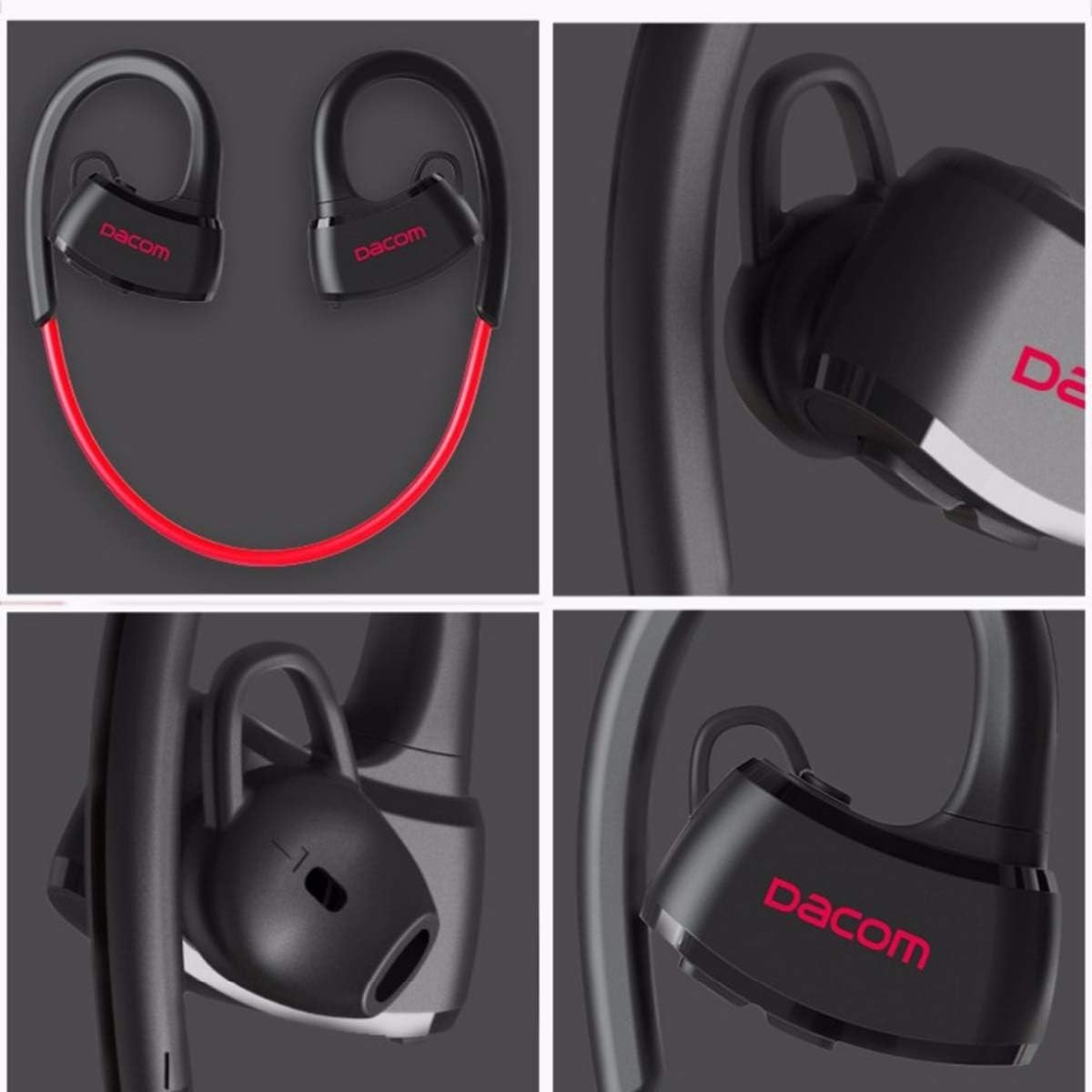
Obrázek: Podrobný views of the Dacom P10 earbuds, highlighting the ear hook design, Dacom branding, and ear tip structure.
Klíčové vlastnosti:
- IPX7 Waterproof Rating: Suitable for use during intense workouts and in rainy conditions.
- Bluetooth Connectivity: For wireless audio streaming.
- Built-in Microphone: For hands-free calling.
- Noise Cancelling: Enhances audio clarity.
- Stereo Sound: Delivers rich audio experience.

Image: A person floating in water, demonstrating the IPX7 waterproof capability of the Dacom P10 earbuds.
Nastavení
1. Nabíjení sluchátek:
Before first use, fully charge the earbuds. Connect the USB charging cable to the charging port on the earbuds and the other end to a USB power source (e.g., computer USB port, wall adapter). The indicator light will show charging status and turn off when fully charged.
2. Párování se zařízením Bluetooth:
- Ujistěte se, že jsou sluchátka vypnutá.
- Press and hold the multi-function button on the earbuds until the indicator light flashes red and blue alternately, indicating pairing mode.
- Na svém zařízení (chytrý telefon, tablet, počítač) povolte Bluetooth a vyhledejte dostupná zařízení.
- Select "Dacom P10" from the list of found devices.
- Once paired, the indicator light on the earbuds will flash blue slowly or turn off, and you will hear a confirmation tone.

Image: Illustrates compatibility with various devices such as laptops, tablets, and smartphones, which can be paired with the earbuds.
Návod k obsluze
Zapnutí/vypnutí:
- Zapnutí: Press and hold the multi-function button until the blue indicator light flashes.
- Vypnout: Press and hold the multi-function button until the red indicator light flashes and then turns off.
Přehrávání hudby:
- Přehrát/pozastavit: Krátce stiskněte multifunkční tlačítko.
- Další skladba: Dlouze stiskněte tlačítko pro zvýšení hlasitosti.
- Předchozí skladba: Dlouze stiskněte tlačítko pro zvýšení hlasitosti.
- Zvýšit hlasitost: Krátce stiskněte tlačítko Hlasitost +.
- Snížit hlasitost: Krátce stiskněte tlačítko Hlasitost -.
Správa hovorů:
- Přijmout/ukončit hovor: Krátce stiskněte multifunkční tlačítko.
- Odmítnout hovor: Dlouze stiskněte multifunkční tlačítko.
- Znovu vytočit poslední číslo: Dvakrát stiskněte multifunkční tlačítko.
Údržba
- Čištění: Use a soft, lint-free cloth to wipe the earbuds. For ear tips, remove them and clean with mild soap and water, then dry thoroughly before reattaching.
- Skladování: Sluchátka skladujte na chladném a suchém místě mimo dosah přímého slunečního záření a extrémních teplot.
- Péče o baterie: Chcete-li prodloužit životnost baterie, vyvarujte se častého úplného vybíjení sluchátek. Pravidelně je nabíjejte, i když je delší dobu nepoužíváte.
Odstraňování problémů
| Problém | Možná příčina | Řešení |
|---|---|---|
| Nelze zapnout | Slabá baterie | Plně nabijte sluchátka. |
| Nelze spárovat se zařízením | Earbuds not in pairing mode / Device Bluetooth off / Too far apart | Ensure earbuds are in pairing mode (flashing red/blue). Turn on Bluetooth on your device. Keep devices within 10 meters. |
| Žádný zvuk | Volume too low / Not connected / Wrong audio output selected | Increase volume on earbuds and device. Re-pair the earbuds. Check audio output settings on your device. |
| Přerušované připojení | Interference / Too far from device / Obstacles | Move closer to the device. Avoid strong electromagnetic interference. |
Specifikace
| Funkce | Detail |
|---|---|
| Značka | Dacom |
| Číslo modelu | P10 (2724629220479) |
| Technologie připojení | Bezdrátové (Bluetooth) |
| Tvarový faktor sluchátek | In-Ear |
| Kontrola hluku | Aktivní potlačení hluku |
| Mikrofon | V ceně |
| Hodnocení voděodolnosti | IPX7 |
| Kompatibilní zařízení | PC, Mac |
| Rozměry produktu | 4.6 x 16.2 x 11 cm |
| Hmotnost položky | 160 gramů |
| Barva | Červený |
| Zahrnuté komponenty | Kabel, uživatelská příručka |
Záruka a podpora
For warranty information and technical support, please refer to the contact details provided on the product packaging or the official Dacom webUschovejte si účtenku jako doklad o koupi pro případ reklamace.
This product is designed for adult use. Please ensure proper handling and storage.