
Zavedení
The Beurer HM55 Wireless Thermometer and Hygrometer is designed to monitor your indoor climate, providing real-time data on temperature and relative humidity. This device helps you maintain a comfortable and healthy environment within your home by displaying current conditions and allowing long-term monitoring via the Beurer FreshRoom app on your smartphone. This manual provides essential information for the safe and effective use of your HM55 device.
Klíčové vlastnosti
- Monitors and displays current time, temperature, and relative humidity.
- Poskytuje rychlý konecview of indoor environment quality through a colored indicator.
- Bluetooth Smart connectivity for long-term monitoring with the free Beurer FreshRoom app.
- Allows monitoring of temperature and humidity trends over time with easy-to-read graphs in the app.
- Compact and elegant design for discreet placement.
- Multi-room display function enables management of multiple Beurer indoor humidity monitors via the app.
- App features include LED brightness control and time zone settings.
Bezpečnostní informace
Před použitím zařízení si pečlivě přečtěte tyto bezpečnostní pokyny. Uschovejte si tento návod pro budoucí použití.
Obecná bezpečnost
- Nevystavujte zařízení přímému slunečnímu záření, extrémním teplotám nebo vysoké vlhkosti.
- Keep the device away from water and other liquids. Do not immerse it.
- Neotevírejte ani se nepokoušejte zařízení sami opravovat. Veškerý servis svěřte kvalifikovanému personálu.
- This device is not a toy. Keep it out of reach of children.
- Používejte zařízení pouze k účelu, ke kterému je určeno, jak je popsáno v tomto návodu.
Bezpečnost baterie
- Always insert batteries with the correct polarity (+/-).
- Nekombinujte staré a nové baterie ani různé typy baterií.
- Vybité baterie ihned vyjměte, abyste zabránili vytečení a poškození.
- Pokud zařízení nebudete delší dobu používat, vyjměte baterie.
- Baterie zlikvidujte v souladu s místními předpisy. Nevhazujte baterie do ohně.
Obsah balení
Carefully unpack your Beurer HM55 and check that all components are present and undamaged.
- 1 x Beurer HM55 Thermo-Hygrometer
- 2x 1.5V AAA baterie
- 1 x Návod k obsluze (tento dokument)
Zařízení skončiloview
Familiarize yourself with the components of your Beurer HM55 device.
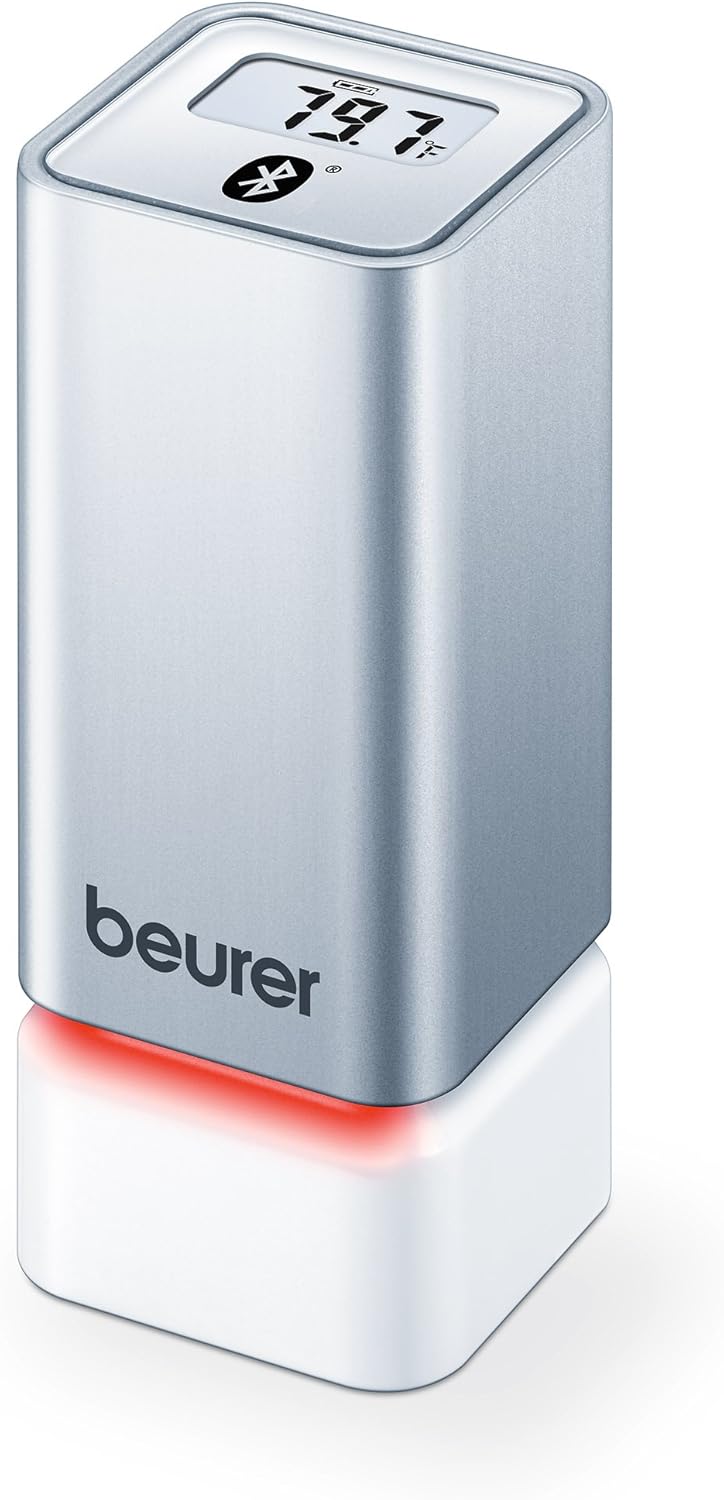
Obrázek 1: Přední view of the Beurer HM55 device, showing the display and Beurer logo.

Obrázek 2: Close-up of the HM55 display, indicating temperature, humidity, and Bluetooth icon.

Obrázek 3: The compact size of the HM55 device, shown in comparison to a hand.
- Zobrazit: Shows current temperature, relative humidity, and time.
- LED indikátor: Located at the base, changes color to indicate indoor climate quality.
- Přihrádka na baterie: Located on the underside of the device.
- Symbol Bluetooth: Indicates active Bluetooth connection.
Nastavení
1. Vložení baterií
- Locate the battery compartment on the bottom of the HM55 device.
- Otevřete kryt bateriového prostoru.
- Vložte dvě 1.5V baterie typu AAA a dbejte na správnou polaritu (+/-).
- Close the battery compartment cover securely. The device display should activate.
2. Downloading the Beurer FreshRoom App
The Beurer FreshRoom app is required to utilize the full functionality of your HM55 device, including long-term monitoring and multi-room management. The app is compatible with iOS (version 8.0 or higher) and Android (version 4.4 or higher with Bluetooth 4.0).
- For iOS devices, download the "Beurer FreshRoom" app from the Apple App Store.
- For Android devices, download the "Beurer FreshRoom" app from the Google Play Store.
- Alternatively, scan the QR code provided in the product packaging or visit the official Beurer webmísto pro přímé odkazy. Beurer Smartphone App Information

Obrázek 4: Example of the Beurer FreshRoom app interface on a smartphone.
3. Párování s vaším smartphonem
- Ujistěte se, že je na vašem smartphonu povoleno Bluetooth.
- Open the Beurer FreshRoom app.
- Follow the on-screen instructions within the app to search for and connect to your HM55 device. The app will guide you through the pairing process.
- Once successfully paired, the Bluetooth symbol on the HM55 display will illuminate, and data will begin to synchronize with the app.
4. Počáteční umístění
Place the HM55 in the room you wish to monitor. For accurate readings, avoid placing it:
- Near heat sources (e.g., radiators, direct sunlight).
- Near air conditioning vents or open windows.
- In areas with high airflow or drafts.
- In direct contact with moisture.
Obsluha zařízení
Pochopení displeje
The HM55 display provides immediate readings:
- Teplota: Displays in Celsius (°C) or Fahrenheit (°F). The unit can be changed via the app.
- Relativní vlhkost: Zobrazuje se v procentechtage (%).
- Čas: Displays the current time, synchronized via the app.
- Ikona Bluetooth: Indicates an active connection to your smartphone.
Interpreting the Colored Climate Indicator
The LED light at the base of the HM55 provides a quick visual indication of your indoor climate:
- Zelený: Optimal indoor climate.
- Červený: Poor indoor climate (e.g., too dry, too humid, or extreme temperature).
- The specific thresholds for these indicators can be customized within the Beurer FreshRoom app.

Obrázek 5: HM55 device showing a red LED indicator, signifying a poor indoor climate.

Obrázek 6: HM55 device showing a green LED indicator, signifying an optimal indoor climate.
Using the Beurer FreshRoom App
The app provides advanced features for monitoring and managing your indoor climate:
- Data v reálném čase: View current temperature and humidity readings from your device.
- Historická data: Access graphs and logs of temperature and humidity over various periods (e.g., hourly, denně, týdně, měsíčně).
- Upozornění: Set custom minimum and maximum thresholds for temperature and humidity. Receive notifications if readings fall outside these ranges.
- Nastavení: Adjust device settings such as temperature unit (°C/°F), LED brightness, and time zone.
Multi-Room Function
If you have multiple Beurer HM55 devices, the FreshRoom app allows you to monitor all of them from a single interface. Each device can be assigned to a specific room for easy identification and tracking.
- Add each additional HM55 device to the app following the pairing instructions.
- Assign a unique name or room designation to each device within the app settings.
- View and compare climate data from all connected rooms on a single dashboard.
Údržba
Čištění
- Otřete zařízení měkkým, suchým nebo lehce vlhkým hadříkemamp tkanina.
- Nepoužívejte abrazivní čisticí prostředky, rozpouštědla ani agresivní chemikálie, protože by mohly poškodit povrch nebo vnitřní součásti.
- Zajistěte, aby se do zařízení nedostala žádná kapalina.
Výměna baterie
When the battery low indicator appears on the display or in the app, replace both AAA batteries following the instructions in the "Inserting Batteries" section.
Skladování
If the device will not be used for an extended period, remove the batteries and store the device in a cool, dry place, away from direct sunlight and extreme temperatures.
Odstraňování problémů
If you encounter issues with your Beurer HM55, refer to the following common problems and solutions:
| Problém | Možná příčina | Řešení |
|---|---|---|
| Displej zařízení je prázdný. | Baterie jsou vybité nebo nesprávně vložené. | Zkontrolujte polaritu baterií nebo je vyměňte za nové baterie AAA. |
| Aplikace se nemůže připojit k zařízení. | Bluetooth is off on smartphone; device is out of range; app issue. | Ensure Bluetooth is enabled. Move smartphone closer to the device. Restart the app or smartphone. Re-pair the device if necessary. |
| Naměřené hodnoty se zdají být nepřesné. | Device placement is suboptimal; environmental factors. | Relocate the device away from direct heat, cold, or drafts. Allow time for readings to stabilize after relocation. |
| LED indicator is always red. | Indoor climate is consistently outside optimal range; app settings. | Check temperature and humidity levels in the app. Adjust environmental conditions (e.g., use a humidifier/dehumidifier, adjust heating/cooling). Review and adjust alert thresholds in the app. |
Technické specifikace
| Model | HM55 |
| Značka | Beurer |
| Napájení | 2x 1.5V AAA baterie |
| Konektivita | Bluetooth Smart (Bluetooth 4.0) |
| Kompatibilita aplikací | iOS 8.0 nebo vyšší, Android 4.4 nebo vyšší |
| Typ montáže | Držák na zeď |
| Barva | Stříbro |
| Zahrnuté komponenty | Beurer Thermo-Hygrometer |
Záruka a podpora
Společnost Beurer poskytuje na tento produkt omezenou záruku. Podrobné záruční podmínky naleznete v záruční kartě dodané s produktem nebo na oficiálních webových stránkách společnosti Beurer. webmísto.
For technical support, troubleshooting assistance, or to inquire about replacement parts, please contact Beurer customer service. Contact information can typically be found on the Beurer webmístě nebo na obalu produktu.
Online zdroje: For additional information and app support, visit Beurer Smartphone App Information.