
New bee B41
Uživatelská příručka k bezdrátovému handsfree sluchátku New Bee Bluetooth Earpiece V5.0 B41
Model: B41
1. Úvod
Thank you for choosing the New bee Bluetooth Earpiece V5.0 Wireless Handsfree Headset. This manual provides detailed instructions for setting up, operating, and maintaining your device to ensure optimal performance and longevity. Please read this manual carefully before use.

Image 1.1: New bee Bluetooth Earpiece B41 (Gold)
2. Obsah balení
Ujistěte se, že v balení jsou přítomny všechny položky:
- New bee Bluetooth Earpiece B41
- Bezdrátové nabíjecí pouzdro
- USB nabíjecí kabel
- Uživatelská příručka
- Multiple Ear Tips (Small, Medium, Large)
- Ear Hooks (various sizes)
Obrázek 2.1: Obsah balení
3. Konec produktuview
Familiarize yourself with the components of your New bee B41 Bluetooth Earpiece:
- Hlavní tlačítko: Multi-function button for power, calls, and music control.
- Tlačítka hlasitosti: Nastavení hlasitosti, přeskakování skladeb.
- Mikrofon: Integrated for clear voice transmission with CVC 6.0 Noise Cancelling.
- Nabíjecí port: Pro připojení nabíjecího kabelu USB.
- LED indikátor: Zobrazuje stav (párování, nabíjení, slabá baterie).
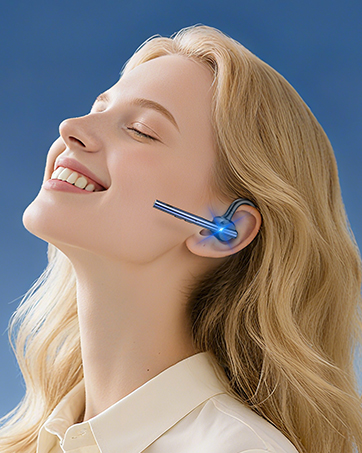
- Háček na ucho: Adjustable for secure and comfortable fit.
- Ušní koncovka: Interchangeable for personalized comfort.

Image 3.1: Earpiece Components
4. Nastavení
4.1. Počáteční nabíjení
Before first use, fully charge your earpiece.
- Connect the USB charging cable to the earpiece's charging port and a power source (e.g., computer USB port or wall adapter).
- LED indikátor bude zobrazovat stav nabíjení. Úplné nabití obvykle trvá 2–3 hodiny.
- Once fully charged, the LED indicator will change (refer to LED status in specifications).

Image 4.1: Charging the Earpiece
4.2. Spárování se zařízením Bluetooth
Follow these steps to pair your earpiece with your smartphone or other Bluetooth-enabled device:
- Zapnutí: Press and hold the Main Button until the LED indicator flashes blue and red alternately, indicating pairing mode.
- Aktivujte Bluetooth: On your device, go to Bluetooth settings and turn on Bluetooth.
- Vyberte zařízení: Look for "New bee B41" (or similar) in the list of available devices and select it.
- Potvrdit spárování: Once connected, the LED indicator on the earpiece will flash blue slowly. You may hear a voice prompt confirming the connection.
The earpiece supports connecting to two devices simultaneously. After pairing with the first device, disable Bluetooth on it, then pair with the second device. Re-enable Bluetooth on the first device, and the earpiece should connect to both.

Image 4.2: Bluetooth Pairing and Features
5. Návod k obsluze
5.1. Zapnutí/vypnutí
- Zapnutí: Stiskněte a podržte hlavní tlačítko přibližně 3 sekundy, dokud LED indikátor nezačne modře blikat.
- Vypnout: Stiskněte a podržte hlavní tlačítko přibližně 5 sekund, dokud LED indikátor nezačne blikat červeně a poté nezhasne.
5.2. Správa hovorů
- Přijmout/ukončit hovor: Stiskněte jednou hlavní tlačítko.
- Odmítnout hovor: Stiskněte a podržte hlavní tlačítko po dobu 2 sekund.
- Znovu vytočit poslední číslo: Double-click the Main Button.
- Hlasový asistent (Siri/Google Assistant): Press and hold the Main Button for 1 second (when not on a call).

Image 5.1: Call Control Button
5.3. Přehrávání hudby
- Přehrát/pozastavit: Stiskněte jednou hlavní tlačítko.
- Další skladba: Stiskněte a podržte tlačítko pro zvýšení hlasitosti.
- Předchozí skladba: Stiskněte a podržte tlačítko snížení hlasitosti.
5.4. Ovládání hlasitosti
- Zvýšení hlasitosti: Stiskněte tlačítko pro zvýšení hlasitosti.
- Snížit hlasitost: Stiskněte tlačítko pro snížení hlasitosti.
5.5. Wearing the Earpiece
The ear hook is 360-degree adjustable to fit comfortably on either your left or right ear. Choose the ear tip size that provides the best seal and comfort.

Image 5.2: Adjusting and Wearing the Earpiece
6. Údržba
- Čištění: Use a soft, dry cloth to clean the earpiece. Do not use harsh chemicals or abrasive materials.
- Skladování: Store the earpiece in its charging case or a cool, dry place when not in use. Avoid extreme temperatures.
- Péče o baterie: To prolong battery life, avoid fully discharging the battery frequently. Charge the earpiece regularly, even if not used for extended periods.
- Vystavení vodě: The earpiece is not waterproof. Avoid exposure to water or excessive moisture.
7. Řešení problémů
| Problém | Možné řešení |
|---|---|
| Earpiece does not power on. | Ujistěte se, že je baterie nabitá. Připojte ke zdroji napájení a zkuste to znovu. |
| Nelze spárovat se zařízením. |
|
| Žádný zvuk nebo nízká hlasitost. |
|
| Špatná kvalita hovoru. |
|
| Earpiece disconnects frequently. |
|
8. Specifikace
| Funkce | Detail |
|---|---|
| Název modelu | B41 |
| Verze Bluetooth | 5.0 |
| Technologie připojení | Bezdrátové (Bluetooth) |
| Bezdrátové Dosah | Až 10 metrů (33 stop) |
| Doba hovoru | Až 24 hodin |
| Čas hudby | Až 22 hodin |
| Pohotovostní doba | Až 60 dní |
| Doba nabíjení | 2-3 hodin |
| Kontrola hluku | Zrušení šumu CVC 6.0 |
| Mikrofon | V ceně |
| Hmotnost položky | 12 gramů (0.423 unce) |
| Kompatibilní zařízení | Bluetooth-enabled devices (iPhone, Android, Samsung, HTC, LG, SONY, PC, Laptop, etc.) |
| Typ baterie | 1 baterie AAA (součástí balení) |
9. Záruka a podpora
9.1. Informace o záruce
The New bee Bluetooth Earpiece B41 comes with a 3-letá záruka od data nákupu, která pokrývá výrobní vady. Navíc 30denní zásada bezplatného vrácení je k dispozici pro vybrané nákupy.

Image 9.1: Warranty and Return Policy
9.2. Zákaznická podpora
For technical assistance, warranty claims, or any questions regarding your New bee product, please contact our customer support team:
- Webmísto: Visit the official New bee webweb s nejčastějšími dotazy a zdroji podpory.
- E-mail: Viz kontaktní informace uvedené na obalu produktu nebo oficiální webmísto.
Ask a question about this manual
Ask about setup, troubleshooting, compatibility, parts, safety, or missing instructions. Manuals+ will review the question and use this page’s manual context to help answer it.