
1. Úvod
The Sengled Smart Light Bulbs A19 are Zigbee-compatible LED bulbs designed for integration into smart home systems. These bulbs provide soft white (2700K) illumination, are dimmable, and offer control via voice commands or a mobile application when connected to a compatible Zigbee hub. This manual provides instructions for installation, setup, operation, and troubleshooting.

Image 1.1: Sengled Smart Light Bulbs A19 (4-Pack)
2. Bezpečnostní informace
- Elektrická bezpečnost: Always ensure power is turned off at the switch before installing or removing bulbs.
- Pouze pro vnitřní použití: These bulbs are designed for indoor use in dry locations. Do not expose to water or excessive humidity.
- Provozní teplota: Neinstalujte do uzavřených svítidel, která omezují proudění vzduchu, mohlo by to zkrátit životnost žárovky.
- Kompatibilita stmívače: These bulbs are dimmable via the smart home system. Do not use with standard incandescent dimmers.
- Likvidace: Elektronický odpad zlikvidujte zodpovědně v souladu s místními předpisy.
3. Obsah balení
Balíček obsahuje:
- 4 x Sengled Smart LED Light Bulbs (A19, Soft White 2700K)
4. Specifikace
| Funkce | Detail |
|---|---|
| Číslo modelu | E21-N13A |
| Typ žárovky | LED |
| Velikost tvaru žárovky | A19 |
| Základna žárovky | E26 |
| Wattage | 9 wattů |
| Žárovkový ekvivalent | 60 wattů |
| Jas | 800 XNUMX lumenů |
| Teplota barev | 2700 Kelvinů (měkká bílá) |
| svtage | 120 Volts (100-120V, 60Hz) |
| Kontrolní metoda | Hlas, Aplikace |
| Konektivita | Protokol Zigbee (vyžaduje Hub) |
| Průměrný život | 25,000 hodiny |
| Vnitřní/venkovní použití | Krytý |
| Rozměry | 2.4 cm Š x 4.5 cm V |
5. Pokyny k nastavení
These Sengled Smart Light Bulbs require a compatible Zigbee hub for full functionality. Compatible hubs include Sengled Smart Hub, Amazon Echo devices with a built-in Zigbee hub (e.g., Echo 4th Gen, Echo Plus, Echo Show 10, Echo Studio), SmartThings Hub, Wink Hub, or Hubitat Hub.
5.1. Počáteční kroky nastavení
- Nainstalujte žárovku: Screw the Sengled Smart Light Bulb into a standard E26 light socket. Ensure the power to the fixture is turned off before installation.
- Zapnutí: Zapněte napájení svítidla. Žárovka by se měla rozsvítit.
- Stáhněte si aplikaci: Download the Sengled Home App from the Apple App Store or Google Play Store. Alternatively, use the app for your chosen compatible hub (e.g., Amazon Alexa App, SmartThings App).
- Registrace/Přihlášení: Otevřete aplikaci a zaregistrujte si účet, nebo se přihlaste, pokud jej již máte.
- Přidat zařízení: Follow the in-app instructions to add a new device. This typically involves scanning a QR code on the bulb or packaging, or initiating a device search within the app.
- Připojení k Hubu: The bulb will connect to your Zigbee hub. This process usually completes within one minute.
5.2. Hub-Specific Setup Options
The following images illustrate common setup configurations:

Image 5.1: Setup with Sengled Smart Hub

Image 5.2: Setup with Samsung SmartThings Hub

Image 5.3: Setup with Amazon Echo (Built-in Hub)
6. Provoz
Once successfully paired with your smart hub, the Sengled Smart Light Bulbs offer various control options.
6.1. Hlasové ovládání
Control your lights hands-free using voice commands with compatible assistants like Amazon Alexa or Google Home Assistant.

Image 6.1: Voice control example with Alexa
6.2. Dimming and Remote Control
Adjust the brightness from 1% to 100% and control your lights from anywhere using the Sengled Home App or your smart home platform's app.
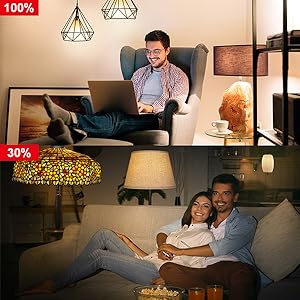
Image 6.2: Dimming functionality from 100% to 30%

Image 6.3: Remote control from any location
6.3. Plánování a rutiny
Set schedules for your lights to turn on/off or adjust brightness at specific times, such as dusk or sunrise. Create routines for automated lighting scenarios.
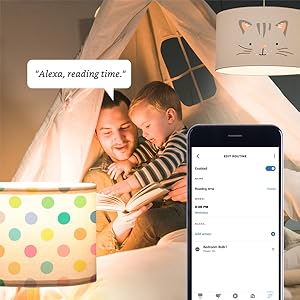
Image 6.4: Setting up a reading time routine
6.4. Skupinová kontrola
Add multiple smart bulbs (up to 64) to your smart hub system and control them individually or as a group within the app.
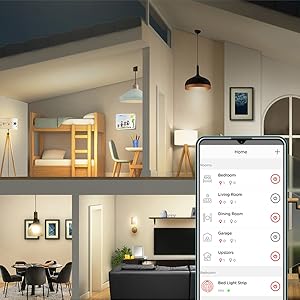
Image 6.5: Managing lights by room for group control
7. Údržba
- Čištění: Před čištěním se ujistěte, že je žárovka vypnutá a vychladlá. Otřete měkkým, suchým hadříkem. Nepoužívejte tekuté čisticí prostředky.
- Skladování: Pokud skladujete cibulky, uchovávejte je na chladném a suchém místě mimo dosah přímého slunečního záření a extrémních teplot.
- Žádné díly opravitelné uživatelem: Do not attempt to disassemble or repair the bulb. This will void the warranty.
8. Řešení problémů
8.1. Bulb Not Responding/Connecting
- Zkontrolujte napájení: Ensure the light fixture switch is in the ON position and the bulb is receiving power.
- Připojení rozbočovače: Ověřte, zda je váš Zigbee hub zapnutý a připojený k síti.
- Blízkost: Ensure the bulb is within range of your Zigbee hub or another Zigbee device acting as a repeater.
- Opětovné spárování: If the bulb loses connection, try removing it from your app and re-pairing it according to the setup instructions. Power cycling the bulb (turning it off and on 5 times) can sometimes reset it for re-pairing.
- Aktualizace aplikace: Ensure your Sengled Home App or smart home platform app is updated to the latest version.
8.2. Voice Control Issues
- Assistant Link: Confirm that your Sengled account (or smart hub) is correctly linked to your voice assistant (Alexa, Google Home).
- Zjišťování zařízení: Ask your voice assistant to "Discover devices" to ensure all bulbs are recognized.
- Command Clarity: Speak commands clearly and ensure the device name used in the command matches the name in your app.
8.3. Unstable Connection
- Síť Zigbee: A strong Zigbee mesh network is crucial. Adding more Zigbee devices (like smart plugs or other bulbs) can strengthen the network.
- Rušení: Keep your Zigbee hub away from Wi-Fi routers, microwaves, or other devices that might cause wireless interference.
9. Informace o záruce
Sengled Smart Light Bulbs are covered by a 3letá omezená záruka from the date of purchase. This warranty covers defects in materials and workmanship under normal use. For warranty claims or detailed terms, please refer to the official Sengled webwebu nebo kontaktujte zákaznickou podporu.
10. Zákaznická podpora
For further assistance, technical support, or to report issues, please visit the official Sengled support website or contact their customer service department. Contact information can typically be found on the Sengled website or within the Sengled Home App.