
Zavedení
The Nyko Clip Grip Power is an ergonomic accessory designed for the Nintendo Switch. It enhances your gaming experience by providing a comfortable grip for Joy-Con controllers, an integrated 3000 mAh rechargeable battery for extended play, a secure mount for most smartphones, and convenient storage for Nintendo Switch game cards and Micro-SD cards.

Image: The Nyko Clip Grip Power shown with Nintendo Switch Joy-Con controllers inserted and a smartphone mounted on top, illustrating its primary function as a combined gaming and mobile device accessory.
Nastavení
1. Attaching Joy-Con Controllers
- Align the Joy-Con controllers with the rails on the Clip Grip Power. Ensure the '+' and '-' buttons on the Joy-Cons match the corresponding indicators on the grip.
- Slide each Joy-Con down the rails until it clicks securely into place.
2. Attaching a Smartphone
- Locate the detachable smartphone clip on the underside of the Clip Grip Power.
- Detach the clip by sliding it out of its storage slot.
- Insert the clip into the designated slot on the top of the Clip Grip Power.
- Gently pull the top arm of the clip upwards to expand it, then place your smartphone securely within the adjustable arms. The clip is designed to accommodate most smartphone sizes.

Obrázek: Explodoval view of the Nyko Clip Grip Power, highlighting the detachable smartphone clip and the USB and micro-USB charging ports. The clip is shown both attached and detached, illustrating its storage position.
3. Charging the Clip Grip Power
- Connect the included USB charging cable to the micro-USB port on the Clip Grip Power.
- Connect the other end of the cable to a USB power source (e.g., a wall adapter, computer USB port).
- The LED indicators on the grip will illuminate to show charging status. A full charge typically takes less than 3 hours.
Návod k obsluze
1. Using as a Joy-Con Grip
Once the Joy-Cons are securely attached, the Clip Grip Power functions as an ergonomic controller grip, providing a more comfortable and familiar feel for extended gaming sessions.
2. Nabíjecí zařízení
- Joy-Cons: The integrated 3000 mAh battery automatically charges the attached Joy-Cons when they are inserted into the grip.
- Smartphone/Nintendo Switch: Use the USB-A output port on the Clip Grip Power to charge your smartphone or Nintendo Switch console using your device's charging cable.

Obrázek: Podrobný view of the Nyko Clip Grip Power, pointing out the 3000 mAh rechargeable battery and its function to charge the inserted Joy-Con controllers, extending their battery life.
3. Game and Micro-SD Card Storage
The Clip Grip Power features a hidden compartment for storing up to 7 Nintendo Switch game cards and 2 Micro-SD cards. To access, open the cover located on the front of the grip.
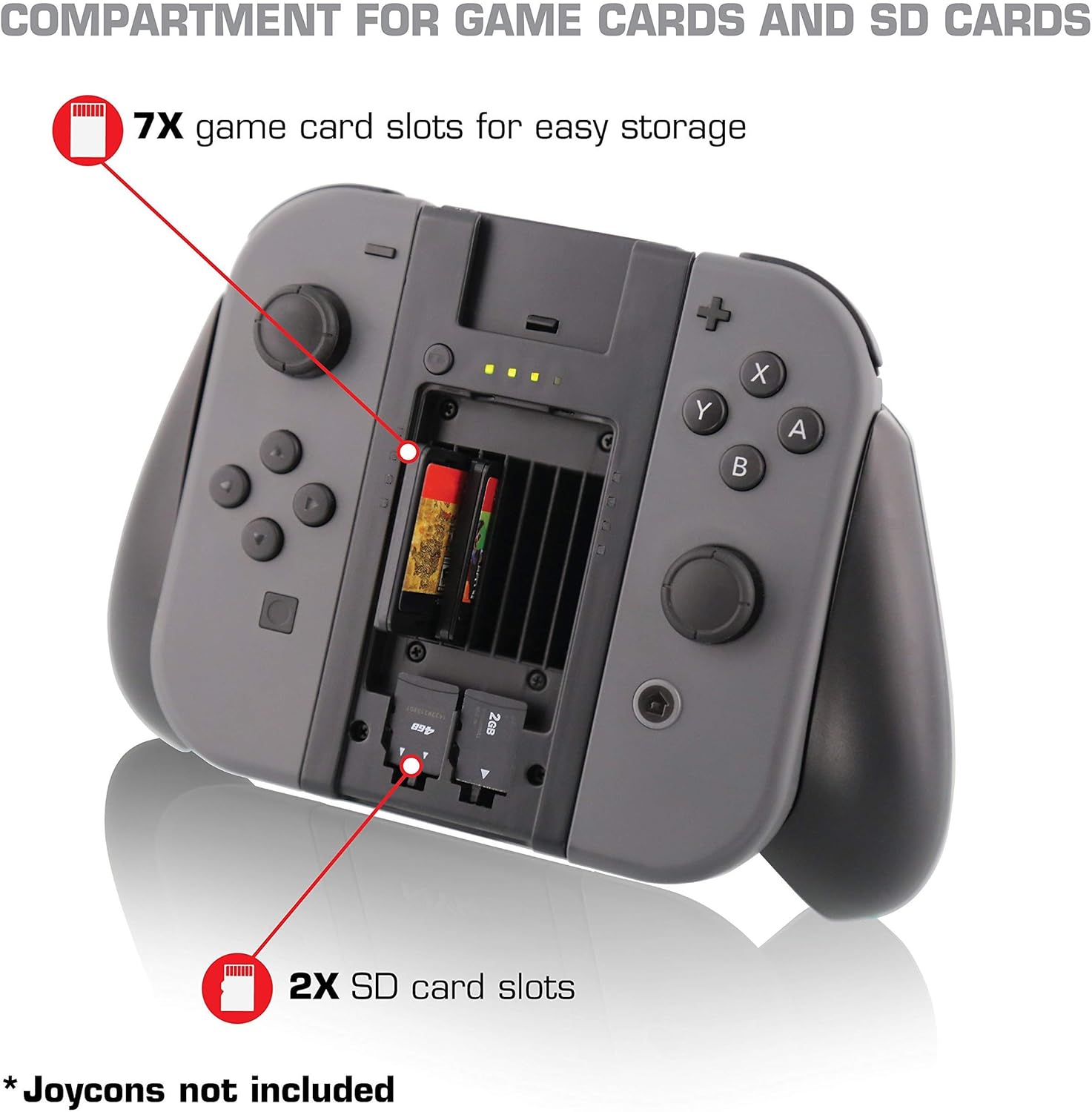
Image: The Nyko Clip Grip Power with its storage compartment open, revealing slots for seven Nintendo Switch game cards and two Micro-SD cards, demonstrating its integrated storage capability.
Údržba
Čištění
- Wipe the Clip Grip Power with a soft, dry cloth.
- Nepoužívejte drsné chemikálie ani abrazivní čisticí prostředky.
Skladování
- Přístroj skladujte na chladném a suchém místě mimo dosah přímého slunečního záření a extrémních teplot.
- When not in use, the smartphone clip can be stored on the underside of the grip for a more streamlined profile.
Odstraňování problémů
Joy-Cons Not Charging
- Ensure the Joy-Cons are fully inserted and clicked into place on the grip.
- Verify that the Clip Grip Power itself is charged. Check the LED indicators.
- If the grip's battery is depleted, connect it to a power source.
Smartphone Not Fitting in Clip
- The clip is adjustable. Gently pull the top arm to expand it.
- Remove any bulky phone cases that may prevent a secure fit.
Grip Feels Loose or Joy-Cons Slide
- Ensure Joy-Cons are fully slid down the rails until they click.
- If the issue persists, inspect the rails on both the Joy-Cons and the Clip Grip Power for any obstructions or damage.
Specifikace
| Název modelu | Clip Grip Power |
| Číslo modelu | 87220 |
| Značka | Nyko |
| Kompatibilní zařízení | Nintendo Switch, Most Smartphones |
| Kapacita baterie | 3000 XNUMX mAh |
| Skladování | 7 Nintendo Switch Game Cards, 2 Micro-SD Cards |
| Konektivita | USB (Micro-USB input, USB-A output) |
| Rozměry položky | 7.09 x 2.36 x 4.72 palce |
| Hmotnost položky | 7.8 unce |
Záruka a podpora
For warranty information or technical support, please refer to the official Nyko website or contact Nyko customer service directly. Keep your proof of purchase for any warranty claims.
Official Nyko Webmísto: www.nyko.com