
Comix CS-3302
Comix CS-3302 12-Digit Desktop Calculator User Manual
Model: CS-3302 (P/N: 11821063)
Brand: Comix
1. Úvod
This user manual provides comprehensive instructions for the Comix CS-3302 12-Digit Desktop Calculator. Please read this manual thoroughly before using the calculator to ensure proper operation and to maximize its lifespan. This calculator is designed for general office and school use, featuring a large LCD display, dual power source, and various calculation functions.
2. Bezpečnostní informace
- Do not expose the calculator to extreme temperatures, direct sunlight, or high humidity.
- Zabraňte pádu kalkulačky na zem nebo jejímu vystavení silným nárazům.
- Do not attempt to disassemble or modify the calculator. This will void the warranty.
- K čištění používejte měkký, suchý hadřík. Nepoužívejte tekuté čisticí prostředky ani abrazivní materiály.
- Uchovávejte mimo dosah malých dětí.
3. Konec produktuview

Obrázek 3.1: Přední view of the Comix CS-3302 Desktop Calculator, showing the large LCD display and full keypad.
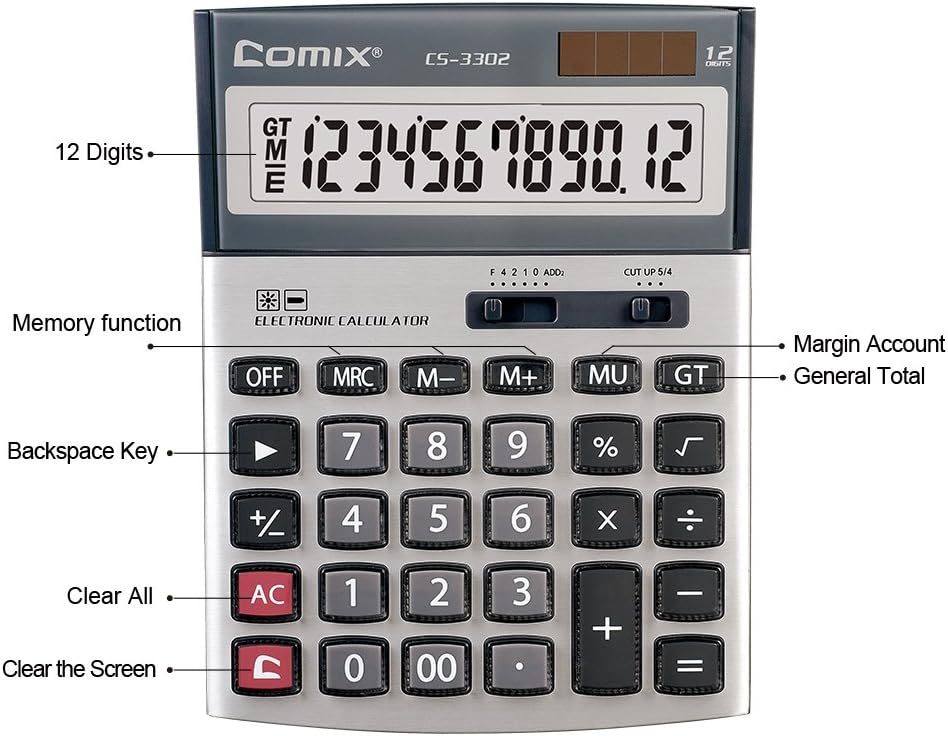
Obrázek 3.2: Key functions and display features of the Comix CS-3302 Calculator, including 12 digits display, memory functions, and clear keys.

Obrázek 3.3: Dimensions of the Comix CS-3302 Calculator, showing its compact and ergonomic design.

Obrázek 3.4: Úhlové view of the Comix CS-3302 Calculator, highlighting its sleek profile a rozložení kláves.

Obrázek 3.5: Boční profíkfile of the Comix CS-3302 Calculator, showing its slim design.

Obrázek 3.6: Retail packaging of the Comix CS-3302 Calculator, highlighting key features like 12 digits, dual power, and acrylic keys.
4. Nastavení
4.1 Zdroj napájení
The Comix CS-3302 calculator operates on a dual power system: solar and battery. The solar panel provides power in well-lit environments, while a single AA battery (not included) serves as an auxiliary power source for low-light conditions or when solar power is insufficient.
- Instalace baterie: Locate the battery compartment on the back of the calculator. Open the cover and insert one AA battery, ensuring correct polarity (+/-). Close the battery compartment cover securely.
- Počáteční zapnutí: The calculator should power on automatically when sufficient light is available or with the battery installed. If not, press the ON/AC tlačítko.
5. Návod k obsluze
5.1 Základní operace
- Doplnění (+): Zadejte první číslo a stiskněte +, zadejte druhé číslo a poté stiskněte =.
- Odečítání (-): Zadejte první číslo a stiskněte -, zadejte druhé číslo a poté stiskněte =.
- Násobení (×): Zadejte první číslo a stiskněte ×, zadejte druhé číslo a poté stiskněte =.
- Dělení (÷): Zadejte první číslo a stiskněte ÷, zadejte druhé číslo a poté stiskněte =.
- Procenttage (%): Zadejte číslo, stiskněte × (nebo ÷), enter the percentaghodnotu a poté stiskněte %. Napřampnapř. pro výpočet 10 % z 200 zadejte 200 × 10 %.
- Druhá odmocnina (√): Zadejte číslo a poté stiskněte √.
5.2 Speciální funkce
- OFF: Powers off the calculator.
- AC (vše jasné): Clears all entries and memory, resetting the calculator to its initial state.
- C (Vymazat záznam): Clears the last entered number or the current display value without affecting previous calculations or memory.
- Backspace (►): Smaže poslední zadanou číslici.
- M+ (Memory Plus): Přičte zobrazenou hodnotu do paměti.
- M- (minus paměti): Odečte zobrazenou hodnotu z paměti.
- MRC (vyvolání/vymazání paměti): Jedním stisknutím vyvoláte hodnotu z paměti. Dvojím stisknutím paměť vymažete.
- MU (Mark Up / Margin Account): Used for profit margin calculations. Enter cost, press MU, enter selling price, then press = to get the profit margin.
- GT (celkový součet): Accumulates the results of all calculations. Pressing GT displays the grand total.
- +/- (Změna znaménka): Mění znaménko zobrazeného čísla (z kladného na záporné nebo ze záporného na kladné).
5.3 Decimal and Rounding Settings
The calculator features two slide switches at the top for controlling decimal places and rounding:
- Decimal Selector (F 4 2 1 0 ADD2):
- F (Floating Decimal): Displays all available decimal places.
- 4, 2, 1, 0: Sets the number of decimal places to 4, 2, 1, or 0 respectively.
- ADD2 (Režim přidání): Automatically adds two decimal places to all results, useful for currency calculations.
- Rounding Selector (CUT UP 5/4):
- CUT (Cut Off): Truncates the number, discarding all digits beyond the set decimal places.
- UP (Round Up): Rounds up the last digit if there are any non-zero digits beyond the set decimal places.
- 5/4 (Round Half Up): Rounds up if the first discarded digit is 5 or greater, otherwise rounds down.
6. Údržba
- Čištění: Wipe the calculator surface with a soft, dry cloth. For stubborn dirt, slightly dampen the cloth with water, but ensure no liquid enters the calculator. Do not use chemical cleaners.
- Skladování: When not in use for extended periods, store the calculator in a cool, dry place away from direct sunlight and extreme temperatures.
- Výměna baterie: If the display becomes dim or unresponsive in low light, replace the AA battery. Ensure the calculator is off before replacing the battery.
7. Řešení problémů
| Problém | Možná příčina | Řešení |
|---|---|---|
| Displej je prázdný nebo tmavý. | Nedostatek světla pro solární napájení nebo slabá baterie. | Move to a brighter area or replace the AA battery. |
| Nesprávné výsledky výpočtu. | Incorrect input, incorrect decimal/rounding settings, or memory interference. | Stiskněte AC to clear all and restart. Check decimal and rounding switch positions. Ensure correct key presses. |
| Klávesy nereagují. | Kalkulačka zamrzla nebo byla fyzicky poškozena. | Zkuste stisknout VYPNUTO pak ON/AC. If problem persists, remove and reinsert battery. If still unresponsive, contact support. |
8. Specifikace
| Značka | Comix |
| Číslo modelu | CS-3302 (P/N: 11821063) |
| Zobrazit | 12místný LCD |
| Zdroj napájení | Dual Power (Solar & 1x AA Battery - not included) |
| Materiál | Akryl, kov |
| Rozměry (D x Š x V) | Přibližně 23.6 x 15.7 x 4.3 cm (9.3 x 6.2 x 1.7 palce) |
| Hmotnost | Přibližně 322 g (0.71 lb) |
| Provozní teplota | -25 ℃ to +60 ℃ (-13 ℉ to +140 ℉) |
| UPC | 842064102524 |
9. Záruka a podpora
Comix products are designed for quality and durability. This product comes with a 3-letá záruka od data nákupu, která se vztahuje na vady materiálu a zpracování při běžném používání.
For warranty claims, technical support, or any inquiries regarding your Comix CS-3302 calculator, please contact Comix customer service through their official website or the retailer where the product was purchased. Please have your proof of purchase and the product model number ready when contacting support.
For more information, visit the official Comix webmísto: www.comix.com
Ask a question about this manual
Ask about setup, troubleshooting, compatibility, parts, safety, or missing instructions. Manuals+ will review the question and use this page’s manual context to help answer it.