
1. Úvod
This user manual provides detailed instructions for the installation, operation, and maintenance of the Cooler Master Elite RC-342 Mini-Tower Computer Case. This chassis is designed to support Micro-ATX motherboards and offers efficient cooling with its front mesh design. Please read this manual thoroughly before beginning installation to ensure proper setup and optimal performance.
2. Vlastnosti produktu
- Mini-Tower Design: Compact form factor supporting Micro-ATX motherboards.
- Optimalizované větrání: Front mesh panel ensures superior airflow for component cooling.
- Easy Access I/O: Conveniently located front panel with USB ports and audio jacks.
- Dodávaný napájecí zdroj: Comes with a 400W power supply unit.
- Drive Bay Flexibility: Features internal 3.5" drive bays, including a removable bay for easier installation.
3. Nastavení a instalace
Before starting, ensure you have a clean, static-free workspace. Refer to your motherboard and component manuals for specific installation details.
3.1. Otevření případu
To access the interior, remove the two thumbscrews located at the rear of the case on the left side panel. Slide the side panel backward and lift it off.

Obrázek 3.1: Left side panel of the case. Remove thumbscrews to open.
3.2. Instalace základní desky
The Elite RC-342 supports Micro-ATX motherboards. Install the necessary standoffs into the motherboard tray according to your motherboard's mounting holes. Carefully place the motherboard onto the standoffs and secure it with screws.
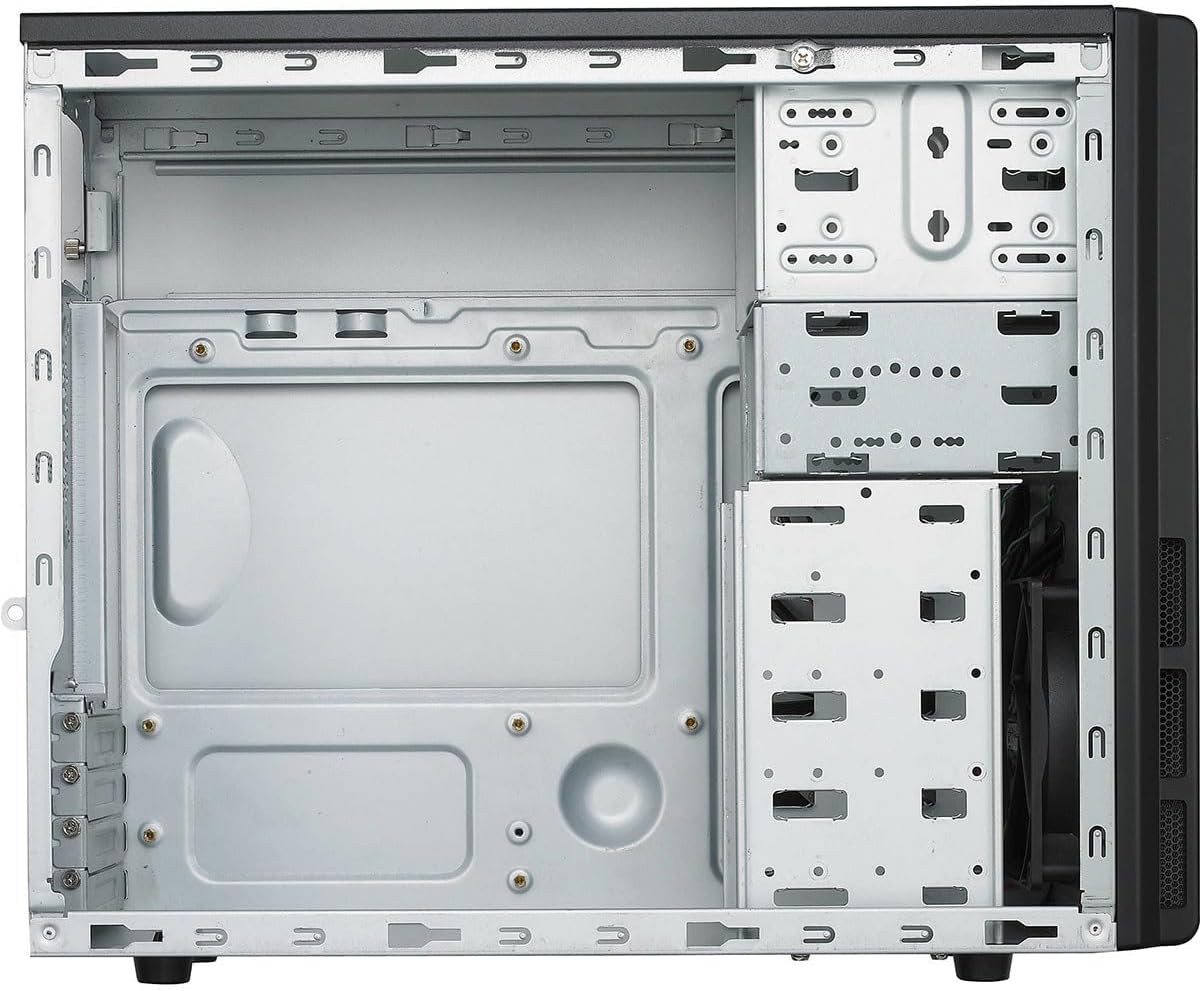
Obrázek 3.2: Interiér view of the case, illustrating the motherboard mounting area and drive bays.
3.3. Instalace disku (HDD/SSD)
The case features multiple 3.5-inch internal drive bays. One of these bays is removable to facilitate easier installation of hard drives. For 2.5-inch SSDs, use the provided 2.5-inch to 3.5-inch adapter if necessary. Secure drives with screws.

Obrázek 3.3: Removable drive cage for hard drive installation.
3.4. Instalace napájecího zdroje (PSU)
The Cooler Master Elite RC-342 includes a 400W power supply unit. Install the PSU into the designated bottom-mount area at the rear of the case. Secure it with screws from the exterior. Connect the necessary power cables to your motherboard and components.

Obrázek 3.4: The included 400W power supply unit.
3.5. Připojení předního I/O panelu
Connect the front panel cables (USB 3.0, audio, power switch, reset switch, power LED, HDD LED) to the corresponding headers on your motherboard. Refer to your motherboard manual for header locations.

Obrázek 3.5: Front panel with USB 3.0 ports, audio jacks, and power/reset buttons.

Obrázek 3.6: Zadní view of the case, showing the I/O shield area and expansion slots.
4. Provozní aspekty
The Elite RC-342 is designed for optimal airflow through its front mesh panel. Ensure that the case is placed in an area with adequate ventilation to allow for proper air intake and exhaust. Avoid blocking the front, rear, or side vents.
The front I/O panel provides convenient access to two USB 3.0 ports and audio jacks for headphones and microphones.
5. Údržba
Regular maintenance helps maintain optimal cooling performance and extends the lifespan of your components.
- Čištění prachu: Periodically clean the front mesh panel and any fan filters to prevent dust buildup, which can restrict airflow. Use compressed air or a soft brush.
- Čištění interiéru: With the system powered off and unplugged, carefully clean the interior of the case to remove accumulated dust from components and surfaces.
6. Řešení problémů
Pokud se během instalace nebo po ní setkáte s problémy, zvažte následující:
- Vhodnost komponentu: Ensure all components, especially the motherboard and expansion cards, are properly seated and secured.
- Správa kabelů: Verify that internal cables are routed efficiently and do not obstruct airflow or prevent side panel closure. Poor cable management can sometimes hinder component installation or cooling.
- Problémy s napájením: Double-check all power connections from the PSU to the motherboard and other components. Ensure the PSU switch is in the 'ON' position.
- Funkce předního panelu: If front USB ports or audio jacks are not working, confirm that their respective cables are correctly connected to the motherboard headers.
7. Specifikace
| Funkce | Detail |
|---|---|
| Značka | Cooler Master |
| Název modelu | Elita |
| Číslo modelu | RC342KKR400U3 |
| Typ pouzdra | Mini-Tower |
| Kompatibilita základní desky | Micro-ATX |
| Barva | Černý |
| Materiál | Akrylonitril-butadien-styren (ABS), legovaná ocel |
| Rozměry produktu (D x Š x V) | 17.3" x 7.1" x 13.9" (43.9 cm x 18.0 cm x 35.3 cm) |
| Hmotnost položky | 9 liber (4.08 kg) |
| Typ montáže napájecího zdroje | Spodní montáž |
| Včetně napájecího zdroje | 400 wattů |
| Způsob chlazení | Vzduch |
| Total USB 3.0 Ports | 2 (Přední panel) |
| Vnitřní pozice pro disky | 4 x 3.5 palců |
| UPC | 884102029349 |

Obrázek 7.1: Product dimensions (Depth x Width x Height).
8. Informace o záruce
The Cooler Master Elite RC-342 Computer Case comes with a 2-letá záruka od data nákupu. Tato záruka se vztahuje na vady materiálu a zpracování při běžném používání. Uschovejte si prosím doklad o koupi pro případ uplatnění záruky.
9. Podpora
For technical assistance, troubleshooting, or warranty inquiries, please visit the official Cooler Master support webnebo kontaktujte jejich zákaznický servis.
Oficiální produkt Cooler Master Webmísto: www.coolermaster.com