
KabelDirekt 1012
KabelDirekt SAT Cable User Manual
Model: 1012
1. Úvod
This manual provides comprehensive instructions for the proper use, setup, and maintenance of your KabelDirekt SAT Cable. Please read this manual thoroughly before use to ensure optimal performance and longevity of the product.
2. Konec produktuview
The KabelDirekt SAT Cable is a high-quality coaxial cable designed for reliable signal transmission for various applications including satellite TV, cable TV, and antenna/aerial TV. It supports Full HD and 4K resolutions and features robust shielding for interference protection.

Figure 2.1: KabelDirekt SAT Cable with its distinctive 90-degree angled F-connectors and product branding.
3. Klíčové vlastnosti
- High Signal Quality: Guarantees highest signal quality for satellite TV, cable TV, or antenna/aerial TV, in Full HD or 4K.
- Pokročilé stínění: Features multiple layers of shielding from aluminium Mylar foil and dense copper braid for excellent interference protection.
- Flexibilní design: Maintains high flexibility despite robust shielding.
- Durable Connectors: Connectors are protected by a break-resistant metal sleeve.
- Všestranná konektivita: Suitable for connecting TVs, satellite receivers, radio receivers, TV antennas, wall sockets for satellite dishes, and certain internet routers.
- Angled Connectors: 90-degree angled F-connectors for convenient installation in tight spaces.

Figure 3.1: The cable's gold-plated connectors and icons indicating compatibility with DVB-T2, DVB-S2, DVB-C, Radio, Internet, and Full HD 1080p.
4. Nastavení a instalace
The KabelDirekt SAT Cable is designed for straightforward installation. Follow these steps to connect your devices:
- Identifikace portů: Locate the F-type coaxial input port on your television, satellite receiver, cable modem, or wall outlet.
- Připojení prvního konce: Gently screw one of the 90-degree angled F-connectors of the KabelDirekt SAT Cable into the corresponding port on your source device (e.g., wall outlet). Ensure it is finger-tight to secure the connection without over-tightening.
- Adjust Angle (if needed): The angled connector can be rotated to achieve the desired cable routing, allowing for installation in tight spaces or flush against a wall. Loosen slightly, rotate, then re-tighten.
- Připojení druhého konce: Connect the other 90-degree angled F-connector to the input port of your receiving device (e.g., TV, satellite receiver).
- Ověřit připojení: Ensure both ends are securely connected. A loose connection can result in signal degradation.
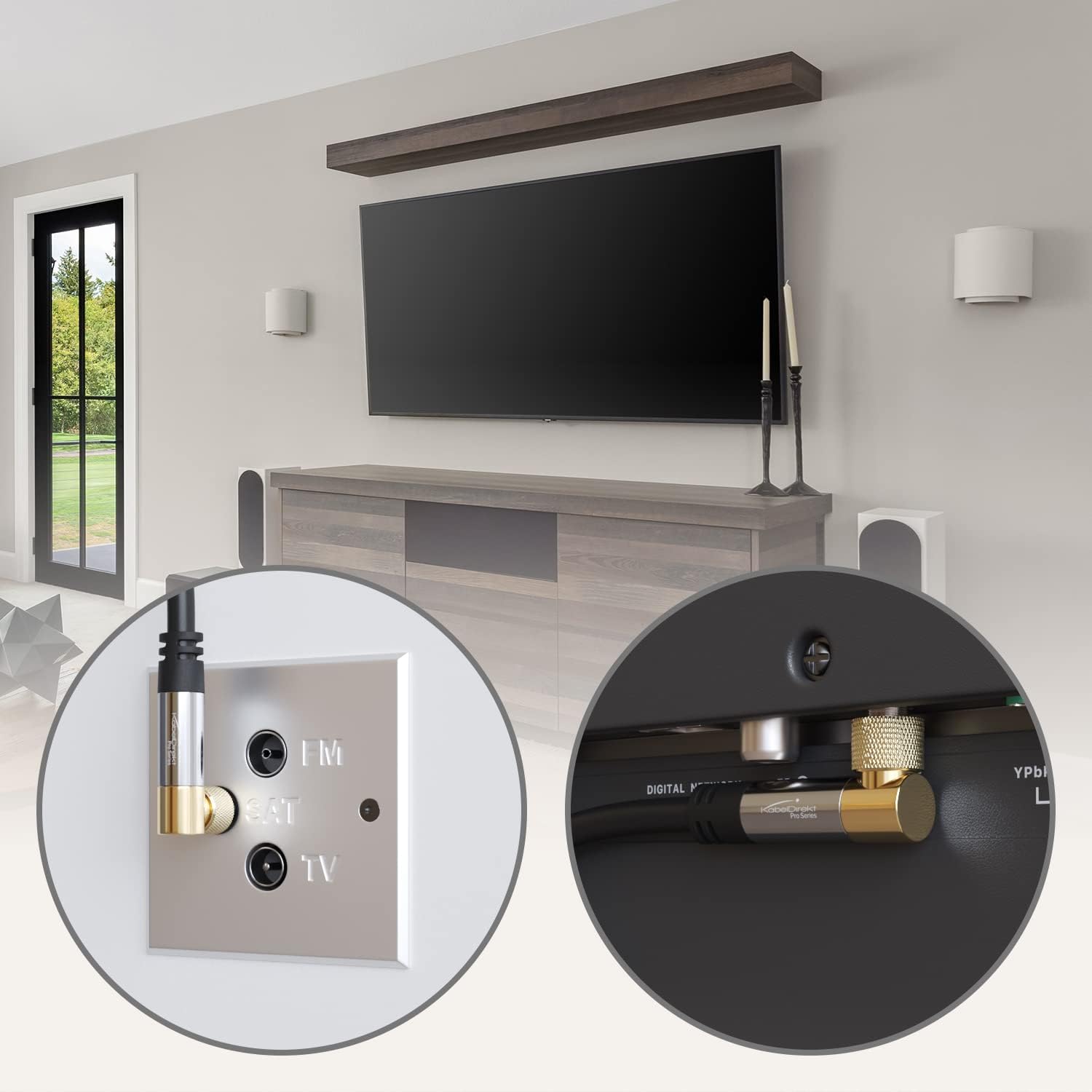
Obrázek 4.1: Přample of the KabelDirekt SAT Cable connected to a wall plate and a television, demonstrating how the 90-degree angled connector allows for a flush installation.
5. Návod k obsluze
The KabelDirekt SAT Cable functions as a passive signal conduit. Once properly connected, it requires no further operation. Its primary function is to transmit high-quality audio and video signals between compatible devices.
- Ensure all connected devices (TV, receiver, modem) are powered on and configured correctly according to their respective manuals.
- Select the appropriate input source on your television or receiver to view the signal transmitted via the cable.

Figure 5.1: Various connector configurations available for KabelDirekt satellite cables, including angled and straight options, highlighting the angled/angled configuration of this specific model.
6. Údržba
The KabelDirekt SAT Cable is designed for durability and requires minimal maintenance. Follow these guidelines to ensure its longevity:
- Čištění: K otření kabelu a konektorů použijte měkký, suchý hadřík. Nepoužívejte agresivní chemikálie ani abrazivní čisticí prostředky.
- Skladování: When not in use, store the cable in a cool, dry place, away from direct sunlight and extreme temperatures. Avoid sharp bends or kinks in the cable.
- Kontrola připojení: Periodically check the connections to ensure they remain finger-tight. Loose connections can lead to signal loss or interference.
- Fyzická kontrola: Inspect the cable periodically for any signs of damage, such as cuts, fraying, or exposed wiring. Do not use a damaged cable.

Figure 6.1: An illustration of the KabelDirekt SAT Cable's internal construction, highlighting its multi-layered shielding for enhanced signal integrity and durability.
7. Řešení problémů
If you experience issues with your KabelDirekt SAT Cable, consider the following troubleshooting steps:
| Problém | Možná příčina | Řešení |
|---|---|---|
| No Signal / Poor Picture Quality | Loose connections, damaged cable, incorrect input source selected on TV/receiver. |
|
| Interference / Static | External electromagnetic interference, loose shielding, damaged cable. |
|
8. Specifikace
| Atribut | Detail |
|---|---|
| Značka | KabelDirekt |
| Název modelu | KabelDirekt – SAT Cable, Coaxial – Internet, Satellite Cable – TV/Aerial/Coax Cord, F-Connector – Designed in Germany – 90° angled – 3.3ft (Radio, DVB-C/DVB-S2 – black) |
| Číslo modelu položky | 1012 |
| Typ kabelu | Sat cable (Coaxial) |
| Typ konektoru | F Connector (90° Angled) |
| Pohlaví konektoru | Muž k muži |
| Délka | 3.3 stopy (1 metr) |
| Barva | Černý |
| Vnější materiál | PVC (polyvinylchlorid) |
| Hmotnost položky | 1.59 unce (45 gramů) |
| Rozměry produktu | 5.67 x 4.02 x 0.63 palce |
| Kompatibilní zařízení | Satellite set-top boxes, radios, antennas, DVB-T receivers, cable set-top boxes, cable modems, TVs |
| Speciální funkce | Braided, 90° Angled Connectors |
| Vnitřní/venkovní použití | Venkovní |

Figure 8.1: Detailed measurements of the 90-degree angled F-connector, showing its compact design for space-saving installations.
9. Záruka a podpora
KabelDirekt provides a 36měsíční záruka výrobce for this product. This warranty covers defects in materials and workmanship under normal use. For warranty claims or technical support, please contact KabelDirekt customer service through their official channels or the retailer where the product was purchased.
For further assistance, please visit the official KabelDirekt webwebu nebo se podívejte na kontaktní informace uvedené při nákupu.
Související dokumenty - 1012
 |
KabelDirekt USB-C to USB-C Cable User Manual Comprehensive user manual and installation guide for KabelDirekt USB-C to USB-C cables. Includes safety instructions, troubleshooting, and technical specifications for USB 2.0, 3.2, and 4 models. |
 |
KabelDirekt 3.5mm Audio Jack Cable User Manual User manual and installation guide for the KabelDirekt 3.5mm Audio Jack Cable. Includes safety information, troubleshooting, and technical specifications. |
 |
KabelDirekt Optický HDMI kabel - Ultra High Speed 48G Podrobné informace o optickém HDMI kabelu KabelDirekt s ultrarychlým přenosem dat 48G, HDCP 2.3 a bezztrátovým přenosem signálu v rozlišení 8K. Zahrnuje technické specifikace, bezpečnostní pokyny, záruku a informace o environmentální likvidaci. |
 |
KabelDirekt 3.5mm Audio and Headset Extension Cable User Manual This user manual provides comprehensive instructions for installing, using, and maintaining KabelDirekt 3.5mm audio and headset extension cables. It includes safety information, troubleshooting tips, and technical specifications. |
 |
KabelDirekt HDMI 2.0 Mini and Micro Cable User Manual User manual and installation guide for KabelDirekt HDMI 2.0 Mini and Micro cables. Includes setup instructions, safety information, troubleshooting, and technical specifications. |
 |
KabelDirekt Garantieinformationen und Garantiebedingungen | Idel Versandhandel GmbH Umfassende Garantieinformationen für KabelDirekt-Produkte von Idel Versandhandel GmbH. Erfahren Sie mehr über Abdeckung, Bedingungen, Ausschlüsse und wie Sie Ihre Garantie 36 monatige in Anspruch nehmen. |
Ask a question about this manual
Ask about setup, troubleshooting, compatibility, parts, safety, or missing instructions. Manuals+ will review the question and use this page’s manual context to help answer it.