
Zavedení
This manual provides instructions for the proper use and care of your Helios 77M-4 50mm F1.8 vintage lens. Designed for Sony E-mount cameras, this manual focus lens offers a classic photographic experience with its distinct optical characteristics. Please read this manual thoroughly before using the lens to ensure optimal performance and longevity.
Komponenty objektivu
Familiarize yourself with the main components of your Helios 77M-4 lens.
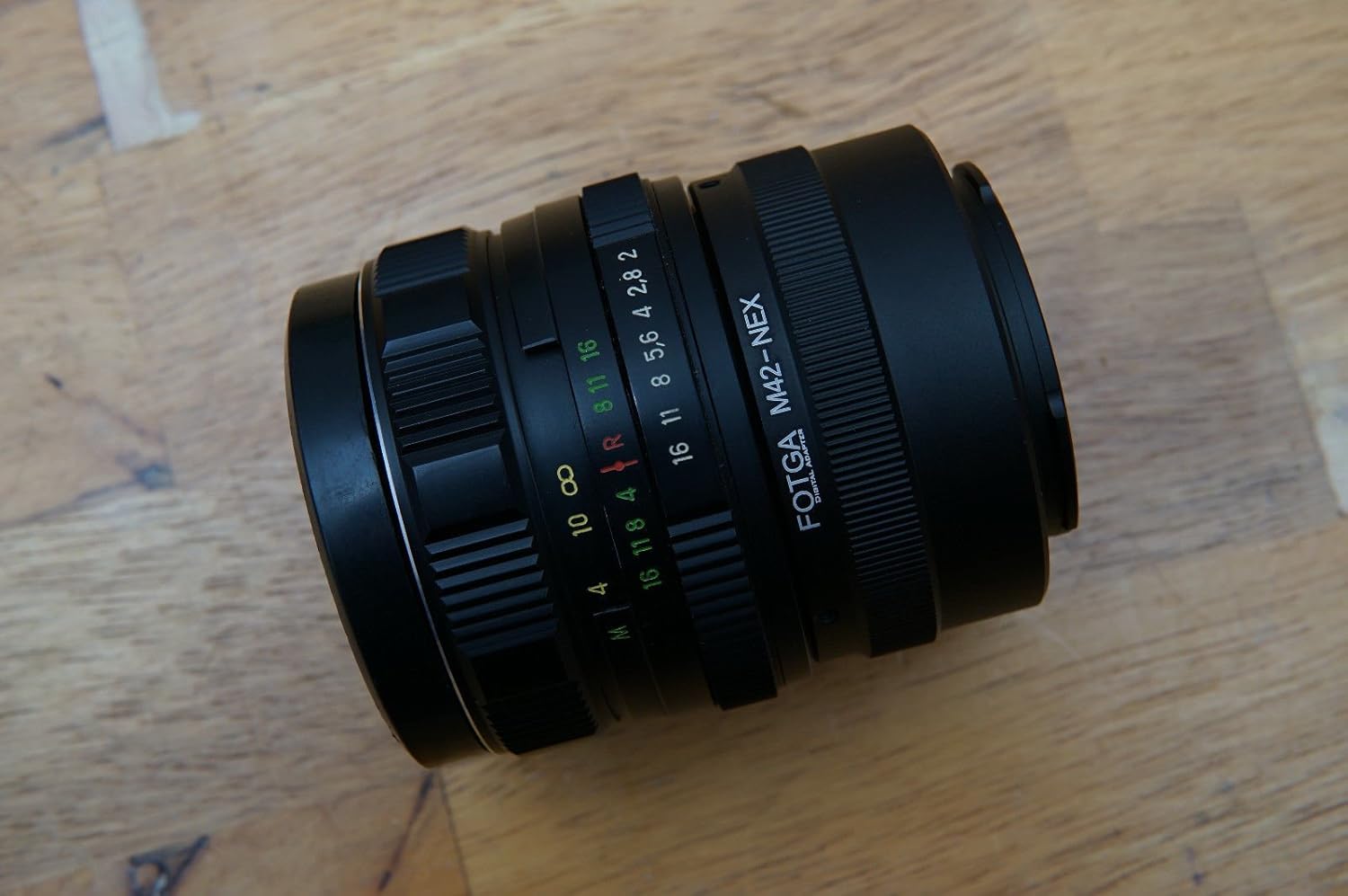
Image: The Helios 77M-4 50mm F1.8 lens, displaying its manual focus ring, aperture ring, and depth of field scale. This view highlights the robust construction and clear markings essential for manual operation.
- Zaostřovací kroužek: Used to adjust the focus manually.
- Clonový kroužek: Used to set the desired aperture (f-stop).
- Depth of Field Scale: Provides an indication of the depth of field at various apertures.
- Montážní kroužek: Spojuje objektiv s tělem fotoaparátu.
Nastavení
Montáž objektivu
- Ujistěte se, že je fotoaparát vypnutý.
- Remove the rear lens cap from the Helios 77M-4 lens and the body cap from your Sony E-mount camera.
- Align the white index mark on the lens barrel with the corresponding white index mark on the camera body.
- Vložte objektiv do bajonetu fotoaparátu a otáčejte jím ve směru hodinových ručiček, dokud nezacvakne. Netlačte na objektiv silou.
- Once mounted, remove the front lens cap.

Image: The Helios 77M-4 lens securely attached to a Sony E-mount camera body. This illustrates the correct mounting position, ready for use.
Nastavení fotoaparátu
Since this is a manual lens, you will need to adjust your camera settings:
- Nastavte fotoaparát na Manuální (M) or Aperture Priority (A) režimu.
- Umožnit "Release without lens" or "Shoot without lens" in your camera's menu, as the camera will not detect an electronic connection to the lens.
- Consider using "Focus Peaking" a "Magnified View" features on your camera for easier manual focusing. Refer to your camera's manual for specific instructions on these features.
Ovládání objektivu
Nastavení clony
The aperture is controlled directly on the lens using the aperture ring. Rotate the ring to select your desired f-stop. A wider aperture (smaller f-number like F1.8) allows more light and creates a shallower depth of field, ideal for portraits. A narrower aperture (larger f-number) allows less light and creates a deeper depth of field, suitable for landscapes.
Manuální ostření
To focus, rotate the focus ring on the lens barrel until your subject appears sharp in the viewfinder or on the LCD screen. Utilize your camera's focus peaking and magnification features for precise focusing, especially at wider apertures.
- Focus Peaking: Highlights in-focus areas with a colored outline.
- Zvětšeno View: Zooms in on a portion of the image for critical focus assessment.
Údržba
Čištění objektivu
- Use a soft, lint-free microfiber cloth specifically designed for optical surfaces to clean the front and rear elements.
- For stubborn smudges, apply a small amount of lens cleaning solution to the cloth, not directly to the lens.
- Use a blower brush to remove dust particles before wiping to prevent scratching.
- Nikdy nepoužívejte abrazivní materiály ani agresivní chemikálie.
Skladování
- Vždy nasaďte přední a zadní krytku objektivu, když objektiv nepoužíváte.
- Čočku skladujte na chladném a suchém místě, mimo dosah přímého slunečního záření a extrémních teplot.
- If storing for extended periods, consider using a dehumidifying agent to prevent fungus growth.
Odstraňování problémů
| Problém | Možná příčina | Řešení |
|---|---|---|
| Camera does not recognize lens / Cannot take photos | Manual lens, no electronic contacts. | Enable "Release without lens" or "Shoot without lens" in camera settings. |
| Obrázky jsou rozmazané | Incorrect focus or camera shake. | Ensure proper manual focus using focus peaking/magnification. Use a faster shutter speed or tripod to prevent camera shake. |
| Images are too dark/bright | Nesprávné nastavení expozice (clona, rychlost závěrky, ISO). | Adjust aperture on the lens. Adjust shutter speed and ISO on the camera to achieve desired exposure. |
| Dust or smudges on images | Znečištěné členy objektivu. | Clean lens elements carefully using a blower brush and microfiber cloth. |
Specifikace
| Funkce | Detail |
|---|---|
| Model | Helios 77M-4 |
| Ohnisková vzdálenost | 50 mm |
| Maximální clona | F1.8 |
| Typ objektivu | Standardní primární čočka |
| Kompatibilní montáže | Sony E-Mount (NEX, A7 series, 6500, a6300, a6000, a5100, a5000, a3000) |
| Typ zaměření | Manuální ostření |
| Výrobce | 77M-4 (as per product data) |
Záruka a podpora
This product is a vintage lens. Specific warranty information may vary depending on the seller and purchase conditions. Please refer to your purchase documentation for details regarding any applicable warranty.
For technical support or inquiries, please contact the retailer or the original manufacturer if contact information is available. As a vintage item, direct manufacturer support may be limited.