
1. Bezpečnostní informace
Always follow assembly instructions carefully to avoid injury or damage to the product. Ensure all components are securely fastened before placing a television or other items on the stand. Do not exceed the maximum weight capacities for the TV mount or shelves.
2. Nastavení a montáž
This section provides general guidance for assembling your Rfiver TV stand. Detailed step-by-step instructions are included in the product packaging. It is recommended to have a clear workspace and refer to the provided diagrams during assembly.
2.1 Vybalení a kontrola součástí
Carefully unpack all components and verify against the parts list in your manual. Report any missing or damaged parts immediately.
2.2 Montážní kroky
Follow the numbered steps in the included manual. Assembly typically involves:
- Assembling the base and vertical support column.
- Attaching the glass shelves to the support columns.
- Mounting the TV bracket to the vertical support.
- Attaching the TV to the mounted bracket.
Most assembly can be completed within 30-45 minutes using the supplied tools.
2.3 Správa kabelů
The stand features integrated channels for routing cables, ensuring a clean and organized appearance. Utilize the provided cable ties or clips to secure wires along the main column.

3. Návod k obsluze
The Rfiver TV stand offers several features to enhance your viewing experience and organize your media devices.
3.1 Funkce otáčení
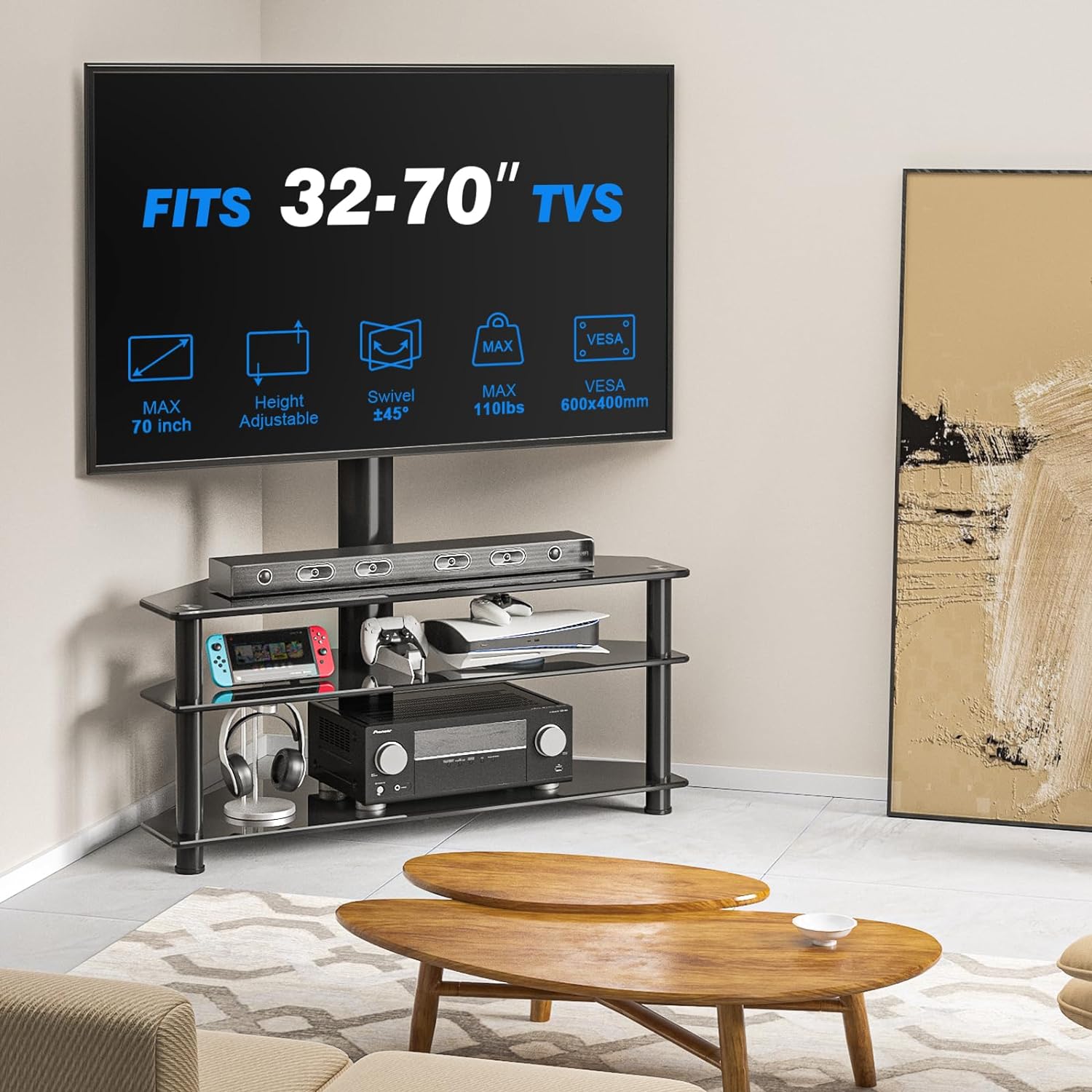
The integrated TV mount allows for a 45-degree swivel in each direction (left and right). This feature enables optimal viewsnímání z různých úhlů v místnosti.

3.2 Nastavení výšky
The TV mount offers 3 levels of height adjustment. This allows you to position your television at the desired viewing height. Adjustments are typically made by repositioning the mounting brackets on the vertical support column.

3.3 Kompatibilita s televizory
This stand is compatible with most Plasma, LED, and LCD flat and curved screens ranging from 32 to 70 inches. Ensure your TV's VESA bolt pattern falls between 100 x 100mm and 600 x 400mm. The maximum weight capacity for the TV mount is 110 lbs.
3.4 Skladovací police
The stand features three trapezoidal tempered glass shelves for storing AV components, gaming systems, soundbars, and other media devices. The top shelf has a capacity of 88 lbs, while the middle and bottom shelves each support up to 33 lbs.

4. Údržba
Proper care ensures the longevity and appearance of your Rfiver TV stand.
4.1 Pokyny pro čištění
To clean the tempered glass and metal components, wipe with a dry, soft cloth. Avoid using abrasive cleaners or harsh chemicals, as these may damage the finish or glass surface.
4.2 Obecná péče
Regularly check all screws and connections to ensure they remain tight. Do not overtighten. Avoid placing excessively heavy objects on the shelves or mount beyond their specified capacities.
5. Řešení problémů
Tato část se zabývá běžnými problémy, se kterými se můžete setkat při používání televizního stolku.
5.1 Stand Appears Wobbly
If the stand feels unstable after assembly, check the following:
- Ensure all screws and bolts are fully tightened according to the assembly instructions.
- Zkontrolujte, zda je stojan umístěn na rovném a vodorovném povrchu.
- Confirm that the TV weight does not exceed the maximum capacity of 110 lbs.
5.2 TV není v rovině
If your TV appears unlevel after mounting:
- Recheck the installation of the TV mounting brackets on the back of your television.
- Ensure the main vertical support column is correctly assembled and plumb.
6. Specifikace
| Funkce | Detail |
|---|---|
| Značka | Rfiver |
| Číslo modelu | TV Stand with Mount for 32-70 inch |
| Materiál | Tempered Glass, Aluminum |
| Barva | Černý |
| Kompatibilní velikost TV | 32-70 palců |
| Maximální nosnost televizoru | 110 liber |
| Kompatibilita VESA | 100x100mm až 600x400mm |
| Nosnost horní police | 88 liber |
| Middle/Bottom Shelf Weight Capacity | 33 liber každý |
| Rozměry produktu (D x Š x V) | 39.4 x 15 x 50.3 palce |
| Složená výška | Up to 52 inches (adjustable) |
| Hmotnost položky | 42.4 libry |
| UPC | 738920875179 |
7. Záruka a podpora
7.1 Informace o záruce
Specific warranty details are typically provided with the product packaging or can be obtained directly from the manufacturer. Please refer to the documentation included with your purchase for warranty terms and conditions.
7.2 Zákaznická podpora
For assistance with assembly, missing parts, or any other product-related inquiries, please contact Rfiver customer support. You can find contact information on the manufacturer's webwebu nebo prostřednictvím prodejce, u kterého byl produkt zakoupen.
Navštivte úředníka Rfiver Store pro více informací.