
DOOGEE F7
DOOGEE F7 Smartphone User Manual
Model: F7
1. Úvod
This user manual provides essential information for the safe and efficient operation of your DOOGEE F7 smartphone. Please read this manual thoroughly before using your device to ensure proper functionality and to prevent damage. Keep this manual for future reference.
2. Bezpečnostní informace
- Do not attempt to disassemble or modify the device. Unauthorized modifications can void your warranty and may result in damage or injury.
- Use only original or certified accessories (charger, USB cable, etc.) to avoid damage to the device and ensure safety.
- Nevystavujte zařízení extrémním teplotám, přímému slunečnímu záření nebo vysoké vlhkosti.
- Keep the device away from water and other liquids. If the device gets wet, power it off immediately and do not attempt to use it until it is completely dry.
- Do not use the device while driving or operating heavy machinery. Always prioritize safety.
- Zařízení a jeho baterii zlikvidujte zodpovědně v souladu s místními předpisy. Nevyhazujte do domovního odpadu.
3. Obsah balení
Po otevření balíku se prosím ujistěte, že jsou všechny níže uvedené položky přítomny a v dobrém stavu:
- 1 x DOOGEE F7 Smartphone
- 1 x napájecí adaptér
- 1 x USB kabel
If any item is missing or damaged, please contact your retailer or DOOGEE customer support.
4. Zařízení skončiloview
Familiarize yourself with the physical components of your DOOGEE F7 smartphone.

Obrázek 4.1: Přední, zadní a boční view of the DOOGEE F7 smartphone. This image provides a comprehensive look at the device's design, including the display, rear camera, fingerprint sensor, and side buttons.

Obrázek 4.2: Přední view of the DOOGEE F7 smartphone, highlighting the 5.5-inch display and front-facing camera.
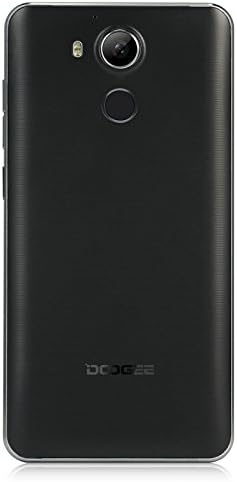
Obrázek 4.3: Zadní view of the DOOGEE F7 smartphone, showing the rear camera, LED flash, and fingerprint sensor placement.
The DOOGEE F7 features a sleek design with a 5.5-inch display on the front. The rear panel houses the main camera and a circular fingerprint sensor for secure unlocking. Volume and power buttons are located on the side for easy access.
5. Nastavení
5.1. Installing SIM Cards and SD Card
The DOOGEE F7 supports dual Micro SIM cards for flexible network usage and a microSD card for expandable storage.
- Locate the SIM/SD card tray on the side of the device.
- Insert the SIM ejector tool (if provided) into the small hole next to the tray to pop it open.
- Opatrně vytáhněte zásobník.
- Place your Micro SIM cards and/or microSD card into the designated slots on the tray, ensuring correct orientation as indicated on the tray.
- Jemně zatlačte zásobník zpět do zařízení, dokud nezapadne na místo.
5.2. Počáteční zapnutí
To power on your DOOGEE F7 for the first time:
- Stiskněte a podržte tlačítko napájení (umístěné na boku), dokud se na obrazovce nezobrazí logo DOOGEE.
- Postupujte podle pokynů na obrazovce a dokončete počáteční nastavení, včetně výběru jazyka, připojení k Wi-Fi a nastavení účtu Google.
5.3. Nabíjení baterie
Před prvním použitím se doporučuje plně nabít baterii zařízení.
- Připojte kabel USB k nabíjecímu portu na telefonu.
- Připojte druhý konec kabelu USB k napájecímu adaptéru.
- Zapojte napájecí adaptér do elektrické zásuvky.
- Na obrazovce se zobrazí indikátor nabíjení. Po úplném nabití odpojte nabíječku.
The DOOGEE F7 is equipped with a 3400mAh Li-polymer battery.
6. Obsluha vašeho zařízení
6.1. Základní funkce
- Zapnutí/vypnutí: Press and hold the Power button. Select "Power off" or "Restart" from the options.
- Uzamčení/odemknutí obrazovky: Krátkým stisknutím tlačítka napájení zamknete nebo odemknete obrazovku.
- Ovládání hlasitosti: Pomocí tlačítek pro zvýšení a snížení hlasitosti na boku můžete upravit hlasitost médií, hovorů a budíku.
6.2. Hovory a zprávy
Utilize the Phone and Messaging applications for communication. The device supports dual SIM functionality, allowing you to manage two numbers simultaneously.
6.3. Připojení k internetu
Connect to the internet via Wi-Fi or mobile data (4G FDD-LTE, 3G WCDMA, 2G GSM). Navigate to Nastavení > Wi-Fi or Nastavení > Využití dat to manage your connections.
6.4. Funkce fotoaparátu
The DOOGEE F7 is equipped with a 13.0MP rear camera with PDAF (Phase Detection Auto Focus) and a 5.0MP front camera.

Obrázek 6.1: The DOOGEE F7 camera in action, demonstrating its ability to capture dynamic scenes with its 13.0MP PDAF rear camera for faster and more stable focusing.
Open the Camera application to capture photos and videos. The PDAF technology ensures quick and accurate focusing, even in challenging lighting conditions.
6.5. Snímač otisků prstů
The integrated fingerprint scanner provides a secure and convenient way to unlock your device and authorize purchases. It supports 360-degree identification for rapid and accurate recognition.

Obrázek 6.2: Close-up of the DOOGEE F7's rear fingerprint sensor, illustrating its position relative to the camera. The image also shows the Android 6.0 software interface with various application icons.
To set up your fingerprint, navigate to Nastavení > Zabezpečení > Otisk prstu a postupujte podle pokynů na obrazovce.
6.6. Ovládání gesty
The DOOGEE F7 incorporates several gesture controls for enhanced usability:
- Dvojí poklepání: Double-tap the screen to quickly light it up.
- Gesture Start APP: Configure specific gestures to launch applications directly from the locked screen.
- Contactless Control: Utilize air gestures for certain functions without touching the screen.
- Direct Calling: Initiate calls by bringing the phone to your ear when viewing a contact.
- Contactless Hands-Free Mode: Answer calls or control media with specific hand movements.
6.7. Operační systém Android 6.0
Your DOOGEE F7 runs on Android 6.0, offering a user-friendly interface and access to a wide range of applications via the Google Play Store.
7. Údržba
- Čištění: K čištění zařízení používejte měkký, suchý hadřík, který nepouští vlákna. Nepoužívejte agresivní chemikálie ani abrazivní materiály.
- Skladování: Pokud zařízení delší dobu nepoužíváte, skladujte jej na chladném a suchém místě mimo dosah přímého slunečního záření a extrémních teplot.
- Aktualizace softwaru: Pravidelně kontrolujte a instalujte aktualizace softwaru, abyste zajistili optimální výkon a zabezpečení.
8. Řešení problémů
If you encounter issues with your DOOGEE F7, try the following basic troubleshooting steps:
- Zařízení se nezapne: Ujistěte se, že je baterie nabitá. Připojte nabíječku a před opětovným zapnutím počkejte několik minut.
- Aplikace padá nebo zamrzá: Zavřete problematickou aplikaci a znovu ji otevřete. Pokud problém přetrvává, restartujte zařízení.
- Slabý signál sítě: Zkontrolujte vložení SIM karty. Přesuňte se do oblasti s lepším pokrytím sítě.
- Rychlé vybíjení baterie: Reduce screen brightness, close unused apps, or disable features like Wi-Fi/Bluetooth when not needed.
- Problémy s rozpoznáváním otisků prstů: Ujistěte se, že máte prst čistý a suchý. V případě potřeby otisk prstu znovu zaregistrujte.
For more complex issues, refer to online resources or contact DOOGEE customer support.
9. Specifikace
| Funkce | Popis |
|---|---|
| Model | F7 |
| CPU | Helio X20 (MTK6797) Deca Core |
| Operační systém | Android 6.0 |
| BERAN | 3 GB |
| ROM | 32 GB |
| Zobrazit | 5.5 inch IPS, 1920 x 1080 pixels |
| Přední kamera | 5.0 MP |
| Zadní kamera | 13.0MP (with PDAF) |
| Kapacita baterie | Li-polymer 3400mAh |
| Množství SIM karty | Dual SIM (Micro SIM) |
| Síťová pásma | 2G: GSM 850/900/1800/1900MHz 3G: WCDMA 850/1900/2100 MHz 4G: FDD-LTE 800/1800/2100/2600MHz |
| Senzory | G-sensor, Light sensor, Proximity sensor, Gesture Sensor, Hall sensor |
| Rozměry | Rozměr 153 x 77 x 9.0 mm |
| Barva | Černý |
10. Záruka a podpora
Your DOOGEE F7 smartphone is covered by a standard manufacturer's warranty. Please refer to the warranty card included in your package for specific terms and conditions. In general, the product is subject to a return policy of 30 days for refund or replacement, as offered by Amazon.
For technical support, troubleshooting assistance, or warranty claims, please contact DOOGEE customer service or your point of purchase. Keep your purchase receipt as proof of purchase.
Ask a question about this manual
Ask about setup, troubleshooting, compatibility, parts, safety, or missing instructions. Manuals+ will review the question and use this page’s manual context to help answer it.