
1. Úvod
The Focal Shape 50 is a versatile monitoring loudspeaker designed for professional audio environments. It offers extended low-frequency response and precise control, making it suitable for rooms up to 130 sq ft (12 sq m). This manual provides essential information for the proper setup, operation, and maintenance of your Shape 50 studio monitor.

Obrázek 1.1: Přední strana view of the Focal Shape 50 Studio Monitor, showcasing its dark walnut finish and speaker components.
2. Obsah balení
Before proceeding with installation, please verify that all components are present in the packaging:
- Focal Shape 50 Studio Monitor (1 unit)
- Napájecí kabel
- Uživatelská příručka (tento dokument)
3. Nastavení
3.1 Umístění
The Shape 50 monitor is designed to be placed near a wall due to its port-less design. For optimal listening, position the monitor at a distance of approximately 30 inches (80 cm) from your listening position. Ensure the monitors are placed symmetrically in your room to achieve a balanced stereo image.
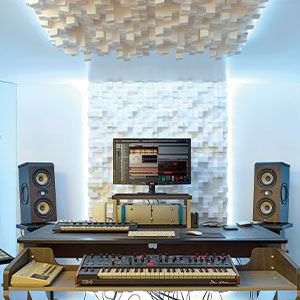
Obrázek 3.1: Přample of a studio setup with two Focal Shape 50 monitors positioned for optimal sound monitoring.
3.2 Připojení
Connect your audio source to the Shape 50 monitor using an RCA cable. Ensure all connections are secure before powering on the unit.
- Zvukový vstup: Use the RCA input for connecting your audio interface or mixer.
- Moc: Connect the provided power cord to the monitor's power inlet and then to a suitable electrical outlet.

Figure 3.2: Rear panel of the Focal Shape 50, showing the RCA input, power connection, and various adjustment controls.
3.3 Montáž
The Shape 50 includes threads for ceiling and wall mount fastening. Mounting accessories are not supplied and must be purchased separately. Consult a professional for proper installation of wall or ceiling mounts.
4. Návod k obsluze
4.1 Zapnutí/vypnutí
To power on the monitor, ensure all audio connections are made, then connect the power cord and flip the power switch located on the rear panel. To power off, reverse this process.
4.2 Úprava nastavení
The Shape 50 features numerous settings on its rear panel for optimal integration into various acoustic environments and for accurate control of sound reproduction. These include adjustments for high-frequency, mid-frequency, and low-frequency response, allowing you to tailor the sound to your specific room and preferences.
4.3 Flexible Listening Position
The monitor's low directivity tweeter design allows for a flexible listening position, providing consistent sound quality even when slightly off-axis from the monitor.
5. Údržba
To ensure the longevity and optimal performance of your Focal Shape 50 monitors, follow these maintenance guidelines:
- Čištění: Use a soft, dry cloth to clean the exterior surfaces of the monitor. Avoid abrasive cleaners or solvents.
- Větrání: Ensure adequate airflow around the monitor to prevent overheating. Do not block the ventilation openings.
- Prostředí: Operate the monitor in a stable environment, away from extreme temperatures, humidity, and direct sunlight.
6. Řešení problémů
If you encounter issues with your Focal Shape 50 monitor, refer to the following common troubleshooting steps:
- Žádný zvuk:
- Check if the monitor is powered on and the power cord is securely connected.
- Verify that the audio source is active and connected correctly to the monitor's input.
- Ensure the volume levels on both the monitor and the audio source are appropriately set.
- Zkreslený zvuk:
- Reduce the input level from your audio source to prevent clipping.
- Zkontrolujte všechny kabely, zda nejsou poškozené nebo zda nejsou uvolněné.
- Ensure the monitor's rear panel settings are not causing excessive boosting of certain frequencies.
- Hučení nebo bzučení:
- Ujistěte se, že všechny audio kabely jsou řádně stíněné.
- Try connecting the monitor to a different power outlet, preferably on a different circuit.
- Zkontrolujte, zda se v blízkosti nenacházejí elektronická zařízení, která by mohla způsobovat rušení.
If the issue persists after attempting these steps, please contact Focal customer support.
7. Specifikace
| Funkce | Specifikace |
|---|---|
| Značka | Ohniskové |
| Název modelu | Tvar 50 |
| Číslo modelu | 3544059801524 001 DWXNUMX |
| Typ reproduktoru | Monitor |
| Maximální výstupní výkon reproduktoru | 1000 wattů |
| Frekvenční odezva | 35000 Hz |
| Technologie připojení | RCA |
| Režim zvukového výstupu | Stereo, prostorový zvuk |
| Typ montáže | Wall Mount (accessories not supplied) |
| Materiál pouzdra | Vlašský ořech |
| Průměr subwooferu | 5 palce |
| Průměr basového reproduktoru | 5 palce |
| Barva | Tmavý ořech |
| Rozměry položky (D x Š x V) | 9.5"H x 12.3"Š x 7.5"V |
| Hmotnost položky | 14.33 libry |
| Zdroj napájení | Elektrický kabel |
| Počet zvukových kanálů | 2.0 |
| Kompatibilní zařízení | Chytrý telefon, tablet, MP3 přehrávač, stolní počítač, televize, projektor, notebook |
8. Informace o záruce
The Focal Shape 50 Studio Monitor is covered by a 2letá záruka výrobce od data nákupu. Tato záruka se vztahuje na vady materiálu a zpracování při běžném používání. Nevztahuje se na škody způsobené nesprávným použitím, nehodami, neoprávněnými úpravami nebo nesprávnou instalací.
Please retain your proof of purchase for warranty claims. For detailed warranty terms and conditions, refer to the official Focal webwebu nebo kontaktujte zákaznickou podporu.
9. Podpora
For technical assistance, troubleshooting beyond this manual, or warranty inquiries, please contact Focal customer support through their official webwebu nebo kontaktních informací uvedených v dokumentaci k produktu.
Online zdroje: Visit the official Focal webweb pro registraci produktů, časté dotazy a další podpůrné materiály.