
1. Úvod
The EVGA GeForce GTX 1080 Ti Founders Edition is a high-performance graphics card designed for demanding gaming and professional applications. Based on the NVIDIA Pascal architecture, it features 11GB of GDDR5X memory and advanced technologies for an immersive visual experience.

Figure 1: EVGA GeForce GTX 1080 Ti Founders Edition Graphics Card.
2. Co je v krabici
Ověřte, zda balení produktu obsahuje všechny následující položky:
- EVGA GTX 1080 Ti FOUNDERS EDITION GAMING Graphics Card
- Disk CD s ovladači
- Průvodce instalací
- 6Pin(2) to 8 Pin Adapter
- EVGA Gaming Poster
- Powered by EVGA Case Badge
- EVGA Enthusiast Built Sticker

Figure 2: Packaging contents for the EVGA GeForce GTX 1080 Ti.
3. Nastavení a instalace
Before beginning installation, ensure your computer is powered off and unplugged from the wall outlet. It is recommended to wear an anti-static wrist strap to prevent electrostatic discharge (ESD) damage.
3.1 Systémové požadavky
- PCI Express graphics slot required
- Microsoft Windows 10/11 64-bit or Linux 64-bit operating system required
- One 8-pin power connector required
- 450W system power supply required
3.2 Instalace hardwaru
- Připravte si systém: Power down your computer and unplug all cables. Open your computer case to access the motherboard.
- Vyhledejte slot PCIe: Find an available PCI Express x16 slot on your motherboard. This is typically the longest slot.
- Remove expansion slot covers: Remove the necessary expansion slot covers from the back of your computer case to accommodate the graphics card's output ports.
- Vložte grafickou kartu: Opatrně zarovnejte grafickou kartu se slotem PCIe a pevně ji zatlačte dolů, dokud nebude bezpečně usazena. Ujistěte se, že pojistná svorka na slotu PCIe zacvakne na místo.
- Zabezpečení karty: Use screws to fasten the graphics card to the computer case's expansion slot bracket.
- Připojte napájecí kabely: Connect the required 8-pin PCIe power connector from your power supply to the graphics card. If your power supply only has 6-pin connectors, use the provided 6-pin to 8-pin adapter.
- Zavřete případ: Jakmile je karta bezpečně nainstalována a připojena k napájení, zavřete skříň počítače.

Figure 3: Graphics card with power connectors visible.
4. Návod k obsluze
4.1 Instalace ovladače
- Zapnutí počítače: Connect your monitor to one of the graphics card's output ports (DisplayPort or HDMI).
- Instalace ovladačů: Insert the provided Driver CD into your optical drive and follow the on-screen instructions. Alternatively, download the latest drivers from the official EVGA or NVIDIA webmísto pro optimální výkon a kompatibilitu.
- Restart your system: After driver installation is complete, restart your computer.
4.2 Připojení displeje
The EVGA GeForce GTX 1080 Ti Founders Edition supports multiple display outputs for a versatile setup. Connect your monitor(s) using the available ports:
- DisplayPort 1.4: For high-resolution and high-refresh-rate displays.
- HDMI 2.0b: For connecting to TVs and monitors with HDMI input.

Figure 4: Available display output ports on the graphics card.
4.3 EVGA Precision XOC Software
Utilize the EVGA Precision XOC software for advanced control over your graphics card. This software allows for:
- Přetaktování: Fine-tune clock speeds and memory for enhanced performance.
- Ovládání ventilátoru: Customize fan curves for optimal cooling and noise levels.
- Podpora OSD: Monitor critical system information directly on your screen during gameplay.
- Ovládání LED: Adjust the integrated LED lighting effects.
5. Údržba
Správná údržba zajistí dlouhou životnost a optimální výkon vaší grafické karty.
- Udržujte to čisté: Pravidelně čistěte prach z ventilátorů a chladiče stlačeným vzduchem. Před čištěním se ujistěte, že je počítač vypnutý a odpojený od sítě.
- Aktualizace ovladačů: Keep your graphics drivers updated to the latest version from the official NVIDIA or EVGA webwebu. Aktualizace ovladačů často zahrnují vylepšení výkonu, opravy chyb a vylepšení kompatibility.
- Monitor temperatures: Use monitoring software (like EVGA Precision XOC) to keep an eye on your GPU temperatures, especially during heavy loads. Ensure temperatures remain within safe operating limits.
- Zajistěte správné proudění vzduchu: Make sure your computer case has adequate airflow to prevent heat buildup. Clear any obstructions around the graphics card.
6. Řešení problémů
Pokud narazíte na problémy s grafickou kartou, zkuste následující kroky pro řešení potíží:
- Žádný displej/černá obrazovka:
- Ujistěte se, že je kabel monitoru bezpečně připojen ke grafické kartě a monitoru.
- Ověřte, zda je grafická karta zcela zasunuta do slotu PCIe.
- Check that all necessary power cables are connected to the graphics card.
- Try connecting to a different display output port or using a different cable.
- Driver issues:
- Perform a clean installation of the latest graphics drivers. Uninstall existing drivers using DDU (Display Driver Uninstaller) in Safe Mode, then install the new drivers.
- Přehřívání:
- Clean dust from the heatsink and fans.
- Zajistěte správné proudění vzduchu uvnitř skříně počítače.
- Adjust fan curves using EVGA Precision XOC to increase cooling.
- Problémy s výkonem:
- Ensure your system meets the minimum requirements for the games/applications you are running.
- Aktualizujte ovladače grafiky.
- Zkontrolujte, zda aplikace na pozadí nespotřebovávají systémové prostředky.
7. Specifikace
| Funkce | Detail |
|---|---|
| Značka | EVGA |
| Číslo modelu | 11G-P4-6390-KR |
| Grafický koprocesor | NVIDIA GP102 |
| Popis karty | GeForce GTX 1080 Ti |
| Velikost paměti RAM grafické karty | 11 GB GDDR5X |
| Real Base Clock | 1480 MHz |
| Real Boost Clock | 1582 MHz |
| Rychlost paměti | 11000 MHz |
| Maximální rozlišení obrazovky | 7680x4320 |
| Video výstupní rozhraní | DisplayPort 1.4 and HDMI 2.0b |
| Hmotnost položky | 3 libry |
| Rozměry produktu (DxŠxV) | 10.5 x 1.5 x 4.38 palce |
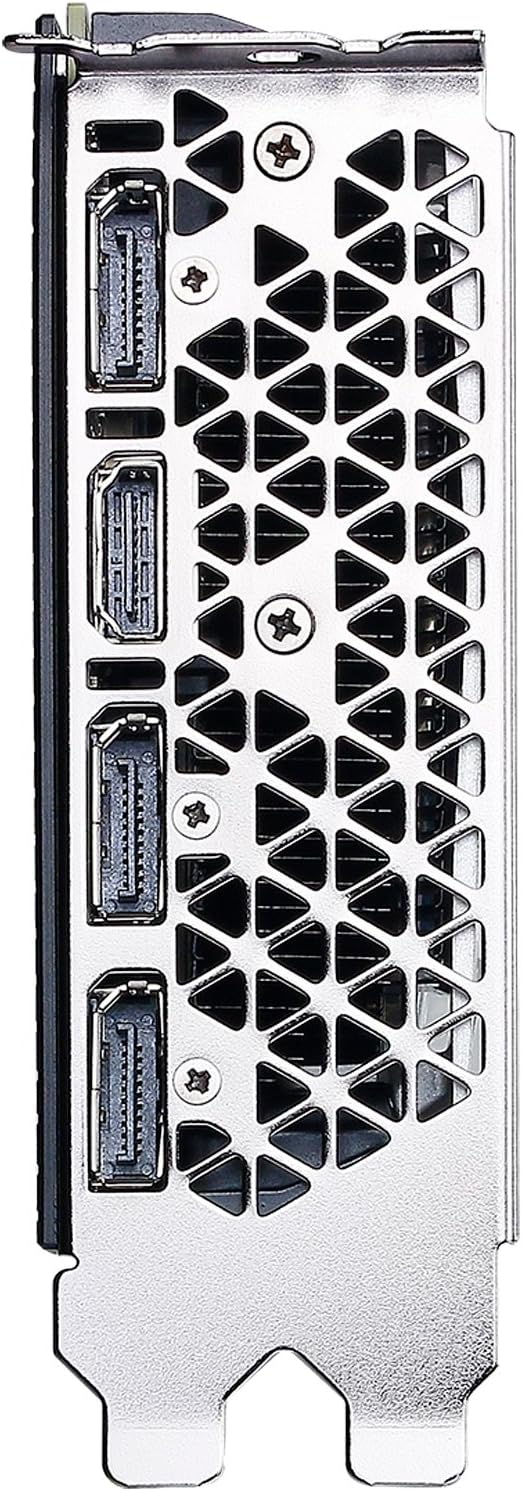
Obrázek 5: Nahoře view of the EVGA GeForce GTX 1080 Ti.
8. Záruka a podpora
EVGA products typically come with a manufacturer's warranty. Please refer to the official EVGA website or your product registration for specific warranty terms and conditions.
For technical support, driver downloads, and product registration, visit the official EVGA support page: www.evga.com.
Legal Disclaimer: A 20% restock fee may apply for returns.