
1. Úvod
This manual provides essential information for the installation, operation, and maintenance of your Alpine i209-WRA 9-inch Restyle Dash System. Engineered specifically for 2011-2018 Jeep Wrangler JK models, this mech-less AM/FM/Bluetooth system features a 9-inch WVGA capacitive touchscreen and a custom dash bezel. The i209-WRA is designed with a weatherproof touch screen and bezel, rated at IP53, offering protection against dust and fresh water spray. It supports both Apple CarPlay and Android Auto for seamless smartphone integration.
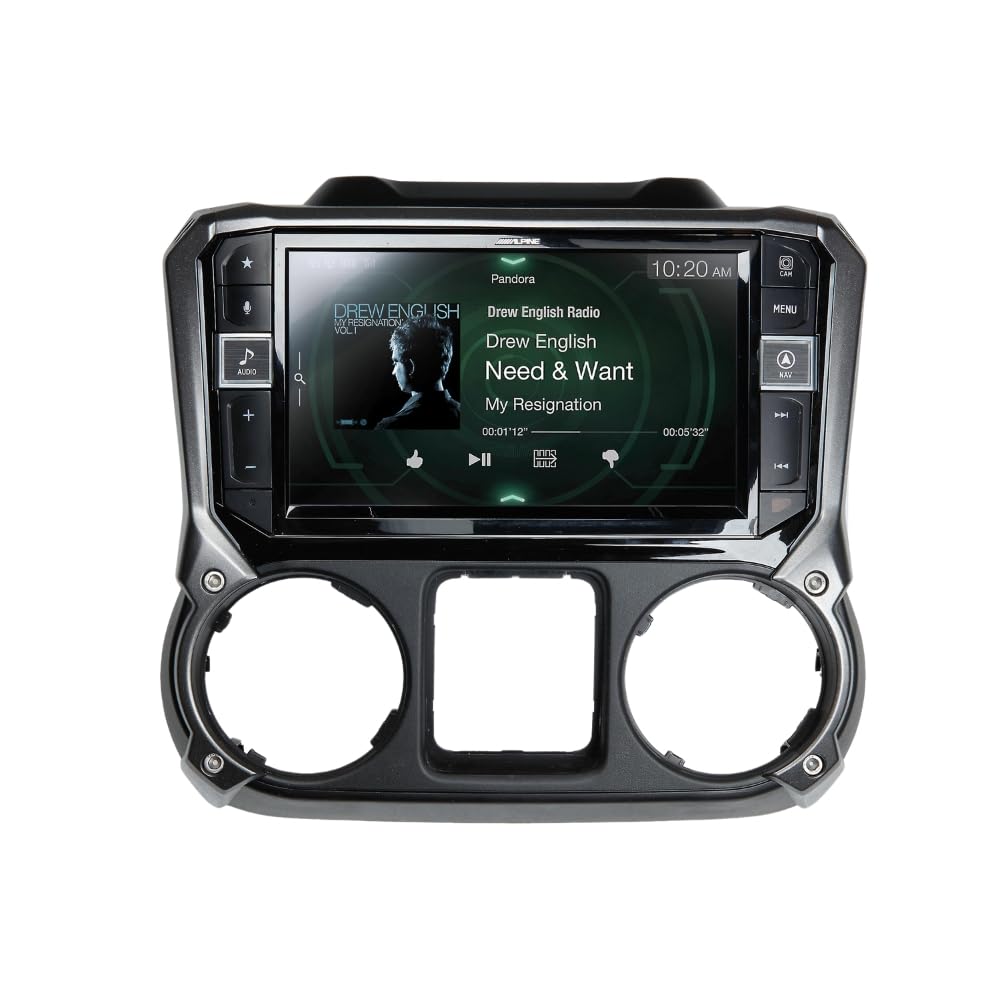
Image 1.1: The Alpine i209-WRA unit seamlessly integrated into a Jeep Wrangler JK dashboard, showcasinjeho velký displej a uživatelské rozhraní.
2. Bezpečnostní informace
Read all instructions carefully before installation and operation. Failure to follow these guidelines may result in personal injury or damage to the product or vehicle.
- Doporučená profesionální instalace: Due to the complexity of vehicle electronics and the need for dash modification, professional installation is highly recommended.
- Kompatibilita vozidla: This unit is designed for 2011-2018 Jeep Wrangler JK models. Ensure compatibility before attempting installation.
- Připojení napájení: Connect the unit only to a 12V DC negative ground electrical system. Incorrect wiring can cause fire or malfunction.
- Bezpečnost jízdy: Do not operate features that distract you from driving. Always keep your eyes on the road and obey all traffic laws.
- Odolnost vůči počasí: The unit is IP53 rated for dust and water spray. Avoid direct high-pressure water jets or submersion.
3. Co je v krabici
Verify that all components listed below are present before beginning installation.
- i209 Display Unit
- i209 Source Unit
- Prodlužovací kabel USB
- AUX/Pre-out Harness
- GPS anténa
- Direct Camera Adapter
- Kabel displeje
- Display Power Harness
- Anti-Vibration Foam
- šrouby (12)
- Source Unit HDMI Bracket
- G-KTX-i209-WRA Installation Kit Parts (i209-WRA Radio Display Bezel)
- Key Harness
- Boční montážní konzoly
- Mikrofon
- GPS Antenna Bracket
- Display Mounting Brackets
- iDatalink Maestro Box Parts (Maestro Flashing Cable)
- Anténní adaptér
- iDatalink Maestro Module
- Hlavní postroj
- Satellite Radio Antenna Adapter
- OEM USB Adapter

Image 3.1: All included wiring harnesses, adapters, and the iDatalink Maestro module for the Alpine i209-WRA system.
4. Nastavení a instalace
The installation of the Alpine i209-WRA system involves replacing the factory radio and dash components. This process requires careful attention to detail and may involve modifying the vehicle's dashboard. It is strongly recommended that installation be performed by a qualified professional.
4.1. Kroky před instalací
- Odpojit baterii: Před zahájením jakýchkoli elektrických prací vždy odpojte záporný pól baterie vozidla.
- Odstraňte tovární komponenty: Carefully remove the factory radio, dash bezel, and any associated wiring.
- Dash Modification: The installation may require cutting or modifying the factory dash structure to accommodate the larger 9-inch display and new bezel. Refer to the detailed installation guide provided with the product for specific instructions.

Image 4.1: The internal structure of the Alpine i209-WRA dash bezel, ready for display unit integration.
4.2. Wiring and Module Connection
- iDatalink Maestro Module: Connect the iDatalink Maestro module according to the provided instructions. This module retains factory features such as steering wheel controls and vehicle information display. Ensure the module is flashed with the correct firmware for your vehicle.
- Připojení kabelů: Connect the main harness, AUX/Pre-out harness, display power harness, and other specific adapters (GPS antenna, camera adapter, satellite radio adapter) to the i209 Source Unit and Display Unit.
- USB and HDMI: Route the USB extension cable and HDMI cable (if applicable) to desired locations for easy access.

Image 4.2: The Alpine i209-WRA dash bezel and mounting hardware.
4.3. Montáž jednotky
- Assemble Display and Bezel: Secure the i209 Display Unit into the custom dash bezel using the provided screws and mounting brackets.
- Install into Dash: Carefully install the assembled unit into the vehicle's dashboard, ensuring all connections are secure and no wires are pinched.
- Znovu připojte baterii: Once all components are securely installed and wired, reconnect the vehicle's negative battery terminal.
5. Návod k obsluze
The Alpine i209-WRA offers a user-friendly interface with advanced features. Familiarize yourself with the main functions for optimal use.
5.1. Zapnutí/vypnutí a základní ovládací prvky
- Moc: The unit powers on automatically with the vehicle's ignition. To manually turn off or on, press and hold the power button (if available on the bezel).
- Objem: Adjust volume using the physical buttons on the bezel or the steering wheel controls (if retained via iDatalink Maestro).
- Domovská obrazovka: Press the 'Home' or 'Menu' button on the bezel to return to the main menu.
5.2. Apple CarPlay
Connect your iPhone (iPhone 5 or later) via an Apple Lightning cable to enable Apple CarPlay. CarPlay allows you to make calls, send messages, get directions, and play music using Siri voice control or the touchscreen.
- Spojení: Plug your iPhone into the designated USB port. The CarPlay interface will automatically launch.
- Hlasové ovládání Siri: Press the 'Voice' button on the unit or steering wheel to activate Siri.
- Navigace: Use Apple Maps or other compatible navigation apps for directions.
5.3. Android Auto
Connect your Android phone (running Android 5.0 Lollipop or higher with the Android Auto app installed) via a USB cable and Bluetooth connection to use Android Auto. This feature provides a simplified interface for navigation, communication, and music.
- Spojení: Connect your Android phone via USB and ensure Bluetooth is paired. The Android Auto interface will appear.
- Hlasové příkazy: Use the 'Voice' button to activate Google Assistant for hands-free control.
- Navigace: Utilize Google Maps or Waze for turn-by-turn directions.
5.4. Bluetooth audio a handsfree volání
The i209-WRA includes built-in Bluetooth for wireless audio streaming and hands-free calling.
- Párování: Přejděte do nastavení Bluetooth na jednotce a na smartphonu a spárujte zařízení.
- Streamování zvuku: Stream music from your phone directly to the unit.
- Hands-free volání: Make and receive calls using the unit's microphone and speakers.
5.5. Radio (AM/FM/HD Radio/SiriusXM)
Access various radio sources through the unit's interface.
- AM/FM: Tune to your favorite local stations. The built-in HD Radio tuner provides enhanced sound quality where available.
- SiriusXM: The unit is SiriusXM compatible. A separate SiriusXM Connect Vehicle Tuner and subscription are required for satellite radio access.
5.6. Integrace kamery
The unit supports direct camera input. Connect compatible cameras (e.g., rearview, front, side) to enhance visibility and safety.
6. Údržba
Proper care ensures the longevity and optimal performance of your Alpine i209-WRA receiver.
- Čištění obrazovky: Dotykovou obrazovku jemně otřete měkkým hadříkem, který nepouští vlákna. V případě odolných šmouh lehceampOtřete hadřík vodou nebo čisticím prostředkem vhodným pro obrazovky. Vyhněte se agresivním chemikáliím nebo abrazivním materiálům.
- Čištění jednotky: Wipe the unit and bezel with a soft, dry cloth. Do not use excessive moisture.
- Ochrana proti počasí: While the unit is IP53 rated, prolonged exposure to extreme weather conditions (e.g., heavy rain, direct sunlight) should be minimized when possible to prevent wear and tear.
- Aktualizace softwaru: Pravidelně kontrolujte Alpine webweb s aktualizacemi firmwaru, abyste zajistili, že vaše zařízení má nejnovější funkce a opravy chyb.
7. Řešení problémů
If you encounter issues with your Alpine i209-WRA, refer to the following common problems and solutions.
- Bez napájení:
- Check vehicle's battery connection.
- Verify all power harnesses are securely connected.
- Check vehicle fuses.
- Žádný zvuk:
- Ujistěte se, že hlasitost není ztlumená nebo nastavená na minimum.
- Zkontrolujte připojení kabelů reproduktorů.
- Verify audio source selection.
- CarPlay/Android Auto se nespouští:
- Ensure your smartphone is compatible and has the latest OS updates.
- Použijte vysoce kvalitní USB kabel.
- For Android Auto, confirm Bluetooth is paired and the Android Auto app is installed.
- Try restarting your phone and the unit.
- Dotyková obrazovka nereaguje:
- Perform a soft reset (refer to the full product manual for instructions).
- Ujistěte se, že je obrazovka čistá a bez nečistot.
- Ovládání na volantu nefunguje:
- Verify the iDatalink Maestro module is correctly installed and flashed.
- Check connections to the iDatalink module.
For persistent issues, contact Alpine customer support or consult a professional installer.
8. Specifikace
| Funkce | Specifikace |
|---|---|
| Číslo modelu | i209-WRA |
| Velikost obrazovky | 9 palců |
| Typ zobrazení | WVGA Capacitive Touchscreen |
| Kompatibilita | 2011-2018 Jeep Wrangler JK |
| Integrace smartphonu | Apple CarPlay, Android Auto |
| Odolnost vůči povětrnostním vlivům | Stupeň krytí IP53 |
| Rádiový tuner | AM/FM, Built-in HD Radio, SiriusXM Ready (tuner and subscription required) |
| Bluetooth | Vestavěný Bluetooth pro handsfree volání a streamování hudby |
| Konektivita | USB, HDMI, RCA |
| Rozměry (produkt) | 3.63 x 8.44 x 5.25 palce |
| Hmotnost | 11 libry |
9. Záruka a podpora
Alpine Electronics USA provides a limited warranty for this product. For specific warranty terms, registration, and support, please refer to the warranty card included with your product or visit the official Alpine website. For technical assistance or service inquiries, contact Alpine customer support directly.
Zákaznická podpora Alpine: Refer to your product documentation or the Alpine webstránky s nejaktuálnějšími kontaktními informacemi.