
1. Úvod
This manual provides instructions for the installation, operation, and maintenance of your FreedConn TCOM VB Bluetooth Motorcycle Intercom. Please read this manual thoroughly before use to ensure proper functionality and safety.
2. Klíčové vlastnosti
- Bluetooth V5.0 for stable connectivity.
- Intercom communication for 2-3 riders with an 800m range.
- Universal pairing with most Bluetooth headsets.
- Hands-free calling for mobile phones.
- Stereo music playback and music sharing with a passenger.
- Vestavěné FM rádio.
- CVC noise reduction technology for clear audio.
- Třída vodotěsnosti IP65.
- LCD screen for easy information display.
- Long battery life: up to 10 hours talk time, 7 hours intercom, 300 hours standby.

Obrázek: Overview of FreedConn TCOM VB Intercom key features.
3. Obsah balení
Ověřte, zda jsou v balení přítomny všechny položky:
- TCOM-VB Main Unit (x2 for this package)
- Boom Microphone / Button Microphone (x2 sets)
- Speaker Pads (x12)
- Clip Bracket (x2)
- 3M Adhesive Mount (x2)
- Imbusový klíč (x2)
- Datový kabel USB (x2)
- Uživatelská příručka (x1)

Image: Contents of the FreedConn TCOM VB package.
4. Nastavení a instalace
4.1 Montáž interkomové jednotky
The TCOM VB unit can be mounted using either the clip bracket or the adhesive mount.
- Vyberte umístění: Select a suitable flat surface on the left side of your helmet.
- Clip Bracket Installation:
- Loosen the screws on the clip bracket.
- Slide the bracket between the helmet shell and the inner padding.
- Tighten the screws to secure the bracket.
- Adhesive Mount Installation:
- Clean the helmet surface thoroughly.
- Sloupněte ochrannou fólii z lepicího držáku 3M.
- Press the mount firmly onto the helmet surface for at least 30 seconds. Allow 24 hours for the adhesive to cure before use.
- Připojení hlavní jednotky: Slide the TCOM VB main unit onto the installed bracket until it clicks into place.
4.2 Instalace reproduktorů a mikrofonu
Nainstalujte reproduktory a mikrofon dovnitř helmy.
- Umístění reproduktorů: Attach the speakers to the inside of the helmet, aligning them with your ears. Use the provided speaker pads for comfort and optimal sound.
- Výběr mikrofonu: Choose between the boom microphone (for open-face helmets) or the button microphone (for full-face helmets).
- Umístění mikrofonu: Position the microphone close to your mouth for clear voice transmission.
- Připojit kabely: Plug the speaker and microphone cables into the corresponding ports on the TCOM VB main unit.

Image: Hard and soft cable microphone options for helmet installation.
Image: Step-by-step installation guide for the intercom unit.
5. Návod k obsluze
5.1 Zapnutí/vypnutí
- Zapnutí: Press and hold the Power button for approximately 3 seconds until the blue indicator light flashes.
- Vypnout: Press and hold the Power button for approximately 3 seconds until the red indicator light flashes and the unit powers down.
5.2 Bluetooth Pairing (Phone/GPS)
To connect your TCOM VB to a mobile phone or GPS device:
- Ensure the TCOM VB unit is powered off.
- Press and hold the Power button for approximately 5-7 seconds until the red and blue indicator lights flash alternately. This indicates pairing mode.
- On your phone or GPS, enable Bluetooth and search for new devices.
- Select "FreedConn TCOM VB" from the list of available devices.
- Pokud se zobrazí výzva, zadejte PIN „0000“.
- Once paired, the blue indicator light will flash slowly.

Image: Bluetooth pairing with smartphone and GPS.
5.3 Intercom Pairing and Communication
The TCOM VB supports intercom communication for up to 3 riders, with 2 riders communicating simultaneously.
- Pairing Two Units (A & B):
- Ensure both units A and B are powered off.
- Press and hold the Power button on both units A and B simultaneously for 5-7 seconds until they enter pairing mode (red and blue lights flash alternately).
- Press the Power button on either unit A or B once. The units will search and pair with each other. Once paired, the blue light will flash slowly on both.
- Pairing Three Units (A, B, & C):
- First, pair units A and B as described above. Turn off both A and B after successful pairing.
- Next, pair units B and C. Turn off both B and C after successful pairing.
- To initiate a 3-way intercom: Power on all three units. Press the Power button on unit C once to connect to B. Then, press the Power button on unit B once to connect to A. All three units should now be connected.
- Initiate Intercom Call: After pairing, a short press of the Power button will initiate or end an intercom call.
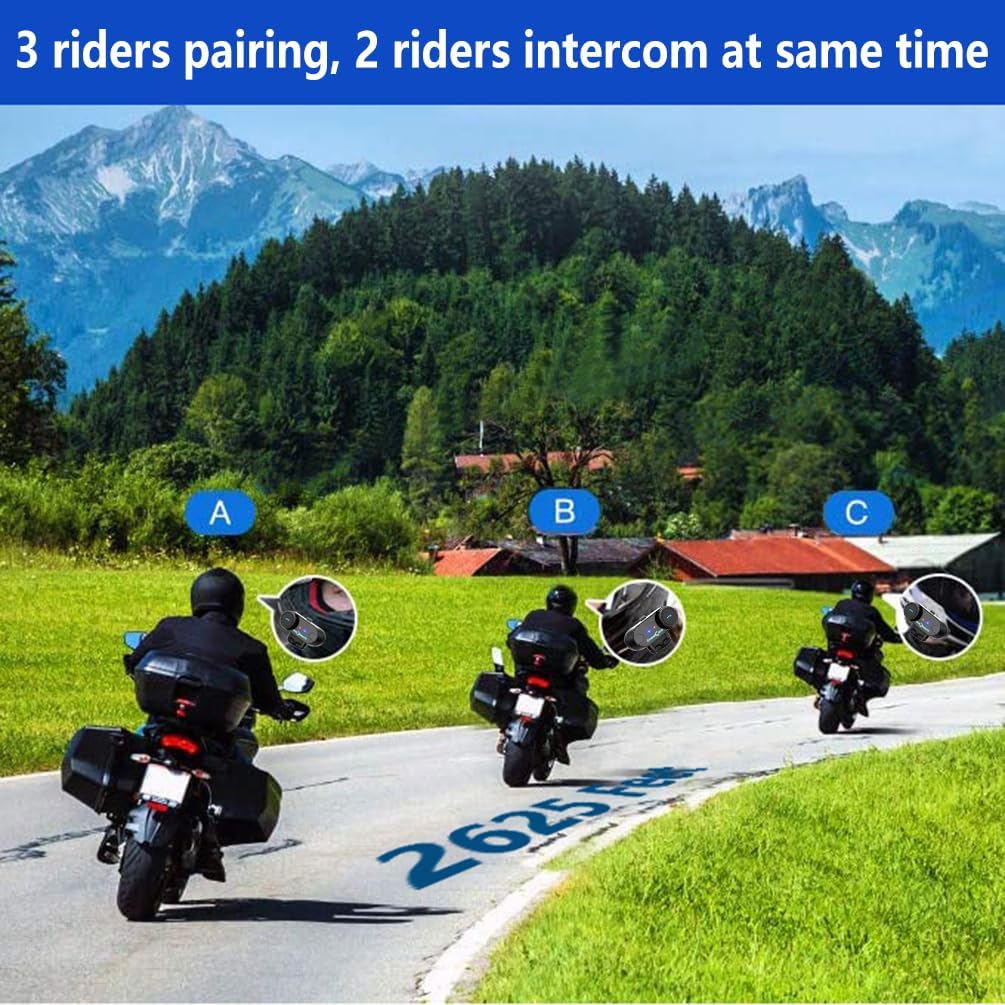
Image: 3 riders pairing, 2 riders intercom at the same time.

Image: Universal pairing feature.
Video: This video demonstrates the pairing process for three T-COMSC intercom units. The pairing steps are generally similar for TCOM VB models. First, pair two devices (A and B), then turn them off. Next, pair device B with device C. Finally, power on all three and initiate connections from C to B, then B to A for a three-way intercom.
5.4 Funkce telefonu
- Přijmout hovor: Krátce stiskněte tlačítko Telefon.
- Ukončit hovor: Krátce stiskněte tlačítko Telefon.
- Odmítnout hovor: Stiskněte a podržte tlačítko Telefon po dobu 2 sekund.
- Znovu vytočit poslední číslo: Dvakrát stiskněte tlačítko Telefon.
- Voice Assistant (Siri/S-Voice): Short press the Voice Assistant button (if available) or a specific button combination as per your device's manual.
5.5 Přehrávání hudby
- Přehrát/pozastavit: Krátce stiskněte tlačítko Přehrát/Pozastavit.
- Další skladba: Short press the "Next" button or rotate the multi-function knob clockwise.
- Předchozí skladba: Short press the "Previous" button or rotate the multi-function knob counter-clockwise.
- Sdílení hudby: While playing music, activate the music sharing function (refer to specific button combination in the full manual) to share audio with a paired intercom unit.

Image: Music sharing with a partner.
5.6 FM rádio
- Zapnutí/vypnutí FM rádia: Press and hold the FM button for 2 seconds.
- Skenovací stanice: Short press the "Next" or "Previous" button to scan for available FM stations.

Image: Built-in FM Radio feature.
5.7 Ovládání hlasitosti
Adjust the volume using the multi-function knob or dedicated volume buttons (if present).
- Zvýšení hlasitosti: Rotate the multi-function knob clockwise or press the Volume Up button.
- Snížit hlasitost: Rotate the multi-function knob counter-clockwise or press the Volume Down button.
6. Údržba
- Čištění: Jednotku otřete měkkým, damp tkanina. Nepoužívejte agresivní chemikálie nebo abrazivní čisticí prostředky.
- Voděodolnost: The unit is IP65 waterproof, meaning it is protected against low-pressure water jets from any direction. It is not designed for submersion. Ensure the USB port cover is securely closed when not charging.
- Nabíjení: Charge the unit using the provided USB cable. A full charge takes approximately 2.5 hours. The indicator light will change to indicate charging status (e.g., red during charging, blue when fully charged).
- Skladování: Pokud přístroj delší dobu nepoužíváte, skladujte jej na chladném a suchém místě.

Image: Battery life and waterproof features.
7. Řešení problémů
| Problém | Možná příčina | Řešení |
|---|---|---|
| Žádná síla | Slabá baterie | Nabíjejte jednotku po dobu 2.5 hodin. |
| Nelze spárovat s telefonem/GPS | Unit not in pairing mode; Bluetooth disabled on device | Ensure unit is in pairing mode (red/blue flashing). Enable Bluetooth on your device. |
| Interkom se nepřipojuje | Units not paired correctly; out of range | Repeat intercom pairing steps. Ensure units are within 800m range. |
| Low audio volume or no sound from speakers | Speakers not positioned correctly; volume too low; cable loose | Adjust speaker position closer to ears. Increase volume. Ensure speaker cable is fully inserted. |
| Poor microphone quality / background noise | Microphone not positioned correctly; wind noise | Position microphone closer to mouth. Ensure CVC noise reduction is active. Consider using a different microphone type if applicable. |
Poznámka: If your two speakers or one side speaker are not working, ensure the headset cable is completely inserted into the interface and that the speaker is inserted into the correct port. If the volume is low, adjust the speaker placement as close to your ears as possible.
8. Specifikace
| Model: | T-COMVB-800M |
| Verze Bluetooth: | 5.0 |
| Rozsah interkomu: | Až 800 metrů (mezi 2 jezdci) |
| Max Riders: | 3 (2 simultaneous communication) |
| Kapacita baterie: | 400 XNUMX mAh |
| Doba nabíjení: | Přibl. 2.5 hodin |
| Doba hovoru: | Až 10 hodin |
| Čas interkomu: | Až 7 hodin |
| Pohotovostní doba: | Až 300 hodin |
| Voděodolnost: | IP65 |
| Průměr reproduktoru: | 40 mm |
| Impedance: | 32 ohmů |
| Frekvenční rozsah: | 20 Hz - 20,000 XNUMX Hz |
| Kontrola hluku: | Aktivní potlačení hluku (CVC) |
| Kompatibilní zařízení: | Mobile phones, MP3 players, GPS devices |
9. Záruka a podpora
Informace o záruce a technickou podporu získáte na oficiálních stránkách společnosti FreedConn. webnebo se obraťte na místního distributora. Uschovejte si účtenku jako doklad o koupi pro případ reklamace.
For common issues, please consult the troubleshooting section of this manual or the online FAQ resources provided by FreedConn.