
Zavedení
This manual provides instructions for the ZdalaMit RM-YD102 Replacement Remote Control. This remote is designed as a direct replacement for various Sony Bravia TV models, offering immediate functionality without the need for programming.
Kompatibilní modely televizorů Sony:
- KDL-50W790B, KDL-50W800B
- KDL-55W790B, KDL-55W800B, KDL-55W950B, KDL-55X830B
- KDL-60W840B, KDL-60W850B
- KDL-65W950B, KDL-65X830B
- KDL-70W830B, KDL-70W840B, KDL-70W850B, KDL-70X830B
- XBR-49X850B, XBR-55X850B, XBR-55X900B
- XBR-65X850B, XBR-65X900B, XBR-65X950B
- XBR-70X850B, XBR-79X900B, XBR-85X950B
Nastavení
The ZdalaMit RM-YD102 remote control requires no programming. Simply insert two AAA alkaline batteries, and it will be ready for use with your compatible Sony Bravia TV.
Vkládání baterií
- Najděte přihrádku na baterie na zadní straně dálkového ovladače.
- Posuňte kryt přihrádky na baterie dolů a sejměte jej.
- Insert two 1.5V AAA alkaline batteries, ensuring the positive (+) and negative (-) terminals align correctly with the markings inside the compartment.
- Nasaďte kryt přihrádky na baterie tak, že jej zasunete zpět na místo, dokud bezpečně nezacvakne.
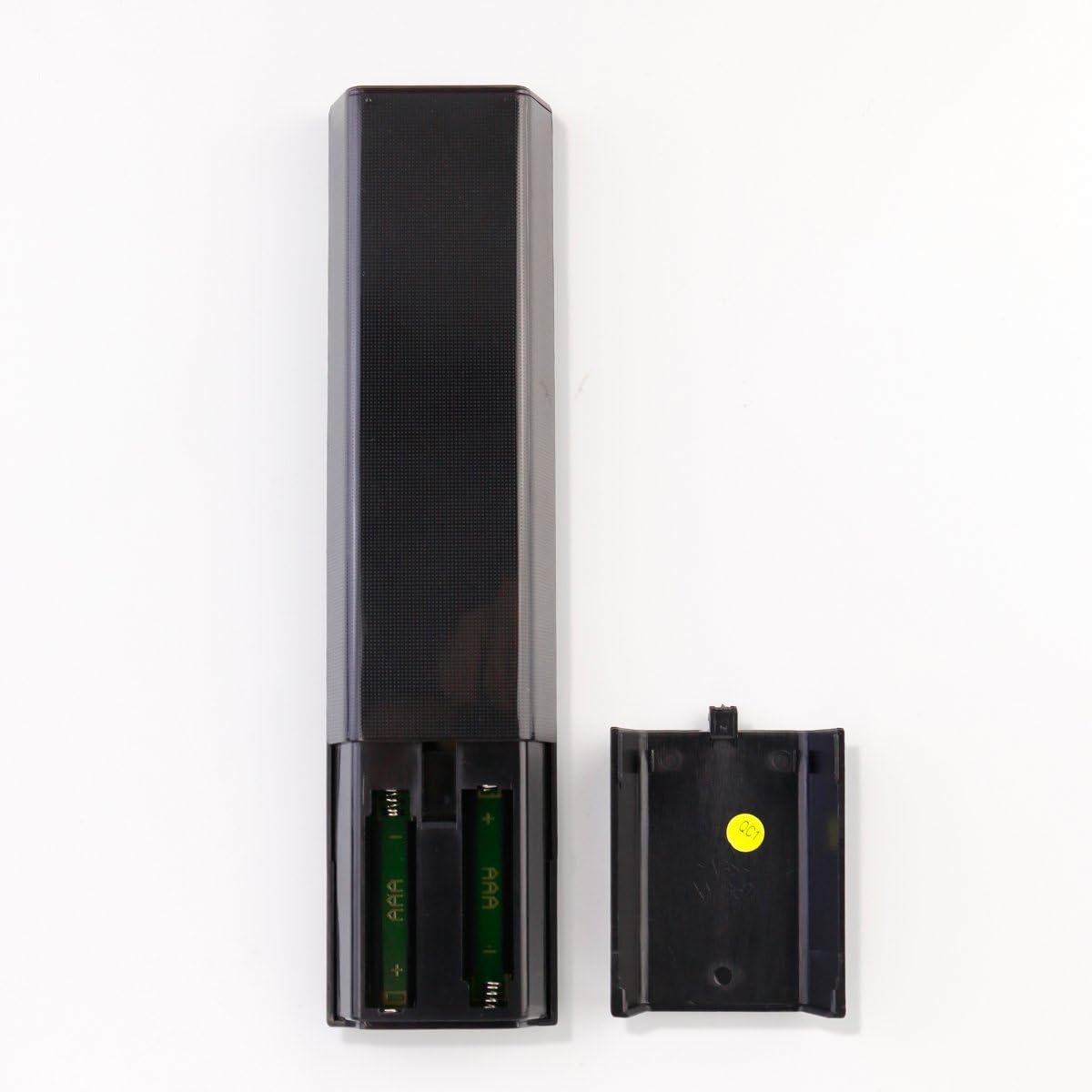
Image: Back of the remote control with the battery compartment open, illustrating the correct orientation for inserting two AAA batteries.
Once batteries are inserted, the remote is ready to operate your TV.
Návod k obsluze
The ZdalaMit RM-YD102 remote control provides full functionality for your compatible Sony Bravia TV. Point the remote directly at your TV's infrared receiver for optimal performance.

Obrázek: Přední strana view of the remote control, displaying the layout of all buttons for various TV functions.
Klíčové funkce:
- MOC: Zapíná nebo vypíná televizor.
- VSTUP: Selects the input source (e.g., HDMI 1, HDMI 2, AV).
- VOL +/-: Nastavuje úroveň hlasitosti.
- CH +/-: Mění televizní kanály.
- Ztlumení: Ztlumí nebo zapne zvuk televizoru.
- Číselná tlačítka (0-9): Přímý výběr kanálů.
- Navigační klávesnice (nahoru/dolů/vlevo/vpravo/Enter): Prochází menu a potvrzuje výběr.
- DOMOV: Accesses the TV's main menu or smart TV interface.
- NÁVRAT: Návrat na předchozí obrazovku nebo do nabídky.
- MOŽNOSTI: Zobrazuje kontextově citlivé možnosti.
- Netflix, Discover, Apps, Football, Social View: Direct access buttons for specific features or applications (functionality depends on TV model and internet connection).
- Přehrát/Pozastavit/Zastavit/Přetočit vzad/Rychle vpřed: Ovládá přehrávání médií.
- PRŮVODCE: Otevře elektronického programového průvodce.
- ZOBRAZIT: Zobrazuje informace na obrazovce.
- SUBTITLE/CC: Toggles subtitles or closed captions.
For detailed information on specific TV functions, please refer to your Sony Bravia TV's original user manual.
Údržba
- Čištění: Dálkový ovladač otírejte měkkým, suchým hadříkem. Nepoužívejte tekuté čisticí prostředky ani abrazivní materiály.
- Výměna baterie: Replace batteries when the remote's response becomes sluggish or stops working. Always replace both batteries at the same time with new 1.5V AAA alkaline batteries.
- Skladování: Pokud dálkový ovladač nebudete delší dobu používat, vyjměte baterie, abyste zabránili jejich vytečení a možnému poškození.
- Prostředí: Keep the remote control away from extreme temperatures, direct sunlight, and moisture.
Odstraňování problémů
| Problém | Řešení |
|---|---|
| Dálkové ovládání nefunguje. |
|
| Některá tlačítka nefungují. |
|
| Remote response is slow or intermittent. |
|
Specifikace
| Značka | ZdalaMit |
| Název modelu | RM-YD102-ZDLMT |
| Kompatibilní zařízení | Sony Bravia Televisions (specific models listed in Introduction) |
| Technologie připojení | Infračervený |
| Napájení | 2 x 1.5V AAA alkalické baterie |
| Množství tlačítek | 18 |
| Maximální dosah | 33 stop (přibližně 10 metry) |
| Barva | Černý |
| Hmotnost položky | 40 gramů |
| Rozměry položky (D x Š x V) | 7.94" x 1.99" x 0.55" (přibližně 20.17 cm x 5.05 cm x 1.40 cm) |
Informace o záruce
This ZdalaMit RM-YD102 Replacement Remote Control comes with a 1-letá záruka from the date of purchase. This warranty covers manufacturing defects under normal use. It does not cover damage caused by misuse, accidents, unauthorized modifications, or battery leakage.
Uschovejte si prosím doklad o koupi pro uplatnění záruky.
Zákaznická podpora
If you encounter any issues or have questions regarding your ZdalaMit RM-YD102 Replacement Remote Control that are not addressed in this manual, please contact the seller or manufacturer for assistance.
For the fastest support, please provide your product model number (RM-YD102) and details of the issue you are experiencing.