
SHARP LC-40U45
SHARP AQUOS LC-40U45 40-inch 4K HDR LCD TV User Manual
Model: LC-40U45 | Brand: SHARP
1. Úvod
This manual provides essential information for the safe and efficient operation of your SHARP AQUOS LC-40U45 40-inch 4K HDR LCD TV. Please read these instructions thoroughly before using the product and retain them for future reference.
The LC-40U45 features a 4K low-reflection panel to minimize glare, 120-speed backlight technology for smooth motion, and the AQUOS 4K-Master Engine PRO II for high-definition image processing. Experience enhanced audio with the bass-reflex speaker box, Sound by ONKYO collaboration, and Eilex PRISM technology. The TV also includes a swivel stand for flexible viewing úhly.
2. Bezpečnostní informace
Při používání tohoto televizoru vždy dodržujte základní bezpečnostní opatření, abyste snížili riziko požáru, úrazu elektrickým proudem a zranění.
- Nevystavujte televizor dešti ani vlhkosti.
- Nezakrývejte ventilační otvory.
- Zajistěte správné uzemnění zástrčky.
- Během bouřek nebo pokud televizor delší dobu nepoužíváte, odpojte jej ze zásuvky.
- Uchovávejte malé součástky a baterie mimo dosah dětí.
3. Co je v krabici
Ověřte, zda jsou s vaším televizorem dodány všechny následující položky:
- SHARP AQUOS LC-40U45 4K HDR LCD TV
- Dálkové ovládání (se 2 bateriemi AAA)
- Napájecí kabel
- Stolní stojan (pokud je k dispozici)
- AV Terminal Conversion Cable
- Uživatelská příručka (tento dokument)
4. Nastavení
4.1 Physical Placement and Dimensions
Ensure the TV is placed on a stable surface or mounted securely. The dimensions of the TV with the stand are approximately 90.1 cm (width) x 27.1 cm (depth) x 55.8 cm (height). The weight is approximately 20.5 kg.

Figure 4.1: TV dimensions (Width: 90.1cm, Height: 55.8cm, Depth: 27.1cm) and recommended viewing distance of approximately 150cm.
4.2 Připojení periferních zařízení
Your TV offers various connection ports on the rear panel for external devices.

Figure 4.2: Rear panel connections including HDMI inputs, USB ports, headphone jack, AV input, LAN port, and antenna inputs.
- HDMI vstupy (x4): Connect Blu-ray players, game consoles, or other HDMI-compatible devices. Input 1 supports HDR.
- USB porty (x2): Connect USB storage devices for media playback or external HDD for recording.
- PC Input (x1): Připojte počítač.
- LAN Port (10BASE-T/100BASE-TX): Pro kabelové připojení k internetu.
- Headphone Jack (3.5mm stereo mini-jack): Pro soukromý poslech.
- AV vstup: Use the provided AV terminal conversion cable for older devices.
- Anténní vstupy: Connect terrestrial digital and BS/CS digital antennas.
- B-CAS Card Slot: Insert the B-CAS card to decrypt digital broadcasts.
4.3 Síťové připojení
The TV supports both wired and wireless (Wi-Fi) network connections. Built-in Wi-Fi allows for easy connection to your home network.
4.4 Swivel Stand
The TV features a swivel stand that allows you to adjust the screen angle left and right by 30 degrees. This provides flexibility for optimal viewing from various positions in the room and makes accessing rear ports easier for cleaning or connecting devices.

Figure 4.3: The swivel stand allows for 30-degree left/right adjustment, simplifying cleaning and access to rear connections.
5. Ovládání vašeho televizoru
5.1 Funkce dálkového ovládání
Use the provided remote control to navigate menus, change channels, adjust volume, and access smart TV features. The remote includes dedicated buttons for popular streaming services.
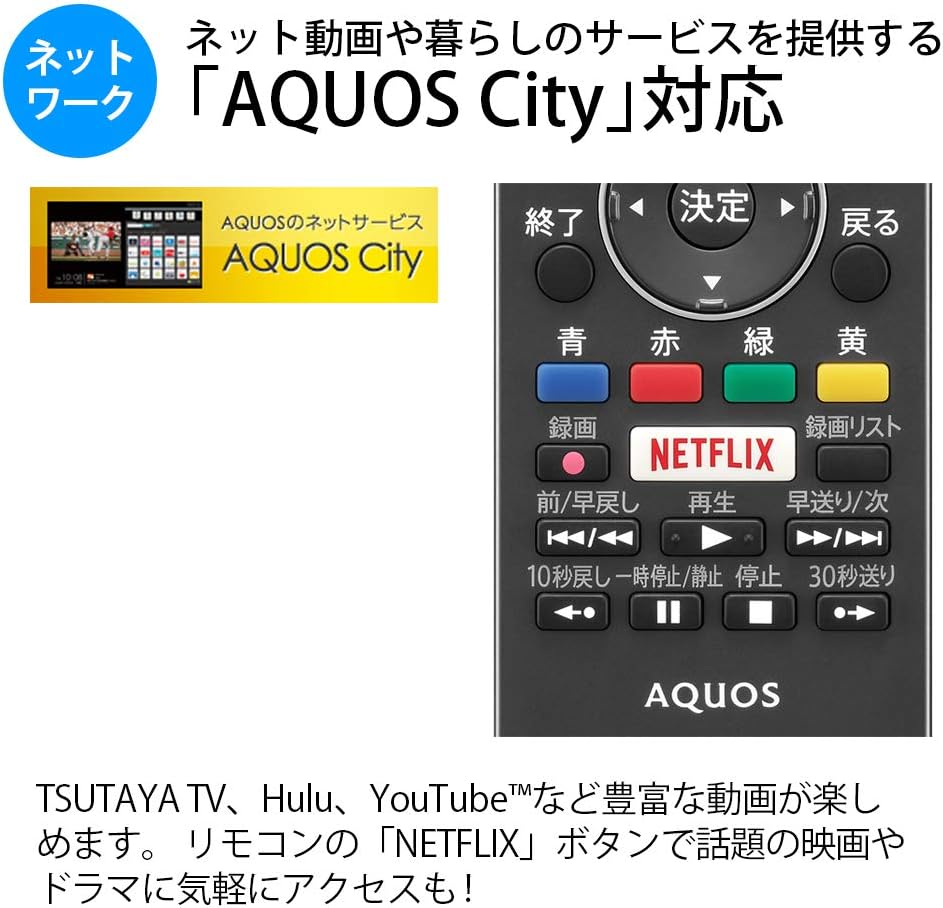
Figure 5.1: Remote control with a dedicated Netflix button and a view of the AQUOS City interface.
5.2 Smart TV Features (AQUOS City)
Your AQUOS TV supports "AQUOS City," providing access to various internet video services and lifestyle applications. Enjoy streaming content from platforms like NETFLIX, YouTube, Hulu, and TSUTAYA TV. Simply press the dedicated "NETFLIX" button on your remote for quick access.
5.3 4K Image Processing
The AQUOS 4K-Master Engine PRO II is a high-definition image processing circuit specifically designed for 4K LCD panels. It reduces noise and enhances contrast for a more immersive 4K viewzkušenosti.

Figure 5.2: The AQUOS 4K-Master Engine PRO II enhances 4K images by reducing noise and improving contrast.
5.4 Zvukové funkce
The TV is equipped with a bass-reflex type speaker box, developed in collaboration with ONKYO, to deliver high-quality sound with enhanced high-frequency pressure and rich bass. Eilex PRISM technology expands the listening position and creates a sense of audio depth.

Figure 5.3: Illustration of the bass-reflex speaker box, designed for superior sound quality.
5.5 Low-Reflection Panel
The 4K low-reflection panel minimizes reflections from room lighting and external light sources, ensuring clear and comfortable viewi v jasném prostředí.

Figure 5.4: Visual comparison demonstrating how the low-reflection panel reduces glare compared to a conventional LCD panel.
5.6 Video Mirroring (Fire TV)
You can mirror your smartphone screen to the TV using Fire TV mirroring. This allows you to display photos, videos, or smartphone apps on the large TV screen. To use this feature, connect a Fire TV device to one of the TV's HDMI ports and ensure both devices are on the same Wi-Fi network. Refer to your Fire TV device's manual for specific mirroring instructions.
6. Údržba
Abyste zajistili dlouhou životnost a optimální výkon vašeho televizoru, dodržujte tyto pokyny pro údržbu:
- Čištění obrazovky: Jemně otřete obrazovku měkkým hadříkem, který nepouští vlákna. V případě odolných skvrn lehceampOtřete hadřík vodou nebo specializovaným čističem obrazovek. Nestříkejte tekutinu přímo na obrazovku.
- Čištění skříně: K otření televizní skříňky používejte měkký, suchý hadřík. Nepoužívejte abrazivní čisticí prostředky ani rozpouštědla.
- Větrání: Ujistěte se, že ventilační otvory na televizoru nejsou zablokované, aby nedošlo k jeho přehřátí.
- Napájecí kabel: Pravidelně kontrolujte napájecí kabel, zda není poškozený. V případě poškození kontaktujte kvalifikovaný servisní personál.
7. Řešení problémů
Pokud se s televizorem setkáte s problémy, podívejte se na následující běžné problémy a jejich řešení:
| Problém | Možná příčina / řešení |
|---|---|
| Žádná síla | Zkontrolujte, zda je napájecí kabel bezpečně zapojený do televizoru a zásuvky. Stiskněte tlačítko napájení na dálkovém ovladači nebo televizoru. |
| Žádný obraz, ale zvuk je přítomný | Ujistěte se, že je vybrán správný vstupní zdroj. Zkontrolujte kabelová připojení k externím zařízením. |
| Žádný zvuk, ale obraz je přítomen | Zkontrolujte úroveň hlasitosti a stav ztlumení. Ujistěte se, že jsou zvukové kabely správně připojeny. |
| Dálkové ovládání nefunguje | Vyměňte baterie. Ujistěte se, že mezi dálkovým ovladačem a infračerveným senzorem televizoru nejsou žádné překážky. |
| Nelze se připojit k Wi-Fi | Check your Wi-Fi router and network settings. Ensure the TV is within range of the router. |
8. Specifikace
| Funkce | Specifikace |
|---|---|
| Velikost obrazovky | 40 palců |
| Technologie displeje | LCD |
| Rezoluce | 3840 x 2160 (4K) |
| Podpora HDR | HDR compatible (HDMI Input 1) |
| Obnovovací frekvence | 120 Hz (120 Speed backlight technology) |
| Tunery | Terrestrial Digital x3, BS/CS Digital x3 |
| Zvukový výstup | 20W (10W + 10W) |
| Funkce reproduktorů | Bass-reflex type, Sound by ONKYO, Eilex PRISM |
| HDMI porty | 4 |
| USB porty | 2 (USB-HDD recording compatible) |
| PC vstup | 1 |
| Připojení k síti | Wi-Fi built-in, LAN port |
| Bezdrátový typ | Bluetooth, Wi-Fi, Miracast |
| Spotřeba energie | Approx. 106W (Annual: 96Kwh/year) |
| Rozměry (Š x H x V) | 90.1 x 27.1 x 55.8 cm (s podstavcem) |
| Hmotnost | 20.5 kg |
| Standardní držák VESA | 600 x 400 mm |
| Recommended Network Services | NETFLIX, YouTube, Hikari TV 4K, Hulu, TSUTAYA TV |
9. Záruka a podpora
For warranty information, please refer to the warranty card included with your product or visit the official SHARP website. For technical support, troubleshooting assistance, or service requests, please contact SHARP customer service. Contact details can be found on the official SHARP webwebu nebo v dokumentaci k produktu.
Ask a question about this manual
Ask about setup, troubleshooting, compatibility, parts, safety, or missing instructions. Manuals+ will review the question and use this page’s manual context to help answer it.