
1. Úvod
This manual provides essential information for the safe and efficient operation of your DNP DS820A Professional Dye-Sublimation Printer. The DS820A is designed for high-quality photo printing, offering a resolution of 300 x 600 dpi and supporting various print sizes up to 8x32 inches. It features a high-speed print mode, producing 8x10 inch glossy photos in approximately 29.3 seconds, and supports multiple surface options including Glossy, Luster, Matte, and Fine Matte.
Please read this manual thoroughly before using the printer to ensure proper setup, operation, and maintenance.

Obrázek 1: Přední úhel view of the DNP DS820A printer.
2. Bezpečnostní informace
Dodržujte následující bezpečnostní opatření, abyste předešli zranění a poškození tiskárny:
- Tiskárnu vždy připojujte k uzemněné elektrické zásuvce.
- Do not block ventilation openings on the printer. Ensure adequate space around the unit for proper airflow.
- Chraňte tiskárnu před vodou nebo nadměrnou vlhkostí.
- Nepokoušejte se tiskárnu rozebírat ani opravovat sami. Obraťte se na kvalifikovaný servisní personál.
- Use only DNP-approved media and ribbons.
3. Obsah balení
Ověřte, zda jsou v balení přítomny všechny položky:
- DNP DS820A Printer Unit
- Napájecí kabel
- USB kabel
- Zásobník médií
- Stručný průvodce a dokumentace
Media (paper and ribbon) is typically sold separately.
4. Nastavení
4.1 Vybalení a umístění
- Opatrně vyjměte tiskárnu z obalu.
- Place the printer on a stable, level surface with sufficient space for ventilation and media loading/unloading.
- Remove all protective tapes and packing materials.
4.2 Připojení tiskárny
- Connect the power cable to the printer's power input and then to a grounded electrical outlet.
- Connect the USB cable to the printer's USB port and to your computer.
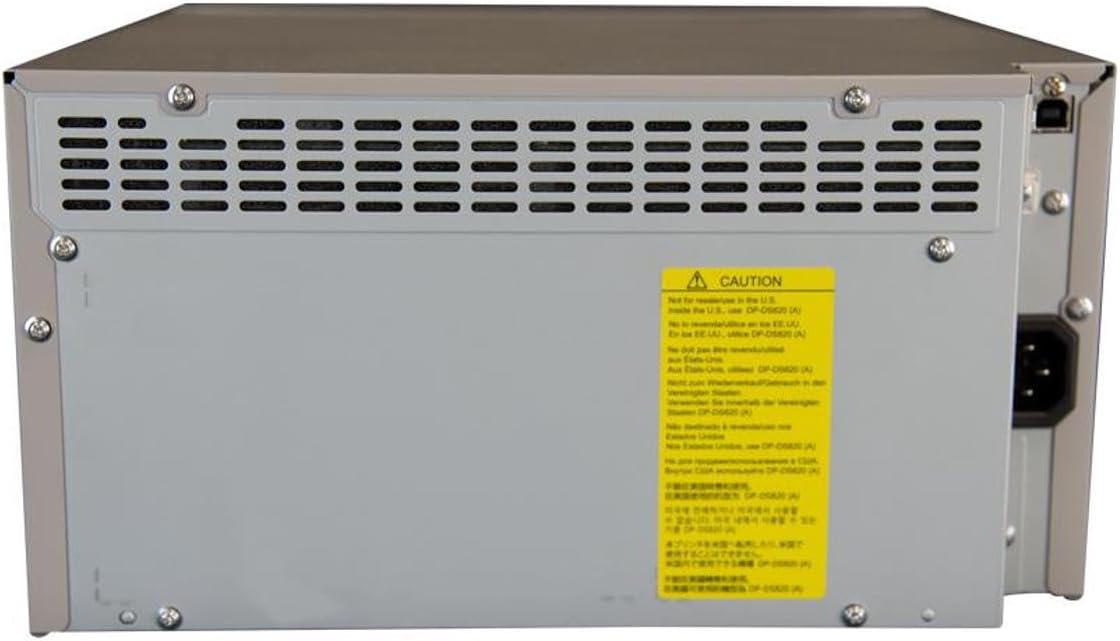
Obrázek 2: Zadní view of the DNP DS820A, highlighting connectivity ports.
4.3 Instalace ovladače
Install the latest printer drivers from the DNP website. The printer is compatible with Windows and Mac OS X/macOS operating systems.
4.4 Loading Media (Paper and Ribbon)
The DS820A uses a roll-fed media system. Refer to the specific instructions provided with your DNP media for detailed loading procedures. Generally, this involves opening the front panel, inserting the ribbon cassette, and then loading the paper roll into its designated slot.
5. Návod k obsluze
5.1 Zapnutí/vypnutí
Locate the power switch on the front or side of the printer. Flip the switch to the 'On' position to power on the printer. To power off, flip the switch to the 'Off' position.
5.2 Kontrolky
The printer features several indicator lights on the front panel to communicate its status:
- MOC: Indikuje, že je tiskárna zapnutá.
- V POHOTOVOSTNÍM REŽIMU: Indicates operational status or standby mode.
- RIBBON: Illuminates when the ribbon needs replacement or is incorrectly installed.
- PAPÍR: Illuminates when paper needs replacement or is incorrectly loaded.
- CHYBA: Indicates a general error. Refer to the troubleshooting section or driver software for details.

Figure 3: Front control panel with status indicator lights.
5.3 Proces tisku
- Ujistěte se, že je tiskárna zapnutá a připojená k počítači.
- Open the image or document you wish to print on your computer.
- Select the DNP DS820A from your printer options.
- Adjust print settings such as print size, resolution (300x600 dpi recommended for color), and surface type (Glossy, Luster, Matte, Fine Matte) in the printer driver settings.
- Initiate the print job. The printer will process and output the photo.
6. Údržba
6.1 Čištění tiskárny
Pravidelné čištění pomáhá udržovat kvalitu tisku a prodlužuje životnost tiskárny.
- Vnější: Vnější povrch otřete měkkým, suchým hadříkem, který nepouští vlákna. Nepoužívejte abrazivní čisticí prostředky ani rozpouštědla.
- Interiér: Periodically open the front panel and gently remove any dust or debris from the media path using a soft brush or compressed air.
6.2 Výměna média
When the RIBBON or PAPER indicator lights illuminate, it's time to replace the respective media. Open the front access panel to replace the ribbon cassette and paper roll according to the instructions provided with the DNP media.
7. Řešení problémů
Tato část se zabývá běžnými problémy, se kterými se můžete setkat.
| Problém | Možná příčina | Řešení |
|---|---|---|
| Tiskárna se nezapíná | Power cable disconnected; Power switch off | Zkontrolujte připojení napájecího kabelu; Ujistěte se, že je vypínač zapnutý. |
| RIBBON light on | Ribbon empty or incorrectly installed | Replace ribbon; Reinstall ribbon correctly. |
| PAPER light on | Paper roll empty or incorrectly loaded | Replace paper roll; Re-load paper correctly. |
| Svítí kontrolka ERROR | Obecná chyba tiskárny | Turn printer off and on; Check computer for specific error messages; Consult DNP support. |
| Špatná kvalita tisku | Dirty print head; Incorrect driver settings; Low quality image source | Clean printer interior; Verify print settings (DPI, media type); Use high-resolution images. |
If you encounter issues not covered here, or if solutions do not resolve the problem, contact DNP customer support.
8. Specifikace
| Funkce | Specifikace |
|---|---|
| Název modelu | DS820A |
| Technologie tisku | Sublimace barviva |
| Maximální rozlišení barevného tisku | 300 x 600 dpi |
| Maximální rozlišení černobílého tisku | 300 x 300 dpi or 300 x 600 dpi |
| Podporované velikosti médií | 5 x 7 inches, 8 x 10 inches, 8 x 12 inches, up to 8 x 32 inches (panoramic) |
| Typy tiskových médií | Glossy photo paper, Luster, Matte, Fine Matte |
| Print Speed (8x10 Glossy) | Přibližně 29.3 sekundy |
| Maximální vstupní kapacita listu | 250 sheets (depending on media type) |
| Výstupní kapacita listů | 250 listů |
| Počet zásobníků | 2 |
| Technologie připojení | USB 2.0 |
| Hardwarové rozhraní | USB |
| Kontrolní metoda | App |
| Tiskový výstup | Color; Monochrome |
| Hmotnost položky | 36 libry (16.33 kg) |
| Rozměry produktu (D x Š x V) | 19.25 x 17.25 x 12 palce (48.9 x 43.8 x 30.5 cm) |
| Výrobce | DNP |
| UPC | 650415905867 |
9. Záruka a podpora
The DNP DS820A printer comes with a full warranty. For specific warranty terms and conditions, please refer to the documentation included with your product or visit the official DNP webmísto.
For technical assistance, troubleshooting beyond this manual, or to inquire about service, please contact DNP customer support directly. Contact information can typically be found on the DNP webna webu nebo v obalu vašeho produktu.