
ILIFE V5s Pro
ILIFE V5s Pro Robot Vacuum and Mop Combo User Manual
Model: V5s Pro
Zavedení
This manual provides essential information for the safe and efficient operation, maintenance, and troubleshooting of your ILIFE V5s Pro Robot Vacuum and Mop Combo. Please read it thoroughly before using the appliance and retain it for future reference.

The ILIFE V5s Pro Robot Vacuum and Mop Combo.
Nastavení
1. Vybalení a kontrola komponent
Opatrně vyjměte všechny součásti z obalu. Ujistěte se, že jsou přítomny všechny níže uvedené položky:
- 1 ILIFE V5s Pro Robot Vacuum (Vacuum & Mop)
- 1 Nádrž na vodu
- 1 Mopovací hadřík
- 1 Popelnice
- 1 Dálkové ovládání
- 2 baterie AAA (do dálkového ovladače)
- 2 filtry
- 1 AC Adapter (approx. 1.5m length)
- 1 Nabíjecí základna
- 1 čisticí kartáček
- 2 boční kartáče
- 1 User's Quick Guide
- 1 Uživatelská příručka
2. Umístění nabíjecí základny
Place the charging base against a wall in an open area, ensuring there are no obstacles within 1 meter (3 feet) to the sides and 2 meters (6 feet) in front. Connect the AC adapter to the charging base and plug it into a power outlet. Ensure the power indicator on the charging base is illuminated.
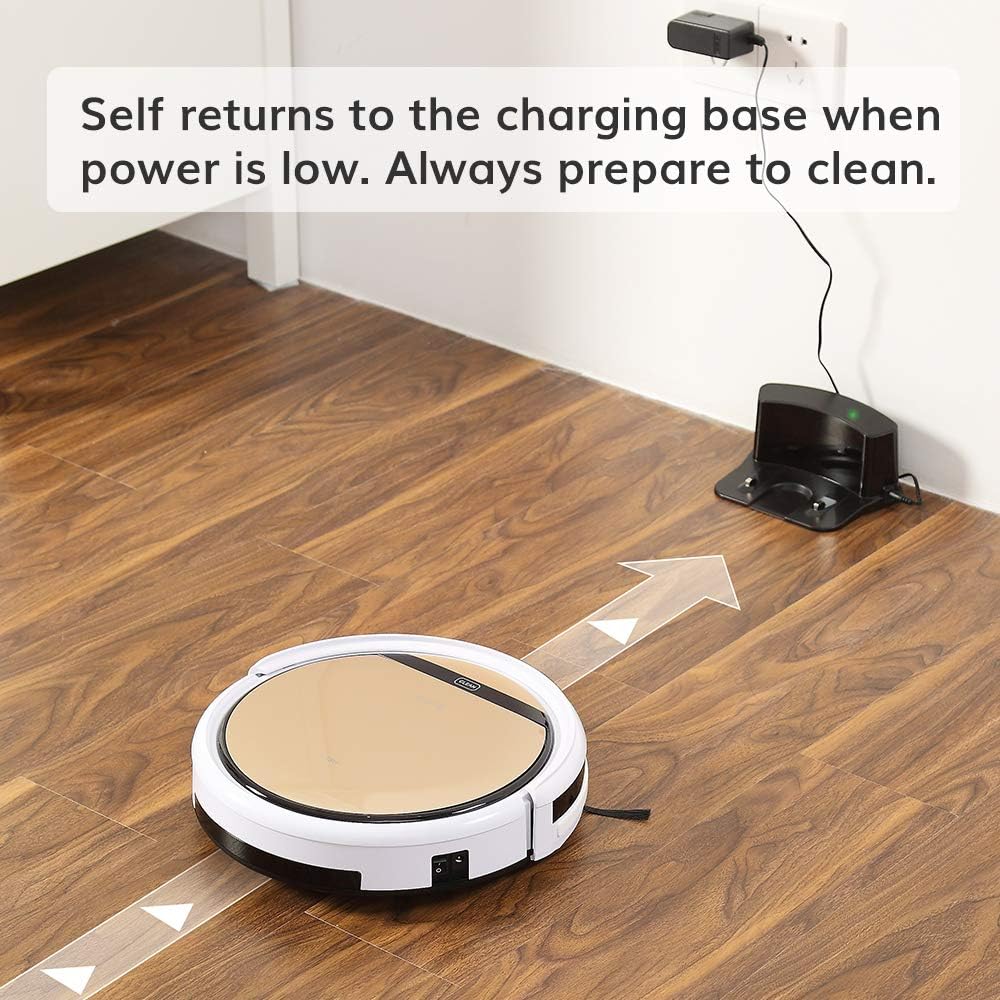
The robot vacuum returning to its charging base.
3. Počáteční nabíjení
Before first use, fully charge the robot. You can either place the robot manually onto the charging base, ensuring the charging contacts align, or connect the AC adapter directly to the robot's charging port. The 'CLEAN' button will flash during charging and turn solid when fully charged. A full charge takes approximately 4-5 hours.
4. Instalace bočních kartáčů
Attach the two side brushes to the posts on the underside of the robot. Press firmly until they click into place.

Underside of the robot showing side brush attachment points.
5. Installing Dustbin or Water Tank
The ILIFE V5s Pro supports both vacuuming and mopping. For vacuuming, ensure the dustbin is installed. For mopping, replace the dustbin with the water tank and attach the mop cloth.

Removing the dustbin.

Inserting the water tank.
Operace
1. Zapnutí/vypnutí
To power on, press the 'CLEAN' button on the robot or the power button on the remote control. To power off, press and hold the 'CLEAN' button for a few seconds or use the remote.
2. Režimy čištění
The ILIFE V5s Pro offers multiple cleaning modes:
- Automatický režim: The robot automatically cleans the area, maximizing coverage.
- Bodový režim: The robot focuses on a specific small area for intensive cleaning.
- Maximální režim: Provides intensive cleaning with increased suction power.
- Režim okraje: The robot cleans along walls and corners.
Vyberte požadovaný režim pomocí dálkového ovladače.

The robot vacuum cleaning a low-pile carpet.
3. Plánování
You can set a daily cleaning schedule using the remote control. Refer to the remote control section in the User's Quick Guide for detailed instructions on setting the time and schedule.
4. Vacuuming and Mopping Functions
The robot automatically detects whether the dustbin (for vacuuming) or water tank (for mopping) is installed and operates accordingly. Ensure the correct tank is in place for the desired cleaning function.

The robot vacuum operating quietly near a sleeping dog, demonstrating its quiet operation.
5. Automatic Docking
When the battery is low, the robot will automatically return to its charging base to recharge. Ensure the charging base is accessible and plugged in.

The robot vacuum intelligently navigating around furniture, showcasing its anti-collision sensors.
Údržba
Pravidelná údržba zajišťuje optimální výkon a prodlužuje životnost vašeho robotického vysavače.
1. Vyprázdnění popelnice
Empty the dustbin after each use. Press the 'PUSH' button on the top cover to open, remove the dustbin, and discard collected debris. Clean the dustbin with the provided cleaning brush or rinse with water (ensure it is completely dry before re-inserting).
2. Čištění filtrů
The robot uses two filters. Clean the primary filter and the high-performance filter regularly. Tap them to remove dust or use the cleaning brush. Replace filters every 3-6 months, depending on usage.
3. Čištění postranních kartáčů
Periodically remove and clean the side brushes. If they are worn or damaged, replace them with new ones.
4. Cleaning the Suction Inlet
The V5s Pro features a unique suction inlet designed to prevent hair tangles. Regularly check and clean the inlet to ensure efficient debris collection, especially for pet owners.
5. Údržba nádrže na vodu a mopu
After mopping, empty any remaining water from the tank and allow it to air dry. Remove and wash the mop cloth. Ensure the water tank is completely dry before storage.
6. Čištění senzorů a nabíjecích kontaktů
Wipe the anti-drop sensors, anti-collision sensors, and charging contacts on both the robot and the charging base with a soft, dry cloth to ensure proper function.
Odstraňování problémů
If your ILIFE V5s Pro encounters an issue, refer to the following common solutions:
- Robot se nestartuje: Ensure the robot is fully charged and the main power switch (usually on the side) is turned on.
- Robot se nenabíjí: Verify the charging base is plugged in and the power indicator is on. Clean the charging contacts on both the robot and the base.
- Robot se často zasekává: Clear obstacles like loose cables, small rugs, or furniture that are too low for the robot to pass under.
- Špatný čisticí výkon: Empty the dustbin, clean or replace filters, and clean the side brushes and suction inlet.
- Funkce mopování nefunguje: Ensure the water tank is filled and correctly installed, and the mop cloth is attached.
V případě přetrvávajících problémů si přečtěte kompletní uživatelskou příručku nebo kontaktujte zákaznickou podporu.
Specifikace
| Funkce | Specifikace |
|---|---|
| Značka | ILIFE |
| Název modelu | ILFV5SPRO2RB |
| Doporučení pro povrch | Tvrdá podlaha, koberec |
| Speciální funkce | Kombinace robotického vysavače a mopu |
| Barva | V5s Pro |
| Typ ovladače | Dálkové ovládání |
| Typ filtru | Kazeta |
| Životnost baterie | 110 minut |
| Typ baterie | Lithium Ion |
| svtage | 14.4 voltů |
| Kapacita (popelnice) | 300 mililitrů |
| Zdroj napájení | Napájení z baterie |
| Rozměry položky D x Š x V | 11.8 cm D x 11.8 cm Š x 3 cm V |
| Hmotnost položky | 4.9 libry |
| Úroveň hluku | 58 decibelů |
| Vnitřní venkovní použití | Krytý |
| Číslo modelu | ILIFEV5SP01 |
| UPC | 768571855510 |
Záruka a podpora
Informace o záruce
A new ILIFE V5s Pro Robot Vacuum is provided with a Záruka 12 měsíců. Refurbished or used robots are provided with a Záruka 3 měsícůUschovejte si prosím doklad o koupi pro případ reklamace.
Zákaznická podpora
For technical assistance, warranty inquiries, or replacement parts, please contact ILIFE customer support through their official webwebu nebo kontaktních informací uvedených na obalu produktu.
Ask a question about this manual
Ask about setup, troubleshooting, compatibility, parts, safety, or missing instructions. Manuals+ will review the question and use this page’s manual context to help answer it.