
Zavedení
The Anderic RR3UNV is a versatile 3-device universal remote control designed to simplify the management of your entertainment systems. This remote can control up to three different devices, including TVs, DVD players, VCRs, cable boxes, satellite receivers, and audio systems. It features a learning function for expanded compatibility and glow-in-the-dark buttons for ease of use in low-light conditions. This manual provides detailed instructions for setup, operation, and maintenance of your RR3UNV remote control.
Nastavení
1. Instalace baterie
The Anderic RR3UNV remote requires two (2) AA batteries for operation. Ensure correct polarity when inserting the batteries.
- Otevřete kryt přihrádky na baterie, který se nachází na zadní straně dálkového ovladače.
- Vložte dvě nové baterie typu AA tak, aby póly (+) a (-) odpovídaly vyznačeným pólům uvnitř přihrádky.
- Bezpečně zavřete kryt bateriového prostoru.

Obrázek: Zadní view of the Anderic RR3UNV remote control, showing the battery compartment cover at the bottom. The back is black with a textured grip area.
2. Programování dálkového ovladače
The RR3UNV can be programmed using direct code entry or the learning function. Refer to the included code booklet for a list of compatible device codes.
2.1. Přímé zadání kódu
- Zapněte zařízení, které chcete naprogramovat (např. televizor, DVD přehrávač).
- Press and hold the desired device button (TV, DVDnebo AUDIO) for approximately 5 seconds until the device button lights up and stays lit.
- Enter the 3-digit code for your device brand from the code booklet.
- If the code is valid, the device button light will blink twice and then turn off.
- Otestujte dálkový ovladač stisknutím tlačítka MOC button. If the device turns off, the programming was successful. If not, repeat the process with the next code listed for your brand.
2.2. Funkce učení
The learning function allows the RR3UNV to learn commands directly from your original remote control.
- Place the RR3UNV and your original remote control head-to-head on a flat surface, approximately 1-2 inches apart.
- Press and hold the desired device button (TV, DVDnebo AUDIO) on the RR3UNV for approximately 5 seconds until the device button lights up and stays lit.
- Press and release the button on the RR3UNV that you want to program (e.g., MOC). The device button light will start blinking slowly.
- Press and hold the corresponding button on your original remote control (e.g., MOC).
- The device button light on the RR3UNV will blink rapidly three times and then stay lit, indicating successful learning.
- Repeat steps 3-5 for all other buttons you wish to program.
- To exit learning mode, press the device button again. The light will turn off.
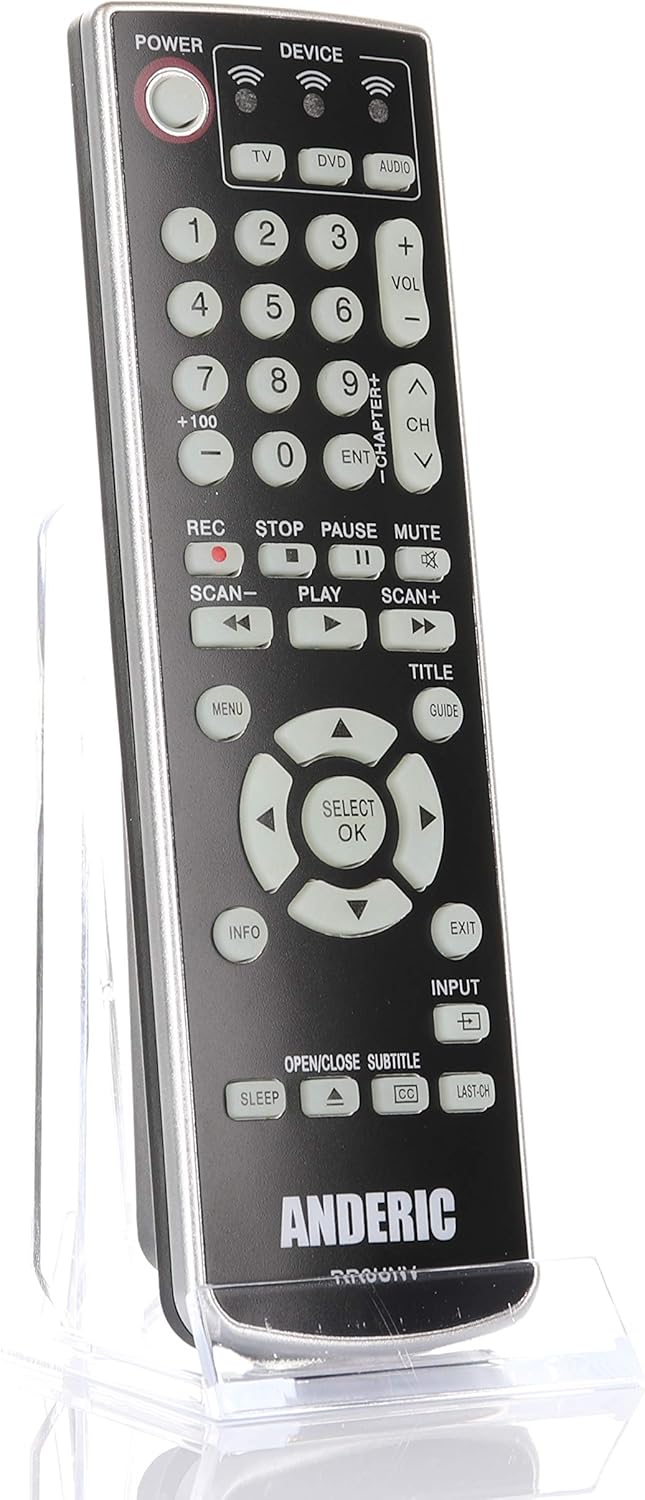
Obrázek: Přední strana view of the Anderic RR3UNV remote control. It is black with silver trim, featuring glow-in-the-dark buttons for power, device selection, number pad, volume, channel, playback, menu, and navigation controls.
Ovládání dálkového ovladače
Once programmed, the Anderic RR3UNV remote functions like your original remote. Select the desired device mode before sending commands.
- Výběr zařízení: Stiskněte tlačítko TV, DVDnebo AUDIO button to select the device you want to control. The selected device button will light up briefly.
- Moc: Stiskněte tlačítko MOC tlačítko pro zapnutí nebo vypnutí vybraného zařízení.
- Ovládání hlasitosti: Použijte VOL+ a VOL- tlačítka pro nastavení hlasitosti.
- Ovládání kanálů: Použijte CH+ a CH- tlačítka pro změnu kanálů.
- Ztlumit: Stiskněte tlačítko ZTLUMIT tlačítko pro ztlumení zvuku.
- Číselná klávesnice: Pomocí číselných tlačítek (0–9) můžete přímo zadávat čísla kanálů nebo jiné číselné údaje.
- Ovládání přehrávání: Tlačítka jako HRÁT, PAUZA, ZASTÁVKA, REC, SCAN-a SCAN+ control media playback functions.
- Navigace: The directional arrow buttons and SELECT/OK button are used for menu navigation.
- Menu/Guide/Info/Exit: These buttons provide access to device-specific menus, program guides, information displays, and exit functions.
- Vstup: The VSTUP button cycles through available input sources on your TV.
- Spát: The SPÁT button may activate a sleep timer function on compatible devices.
- CC/Subtitles: The CC/SUBTITLE button toggles closed captions or subtitles.
Údržba
- Výměna baterie: Replace batteries when the remote's performance degrades or if the device indicator light does not illuminate. Always replace both AA batteries at the same time with new ones.
- Čištění: Clean the remote control with a soft, dry cloth. Do not use liquid cleaners or abrasive materials, as they may damage the remote's surface or internal components.
- Skladování: Store the remote in a dry place away from direct sunlight and extreme temperatures. If storing for an extended period, remove the batteries to prevent leakage.
Odstraňování problémů
| Problém | Možná příčina | Řešení |
|---|---|---|
| Dálkové ovládání vůbec nefunguje. | Vybité nebo nesprávně vložené baterie. | Vyměňte baterie za nové baterie typu AA a dbejte na správnou polaritu. |
| Dálkové ovládání ovládá některé funkce, jiné ne. | Incorrect device code or incomplete learning. | Try a different code for your device brand or re-program specific buttons using the learning function. |
| Device does not respond to remote commands. | Remote not aimed correctly; obstruction; device not selected. | Ensure the remote is aimed directly at the device's IR sensor. Remove any obstructions. Press the correct device button (TV, DVD, AUDIO) before sending commands. |
| Funkce učení selhává. | Original remote batteries low; remotes too far apart; ambient light interference. | Ensure original remote has fresh batteries. Place remotes 1-2 inches apart. Try learning in a dimly lit room. |
Specifikace
- Značka: Anderic
- Název modelu: RR3UNV
- Číslo modelu: RR3UNV
- Maximální počet podporovaných zařízení: 3
- Technologie připojení: Infračervený (IR)
- Typ baterie: 2 x AA baterie (nejsou součástí balení)
- Maximální rozsah: Přibližně 25 stop (7.6 metru)
- Množství tlačítek: 41
- Speciální vlastnosti: Universal compatibility, Learning function, Glow-in-the-dark buttons
- Kompatibilní zařízení: TV, DVD, VCR, Cable, Satellite, Audio, DVD/VCR Combos, TV/DVD/VCR Combos
Informace o záruce
Anderic products typically come with a limited warranty covering manufacturing defects. For specific warranty details, including duration and terms, please refer to the documentation included with your purchase or visit the official Anderic webUschovejte si doklad o koupi pro případ reklamace.
Zákaznická podpora
For technical assistance, programming help, or general inquiries regarding your Anderic RR3UNV remote control, please contact Anderic customer support:
- Webmísto: www.anderic.com
- Telefon: 1-855-573-6683
Please have your model number (RR3UNV) and a description of your issue ready when contacting support.