
Zavedení
The Audeze iSINE10 In-Ear Semi-Open Headphones deliver a unique audio experience through advanced planar magnetic technology. Designed for clarity and wide soundstage, these headphones are lightweight and offer versatile connectivity options for various devices. This manual provides essential information for setting up, operating, maintaining, and troubleshooting your iSINE10 headphones.

Image: Audeze iSINE10 headphones showcasing their semi-open design.
Nastavení
1. Vybalení a komponenty
Your Audeze iSINE10 headphones typically include:
- Audeze iSINE10 In-Ear Headphones
- Cipher Lightning Cable (with in-line amplifier and DAC)
- Standard 3.5mm Audio Cable
- Various Eartips for optimal fit
- Ear Hooks for secure placement
- Nylon Carrying Case
2. Fitting the Headphones
The iSINE10 offers two primary methods for secure and comfortable wear:
- Ear Clips: These hooks fit over your ear, similar to sunglasses, providing stability.
- Rubber Pieces: These inserts fit inside the ear, resting at the entrance of the ear canal, without deep insertion.
Experiment with the included eartips and ear hooks to find the most comfortable and secure fit for extended listening. Proper fit is crucial for both comfort and sound quality.
3. Připojení k zařízením
The iSINE10 headphones offer versatile connectivity:
- iOS Devices (Lightning Port): Use the included Cipher Lightning Cable. This cable features a built-in amplifier and 24-bit Digital-to-Analog Converter (DAC) for enhanced audio performance and allows access to the Audeze iOS app for customization.
- Standard Devices (3.5mm Audio Jack): Use the included 3.5mm audio cable to connect to any device with a standard headphone jack. Note that the sound characteristics may differ without the Cipher cable's built-in DSP/EQ.
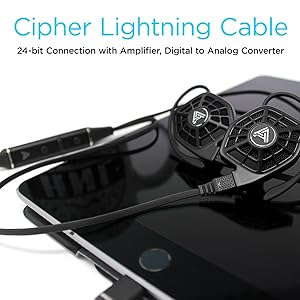
Image: iSINE10 headphones connected to an iPhone, demonstrating Lightning cable use.
Návod k obsluze
1. Základní přehrávání zvuku
Once connected, simply play audio from your device. Adjust the volume using your device's controls or the in-line controls on the Cipher Lightning Cable.
2. Using the Cipher Lightning Cable (for iOS Devices)
The Cipher Lightning Cable is designed to optimize the iSINE10's performance with iOS devices. It includes:
- In-line Amplifier and DAC: Provides high-quality digital-to-analog conversion and ampzvedání.
- DSP (digitální zpracování signálu): Applies an automatic, built-in frequency response correction for a balanced sound profile.
- Siri-Compatible Microphone: Allows for voice commands and hands-free communication.
- In-line ovládání: Manage playback, volume, and calls.
Důležitá poznámka:
- When using the Cipher Lightning Cable, you cannot charge your iOS device simultaneously through the same Lightning port.
- Some users may experience a faint noise with the V1 Lightning cable when no audio is playing. This typically disappears once audio playback begins.
3. Audeze iOS App for Customization
Download the official Audeze iOS app to unlock advanced audio customization features:
- 10pásmový ekvalizér: Fine-tune the sound profile podle vašich preferencí.
- Saveable EQ Presets: Store up to two custom equalizer settings for quick access.
Poznámka pro uživatele systému Android:
Currently, there is no official Android app available for firmware updates or EQ customization. These features require an iOS device.
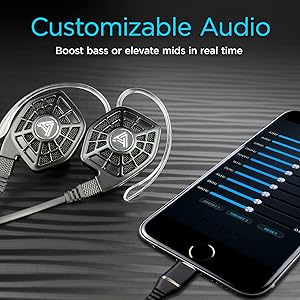
Image: iPhone screen showing the Audeze EQ app interface for audio customization.
4. Optional Bluetooth Cable
An optional Bluetooth cable is available directly from Audeze, allowing wireless connectivity to various devices while maintaining the intended sound profile (with appropriate DSP/EQ).
Video: Overview of the Audeze iSINE10 In-Ear Semi-Open Headphones, highlighting key features and design elements.
Údržba
1. Čištění
- Gently wipe the headphone bodies and cables with a soft, dry, lint-free cloth.
- Sejměte ušní ocásky a v případě potřeby je očistěte jemným mýdlem a vodou. Před opětovným nasazením se ujistěte, že jsou zcela suché.
- Vyhněte se používání agresivních chemikálií, rozpouštědel nebo abrazivních materiálů.
2. Péče o kabely
- Vyhněte se ostrým ohybům nebo nadměrnému tahání za kabely, abyste předešli jejich vnitřnímu poškození.
- Store cables neatly to prevent tangling.
3. Skladování
When not in use, store your iSINE10 headphones in the provided nylon carrying case to protect them from dust, moisture, and physical damage.
4. Háčky na uši
The plastic ear hooks, while designed for comfort, may not be highly durable. Handle them with care during attachment and removal to prolong their lifespan.
Odstraňování problémů
Žádný zvuk nebo nízká hlasitost
- Ensure the cable is securely connected to both the headphones and your audio source.
- Check the volume levels on your device and any in-line controls.
- Pokud je to možné, vyzkoušejte s jiným zdrojem zvuku nebo kabelem, abyste problém izolovali.
Zkreslený zvuk
- If using the 3.5mm cable, ensure your audio source is providing a clean signal. The iSINE10 is designed to benefit from the DSP/EQ of the Cipher cable.
- Reduce the volume on your device to check if distortion is due to overdriving the headphones.
- If using the Cipher cable, check the Audeze iOS app for any extreme EQ settings that might cause distortion.
Nepohodlí během nošení
- Experiment with different sizes and types of eartips. Foam tips, if available, can sometimes improve comfort by distributing pressure more evenly.
- Adjust the ear hooks or rubber pieces to find a less intrusive position.
- Během dlouhých poslechů si dělejte přestávky.
iOS App Issues
- Ensure your iOS device is running a compatible version of iOS.
- Restartujte aplikaci nebo zařízení iOS.
- Ensure the Cipher Lightning Cable is properly connected.
Specifikace
| Funkce | Detail |
|---|---|
| Číslo modelu | 110-IE-1000-00 |
| Typ zvukového ovladače | Planární magnetický ovladač |
| Velikost zvukového ovladače | 30 milimetrů |
| Frekvenční odezva | 10 Hz - 50 kHz |
| Impedance | 16 ohmů |
| Citlivost | 110 dB/1mW |
| Maximální manipulace s výkonem | 500 mW RMS |
| Technologie připojení | Wired (Lightning, 3.5mm Audio) |
| Bezdrátová komunikace | Bluetooth (via optional cable) |
| Typ ovládání | Ovládání médií, aplikace |
| Mikrofon | Siri-compatible (on Cipher cable) |
| Materiál | Plast |
| Hmotnost položky | 20 Grams (per pair) / 0.705 ounces |
| Rozměry produktu | 1.38 x 0.79 x 1.22 palce |
| Úroveň odolnosti proti vodě | Není odolný vůči vodě |
| Materiál přepravního pouzdra | Nylon |
Informace o záruce
Audeze products are covered by a manufacturer's warranty. For detailed information regarding the warranty period, coverage, and terms and conditions, please refer to the official Audeze webwebu nebo záruční kartu dodanou s vaším produktem. Uschovejte si doklad o koupi pro případ reklamace.
Podpora
For technical assistance, product inquiries, or customer service, please visit the official Audeze support page on their website. You can typically find FAQs, troubleshooting guides, and contact information for their support team there.
Audeze Official Webmísto: www.audeze.com