
1. Úvod
This manual provides essential information for the safe and effective operation, maintenance, and troubleshooting of your BLACK+DECKER KC3610 3.6V Cordless Screwdriver. Please read these instructions carefully before using the tool and retain them for future reference.
2. Bezpečnostní pokyny
Vždy dodržujte základní bezpečnostní opatření, abyste snížili riziko požáru, úrazu elektrickým proudem a zranění osob.
- Udržujte pracovní prostor čistý a dobře osvětlený. Nepořádek nebo tmavé prostory vedou k nehodám.
- Nepracujte s elektrickým nářadím ve výbušném prostředí, například v přítomnosti hořlavých kapalin, plynů nebo prachu. Elektrické nářadí vytváří jiskry, které mohou zapálit prach nebo výpary.
- Při práci s elektrickým nářadím držte děti a přihlížející mimo dosah. Rozptylování může způsobit ztrátu kontroly.
- Zabraňte náhodnému spuštění. Před připojením akumulátoru, zvednutím nebo přenášením nářadí se ujistěte, že je vypínač v poloze vypnuto.
- Nepřesahujte. Vždy udržujte správný postoj a rovnováhu. To umožňuje lepší kontrolu nad elektrickým nářadím v neočekávaných situacích.
- Správně se oblečte. Nenoste volné oblečení nebo šperky. Udržujte své vlasy a oděv mimo pohyblivé části. Volné oblečení, šperky nebo dlouhé vlasy mohou být zachyceny pohyblivými částmi.
- Používejte bezpečnostní vybavení. Vždy používejte ochranu očí. Za vhodných podmínek je nutné používat protiprachovou masku, protiskluzovou bezpečnostní obuv, přilbu nebo ochranu sluchu.
- Před seřizováním, výměnou příslušenství nebo před uložením elektrického nářadí odpojte akumulátor od nářadí.
- Nepoužívané elektrické nářadí skladujte mimo dosah dětí a nedovolte osobám, které nejsou obeznámeny s elektrickým nářadím nebo s těmito pokyny, aby s elektrickým nářadím pracovaly.
3. Obsah balení
Ověřte, zda jsou v balení přítomny všechny níže uvedené položky:
- 1 x BLACK+DECKER KC3610 Cordless Screwdriver
- 1 x Nástěnná nabíječka
- 1 x magnetický držák bitů
- 10 x Screwdriver Bits (various sizes and types)
- 1 x Návod k použití

Figure 3.1: Complete package contents including the screwdriver, charger, and bit set.

Obrázek 3.2: Vizuální znázornění zahrnutých komponent.
4. Konec produktuview
Familiarize yourself with the various parts of your BLACK+DECKER KC3610 Cordless Screwdriver.
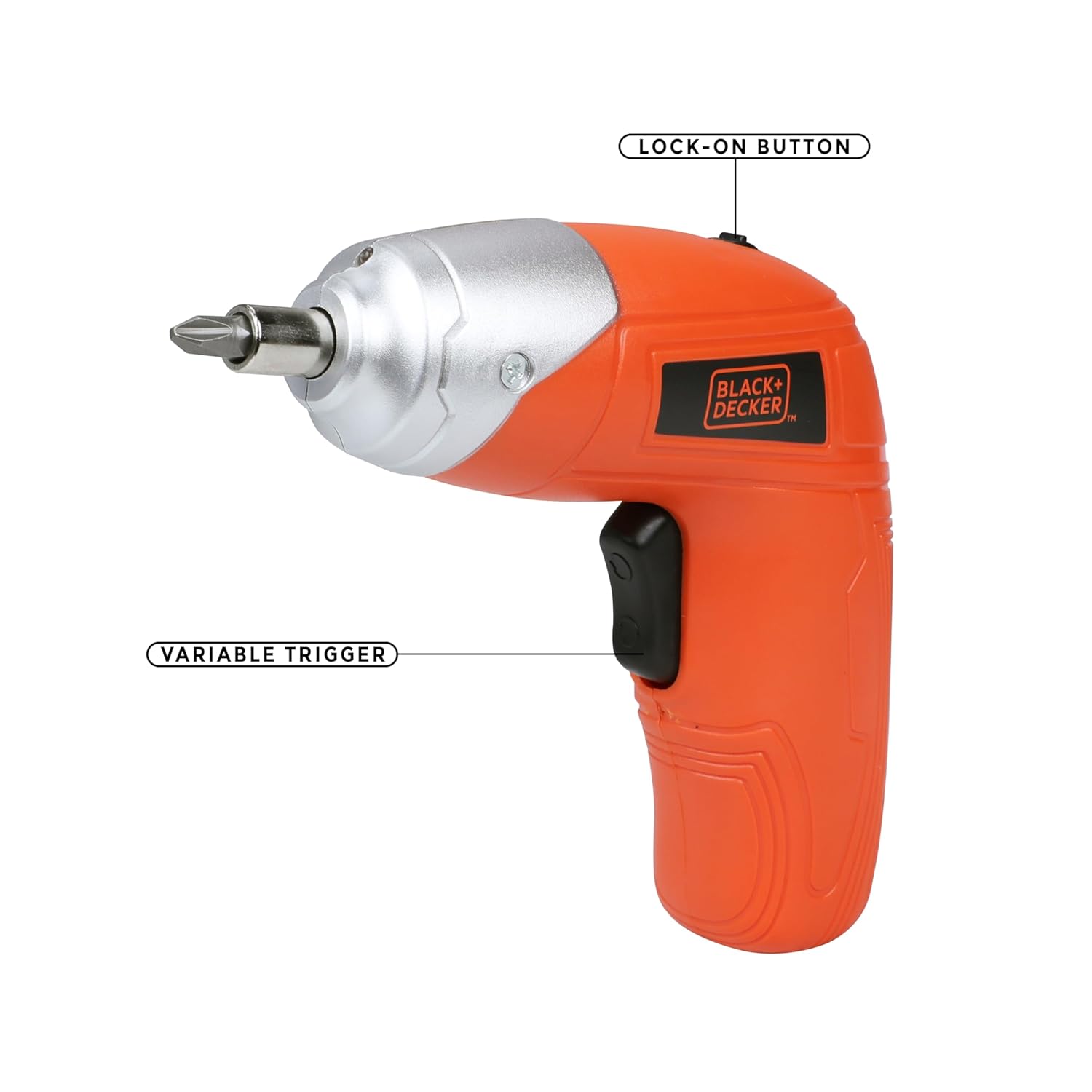
Figure 4.1: Key operational parts: Lock-on Button (top) and Variable Trigger (handle).

Obrázek 4.2: Přední strana view highlighting the Tool Holder (1) and LED Light (2).

Obrázek 4.3: Strana view indicating LED Switch (3), Charging Indicator (4), Charging Port (5), and Main Switch (6).
5. Nastavení
5.1 Nabíjení baterie
- Connect the wall charger to the charging port (5) on the screwdriver.
- Zapojte nabíječku do standardní elektrické zásuvky.
- The charging indicator (4) will illuminate to show that the battery is charging.
- Allow approximately 2 hours for a full charge. The indicator may change or turn off once fully charged (refer to specific product behavior if different).
Poznámka: The screwdriver uses a Lithium-Ion battery. It is recommended to fully charge the battery before first use.
5.2 Vkládání a vyjímání šroubovacích bitů
- Ujistěte se, že je šroubovák vypnutý.
- Insert the desired screwdriver bit into the tool holder (1) until it is securely seated. For smaller bits, use the magnetic bit holder provided.
- To remove a bit, simply pull it straight out from the tool holder.

Figure 5.1: Proper insertion of a screwdriver bit into the tool holder.
6. Návod k obsluze
6.1 Zapnutí/vypnutí a ovládání směru
- To operate the screwdriver, slide the main switch (6) to the desired direction (forward for tightening, reverse for loosening).
- Press the variable trigger to start the screwdriver. Release the trigger to stop.
- For continuous use, press the variable trigger and then engage the lock-on button (Figure 4.1). To disengage, press the trigger again.
6.2 Používání LED pracovního světla
- The integrated LED worklight (2) illuminates the work area for improved visibility.
- To activate the LED light independently, use the LED switch (3). The light may also activate automatically when the trigger is pressed.
6.3 Nastavení točivého momentu
The BLACK+DECKER KC3610 features adjustable torque, allowing you to match the fastening power to the task and material, preventing overtightening or stripping screws.
- Locate the torque adjustment mechanism (refer to product diagram if available, typically a collar near the chuck).
- Rotate the collar to select the desired torque setting. Lower settings are for smaller screws and softer materials, while higher settings are for larger screws and harder materials.
Poznámka: Some user experiences indicate that torque adjustment may not be present or as effective as expected. Always test on a scrap piece of material first to determine the appropriate setting for your application.
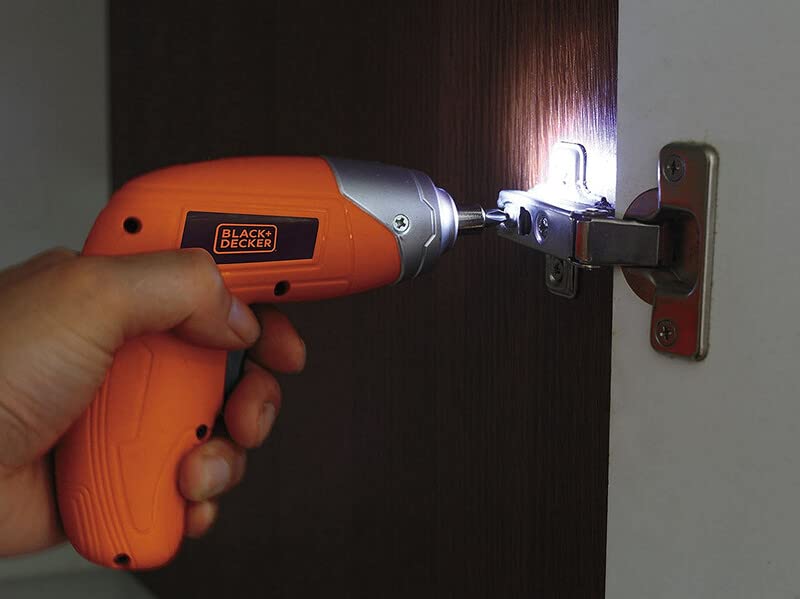
Figure 6.1: Screwdriver in operation, demonstrating the LED worklight.

Figure 6.2: Screwdriver being used for a typical fastening task.
7. Údržba
Pravidelná údržba zajišťuje optimální výkon a prodlužuje životnost vašeho nástroje.
- Čištění: Keep the tool's ventilation slots clean to prevent overheating. Use a soft, damp hadříkem k čištění krytu. Nepoužívejte agresivní chemikálie ani abrazivní čisticí prostředky.
- Skladování: Store the screwdriver and accessories in a dry, secure place out of reach of children. Ensure the battery is partially charged before long-term storage.
- Péče o baterie: Do not store the battery in discharged condition. Recharge it periodically if not in use for extended periods.
8. Řešení problémů
Běžné problémy a jejich řešení naleznete v tabulce níže.
| Problém | Možná příčina | Řešení |
|---|---|---|
| Šroubovák se nezapíná. | Baterie je vybitá. Přepínač je v poloze OFF. | Nabijte baterii. Ensure the main switch is set to forward or reverse. |
| Low power or slow operation. | Baterie je vybitá. Task is too demanding for the tool. | Nabijte baterii. This screwdriver is designed for light-duty fastening tasks, not heavy drilling or driving large screws into dense materials. |
| Screws are stripping or overtightening. | Nesprávné nastavení točivého momentu. Bit is worn or incorrect size. | Adjust the torque setting to a lower value. Use the correct size and type of bit for the screw. Replace worn bits. |
| Porucha tlačítka nebo spínače. | Porucha vnitřní součásti. | Contact customer support for assistance or warranty service. Do not attempt to repair yourself. |
9. Specifikace
Technical specifications for the BLACK+DECKER KC3610 Cordless Screwdriver:
| Funkce | Specifikace |
|---|---|
| Číslo modelu | KC3610 |
| svtage | 3.6 voltů |
| Rychlost bez zatížení | 200 ot./min |
| Zdroj napájení | Bezdrátový |
| Typ baterie | Lithium Ion |
| Kapacita baterie | 1500 XNUMX mAh |
| Doba nabíjení | Přibl. 2 hodin |
| Hmotnost položky | 450 gramů |
| Rozměry produktu | 13.5L x 5.5W x 13H centimetrů |
| Materiál | Plast |
| LED pracovní světlo | Ano |
| Indikátor nabíjení | Ano |
| Nastavení točivého momentu | Ano |
Poznámka: Specifikace se mohou změnit bez předchozího upozornění z důvodu vylepšení produktu.

Obrázek 9.1: Přesview klíčových specifikací produktu.
10. Záruka a zákaznická podpora
BLACK+DECKER provides a 1-letá záruka on this product from the date of purchase, covering manufacturing defects.
For any warranty-related issues, product feedback, or technical assistance, please contact our customer care team:
- Telefon: 1860-425-1111 (Monday to Friday, 10 AM to 5 PM, except government holidays)
- E-mail: SBD-CUSTOMERCOMMUNICATIONS@SBDINC.COM
- WhatsApp: +91 96060 55835
You can also find information on authorized service centers by contacting customer care.

Figure 10.1: BLACK+DECKER Total Care contact details.