
1. Konec produktuview
The Aideepen TDA7492P 2x50W Dual Channel Amplifier Board is designed to provide high-quality stereo audio amplification for various speaker systems. Featuring Bluetooth wireless connectivity, this board is suitable for home or vehicle audio streaming applications.
Klíčové vlastnosti:
- 50W+50W HIFI Board: Delivers 2x50W of power for multi-speaker setups with 8 ohms impedance.
- Upgraded Version (AD-001): Incorporates the TDA7492P chip with enhanced capacitor resistance for improved stereo sound and better heat dissipation. Features gold-plated mounting holes for durability and aesthetics.
- Bluetooth připojení: Compatible with most smartphones for wireless music streaming. Note: Not compatible with computers.
- Integrated Control Buttons: Includes responsive buttons for power, previous track, next track, play/pause, volume up, and volume down. A Bluetooth indicator flashes red and blue alternately when ready for pairing.
- Kompaktní design, silný zvuk: Despite its small size, this amplifier can achieve 110-120 dB output with high-efficiency drivers.

Obrázek 1.1: Nahoře view of the Aideepen TDA7492P Dual Channel Ampliifier Board.
2. Obsah balení
Ensure all items are present and in good condition upon opening the package.
- 1x TDA7492P Audio Receiver Amplifikační deska

Obrázek 2.1: amplifier board as received in its packaging.
3. Bezpečnostní informace
Please read and understand all safety instructions before operating this device. Failure to follow these instructions may result in electric shock, fire, or other hazards.
- Napájení: Use a DC power supply between 8V and 24V. Ensure the power supply's output current is sufficient (at least 2A recommended for optimal performance). The power connector is 5.5mm outside diameter, 2.1mm inside diameter, with positive on the inside and negative on the outside.
- Zapojení: Always distinguish between positive and negative terminals when connecting speakers. Incorrect wiring can damage the amplifier board or speakers.
- Prostředí: Do not expose the device to moisture, extreme temperatures, or direct sunlight. Operate in a well-ventilated area.
- Zacházení: Avoid touching the circuit board components while the device is powered on.
4. Pokyny k nastavení
Follow these steps to set up your Aideepen TDA7492P amplifikační deska.
- Prepare Speakers: Ensure your speakers are rated for 8 ohms impedance. Strip a small amount of insulation from the ends of your speaker wires.
- Připojení reproduktorů: Loosen the screws on the green terminal blocks (speaker outputs) on the amplifier board. Carefully insert the speaker wires, ensuring the positive (+) and negative (-) wires are connected to the corresponding terminals for each channel (L+ L- for left, R+ R- for right). Tighten the screws to secure the wires.
- Připojte napájení: Plug a compatible DC power adapter (8-24V, at least 2A, 5.5x2.1mm barrel connector, center positive) into the power input jack on the board.
- Zapnutí: After connecting the power, the Bluetooth indicator LED on the board will begin to flash, indicating it is ready for pairing.

Obrázek 4.1: Detailní view of speaker and power connection points on the amplifikační deska.

Figure 4.2: Labeled diagram of the amplifier board showing Bluetooth antenna, indicator, buttons, and power interface.
Setup and Connection Video:
Video 4.1: Official Aideepen video demonstrating the installation steps and Bluetooth connection process for the amplifikační deska.
5. Návod k obsluze
Jednou amplifier board is set up, you can begin streaming audio wirelessly.
- Bluetooth párování:
- Zajistěte amplifier board is powered on and the Bluetooth indicator is flashing (red and blue alternately).
- Na smartphonu nebo jiném zařízení s podporou Bluetooth přejděte do nastavení Bluetooth.
- Hledat dostupná zařízení. amplifier board will typically appear as "SANWU Audio" or a similar identifier.
- Vyberte amplifier board to pair. Once connected, the Bluetooth indicator LED will typically show a solid blue light or a slower flash.
- Přehrávání zvuku:
- Open your preferred music player application on your connected device.
- Start playing audio. Sound will be routed through the amplifier board to your connected speakers.
- Using On-Board Controls: The amplifier board features several buttons for direct control:
- PLAY/PAUSE: Toggles playback.
- PŘEDCHOZÍ: Přeskočí na předchozí skladbu.
- DALŠÍ: Přeskočí na další skladbu.
- VOL+: Zvyšuje hlasitost.
- VOL-: Snižuje hlasitost.
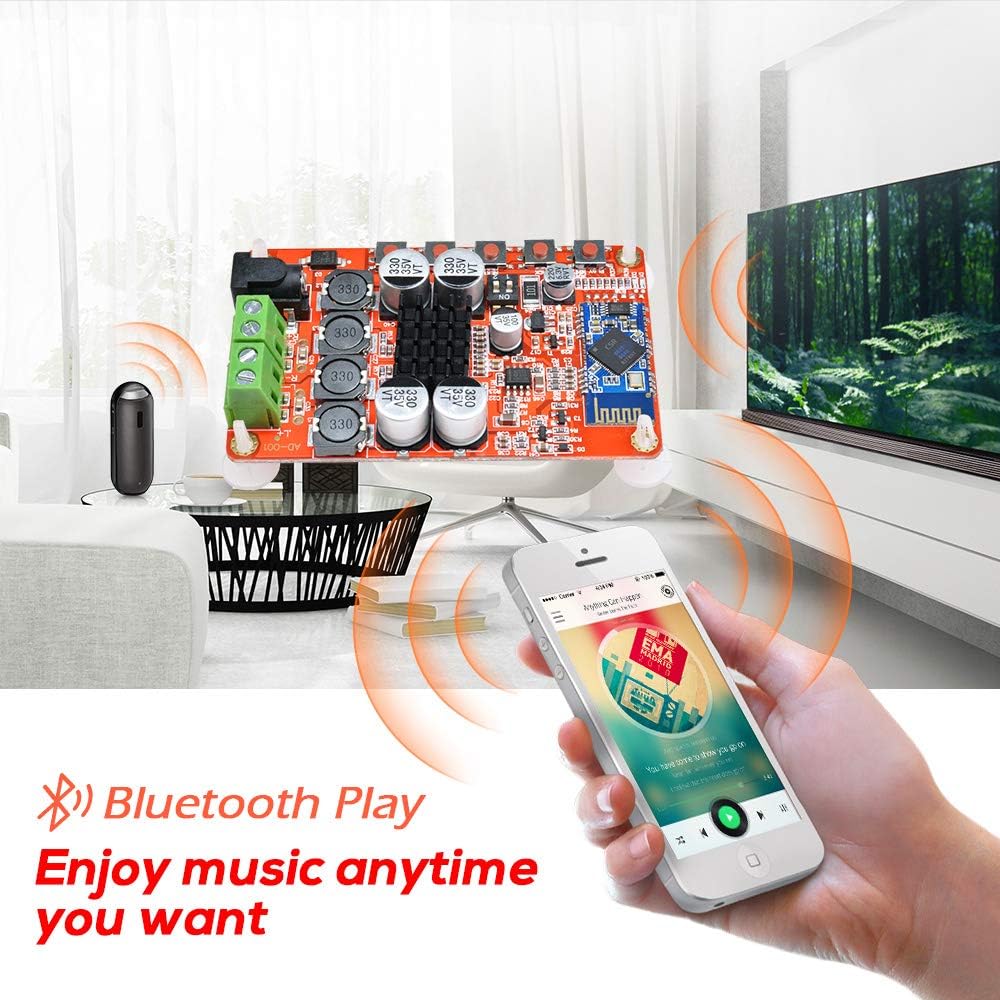
Obrázek 5.1: amplifier board connected to speakers and streaming music from a smartphone via Bluetooth.
6. Údržba
Správná údržba zajistí dlouhou životnost a optimální výkon vašeho amplifikační deska.
- Čištění: Use a soft, dry cloth to gently wipe the surface of the board. Avoid using liquid cleaners or solvents, as these can damage components.
- Skladování: When not in use for extended periods, store the board in a cool, dry place away from direct sunlight and dust.
- Zacházení: Always handle the board by its edges to avoid touching sensitive electronic components.
7. Řešení problémů
Pokud narazíte na problémy s vaším ampdeska záchranáře, viz následující běžné problémy a jejich řešení:
| Problém | Možná příčina | Řešení |
|---|---|---|
| Žádný zvuk z reproduktorů |
|
|
| Bluetooth se nepřipojuje |
|
|
| Statický nebo zkreslený zvuk |
|
|
| Loud beep/chirp during power on/off or Bluetooth disconnect | This is a characteristic of the board's design. | This is normal operation and cannot be adjusted. |
8. Specifikace
Detailed technical specifications for the Aideepen TDA7492P Ampliifier Board.
| Specifikace | Hodnota |
|---|---|
| Model | TDA7492P |
| Výstupní výkon | 2x50W (50W per channel) |
| Počet kanálů | 2 (stereo) |
| Minimální zásoba svtage | 8 V (DC) |
| Maximální objem dodávkytage | 24 V (DC) |
| Impedance reproduktoru | 8 Ohms (recommended) |
| Verze Bluetooth | WL Digital BT Audio Receiver |
| Rozměry položky (D x Š x V) | 3.9 x 2 x 1.2 palce |
| Typ montáže | Povrchová montáž |
9. Záruka a podpora
The Aideepen TDA7492P Dual Channel Amplifier Board comes with a 6měsíční prodloužená záruka.
For technical assistance, troubleshooting, or warranty claims, please contact Aideepen customer service. Our team is available 24/7 to provide friendly support.
Kontaktní údaje:
- Webmísto: www.aideepen.com (Prosím, zkontrolujte oficiální webweb s nejaktuálnějšími kontaktními údaji.)
- E-mail: Viz obal produktu nebo oficiální webweb pro e-mailovou podporu.